
1. Introduction
This manual provides instructions for the proper installation and maintenance of the Sears Craftsman Table Saw V-Belt Kit. This kit is designed to replace worn or damaged pulleys, keys, and V-belt on specific Craftsman 10-inch Belt Drive Table Saw models, ensuring optimal performance and safety.
Please read this manual thoroughly before attempting any installation or maintenance procedures.
2. Compatibility
This V-Belt Kit is specifically designed for the following Craftsman 10-inch Belt Drive Table Saw models:
- 315.228510
- 315.228390
- 315.228310
- 315.228590
- 315.228930
- 315.228490
- 315.228410
Important: This kit features a non-standard pulley and key combination and is not compatible with other brands or models of table saws. Verify your saw's model number before proceeding.
3. Package Contents
The V-Belt Kit includes the following components:
- 2 x Pulleys (Replacement for Craftsman part # 979900-001)
- 2 x Keys (Replacement for Craftsman part # 979894-001)
- 1 x V-Belt (Replacement for Craftsman part # STD304420)

Figure 1: Complete V-Belt Kit showing the two pulleys, two keys, and the V-belt.

Figure 2: Detailed view of the two pulleys and two keys included in the kit.
4. Safety Information
Always prioritize safety when working with power tools. Failure to follow these safety guidelines may result in serious injury.
- Disconnect Power: Always unplug the table saw from its power source before performing any maintenance, adjustments, or installations.
- Wear Personal Protective Equipment (PPE): Use safety glasses, gloves, and appropriate clothing to prevent injury.
- Read Saw Manual: Refer to your specific Craftsman table saw's owner's manual for additional safety precautions and detailed assembly instructions.
- Secure Work Area: Ensure the table saw is stable and the work area is clear of obstructions.
- Proper Tools: Use the correct tools for the job to avoid damaging components or causing injury.
5. Installation Instructions
Follow these steps to replace the V-belt, pulleys, and keys on your Craftsman table saw. These instructions are general; consult your saw's specific manual for model-specific details.
- Prepare the Saw:
- Ensure the table saw is unplugged from the power outlet.
- Remove any guards or covers necessary to access the motor and saw arbor pulleys. This typically involves removing the motor cover or tilting the saw.
- Remove Old Components:
- Loosen any set screws on the existing pulleys.
- Carefully slide the old pulleys off the motor shaft and saw arbor. Note their orientation.
- Remove the old keys from the keyways on the shafts.
- Remove the old V-belt.
- Install New Keys and Pulleys:
- Insert the new 5mm x 5mm keys into the keyways on both the motor shaft and the saw arbor shaft.
- Slide the new 2 1/4" diameter pulleys onto their respective shafts, aligning the pulley's keyway with the installed key. Ensure the pulleys are seated correctly and are at the appropriate depth for belt alignment.
- Tighten the set screws on both pulleys securely to prevent slippage.
- Install New V-Belt:
- Loop the new 41-inch V-belt around both the motor pulley and the saw arbor pulley.
- Ensure the belt is properly seated in the grooves of both pulleys.
- Adjust Belt Tension:
- Most Craftsman table saws allow for motor adjustment to tension the belt. Adjust the motor support assembly to achieve proper belt tension. The belt should be taut but not overly tight; a slight amount of deflection (about 1/2 inch) when pressed firmly in the middle is generally acceptable.
- Over-tightening can cause premature wear on the belt and motor bearings. Under-tightening can lead to belt slippage and loss of power.
- Reassemble and Test:
- Replace all guards and covers that were removed.
- Plug the saw back into the power outlet.
- Perform a brief test run without material to ensure the belt runs smoothly and quietly. Listen for any unusual noises or vibrations.
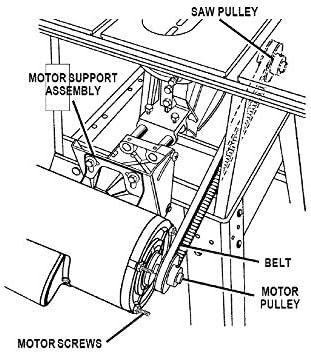
Figure 3: General diagram of a table saw belt drive system. Note the motor pulley, saw pulley, and belt connection.
6. Operation Considerations
After installation, the primary operational consideration is to ensure the belt maintains proper tension. Periodically check the belt tension, especially after the first few hours of operation, as new belts can stretch slightly. A properly tensioned belt will transmit power efficiently and reduce wear on components.
7. Maintenance
Regular maintenance of your V-belt kit will extend its lifespan and ensure consistent saw performance.
- Inspect Belt: Regularly inspect the V-belt for signs of wear, cracking, fraying, or glazing. Replace the belt if any significant damage is observed.
- Check Pulleys: Ensure pulleys are free of debris, rust, or damage. Pulleys should spin freely and be securely fastened to their shafts.
- Verify Tension: Periodically check and adjust belt tension as described in the installation section.
- Clean Components: Keep the pulleys and belt free from sawdust and other debris, which can cause slippage or premature wear.
8. Troubleshooting
If you encounter issues after installing the V-belt kit, consider the following:
- Belt Slippage: If the belt slips during operation, it is likely under-tensioned. Disconnect power and adjust the motor support assembly to increase tension. Ensure pulleys are clean and free of grease.
- Excessive Noise/Vibration: This could indicate improper belt tension (too tight or too loose), misaligned pulleys, or a damaged belt. Disconnect power, inspect components, and adjust as necessary.
- Saw Not Starting/Loss of Power: After verifying the power supply, check if the belt is broken or completely dislodged from the pulleys. Ensure pulleys are securely fastened with their set screws.
9. Specifications
| Component | Specification | Replacement Part Number |
|---|---|---|
| Pulleys (Quantity: 2) | 2 1/4" diameter, 5/8" bore | 979900-001 |
| Keys (Quantity: 2) | 5mm x 5mm | 979894-001 |
| V-Belt (Quantity: 1) | 41" long | STD304420 |
| Material | Zinc (Pulleys) | N/A |
10. Warranty and Support
For warranty information or technical support regarding this V-Belt Kit, please refer to the original purchase documentation or contact the retailer from whom the kit was purchased. Keep your proof of purchase for any warranty claims.


