
1. Introduction
The EXMAX EX-200E UHF Wireless Audio Tour Guide System is a portable audio solution designed for clear communication in various settings, including noisy environments or over distances. It facilitates tour guiding, assisted listening, and simultaneous interpretation by allowing a presenter to speak at a comfortable level while the audience listens through individual receivers with adjustable volume.
This system is frequency agile, offering 200 programmable channels, which allows multiple groups to operate in the same area without interference. Its robust design ensures stable signal transmission up to 328 feet (100 meters) in open areas.
2. Package Contents
Your EXMAX EX-200E system typically includes the following components:
- EX-200T Transmitters (quantity varies by kit)
- EX-200ER Receivers (quantity varies by kit)
- Clip-on Microphones
- Head-worn Microphones
- Lanyards for transmitters and receivers
- 64-slot Charging Case (for kits with multiple units)
- USB Charging Cables
- User Manual

Image: Overview of EXMAX EX-200E system components.
3. Components Overview
3.1. Transmitter (EX-200T)
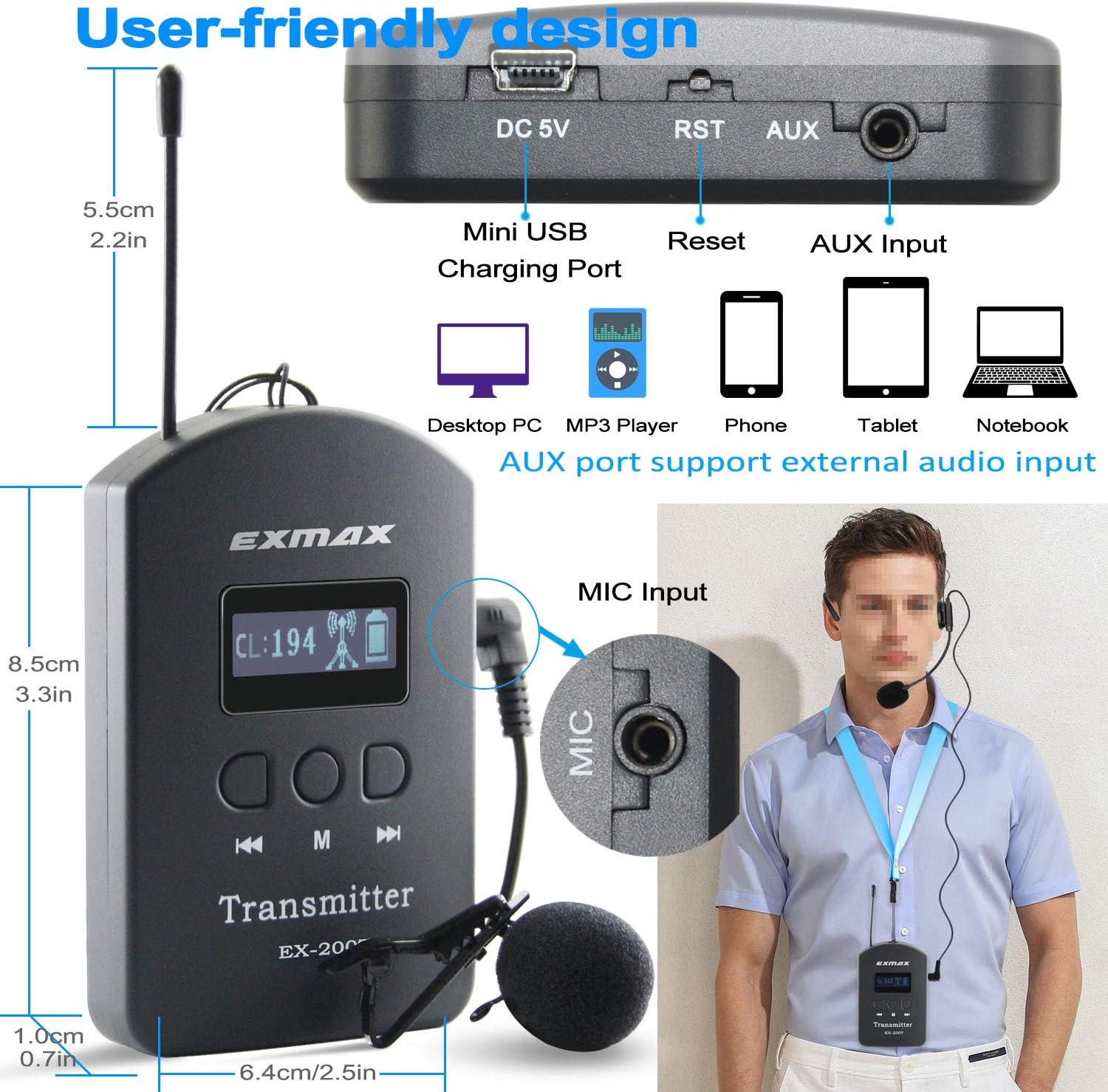
Image: Front and side view of the EX-200T Transmitter with dimensions and port labels.
- Display Screen: Shows channel number, battery status, and signal strength.
- Control Buttons:
- Left/Right Arrows: Channel selection, volume adjustment.
- M Button: Menu/Mode selection, sync initiation.
- Ports:
- DC 5V (Mini USB): Charging port.
- RST: Reset button.
- AUX: 3.5mm audio input for external devices (MP3/MP4 players, smartphones).
- MIC: 3.5mm microphone input for clip-on or head-worn microphones.
- Antenna: For wireless signal transmission.
3.2. Receiver (EX-200ER)

Image: Close-up view of the EX-200ER Receiver showing volume controls, power button, and Mini USB charging port.
- Volume Buttons (+/-): Adjust listening volume.
- Power Button: Turns the receiver on/off.
- Mini USB Charging Port: For charging the receiver.
- Ear-hook Design: Ergonomic and lightweight for comfortable wear.
- Speaker: Integrated speaker for audio output.
Video: A detailed look at the appearance and features of the EXMAX EX-200E Wireless Tour Guide System components.
4. Setup Guide
4.1. Initial Charging
Before first use, ensure all transmitters and receivers are fully charged. Place them into the 64-slot charging case. The charging indicator light on each unit will illuminate (typically red) during charging and change (or turn off) when fully charged. A full charge takes approximately 4-6 hours.
Video: Demonstrates how to charge the EXMAX EX-200E wireless tour guide system components.
4.2. Connecting Microphones and Lanyards
- Microphone Connection: Insert the 3.5mm jack of the clip-on or head-worn microphone into the "MIC" port on the EX-200T Transmitter.
- Lanyard Attachment: Attach the provided lanyard to the designated loop on both the transmitter and receivers for hands-free operation.
4.3. Synchronizing Transmitters and Receivers
To ensure all receivers hear the transmitter's audio, they must be synchronized to the same channel.
- Set Transmitter Channel:
- Press the 'M' button for 1 second to turn it on.
- Simultaneously press the left and right arrow buttons until the signal tower icon disappears from the display.
- Use the left or right arrow buttons to select your desired channel ID (001 to 200).
- Press and hold the 'M' button for approximately 3 seconds until the signal tower icon starts flashing. The transmitter is now in wireless channel matching mode.
- Sync Receivers:
- Turn on the receivers (press and hold the power button for 1 second).
- Place the receivers close to the transmitter (within 1.5 meters). The receivers' blue lights will flash, indicating they are processing the sync.
- Once successfully synchronized, the blue light on the receivers will become stable.
- Exit Sync Mode: Press the 'M' button on the transmitter again to exit the channel matching mode. The blue LED on the receivers will continue to flash, indicating normal speaking mode.

Image: Detailed steps for channel setting on the EX-200T Transmitter.
Video: Instructions on how to synchronize the EXMAX EX-200E transmitter and receivers.
5. Operating Instructions
5.1. Power On/Off
- Transmitter: Press the 'M' button for 1 second to turn on or off.
- Receiver: Press the power button for 1 second to turn on. Press and hold for 2 seconds to turn off.
5.2. Adjusting Volume
On the receiver, click the '+' or '-' buttons to adjust the listening volume to a comfortable level.
5.3. Mute Function (Transmitter)
The transmitter features a convenient MUTE button. Click the right arrow button to mute the microphone, preventing audio transmission. Click it again to unmute.

Image: Transmitter mute function and its impact on receiver audio.
5.4. Shutting Down All Receivers
The transmitter can remotely shut down all connected receivers. Press and hold the left arrow button for 5 seconds until the transmitter's LCD display flashes "OFF". All synchronized receivers will power off. Click the 'M' button again to exit the shutdown mode.
Video: Demonstrates easy operations including power, volume, mute, and remote shutdown for the EXMAX EX-200E system.
5.5. Using AUX Input
Connect a smartphone, MP3 player, tablet, or other audio device to the "AUX" port on the transmitter using a 3.5mm audio cable. This allows you to play background music, pre-recorded commentaries, or supplementary audio materials through the system.
6. Versatile Applications
The EXMAX EX-200E system is suitable for a wide range of professional and leisure applications:
- Church translation for international parishioners.
- Factory and brewery field trips for clear safety instructions.
- Historic site tours with detailed cultural introductions.
- Large business meetings to ensure key points are heard.
- School educational trips.
- Corporate hospitality events.
- Simultaneous interpreting.
- Assisted listening in courtrooms or other public venues.
Image: Examples of the EX-200E system in use for guided tours, interpretation, and more.

Image: Setup for simultaneous interpretation using the EX-200E system.
7. Specifications
| Feature | Detail |
|---|---|
| Model Number | EX-200E |
| Item Weight | 14.89 pounds (total kit) |
| Product Dimensions (Transmitter) | 2.5 x 0.7 x 3.3 inches |
| Body Material | ABS |
| Speaker Amplification Type | Active |
| Mixer Channel Quantity | 200 |
| Transmission Range | Up to 328ft (100m) in open area |
| Transmitter Battery Life | Up to 8 hours (1300mAh lithium battery) |
| Receiver Battery Life | Up to 6 hours (400mAh rechargeable battery) |
| Charging Time | 4-6 hours (for full case) |
8. Troubleshooting
- No Sound from Receiver:
- Ensure both transmitter and receiver are powered on.
- Verify the receiver's volume is not set to minimum.
- Check if the transmitter's microphone is muted.
- Confirm the receiver is synchronized to the correct channel as the transmitter.
- Ensure the microphone is properly plugged into the transmitter's MIC port.
- Interference or Poor Sound Quality:
- Change the channel on the transmitter and re-sync receivers to find a clearer frequency.
- Ensure the transmitter and receivers are within the effective operating range (up to 328ft/100m in open areas).
- Minimize obstructions between the transmitter and receivers.
- Check for other electronic devices operating on similar UHF frequencies that might cause interference.
- Receivers Not Shutting Down Remotely:
- Ensure the receivers are powered on and synchronized with the transmitter.
- Confirm you are pressing and holding the left arrow button on the transmitter for the required 5 seconds until "OFF" flashes.
- Ensure receivers are within range of the transmitter.
- Charging Issues:
- Verify the charging case is properly connected to a power source.
- Ensure transmitters and receivers are correctly seated in their charging slots.
- Check if the charging cables are securely connected.
9. Maintenance
- Cleaning: Use a soft, dry cloth to clean the devices. Avoid using harsh chemicals or abrasive materials.
- Storage: Store the system in its charging case in a cool, dry place when not in use.
- Battery Care: For optimal battery life, fully charge the units before long-term storage and recharge them every 3-6 months.
- Handling: Handle all components with care to prevent damage. Avoid dropping the units or exposing them to extreme temperatures or moisture.
10. Warranty and Support
EXMAX products are designed for reliability and performance. For warranty information, technical support, or service inquiries, please refer to the contact details provided in your product packaging or visit the official EXMAX website. Keep your purchase receipt as proof of purchase for warranty claims.
For further assistance, you may contact EXMAX customer service directly. Details are often available on the product's Amazon store page or the manufacturer's website.