
SIEMENS TI351209GB
SIEMENS EQ.300 TI351209GB Bean to Cup Coffee Machine Instruction Manual
1. Introduction
This instruction manual provides essential information for the safe and efficient operation, maintenance, and care of your SIEMENS EQ.300 TI351209GB Bean to Cup Fully Automatic Freestanding Coffee Machine. Please read this manual thoroughly before first use and keep it for future reference. Following these instructions will help ensure optimal performance and extend the lifespan of your appliance.
2. Important Safety Information
Always observe the following safety precautions to prevent personal injury or damage to the appliance:
- Ensure the appliance is connected to a properly grounded power outlet.
- Do not immerse the appliance, power cord, or plug in water or other liquids.
- Keep children away from the appliance during operation and cleaning.
- Unplug the appliance from the power supply before cleaning or if it will not be used for an extended period.
- Do not operate the appliance if the power cord or plug is damaged, or if the appliance malfunctions or has been damaged in any way. Contact customer service for repair.
- Use only original spare parts and accessories.
- Never open the appliance housing. Repairs should only be performed by authorized service personnel.
3. Product Overview and Components
Familiarize yourself with the main parts of your coffee machine:
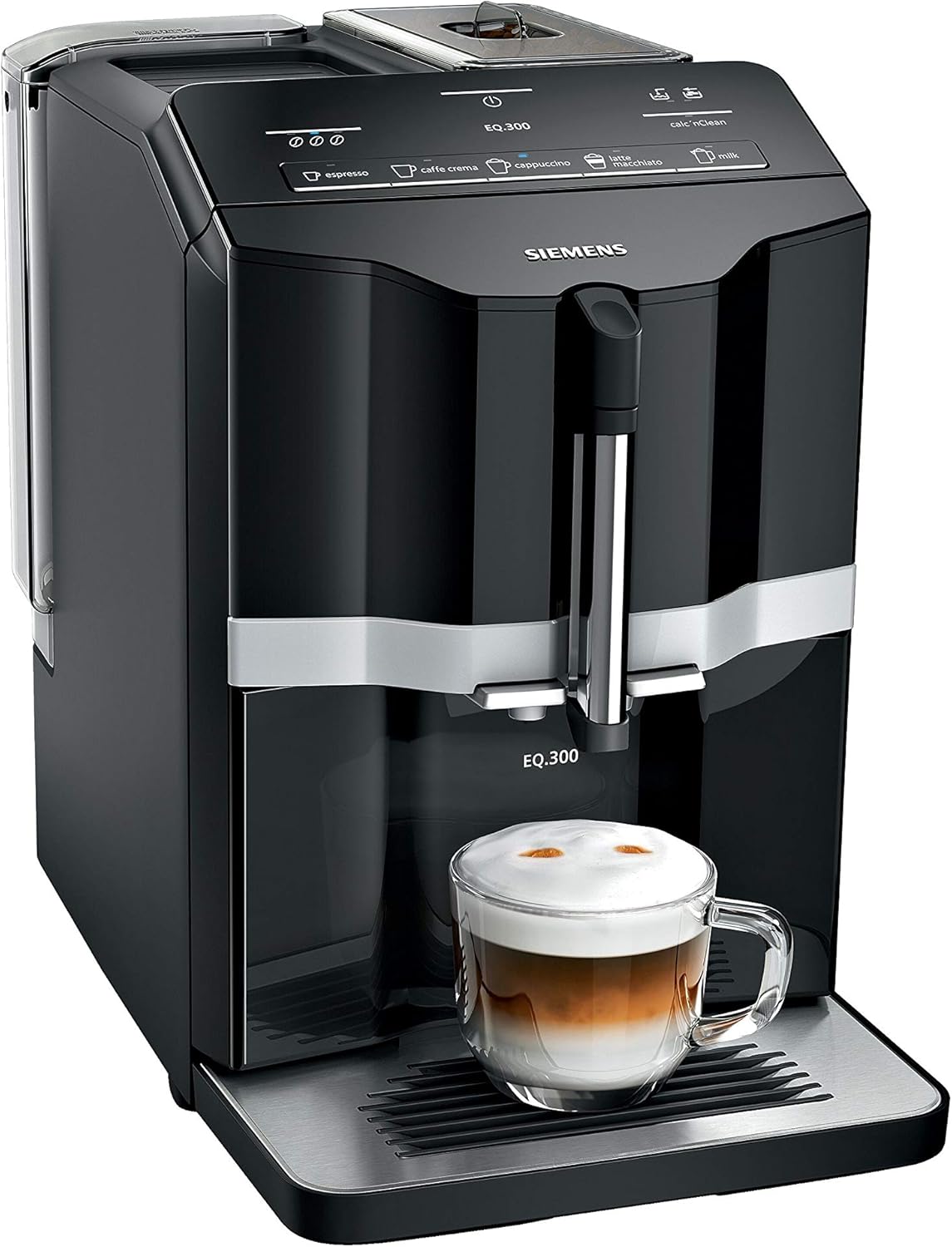
Figure 3.1: Front view of the Siemens EQ.300 Bean to Cup Coffee Machine, black finish, with a frothed coffee drink in a glass cup on the drip tray.

Figure 3.2: Detailed view of the Siemens EQ.300 coffee machine's CoffeeDirect control panel, showing buttons for various coffee types and the calc'nClean indicator.

Figure 3.3: Top-down view of the Siemens EQ.300 coffee machine, showing the bean container filled with coffee beans and the control panel.
Key Components:
- Water Tank: Removable tank for fresh water.
- Bean Container: Holds whole coffee beans for grinding.
- CoffeeDirect Control Panel: Intuitive buttons for beverage selection and machine status.
- Coffee Outlet: Adjustable height for different cup sizes.
- Milk Frother Arm: For frothing milk directly in your cup.
- Drip Tray: Collects excess liquid and houses the coffee grounds container.
- Brewing Unit: Internal component responsible for brewing coffee (removable for cleaning).
4. Initial Setup and First Use
Before using your coffee machine for the first time, follow these steps:
- Unpacking: Remove all packaging materials and protective films. Place the machine on a stable, level surface.
- Rinse Water Tank: Remove the water tank, rinse it with fresh water, and fill it to the 'max' mark. Reinsert it securely.
- Fill Bean Container: Open the lid of the bean container and fill it with fresh coffee beans. Close the lid.
- Power Connection: Plug the appliance into a grounded power outlet.
- First Rinse Cycle: The machine will automatically perform a rinse cycle upon first power-on or after a period of inactivity. Follow any on-screen prompts or indicator lights. Place a cup under the coffee outlet to collect the water.
Your machine is now ready for use.
5. Operation: Preparing Beverages
5.1. Preparing Coffee (Espresso, Caffè Crema)
- Ensure the water tank is filled and the bean container has enough beans.
- Place a cup under the coffee outlet.
- Press the desired coffee button (e.g., Espresso or Caffè Crema). The machine will grind the beans and brew the coffee.
- To adjust coffee strength, press the coffee strength button (usually indicated by coffee bean icons) before selecting your beverage.
5.2. Preparing Milk-Based Beverages (Cappuccino, Latte Macchiato)

Figure 5.1: Close-up of the Siemens EQ.300 coffee machine dispensing frothed milk and coffee into a glass cup, illustrating the in-cup frothing feature.
- Fill your cup with the desired amount of cold milk.
- Position the cup under the milk frother arm and coffee outlet. Ensure the frother arm is submerged in the milk.
- Press the desired milk-based beverage button (e.g., Cappuccino or Latte Macchiato).
- The machine will first froth the milk, then brew the coffee into the same cup.
- For frothed milk only, press the Milk button.
6. Maintenance and Cleaning
Regular cleaning and maintenance are crucial for hygiene and to ensure the longevity and optimal performance of your coffee machine.
6.1. Daily Cleaning
- Drip Tray and Coffee Grounds Container: Empty and rinse the drip tray and coffee grounds container daily. These parts are dishwasher safe.
- Milk Frother Arm: After each use, wipe the milk frother arm with a damp cloth. For thorough cleaning, remove the frother arm and rinse it under running water. It is also dishwasher safe.
6.2. Weekly Cleaning (Brewing Unit)

Figure 6.1: A hand removing the red brewing unit from the side of the Siemens EQ.300 coffee machine for cleaning.
- Switch off the appliance and unplug it.
- Open the service door on the side of the machine.
- Press the red release button and carefully pull out the brewing unit.
- Rinse the brewing unit thoroughly under running water. Do not use detergent.
- Allow the brewing unit to air dry completely before reinserting.
6.3. Descaling (calc'nClean)

Figure 6.2: Various Siemens EQ.series cleaning and maintenance products, including descaling tablets, cleaning tablets, and a water filter.
The machine will indicate when descaling is required via the 'calc'nClean' indicator light. Use only Siemens-approved descaling tablets. Follow the instructions provided with the descaling agent and the machine's display prompts.
6.4. Water Filter Replacement
If you use a water filter, replace it regularly as indicated by the machine or every two months. Refer to the water filter's instructions for proper installation and activation.
7. Troubleshooting
Here are solutions to common issues you might encounter:
| Problem | Possible Cause | Solution |
|---|---|---|
| No coffee is dispensed. | Water tank empty, brewing unit blocked, or machine needs descaling. | Fill water tank, clean brewing unit (Section 6.2), perform descaling (Section 6.3). |
| Coffee is too weak or watery. | Insufficient coffee strength selected, beans running low, or brewing unit dirty. | Increase coffee strength setting, refill bean container, clean brewing unit (Section 6.2). |
| Milk is not frothing properly. | Milk frother arm is dirty or blocked, or milk is not cold enough. | Clean the milk frother arm thoroughly (Section 6.1), use fresh, cold milk. |
| Error message on display. | Specific issue indicated by the message. | Refer to the machine's display for the specific error code and consult the full user manual or Siemens support website for detailed solutions. |
8. Technical Specifications
- Brand: SIEMENS
- Model Number: TI351209GB
- Coffee Maker Type: Bean-to-Cup Fully Automatic Espresso Machine
- Colour: Black
- Product Dimensions (L x W x H): 42.2 x 25.1 x 38.3 cm
- Item Weight: 7.21 kg
- Voltage: 240 V
- Special Features: Dishwasher safe drip plate, milk nozzle, and coffee grounds container.
9. Warranty and Customer Support
Your SIEMENS EQ.300 TI351209GB coffee machine comes with a manufacturer's warranty. Please refer to the warranty card included with your purchase for specific terms and conditions, including the warranty period and coverage details.
For technical assistance, spare parts, or warranty claims, please contact Siemens customer support. You can find contact information and additional resources on the official Siemens Home Appliances website: www.siemens-home.bsh-group.com/uk/
Ask a question about this manual
Ask about setup, troubleshooting, compatibility, parts, safety, or missing instructions. Manuals+ will review the question and use this page’s manual context to help answer it.