
1. Introduction and Overview
This manual provides comprehensive instructions for the safe and efficient operation, maintenance, and troubleshooting of your LG WM3400CW 4.5 cu. ft. Ultra Large Front Load Washer. Designed for large loads, this washer features advanced technologies such as 6Motion Technology for enhanced cleaning, ColdWash Technology for energy savings, and a durable Direct Drive Motor.

Figure 1: LG WM3400CW Front Load Washer with optional SideKick Pedestal.
The LG WM3400CW is an ENERGY STAR certified appliance, ensuring energy efficiency. Its robust design includes a NeveRust™ Stainless Steel Drum for longevity and quiet operation.
2. Safety Instructions
For your safety, read all instructions before using this appliance. Failure to follow these instructions may result in fire, electric shock, property damage, or personal injury.
- Always disconnect power to the washer before servicing.
- Do not wash items that have been previously cleaned in, washed with, soaked in, or spotted with gasoline, dry-cleaning solvents, or other flammable or explosive substances.
- Keep children and pets away from the appliance during operation.
- Ensure proper grounding to reduce the risk of electric shock.
- Do not operate the washer if it is damaged, malfunctioning, or has a damaged power cord.
- This product contains chemicals known to the State of California to cause cancer and birth defects or other reproductive harm (Proposition 65 Warning).
Refer to the full safety manual for detailed warnings and precautions.
3. Setup and Installation
Proper installation is crucial for the performance and longevity of your LG washer. It is recommended that installation be performed by a qualified technician.
3.1 Unpacking and Placement
Remove all packaging materials and shipping bolts before installation. Place the washer on a firm, level floor. Ensure adequate clearance around the appliance for ventilation and servicing.
3.2 Leveling the Washer
The washer must be perfectly level to prevent excessive vibration and noise during operation. Adjust the four adjustable leveling legs until the appliance is stable and level in all directions.
3.3 Water and Electrical Connections
Connect the hot and cold water supply hoses to the corresponding inlets on the back of the washer. Ensure all connections are tight to prevent leaks. Plug the washer into a grounded 120V, 10 Amps electrical outlet.
3.4 Dimensions

Figure 2: Product Dimensions (Depth x Width x Height: 32"D x 30"W x 40"H).
The washer has a shallower depth designed to fit in more places, including closets. The depth with the door open is 55 inches.
3.5 LG SideKick™ Compatibility
This washer is compatible with the LG SideKick™ Pedestal Washer (WD100CW), which allows for washing small loads simultaneously with the main washer. A stacking kit (KSTK1) is available for stacking the main washer and a compatible dryer.

Figure 3: LG WM3400CW with the LG SideKick™ Pedestal Washer.
4. Operating Instructions
Familiarize yourself with the control panel and available wash cycles to optimize your laundry experience.
4.1 Control Panel Overview
The control panel features a central Dial-A-Cycle™ selector for wash programs, touch buttons for various settings, and a digital display for estimated time remaining and processing status.
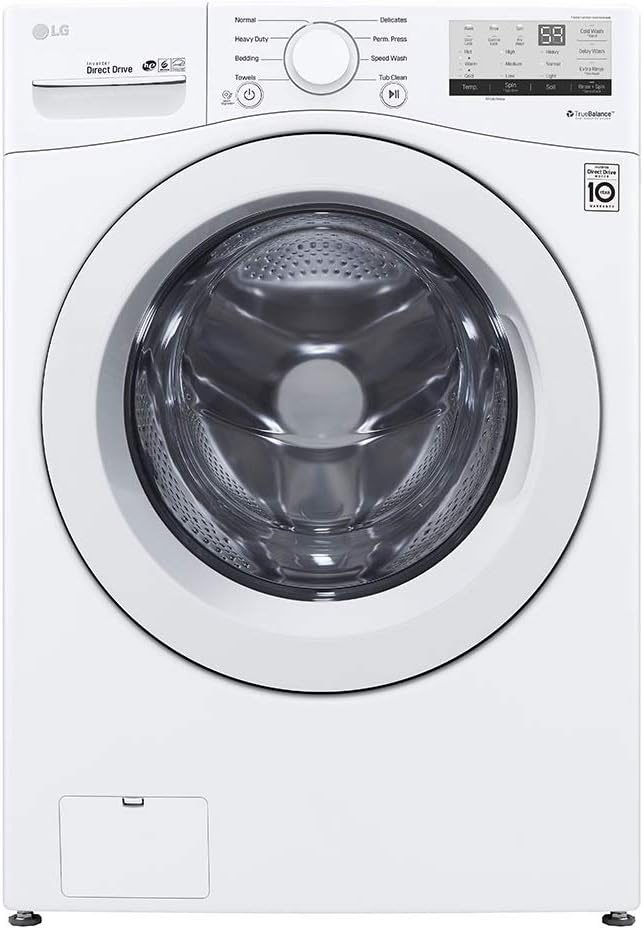
Figure 4: Front view of the LG WM3400CW control panel.
4.2 Loading the Washer
Open the washer door and load items loosely into the NeveRust™ Stainless Steel Drum. Avoid overfilling to ensure proper washing and rinsing. The 4.5 cu. ft. capacity can accommodate ultra-large loads, including bedding and towels.

Figure 5: View of the washer drum with the door open.
4.3 Adding Detergent and Additives
Use the 4-tray dispenser for prewash, main wash (with liquid detergent cup), bleach, and fabric softener. Always use High-Efficiency (HE) detergent for optimal performance and to prevent oversudsing.

Figure 6: The 4-tray detergent dispenser for various additives.
4.4 Selecting a Wash Cycle
Turn the Dial-A-Cycle™ knob to select one of the 8 available wash programs:
- Normal
- Perm. Press
- Heavy Duty
- Delicates
- Towels
- Speed Wash
- Bedding
- Tub Clean
4.5 Customizing Settings
After selecting a cycle, you can customize settings using the touch buttons:
- Wash/Rinse Temperatures (5 options): Extra Hot, Hot, Warm, Cold, Tap Cold. ColdWash™ Technology is available for energy-efficient cold water washing.
- Spin Speeds (3 options): High, Medium, Low. Max RPM is 1300.
- Soil Levels (3 options): Adjust for light, normal, or heavy soil.
- Additional Options (8 options): Pre-wash, Delay Wash, ColdWash, Extra Rinse, Rinse+Spin, Control Lock, Spin Only, Signal.
4.6 Starting a Cycle
Press the Start/Pause button to begin the selected wash cycle. The display will show the estimated time remaining. The Load Sensing feature automatically adjusts water levels based on the load size.
5. Maintenance and Cleaning
Regular maintenance ensures optimal performance and extends the life of your washer.
5.1 Tub Clean Cycle
Run the Tub Clean cycle periodically to remove detergent residue and odors from the drum. Follow the instructions in the control panel or your full user manual for proper use of this cycle.
5.2 Cleaning the Dispenser and Door Seal
Regularly clean the detergent dispenser trays to prevent buildup. Wipe down the door seal (gasket) after each use to remove moisture and lint, which helps prevent mold and mildew growth.
5.3 Exterior Cleaning
Wipe the exterior surfaces with a soft, damp cloth. Avoid abrasive cleaners that could damage the finish.
6. Troubleshooting
If you encounter issues with your washer, refer to the following common problems and solutions. For more complex issues, consult the full user manual or contact LG customer support.
| Problem | Possible Cause / Solution |
|---|---|
| Washer does not start | Ensure the power cord is plugged in, the door is closed securely, and the Start/Pause button has been pressed. Check for a tripped circuit breaker. |
| Excessive vibration or noise | Check if the washer is level and all four leveling legs are making firm contact with the floor. Ensure shipping bolts have been removed. Redistribute the laundry load evenly in the drum. |
| Clothes not clean / Odors | Ensure proper detergent amount and type (HE detergent). Do not overload the washer. Run a Tub Clean cycle. Clean the door seal and dispenser. |
| Spin cycle issues | An unbalanced load can prevent proper spinning. Redistribute items. Ensure the drain hose is not kinked or clogged. |
| Water leaking | Check water inlet hose connections for tightness. Ensure the drain hose is properly installed and not clogged. Inspect the door seal for damage or foreign objects. |
The SmartDiagnosis™ (v3.0) feature can assist in diagnosing issues directly from your smartphone. Refer to your full manual for instructions on using SmartDiagnosis™.
7. Specifications
Detailed technical specifications for the LG WM3400CW Front Load Washer.
- Brand: LG
- Model: WM3400CW
- Capacity: 4.5 cu. ft. Ultra Large
- Motor Type: Inverter Direct Drive Motor
- Drum Material: NeveRust™ Stainless Steel Drum
- Wash Cycles: 8 (Normal, Perm. Press, Heavy Duty, Delicates, Towels, Speed Wash, Bedding, Tub Clean)
- Wash/Rinse Temperatures: 5 (Extra Hot, Hot, Warm, Cold, Tap Cold)
- Spin Speeds: 3 (High, Medium, Low)
- Max RPM: 1300
- Soil Levels: 3
- Electrical Requirements: 120V, 10 Amps
- Dimensions (WxHxD): 27" x 39" x 30 1/4"
- Depth with Door Open: 55"
- Weight (Product): 187.4 lbs.
- ENERGY STAR® Certified: Yes
- Special Features: 6Motion™ Technology, ColdWash™ Technology, TrueBalance™ Anti-Vibration System, SmartDiagnosis™
8. Warranty and Support
LG provides comprehensive warranty coverage for your WM3400CW washer:
- Parts and Labor: 1 Year
- Direct Drive Motor: 10 Years
- Drum: 3 Years
For technical assistance, troubleshooting, or to schedule service, please contact LG customer support. Utilize the SmartDiagnosis™ feature for quick and accurate problem identification before contacting support.
For the most up-to-date warranty information and support resources, please visit the official LG website or refer to the warranty card included with your product.