
RSAG7.820.7181/ROH 240717
Generic Power Button/IR Sensor Board RSAG7.820.7181/ROH 240717 User Manual
Compatible with Hisense 58R6E and 58R7E1 Televisions
1. Introduction
This manual provides essential information for the installation, operation, and maintenance of the Generic Power Button/IR Sensor Board, part number RSAG7.820.7181/ROH 240717. This component is designed as a replacement part for specific Hisense television models, including the 58R6E and 58R7E1. Please read this manual thoroughly before attempting any installation or repair to ensure proper function and safety.
2. Important Safety Information
WARNING: Risk of Electric Shock. Always disconnect power before servicing.
- Ensure the television is completely unplugged from the power outlet before beginning any installation or repair work.
- Only qualified technicians or individuals with experience in electronics repair should attempt to install this component.
- Handle the circuit board by its edges to avoid damaging sensitive components or introducing electrostatic discharge (ESD). Consider using an anti-static wrist strap.
- Keep small components away from children.
- Do not attempt to modify the board. Unauthorized modifications can lead to malfunction, electric shock, or fire.
3. Product Overview
The Power Button/IR Sensor Board is a critical component within compatible Hisense televisions. It integrates the physical power button functionality and the infrared (IR) receiver, which allows the television to respond to commands from a remote control. This board facilitates the primary user interface for turning the TV on/off and receiving remote signals.
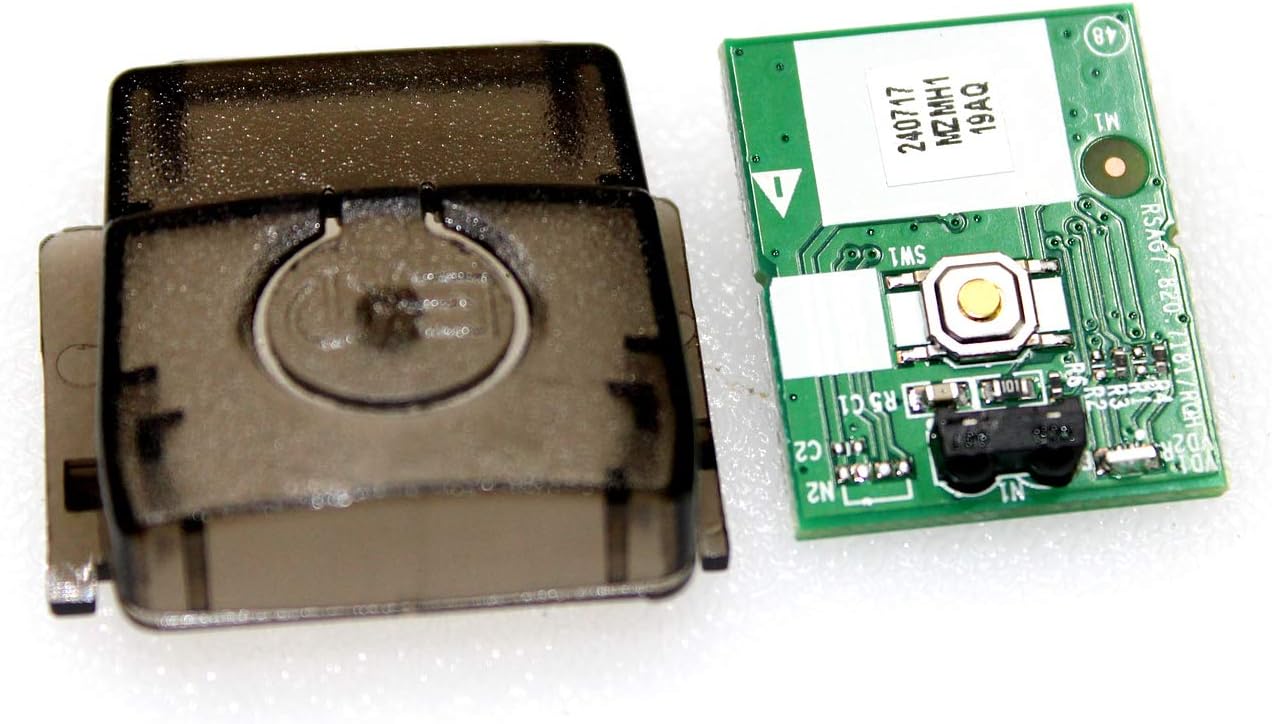
Image 3.1: The Power Button/IR Sensor Board (right) shown alongside its protective plastic cover (left).

Image 3.2: A detailed view of the circuit board, highlighting the power button (gold circle) and the IR sensor (black component).
4. Compatibility
It is essential to purchase this component by its specific part number: RSAG7.820.7181/ROH 240717. The listed television models (Hisense 58R6E, 58R7E1) are for reference only. Different versions of the same TV model may use different internal components that are not interchangeable. Always verify the part number on your existing board against the part number of this product before making a purchase.
If you are uncertain about compatibility, please consult a qualified technician or contact the seller for assistance before attempting installation.
5. Installation Instructions
The following steps provide a general guide for replacing the Power Button/IR Sensor Board. Specific disassembly and reassembly procedures for your television model may vary. Refer to your television's service manual for detailed instructions if available.
- Prepare the Work Area: Ensure a clean, well-lit, and static-free environment. Gather necessary tools, which typically include screwdrivers (Phillips head), plastic prying tools, and an anti-static wrist strap.
- Disconnect Power: Unplug the television from the wall outlet. Wait a few minutes for any residual power to dissipate.
- Access the TV's Interior: Carefully remove the back cover of the television. This usually involves unscrewing multiple screws around the perimeter and sometimes in the center. Use plastic prying tools to gently separate the cover if it has clips.
- Locate the Existing Board: Identify the current Power Button/IR Sensor Board. It is typically located near the bottom or side of the TV frame, often behind a small plastic housing or bezel, and will have a physical button and a small IR receiver window.
- Disconnect Cables: Gently disconnect any ribbon cables or wire connectors attached to the existing board. Note their orientation and connection points for reassembly.
- Remove the Old Board: Unscrew any mounting screws holding the old board in place and carefully remove it.
- Install the New Board: Position the new Power Button/IR Sensor Board (part number RSAG7.820.7181/ROH 240717) in the same location. Secure it with the mounting screws.
- Reconnect Cables: Carefully reattach all ribbon cables and wire connectors to the new board, ensuring they are seated correctly and securely.
- Test Functionality (Optional but Recommended): Before fully reassembling the TV, you may temporarily plug in the TV (while exercising extreme caution to avoid touching live circuits) to test if the power button and IR sensor respond. If it functions correctly, unplug the TV again.
- Reassemble the TV: Carefully replace the back cover of the television, ensuring all clips engage and screws are tightened.
- Final Power-Up: Plug the television back into the power outlet and test its full functionality.
6. Operation
Once correctly installed, the Power Button/IR Sensor Board operates seamlessly as part of your television's control system:
- Power Button: Pressing the physical button on the board (or the corresponding external button on the TV bezel) will toggle the television's power state (On/Standby).
- IR Sensor: The integrated IR sensor receives infrared signals from your television's remote control. Pointing the remote control at the TV's IR window and pressing buttons will transmit commands (e.g., channel change, volume adjustment, menu navigation) to the TV's main board via this sensor.
No specific user configuration is required for the board itself; its function is entirely dependent on the television's main control system.
7. Maintenance
The Power Button/IR Sensor Board is a sealed electronic component and requires no routine maintenance. To ensure its longevity:
- Avoid exposing the television to excessive dust, moisture, or extreme temperatures.
- Do not attempt to clean the board directly with liquids or abrasive materials. If the TV's interior needs cleaning, use compressed air or a soft, dry brush.
- Ensure proper ventilation for the television to prevent overheating of internal components.
8. Troubleshooting
If you experience issues after installing the new Power Button/IR Sensor Board, consider the following troubleshooting steps:
- TV Does Not Turn On:
- Ensure the TV is securely plugged into a working power outlet.
- Verify all cables connected to the Power Button/IR Sensor Board are properly seated.
- Double-check that the board itself is correctly installed and secured.
- Confirm that the part number of the installed board matches the original or the required replacement part number.
- Remote Control Not Responding:
- Ensure there are fresh batteries in the remote control.
- Check for any obstructions between the remote control and the TV's IR sensor window.
- Verify that the IR sensor on the board is clean and unobstructed internally.
- Confirm that the remote control is functioning correctly (e.g., by testing it with a smartphone camera to see the IR light).
- Intermittent Functionality:
- Re-check all cable connections for looseness or poor contact.
- Inspect the board for any visible damage or bent pins.
If problems persist after performing these checks, it may indicate an issue with another component of the television or a faulty replacement part. Contact customer support for further assistance.
9. Specifications
| Feature | Detail |
|---|---|
| Product Type | Power Button / IR Sensor Board |
| Part Number | RSAG7.820.7181/ROH 240717 |
| Compatibility | Hisense 58R6E, 58R7E1 (verify by part number) |
| Manufacturer | Generic |
| Function | Controls TV power, receives infrared remote signals |
10. Warranty Information
Specific warranty details for this Generic Power Button/IR Sensor Board are not provided in this manual. Please refer to the product listing or contact the seller directly for information regarding warranty coverage, terms, and conditions.
11. Customer Support
For technical assistance, compatibility questions, or troubleshooting beyond the scope of this manual, please contact the seller or retailer from whom you purchased this product. Provide them with the product's full name and part number (RSAG7.820.7181/ROH 240717) for efficient support.
Ask a question about this manual
Ask about setup, troubleshooting, compatibility, parts, safety, or missing instructions. Manuals+ will review the question and use this page’s manual context to help answer it.