
Introduction
Thank you for purchasing the Toyomi TF 1624 Desk Fan with Timer. This manual provides important information regarding the safe operation, assembly, maintenance, and troubleshooting of your new desk fan. Please read this manual thoroughly before use and retain it for future reference.
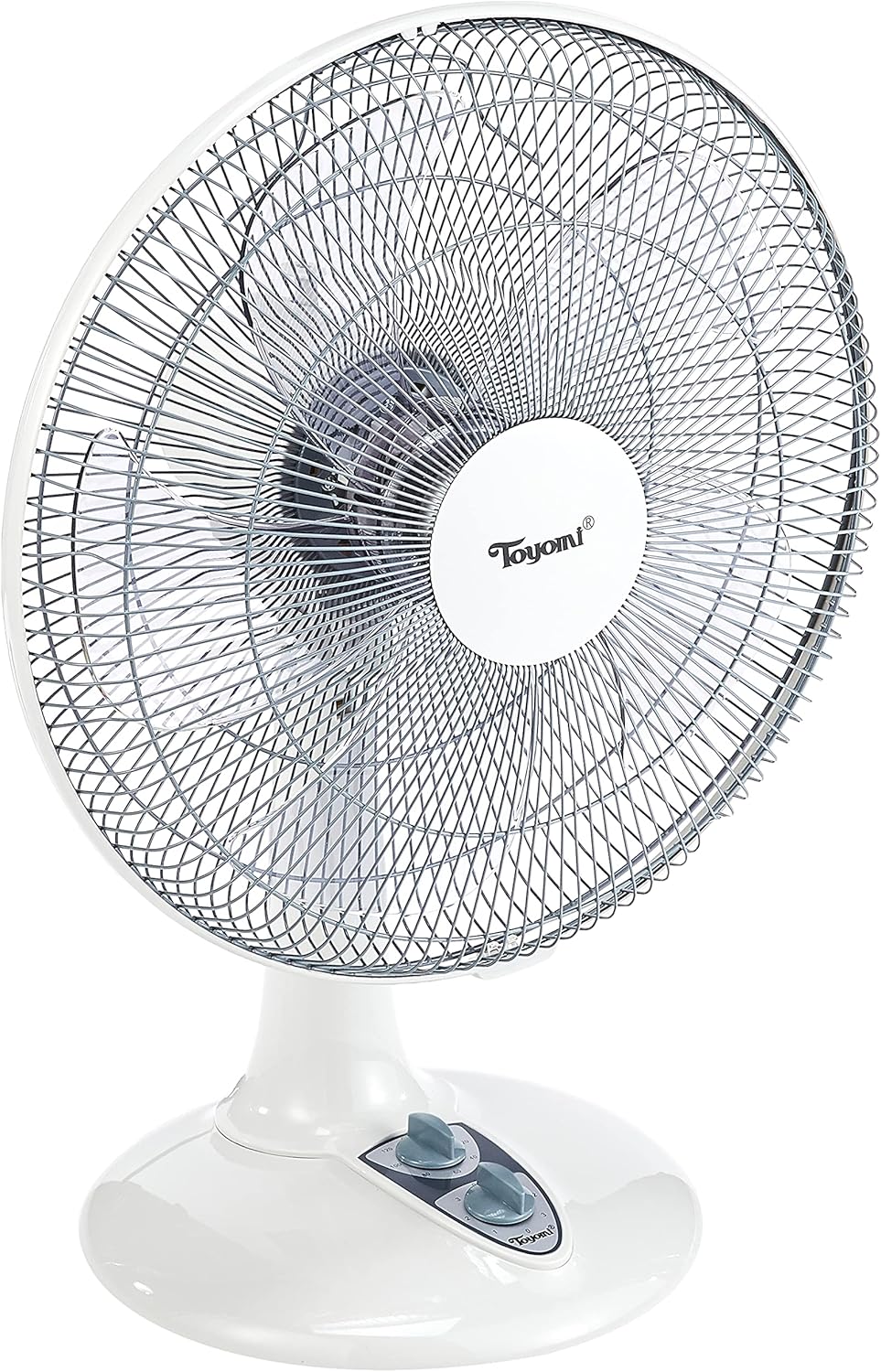
The Toyomi TF 1624 is a 16-inch desk fan designed to provide powerful cooling with 3 speed settings and 90° oscillation. It features a 2-hour timer for energy saving and operates quietly, making it suitable for various environments like offices or bedrooms.
Safety Instructions
To reduce the risk of fire, electric shock, or injury, always follow these basic safety precautions:
- Read all instructions before using this appliance.
- Ensure the power supply voltage matches the rating label on the fan.
- Do not operate the fan with a damaged cord or plug. If the cord is damaged, it must be replaced by the manufacturer, its service agent, or similarly qualified persons to avoid a hazard.
- Unplug the fan from the power outlet when not in use, before cleaning, or before moving it.
- Do not insert fingers or any other objects through the fan guard when the fan is operating.
- Do not use the fan near water or in damp locations such as bathrooms.
- Place the fan on a stable, flat surface to prevent it from tipping over.
- This appliance is not intended for use by persons (including children) with reduced physical, sensory or mental capabilities, or lack of experience and knowledge, unless they have been given supervision or instruction concerning use of the appliance by a person responsible for their safety.
- Children should be supervised to ensure that they do not play with the appliance.
Product Components
Familiarize yourself with the parts of your Toyomi TF 1624 Desk Fan:
- Front Guard
- Fan Blade
- Rear Guard
- Motor Housing
- Control Panel (Speed and Timer Knobs)
- Oscillation Knob
- Base
- Power Cord and Plug

Setup and Assembly
The Toyomi TF 1624 Desk Fan features an easy assembly base. Follow these steps to set up your fan:
- Unpack: Carefully remove all components from the packaging. Ensure all parts listed in the "Product Components" section are present.
- Assemble Base: Attach the fan body to the base. Ensure it is securely fastened.
- Attach Rear Guard: Place the rear guard onto the motor housing, aligning the notches. Secure it with the provided nut or clips.
- Install Fan Blade: Slide the fan blade onto the motor shaft. Ensure it is pushed all the way back and secured with the blade cap.
- Attach Front Guard: Place the front guard over the fan blade and align it with the rear guard. Secure the front guard using the clips or screws provided, ensuring it is firmly closed.
- Position Fan: Place the assembled fan on a stable, flat, and dry surface. Ensure there is adequate space around the fan for proper air circulation.
Operating Instructions
Once assembled, your Toyomi TF 1624 Desk Fan is ready for operation.

Powering On/Off and Speed Control:
- Plug In: Insert the power plug into a suitable electrical outlet.
- Turn On: Rotate the lower knob (Speed Control) clockwise from '0' to select your desired fan speed:
- '1' for Low speed
- '2' for Medium speed
- '3' for High speed
- Turn Off: Rotate the Speed Control knob counter-clockwise back to '0' to turn off the fan.
Oscillation Function:
- To activate oscillation (fan head moves side-to-side), push down the oscillation knob located on top of the motor housing.
- To stop oscillation and direct airflow in a fixed direction, pull up the oscillation knob.
Timer Function:
The fan is equipped with a 2-hour timer.
- To set the timer, rotate the upper knob (Timer Control) clockwise to the desired duration (e.g., 60 minutes, 120 minutes).
- The fan will operate for the set duration and then automatically turn off.
- To operate the fan continuously without the timer, set the timer knob to the 'OFF' position.
Maintenance and Cleaning
Regular cleaning and maintenance will ensure optimal performance and extend the lifespan of your fan.
- Always unplug the fan from the power outlet before cleaning.
- Exterior Cleaning: Wipe the exterior surfaces of the fan with a soft, damp cloth. Do not use abrasive cleaners or solvents, as these may damage the finish.
- Guard and Blade Cleaning: To clean the fan blades and inside the guards, you may need to carefully remove the front guard. Refer to the assembly instructions for guidance on removing and reattaching the guard. Use a soft cloth or a vacuum cleaner with a brush attachment to remove dust from the blades and guards.
- Do not immerse the fan in water or allow water to drip into the motor housing.
- Storage: When not in use for extended periods, store the fan in a cool, dry place, preferably in its original packaging, to protect it from dust.
Troubleshooting
If you encounter any issues with your Toyomi TF 1624 Desk Fan, refer to the following common problems and solutions:
| Problem | Possible Cause | Solution |
|---|---|---|
| Fan does not turn on. |
|
|
| Fan is noisy or vibrating. |
|
|
| Oscillation not working. |
|
|
| Timer not functioning correctly. |
|
|
Specifications
| Feature | Detail |
|---|---|
| Brand | Toyomi |
| Model Name | TF 1624 |
| Electric Fan Design | Table Fan |
| Size | 16 Inch |
| Colour | White |
| Power Source | Corded Electric |
| Number of Speeds | 3 |
| Timer | 2 Hours |
| Special Features | Oscillating |
| Controller Type | Button Control (Knobs) |
| Material | Plastic |
| Wattage | 55 watts |
| Number of Blades | 3 |
| Indoor/Outdoor Usage | Indoor |
| Mounting Type | Tabletop Mount |

Warranty and Support
For warranty information or technical support, please refer to the warranty card included with your product or contact Toyomi customer service. Keep your purchase receipt as proof of purchase for any warranty claims.
For further assistance, you may visit the official Toyomi website or contact their authorized service centers.