1. Introduction
Thank you for choosing the HoldPeak HP-890CN Digital Multimeter. This device is designed for stable and reliable performance, featuring an anti-drop design and a clear 25mm high LCD display. It is capable of measuring various electrical parameters including DC/AC voltage, diode, resistance, capacitance, frequency, duty cycle, temperature, and hFE, along with a non-contact voltage (NCV) detection function. Please read this manual thoroughly before use to ensure safe and proper operation.
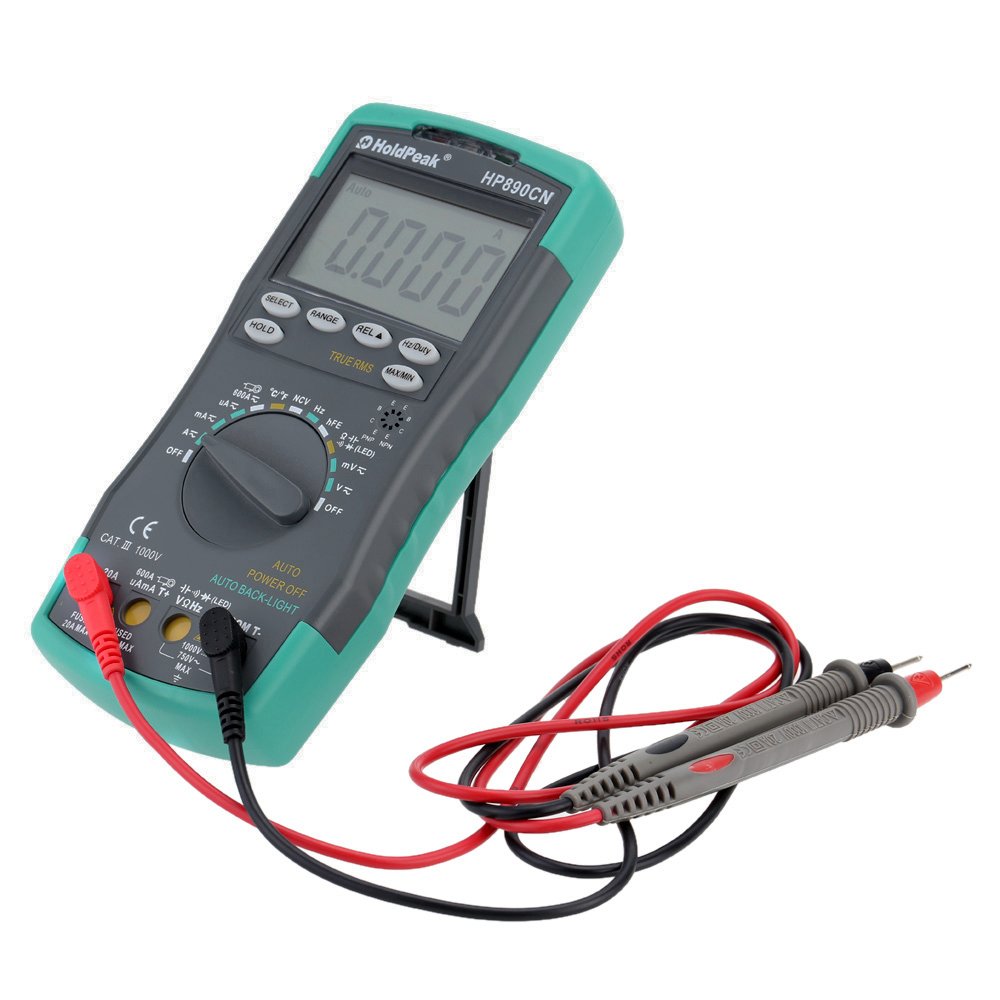
Figure 1: HoldPeak HP-890CN Digital Multimeter
2. Safety Information
WARNING: To avoid electrical shock or damage to the meter, please observe the following safety precautions:
- Always remove test leads from the circuit before opening the case or battery cover.
- Do not operate the meter with the case or battery cover open.
- To prevent damage or injury, ensure quick-acting fuses with the specified amp and volt ratings are installed.
- This device complies with IEC 1010-1 1000V CAT III, Pollution Degree 2 standards.
- Always use the correct function and range for measurements.
- Never apply voltage or current that exceeds the maximum specified limits.
- Be cautious when working with voltages above 30V AC RMS, 42V peak, or 60V DC. These voltages pose a shock hazard.
- Keep fingers behind the probe barriers during measurements.

Figure 2: Rear view of the multimeter showing safety warnings and battery compartment.
3. Product Overview
The HoldPeak HP-890CN Digital Multimeter features a large LCD display and intuitive controls for ease of use. Below is a diagram illustrating the main components and their functions.

Figure 3: Labeled diagram of the HP-890CN Multimeter.
Key Components:
- LCD Display: Shows measurement readings, units, and function indicators. Features smart backlight.
- Function Switch: Rotary switch to select measurement functions (Voltage, Current, Resistance, etc.).
- Input Jacks:
- COM: Common input jack for the black test lead.
- VΩHz: Input for voltage, resistance, frequency, capacitance, diode, and temperature measurements (red test lead).
- mAµA: Input for current measurements up to 600mA (red test lead).
- 20A: Input for current measurements up to 20A (red test lead).
- Buttons:
- SELECT: Toggles between functions within a single rotary switch position (e.g., AC/DC, Diode/Continuity).
- RANGE: Manually selects measurement range (auto-ranging is default).
- REL (Relative Value): Measures relative changes.
- Hz/Duty: Selects frequency or duty cycle measurement.
- HOLD: Freezes the current display reading.
- TRUE RMS: Indicates True RMS measurement capability for AC.
- MAX/MIN: Records maximum and minimum readings.
- NCV Induction Area: For non-contact voltage detection.
- hFE Testing Interface: Socket for transistor testing.
- Kickstand: Integrated stand for convenient viewing (rotates 180 degrees).
4. Setup
4.1 Battery Installation
The multimeter requires either two 1.5V AAA batteries or one 9V 6F22 battery (not included). The specific battery type included with your product may vary. To install or replace batteries:
- Ensure the multimeter is turned OFF and all test leads are disconnected.
- Locate the battery compartment on the back of the meter.
- Use a screwdriver to loosen the screw securing the battery cover.
- Remove the battery cover.
- Insert the new batteries, observing the correct polarity (+ and -).
- Replace the battery cover and tighten the screw securely.

Figure 4: Internal view of the multimeter, showing the battery compartment.
4.2 Connecting Test Leads
Always connect the black test lead to the COM jack. Connect the red test lead to the appropriate input jack based on the measurement you intend to perform:
- For Voltage, Resistance, Capacitance, Frequency, Diode, and Temperature: Connect the red lead to the VΩHz jack.
- For Current up to 600mA: Connect the red lead to the mAµA jack.
- For Current up to 20A: Connect the red lead to the 20A jack.
5. Operating Instructions
Before taking any measurements, ensure the test leads are correctly connected and the function switch is set to the desired measurement type.
5.1 Power On/Off
Rotate the function switch from the OFF position to any desired measurement function to turn the meter ON. Rotate it back to OFF to power it down. The meter features an auto power-off function to conserve battery life.
5.2 Measuring DC Voltage (V=)
- Set the function switch to the V= position.
- Connect the black test lead to the COM jack and the red test lead to the VΩHz jack.
- Connect the test probes across the component or circuit to be measured, in parallel.
- Read the voltage value on the LCD display.
5.3 Measuring AC Voltage (V~)
- Set the function switch to the V~ position.
- Connect the black test lead to the COM jack and the red test lead to the VΩHz jack.
- Connect the test probes across the component or circuit to be measured, in parallel.
- Read the voltage value on the LCD display. This meter provides True RMS readings for AC voltage.

Figure 5: Measuring AC voltage from a power outlet.
5.4 Measuring DC/AC Current (A= / A~)
CAUTION: Always connect the meter in series with the circuit when measuring current. Ensure the circuit is de-energized before connecting the meter.
- Set the function switch to the A= or A~ position. Use the SELECT button to toggle between DC and AC if necessary.
- Connect the black test lead to the COM jack.
- For currents up to 600mA, connect the red test lead to the mAµA jack. For currents up to 20A, connect the red test lead to the 20A jack.
- Break the circuit and connect the test probes in series with the circuit.
- Apply power to the circuit and read the current value on the LCD display.
5.5 Measuring Resistance (Ω)
- Set the function switch to the Ω position.
- Connect the black test lead to the COM jack and the red test lead to the VΩHz jack.
- Connect the test probes across the component to be measured. Ensure the component is de-energized.
- Read the resistance value on the LCD display.
5.6 Measuring Capacitance (F)
- Set the function switch to the capacitance (F) position.
- Connect the black test lead to the COM jack and the red test lead to the VΩHz jack.
- Connect the test probes across the capacitor. Ensure the capacitor is fully discharged before measurement.
- Read the capacitance value on the LCD display.
5.7 Measuring Frequency (Hz) / Duty Cycle (%)
- Set the function switch to the Hz/% position.
- Connect the black test lead to the COM jack and the red test lead to the VΩHz jack.
- Connect the test probes across the signal source.
- Press the Hz/Duty button to toggle between frequency and duty cycle measurements.
- Read the value on the LCD display.
5.8 Diode Test
- Set the function switch to the Diode/Continuity position. Press SELECT to choose Diode Test.
- Connect the black test lead to the COM jack and the red test lead to the VΩHz jack.
- Connect the red probe to the anode and the black probe to the cathode of the diode.
- Read the forward voltage drop on the LCD display. Reverse the probes to check for open circuit (OL).
5.9 Continuity Test
- Set the function switch to the Diode/Continuity position. Press SELECT to choose Continuity Test.
- Connect the black test lead to the COM jack and the red test lead to the VΩHz jack.
- Connect the test probes across the circuit or component.
- If the resistance is below approximately 50Ω, the buzzer will sound, indicating continuity.
5.10 Temperature Measurement (°C/°F)
- Set the function switch to the °C/°F position.
- Connect the K-type thermocouple probe to the VΩHz and COM jacks, observing polarity.
- Place the thermocouple tip on or near the object whose temperature is to be measured.
- Read the temperature on the LCD display. Use the SELECT button to switch between Celsius and Fahrenheit.
5.11 hFE Test (Transistor Test)
- Set the function switch to the hFE position.
- Insert the transistor's Emitter, Base, and Collector leads into the corresponding holes in the hFE socket, ensuring correct NPN or PNP type.
- Read the hFE value (DC current gain) on the LCD display.
5.12 Non-Contact Voltage (NCV) Detection
- Set the function switch to the NCV position.
- Move the NCV induction area of the meter close to the conductor being tested.
- If AC voltage is detected (90V to 1000V AC RMS), the NCV red indicator will light up, and the buzzer will sound. The intensity of the sound and light indicates the strength of the detected voltage.
5.13 Special Functions
- HOLD: Press to freeze the current reading on the display. Press again to release.
- REL (Relative Value): Press to store the current reading as a reference. Subsequent measurements will show the difference from this reference.
- MAX/MIN: Press to enter MAX/MIN mode. The meter will display the maximum or minimum reading recorded since entering this mode. Press again to cycle between MAX, MIN, and current reading.
6. Maintenance
6.1 Cleaning
Wipe the meter with a damp cloth and mild detergent. Do not use abrasives or solvents. Keep the contacts of the input jacks clean.
6.2 Battery Replacement
When the battery symbol appears on the LCD, the batteries need to be replaced. Refer to section 4.1 for battery installation instructions.
6.3 Fuse Replacement
WARNING: To avoid electrical shock, disconnect the test leads before opening the case. Replace fuses only with quick-acting fuses of the specified type and rating.
The meter is protected by two fuses:
- F1: 600mA/250V fast-blow fuse for the mAµA input.
- F2: 20A/250V fast-blow fuse for the 20A input.
To replace a fuse:
- Turn the meter OFF and disconnect all test leads.
- Remove the battery cover and batteries.
- Unscrew the screws holding the back case and carefully open the meter.
- Carefully remove the old fuse by gently prying it from its clips.
- Install a new fuse of the correct type and rating.
- Reassemble the meter, ensuring all screws are tightened.
7. Troubleshooting
- Random values in mV mode: It is normal for the display to show random values in mV mode when the input terminals are open (not connected to a circuit). Simply short the input terminals to zero the reading. This will not affect measurement results.
- No display or dim display: Check battery level. Replace batteries if low.
- No reading in current mode: Check if the fuse is blown. Replace if necessary (refer to section 6.3). Ensure test leads are connected to the correct current input jack (mAµA or 20A) and in series with the circuit.
- "OL" displayed: Indicates an overload (measurement exceeds the selected range) or an open circuit.
8. Specifications
| Parameter | Specification |
|---|---|
| Brand | HoldPeak |
| Model | HP-890CN |
| Color | Gray + Blue-Green |
| Material | Plastic |
| Max Display | 6000 counts |
| Range Control | Auto Range |
| Screen Size | 60 × 35 mm |
| DC Voltage | 60mV/600mV/6V/60V/600V/1000V |
| AC Voltage (True RMS) | 60mV/600mV/6V/60V/600V/750V |
| DC Current | 600µA/6000µA/60mA/600mA/6A/20A |
| AC Current (True RMS) | 600µA/6000µA/60mA/600mA/6A/20A |
| Resistance | 600Ω/6KΩ/60KΩ/600KΩ/6MΩ/60MΩ |
| Capacitance | 9.999nF/99.99nF/999.9nF/9.999µF/99.99µF/999.9µF/9.99mF/99.99mF |
| Frequency | 9.999Hz/99.99Hz/999.9Hz/9.999KHz/99.99KHz/999.9KHz/9.999MHz |
| Duty Cycle | 0.1% to 99.9% |
| Temperature | -20~1000°C / -4~2222°F |
| Diode Test | Yes |
| Continuity Buzzer | Yes |
| Transistor hFE Test | 0-1000 |
| NCV Detection | 90V ~ 1000V AC rms |
| Power Supply | 2 * 1.5V AAA batteries / 1 * 9V 6F22 battery (not included) |
| Operating Environment | 0-40°C (32-104°F) |
| Storage Environment | -20-60°C (-4-140°F) |
| Product Size (L×W×H) | Approx. 19 × 8.5 × 3.5 cm (7.67 × 3.35 × 1.37 inches) |
| Product Weight | 300 grams (10.58 ounces) |
| Manufacturer | MIS-E0833 |
| UPC | 783950206936, 791592905193 |
9. Package Contents
The package includes the following items:
- 1 * HoldPeak HP-890CN Digital Multimeter
- 1 * Storage Bag
- 1 * Pair of Test Leads (Red and Black)
- 1 * K-Type Thermocouple Probe
- 1 * English User Manual

Figure 6: Multimeter and included accessories.

Figure 7: Included storage bag for the multimeter.
10. Warranty and Support
For warranty information or technical support, please refer to the documentation provided with your purchase or contact the seller/manufacturer directly. Keep your purchase receipt as proof of purchase.


