
1. Important Safeguards
When using electrical appliances, basic safety precautions should always be followed to reduce the risk of fire, electric shock, and injury to persons. Read all instructions carefully before using this oven.
- Do not touch hot surfaces. Always use oven mitts or gloves when handling hot items.
- To protect against electrical shock, do not immerse the cord, plug, or any part of the oven in water or other liquid.
- Close supervision is necessary when any appliance is used by or near children.
- Unplug from outlet when not in use and before cleaning. Allow to cool before putting on or taking off parts.
- Do not operate any appliance with a damaged cord or plug, or after the appliance malfunctions or has been damaged in any manner.
- Do not use outdoors.
- Do not let cord hang over edge of table or counter, or touch hot surfaces.
- Do not place on or near a hot gas or electric burner, or in a heated oven.
- Extreme caution must be used when moving an appliance containing hot oil or other hot liquids.
- Do not use the appliance for other than intended use.
- Ensure adequate ventilation around the oven during operation.
- The double protection glass panel meets A12 European Standard (EN) for safety.
2. Product Overview
The Toyomi TO-3533RC Electric Convection Oven is designed for versatile cooking with a 35.0L capacity. It features an 'M' shape heating element for efficient heat distribution, a cool-touch panel, and multiple control options.
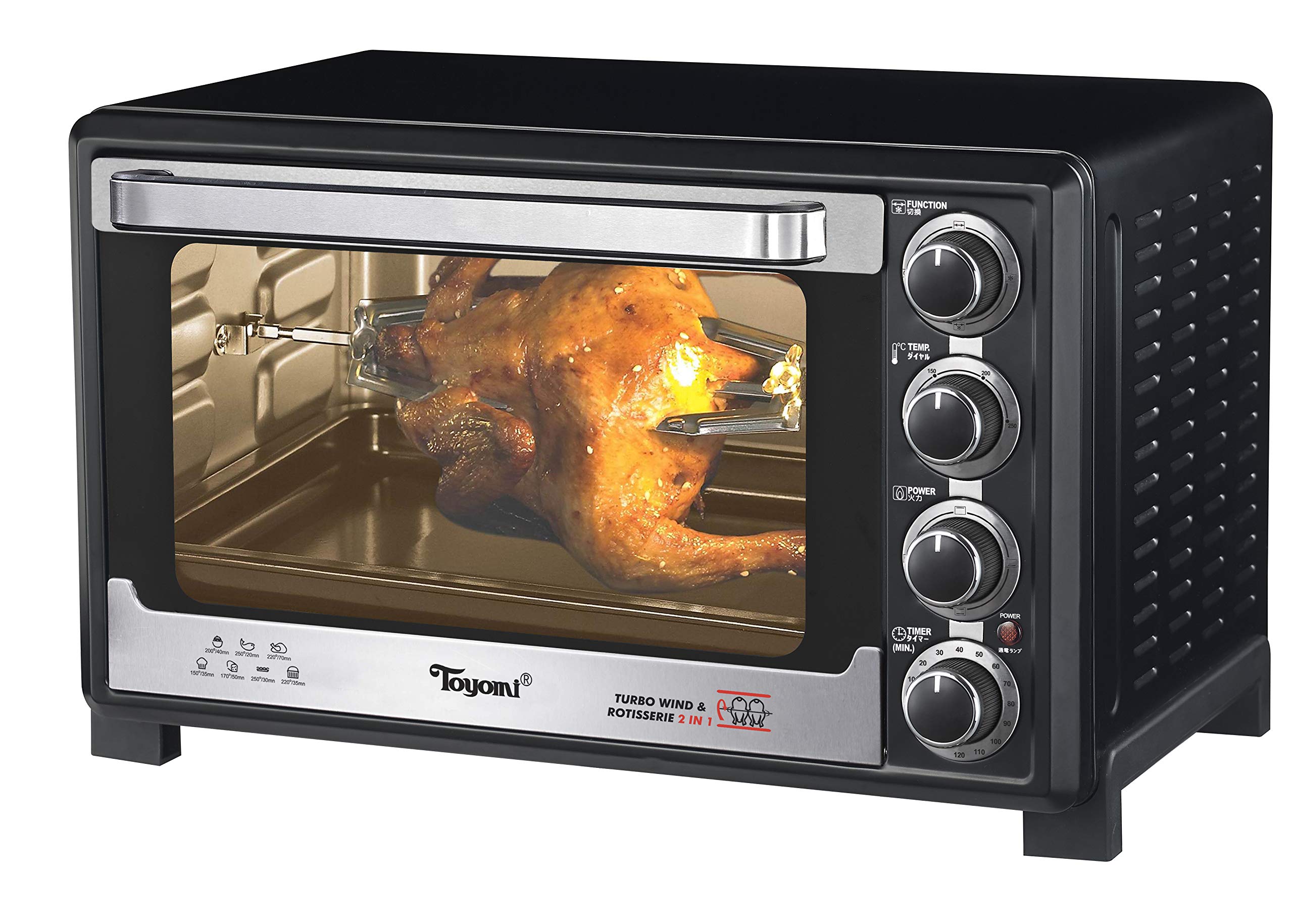
Image: Front view of the Toyomi TO-3533RC Electric Convection Oven, showing the control panel, door, and interior accessories.
Components:
- Control Panel: Features cool-touch design with selector switches and knobs.
- Temperature Select Control: Adjusts temperature up to 250 degrees Celsius.
- 120 Minutes Timer: With auto shut-off and ready bell.
- Heating Element Select Control: Allows selection of top, bottom, or both heating elements.
- Operation Light Indicator: Illuminates when the oven is in operation.
- Interior Light: For visibility inside the oven during cooking.
- Convection Fan: Circulates hot air for even cooking.
- Rotisserie Function: For roasting meats evenly.
- Double Protection Glass Panel: Enhanced safety feature.
- Accessories: Baking tray, baking rack, tray handle, rotisserie spit, and crumb tray.
3. Setup
- Unpacking: Carefully remove the oven and all accessories from the packaging. Retain packaging for future storage or transport.
- Placement: Place the oven on a stable, heat-resistant, and level surface. Ensure there is adequate space (at least 10-15 cm) on all sides and above the oven for proper ventilation. Do not place near flammable materials.
- First Cleaning: Before first use, wipe the interior and exterior of the oven with a damp cloth. Wash the baking tray, baking rack, rotisserie spit, and crumb tray in warm, soapy water, then rinse and dry thoroughly.
- Initial Burn-off: It is recommended to run the oven empty for approximately 15 minutes at the maximum temperature (250°C) with the convection function on. This will burn off any manufacturing residues and odors. Ensure the area is well-ventilated during this process. A slight odor or smoke is normal during this initial use.
- Power Connection: Plug the power cord into a grounded electrical outlet. Ensure the voltage matches the specifications of the oven.
4. Operating Instructions
4.1 Control Panel Overview
- Temperature Knob: Used to select the desired cooking temperature from 100°C to 250°C.
- Function Knob: Selects the heating mode (e.g., top heat, bottom heat, top & bottom heat, convection, rotisserie).
- Timer Knob: Sets the cooking time up to 120 minutes. The oven will automatically shut off and ring a bell when the set time expires.
4.2 General Operation
- Prepare Food: Place food on the baking tray or rack. For rotisserie cooking, secure the food onto the rotisserie spit.
- Place Accessories: Insert the baking tray, rack, or rotisserie assembly into the appropriate guides inside the oven. Ensure the crumb tray is in place at the bottom for easy cleaning.
- Select Temperature: Turn the Temperature Knob to the desired cooking temperature.
- Select Function: Turn the Function Knob to select the desired cooking mode (e.g., Bake, Roast, Convection, Rotisserie).
- Set Timer: Turn the Timer Knob to the desired cooking time. The operation light indicator will illuminate, indicating the oven is heating. If you need to cook for longer than 120 minutes, you can reset the timer during cooking. For continuous operation, turn the timer past the 'ON' mark to the 'Stay On' position (if available).
- Monitor Cooking: Use the interior light to check on your food without opening the oven door.
- Completion: When the timer reaches zero, a bell will ring, and the oven will automatically shut off. Carefully remove the cooked food using oven mitts and the tray handle.
4.3 Convection Function
The convection function circulates hot air throughout the oven cavity, resulting in faster and more even cooking. This is ideal for baking, roasting, and achieving crispy textures. When using convection, you may need to reduce cooking time or temperature slightly compared to conventional oven recipes.
4.4 Rotisserie Function
The rotisserie function is perfect for roasting whole chickens or other meats, ensuring they are evenly cooked and browned on all sides. To use:
- Secure the food onto the rotisserie spit using the forks provided.
- Insert the pointed end of the spit into the rotisserie drive socket on the right side of the oven.
- Rest the notched end of the spit onto the rotisserie support on the left side.
- Select the rotisserie function using the Function Knob.
- Set temperature and time as required.
5. Cleaning and Maintenance
Regular cleaning and maintenance will ensure the longevity and optimal performance of your oven.
- Always Unplug: Before cleaning, always unplug the oven from the power outlet and allow it to cool completely.
- Crumb Tray: The crumb tray is designed for easy cleaning. Slide it out from the bottom of the oven and discard any crumbs. Wash it in warm, soapy water, rinse, and dry thoroughly.
- Interior: Wipe the interior walls, door, and heating elements with a damp cloth and mild detergent. For stubborn stains, a non-abrasive cleaner can be used. Avoid harsh chemicals or abrasive pads that could damage the surface.
- Exterior: Clean the exterior surface with a soft, damp cloth. Do not use abrasive cleaners or polishes. The cool-touch panel should be wiped gently.
- Accessories: Wash the baking tray, baking rack, and rotisserie spit in warm, soapy water. They are generally not dishwasher safe unless specified. Rinse and dry completely before storing or reusing.
- Storage: When not in use, store the oven in a clean, dry place.
6. Troubleshooting
If you encounter issues with your Toyomi TO-3533RC oven, refer to the following common problems and solutions:
- Oven does not turn on:
- Ensure the power cord is securely plugged into a working electrical outlet.
- Check if the timer knob has been set. The oven will not operate unless the timer is set.
- Verify that the circuit breaker has not tripped.
- Food is not cooking evenly:
- Ensure the convection fan function is selected for more even heat distribution.
- Preheat the oven fully before placing food inside.
- Avoid overcrowding the oven. Cook in smaller batches if necessary.
- Rotate the baking tray halfway through cooking for very large items.
- Oven produces smoke during operation:
- A small amount of smoke during the first use is normal (initial burn-off).
- Excessive smoke may indicate food spills or grease buildup. Clean the interior and accessories thoroughly.
- Ensure no packaging materials or foreign objects are inside the oven.
- Timer bell does not ring:
- Ensure the timer knob was turned past the 'OFF' position to set a specific time.
- If the issue persists, contact customer support.
For issues not covered here, please contact Toyomi customer support.
7. Specifications
| Brand | Toyomi |
| Model Number | TO-3533RC |
| Capacity | 35 Liters |
| Wattage | 1600 watts |
| Temperature Range | Up to 250°C |
| Timer | 120 minutes with auto shut-off and ready bell |
| Control Type | Knob |
| Material | Stainless Steel |
| Color | Black |
| Special Features | Cool Touch Panel, Temperature Control, Timer, Convection, Rotisserie, Interior Light |
8. Warranty and Support
This Toyomi TO-3533RC Electric Convection Oven comes with a Limited Warranty. Please refer to the warranty card included with your purchase for specific terms and conditions, including coverage period and what is covered.
For technical support, service, or warranty claims, please contact Toyomi customer service through their official website or the contact information provided in your product documentation.
Please have your model number (TO-3533RC) and proof of purchase ready when contacting support.