Introduction
This manual provides comprehensive instructions for the setup, operation, and maintenance of your Motorola CD4013 DECT 6.0 Cordless Phone System. This system is designed for everyday calling, offering features such as a digital answering machine, call blocking capabilities, and hands-free communication.
Please read this manual thoroughly before using your new phone system to ensure proper functionality and to take full advantage of all its features.
Package Contents
Before you begin, ensure all items are present in your package:
- Cordless Handsets (Quantity: 3)
- Handset Chargers (Quantity: 3)
- Main Base Unit (with integrated answering machine)
- AC Power Adapters (for base unit and chargers)
- Telephone Line Cord
- Rechargeable Ni-MH Battery Packs (for each handset)
- User Manual (this document)

Image: The Motorola CD4013 DECT 6.0 Cordless Phone System with three handsets and their respective charging bases.
Setup
1. Battery Installation
- Locate the battery compartment cover on the back of each handset.
- Slide the cover downwards to remove it.
- Connect the rechargeable Ni-MH battery pack plug into the jack inside the compartment, ensuring correct polarity.
- Place the battery pack into the compartment.
- Slide the battery compartment cover back into place until it clicks.
2. Connecting the Base Unit
- Connect one end of the telephone line cord to the TEL LINE jack on the back of the main base unit.
- Connect the other end of the telephone line cord to your telephone wall jack.
- Plug the small end of the AC power adapter into the DC IN 6V jack on the back of the main base unit.
- Plug the large end of the AC power adapter into a standard electrical outlet.
3. Connecting Handset Chargers
For each additional handset, plug its AC power adapter into a standard electrical outlet and connect the small end to the DC IN jack on the back of the charger unit.
4. Charging Handsets
Place each handset face forward into its respective base unit or charger. The charge indicator on the handset should illuminate, indicating proper charging. Allow at least 15-20 hours for the initial charge before first use to ensure optimal battery performance.
Operating Instructions
Making and Receiving Calls
- To Make a Call: Pick up a handset, press the TALK/FLASH button, and dial the number. Alternatively, dial the number first and then press TALK/FLASH.
- To Receive a Call: When the phone rings, pick up any handset and press the TALK/FLASH button.
- To End a Call: Press the END button or place the handset back on its base/charger.
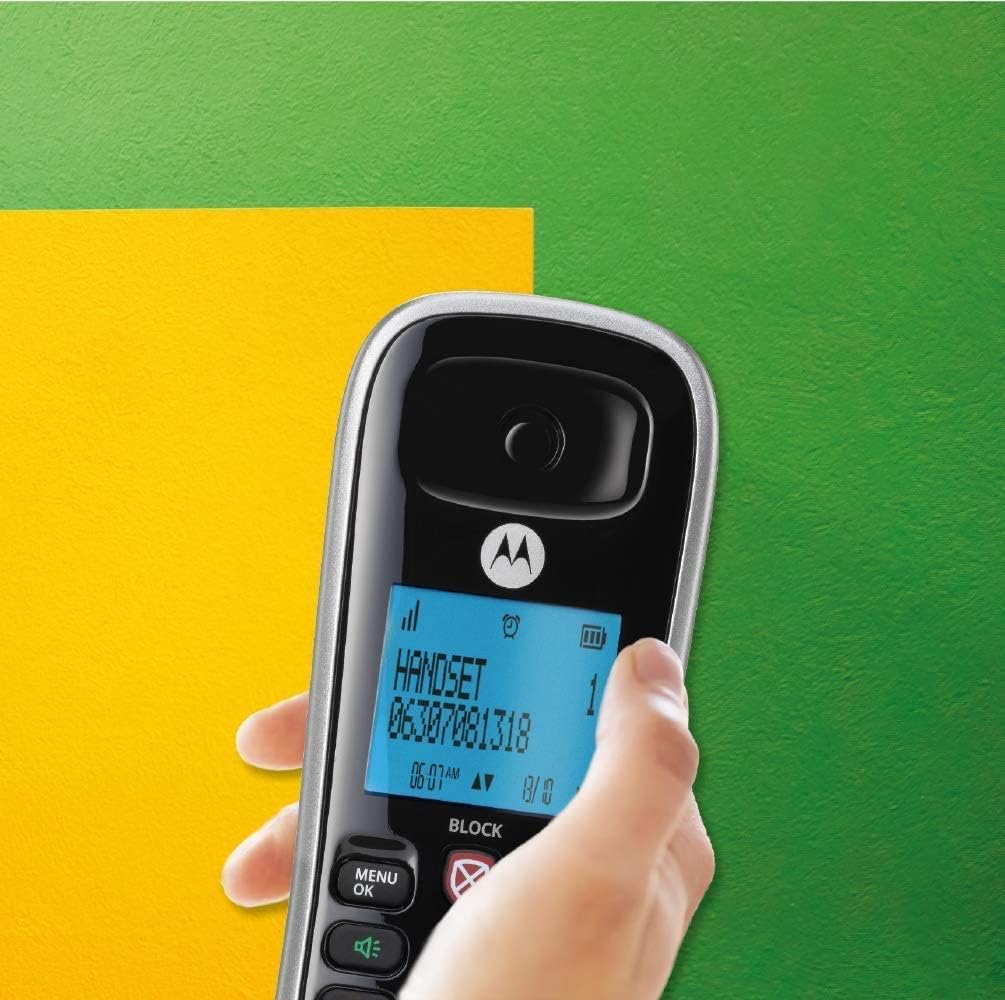
Image: Close-up of a hand holding the Motorola CD4013 handset, highlighting the illuminated display and keypad for easy visibility.
Hands-Free Speakerphone
To activate the speakerphone during a call, press the SPEAKER button. Press it again to switch back to the handset earpiece.
Phonebook (50 Name and Number Capacity)
- Adding a Contact:
- Press MENU/OK.
- Navigate to PHONEBOOK and press MENU/OK.
- Select ADD NEW ENTRY.
- Enter the name using the keypad.
- Press MENU/OK and enter the number.
- Press MENU/OK to save.
- Dialing from Phonebook:
- Press the PHONEBOOK button (usually an icon or dedicated key).
- Scroll through the entries using the UP/DOWN navigation keys.
- Once the desired contact is displayed, press TALK/FLASH to dial.
Digital Answering Machine (12 Minutes Recording Time)
- Turning On/Off: Access the Answering Machine menu via MENU/OK and select the On/Off option.
- Playing Messages: Press the PLAY button on the base unit or access through the handset menu.
- Deleting Messages: During message playback, press the DELETE button.
- Recording Outgoing Message (OGM): Follow the prompts in the Answering Machine menu to record your personalized greeting.
Call Blocking (Up to 10 Numbers)
The system allows you to block unwanted calls from up to 10 specific numbers. There is a dedicated key for direct access to the Call Block menu.
- To Block a Number During a Call: Press the dedicated BLOCK button.
- To Block a Number from Call Log: Access the Call Log, select the number, and choose the "Block" option.
- To Manually Add a Number to Block List: Access the Call Block menu via MENU/OK, select "Add Number," and enter the desired number.

Image: The Motorola CD4013 handset highlighting its call blocking feature, emphasizing its utility for everyday communication.
Maintenance
Cleaning Your Phone
Wipe the phone and base unit with a soft, slightly damp cloth. Do not use cleaning sprays or abrasive cleaners, as they can damage the finish or electronic components. Ensure no liquid enters the phone or base unit.
Battery Care
- Always use the specified rechargeable Ni-MH battery packs.
- If the handset will not be used for an extended period, remove the battery to prevent leakage.
- Dispose of old batteries responsibly according to local regulations.
Storage
Store the phone system in a cool, dry place away from direct sunlight and extreme temperatures when not in use for prolonged periods.
Troubleshooting
| Problem | Possible Cause | Solution |
|---|---|---|
| No dial tone. | Telephone line cord is not connected or is faulty. | Ensure the telephone line cord is securely connected to the base unit and the wall jack. Try a different phone line cord. |
| Handset not charging. | Handset not properly seated in charger; dirty charging contacts; battery not installed correctly. | Ensure handset is firmly seated. Clean charging contacts on handset and charger with a dry cloth. Verify battery is correctly installed. |
| Cannot make or receive calls. | Out of range; low battery; base unit power issue. | Move closer to the base unit. Recharge the handset battery. Check if the base unit's power adapter is properly connected. |
| Poor sound quality/static. | Interference from other electronic devices; out of range. | Move the base unit away from other electronic devices (Wi-Fi routers, microwaves). Move closer to the base unit. |
| Answering machine not recording messages. | Answering machine is off; memory full. | Ensure the answering machine is turned on. Delete old messages to free up memory. |
Specifications
- Model: CD4013CANADA
- Brand: TELEFIELD (Motorola licensed product)
- Telephone Type: DECT 6.0 Cordless Phone
- Handsets Included: 3
- Answering System Type: Digital
- Answering Machine Recording Capacity: Up to 12 Minutes
- Phonebook Capacity: 50 Name and Number Entries
- Call Blocking Capacity: Up to 10 Numbers
- Caller Identification: Yes (Subscription to Caller ID service required from your phone provider)
- Power Source: Rechargeable Ni-MH Battery (for handsets), AC Power Adapter (for base and chargers)
- Multiline Operation: Single-Line Operation
- Dimensions (Parcel): Approximately 18 x 14.2 x 13.3 cm
- Weight (Parcel): Approximately 1.11 kg
- First Available: June 16, 2020
Warranty and Support
This Motorola CD4013 DECT 6.0 Cordless Phone System is covered by a standard manufacturer's warranty. Please refer to the warranty card included in your original packaging for specific terms and conditions, including warranty period and coverage details.
For technical support, troubleshooting assistance beyond this manual, or warranty claims, please contact the manufacturer or the authorized seller from whom you purchased the product. Keep your proof of purchase for warranty validation.
Manufacturer: Telefield