
1. Introduction
This manual provides essential information for the installation, operation, and maintenance of your Tiiwee X1 Wireless Home Alarm System. Please read these instructions carefully before using the product to ensure proper function and safety. The Tiiwee X1 system is designed to provide reliable security for your home, apartment, caravan, or motorhome with its wireless and expandable features.

Figure 1: Tiiwee X1 Siren Unit Overview
This image highlights the key features of the Tiiwee X1 siren unit, including its loud 120dB alarm, the 4-zone light indicator for identifying triggered areas, its extended battery life, a low battery warning, and the manual control buttons for settings and arm/disarm functions.
2. Package Contents
The Tiiwee X1 Wireless Home Alarm System Kit typically includes the following components:
- 1 x Tiiwee X1 Siren Unit
- 2 x Tiiwee Door/Window Sensors
- 2 x Remote Controls
- Mounting accessories (double-sided adhesive tape, screws)
- User Manual
3. Setup and Installation
The Tiiwee X1 system is designed for easy installation without the need for complex wiring.
3.1. Powering the X1 Siren Unit
- The X1 siren is powered by 3 AA batteries (not included).
- Open the battery compartment on the back of the siren unit.
- Insert 3 new AA alkaline batteries, ensuring correct polarity.
- Close the battery compartment. The siren has an extended battery life of up to 12 months.
3.2. Installing Door/Window Sensors
Door and window sensors consist of two parts: a main sensor unit and a magnetic contact.
- Identify the desired location for each sensor (e.g., door frame and door, window frame and window).
- Ensure the two parts are aligned and placed within 1 cm of each other when the door/window is closed.
- Mount the sensors using either the provided double-sided adhesive tape or screws. For screw mounting, mark the positions, drill pilot holes if necessary, and secure the sensors.
- The sensors are typically pre-paired with the X1 siren. Test functionality after installation.
3.3. Mounting the X1 Siren Unit
The X1 siren can be mounted or used as a portable device.
- For wall mounting, use the included screws. Choose a central location within your protected area for optimal wireless range.
- Alternatively, place the siren on a flat surface.
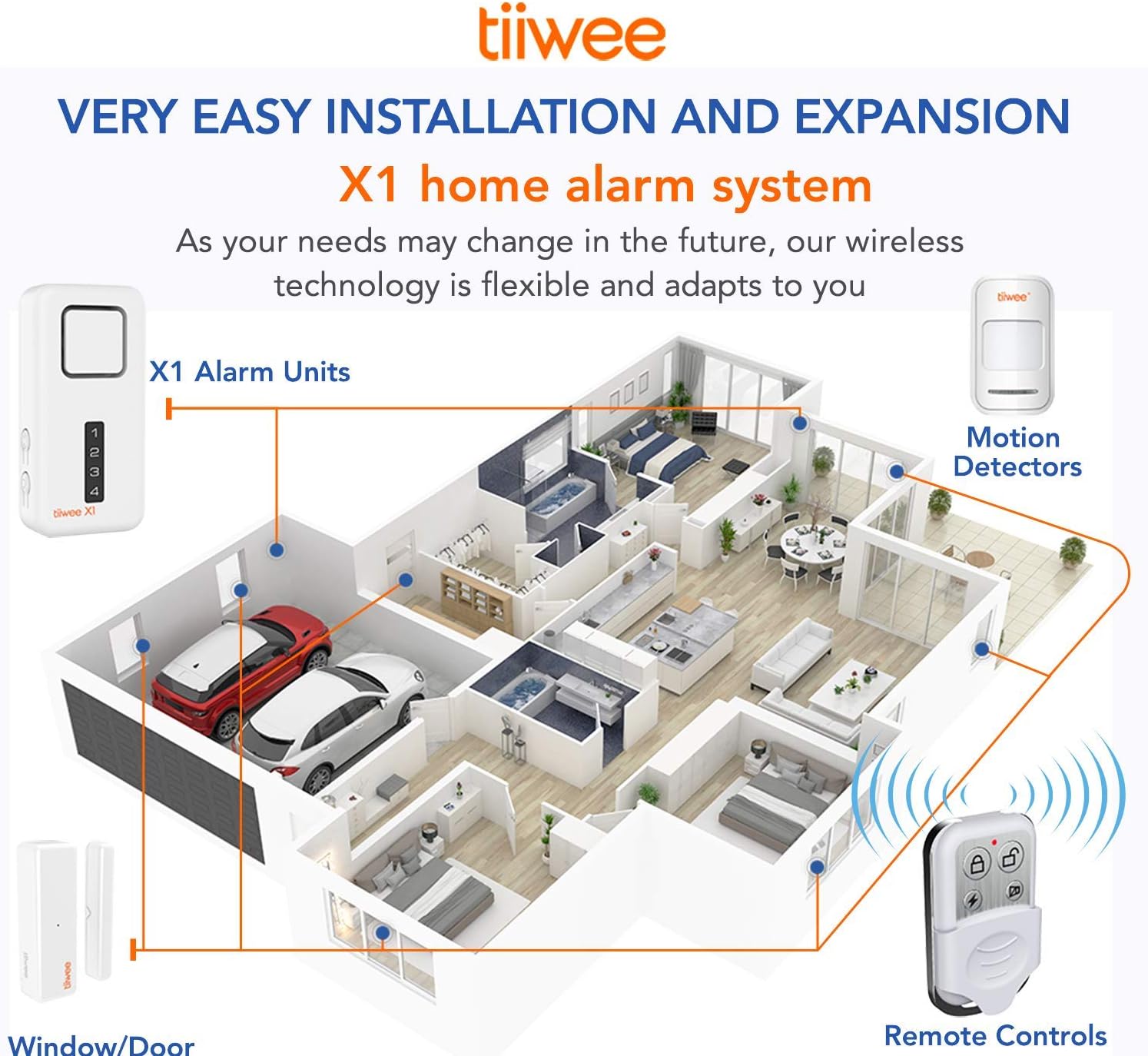
Figure 2: System Installation and Expansion Overview
This diagram demonstrates how the Tiiwee X1 system can be easily installed and expanded throughout a home. It shows the placement of the X1 alarm unit, motion detectors, window/door sensors, and remote controls, highlighting the wireless connectivity.
4. Operating the System
The Tiiwee X1 system is controlled primarily via the remote controls.
4.1. Remote Control Functions
Each remote control typically has buttons for:
- Arm: Activates the alarm system. All paired sensors will trigger the siren if violated.
- Disarm: Deactivates the alarm system.
- SOS/Panic: Triggers the siren immediately, regardless of the system's armed status.
- Home Arm (Partial Arm): Arms specific zones, often used when occupants are home (e.g., arming perimeter sensors only). Refer to the full manual for specific zone programming.
The wireless range of the remote control extends over 2 to 3 floors, depending on building materials, allowing activation/deactivation from outside your door.
4.2. Siren Sound Selection
The X1 siren offers two sound modes:
- 120 dB Siren: A loud alarm sound for intruder deterrence.
- Doorbell Chime: A softer chime sound, useful for notifications when a door or window opens. This mode has 2 adjustable volume levels.
Refer to the full manual for instructions on how to switch between these modes and adjust the doorbell chime volume.
4.3. Zone Indicator
The X1 siren features a 4-zone light indicator on its front panel. When an alarm is triggered, this indicator will show which zone (1-4) was violated, helping to identify the point of entry.
5. System Expansion
The Tiiwee X1 system is highly expandable. You can connect up to 40 sensors across 4 zones (10 sensors per zone).
Compatible accessories include:
- Additional Tiiwee Door/Window Sensors
- Tiiwee Indoor and Outdoor PIR Motion Detectors
- Tiiwee A3 Outdoor Siren
- Additional Remote Controls
- Tiiwee Emergency Button
Refer to the specific accessory's manual for pairing instructions with your X1 siren unit.

Figure 3: X1 Alarm System Compatibility
This diagram illustrates the Tiiwee X1 alarm system's compatibility with various accessories, allowing users to expand their security setup. It shows the X1 unit alongside indoor/outdoor motion detectors, door and window sensors, an emergency button, the A3 outdoor siren, and additional remote controls.
6. Maintenance
Regular maintenance ensures the longevity and reliability of your alarm system.
- Battery Replacement: The X1 siren provides an audible signal when its batteries are low. Replace all 3 AA batteries promptly when this occurs. For door/window sensors and remote controls, replace batteries as needed (typically CR2032 for remotes, and often AAA for sensors, refer to individual component specifications).
- Cleaning: Wipe the units with a soft, dry cloth. Do not use liquid cleaners or aerosols.
- Testing: Periodically test your alarm system by arming it and triggering a sensor to ensure the siren activates.
7. Troubleshooting
If you encounter issues with your Tiiwee X1 system, refer to the following common problems and solutions:
| Problem | Possible Cause | Solution |
|---|---|---|
| Siren does not activate | Low or dead batteries in siren or sensor; sensor not properly paired; sensor gap too wide. | Replace batteries in siren and sensors. Re-pair sensors if necessary. Adjust sensor placement to ensure parts are close. |
| Remote control not working | Low or dead battery in remote; out of range. | Replace remote control battery (CR2032). Move closer to the X1 siren unit. |
| False alarms | Sensor misalignment; environmental factors (e.g., strong vibrations, pets if motion sensor is used). | Ensure door/window sensors are securely mounted and aligned. Adjust motion sensor sensitivity or placement if applicable. |
| Low battery warning persists after replacement | Incorrect battery type or polarity; faulty battery. | Ensure correct battery type and polarity. Try new batteries from a different pack. |
If the problem persists, please contact Tiiwee customer support.
8. Specifications
Key technical specifications for the Tiiwee X1 Wireless Home Alarm System:
- Model Number: TWX1HAKV2 (Reference: HU-XI-201)
- Brand: Tiiwee
- Manufacturer: Tiiwee B.V.
- Siren Sound Level: 120 Decibels
- Power Source: Battery Powered
- Siren Batteries: 3 x AA 1.5V (not included)
- Siren Battery Life: Up to 12 months
- Remote Control Batteries: CR2032 (not included)
- Connectivity: Wireless
- Number of Zones: 4
- Max Sensors per Zone: 10 (Total 40 sensors)
- Control Method: Remote Control
- Product Dimensions (Siren): 11.5 x 5.7 x 2.5 cm
- Color: White
- Compatible Devices: Tiiwee Accessories

Figure 4: Tiiwee Siren Model Comparison
This table provides a detailed comparison between the Tiiwee A1, X1, and X3 siren models. It outlines differences in siren loudness, battery requirements, expected operation time, expandability with various accessories, availability of USB ports, pincode arm/disarm features, number of zones supported, and doorbell sound options.
9. Warranty and Support
For warranty information, technical support, or further assistance, please refer to the official Tiiwee website or contact Tiiwee customer service directly. Details regarding warranty periods and support channels are typically provided with your purchase documentation or on the manufacturer's website.