
Introduction
This manual provides essential information for the safe and effective use of your VUOHOEG BK03XL replacement laptop battery. Please read these instructions carefully before installation and use to ensure optimal performance and longevity of your battery.

Image: The VUOHOEG BK03XL laptop battery, designed for compatibility with HP Pavilion X360 14 series.
Safety Information
Observe the following safety precautions to prevent damage to the battery, your laptop, and personal injury:
- Do not disassemble, crush, puncture, or short-circuit the battery.
- Keep the battery away from fire, water, and extreme temperatures.
- If the battery swells, leaks, or emits an unusual odor, discontinue use immediately.
- Dispose of used batteries according to local regulations. Do not dispose of in household waste.
- The battery features built-in circuit protection to prevent overcharge and over-discharge.

Image: Diagram illustrating the internal components of the BK03XL battery, highlighting the main control chip, charge/discharge MDS chips, battery interface, and R010 resistor for accurate current testing. This design ensures safety and stability.
Compatibility
The VUOHOEG BK03XL battery is compatible with the following HP laptop models and part numbers:
Compatible Laptop Models:
- HP Pavilion x360 Convertible PC 14 Series
- HP Pavilion x360 Convertible PC 14m Series
- Specific models include: 14-ba000, 14-ba001ns, 14-ba004ni, 14-ba006ng, 14-ba011ng, 14-ba012nd, 14-ba012ng, 14-ba013ng, 14-ba015ng, 14-ba016na, 14-ba017ng, 14-ba018ng, 14-ba018ca, 14-ba019ng, 14-ba020ng, 14-ba021ng, 14-ba024nl, 14-ba026ng, 14-ba027ng, 14-ba028ng, 14-ba029ns, 14-ba030ng, 14-ba031ng, 14-ba032na, 14-ba033tx, 14-ba034tx, 14-ba035tx, 14-ba036tx, 14-ba037tx, 14-ba038tx, 14-ba039tx, 14-ba040tx, 14-ba041tx, 14-ba042tx, 14-ba043tx, 14-ba044tx, 14-ba046tx, 14-ba047tx, 14-ba048tx, 14-ba048na, 14-ba049tx, 14-ba070ng, 14-ba071ng, 14-ba100, 14-ba100ng, 14-ba100tx, 14-ba101ng, 14-ba101tx, 14-ba102ng, 14-ba103ng, 14-ba104tx, 14-ba105tx, 14-ba105ne, 14-ba106tx, 14-ba107tx, 14-ba108ng, 14-ba109ng, 14-ba110nr, 14-ba113ng, 14-ba118tu, 14-ba126nd, 14-ba170ng, 14-ba170nz, 14-ba174nz, 14-ba175nr, 14t-ba000, 14m-ba011dx, 14m-ba013dx, 14m-ba015dx, 14m-ba114dx.
Compatible Part Numbers:
- BK03XL
- 916366-421
- 916366-541
- 916811-855
- 916812-855
- BK03041XL
- HSTNN-LB7S
- HSTNN-UB7G
- TPN-W125

Image: The BK03XL battery label displaying compatible part numbers and a visual representation of compatible HP Pavilion x360 laptop series.
Setup (Installation)
Replacing a laptop battery requires careful handling of internal components. If you are not comfortable performing this procedure, it is recommended to seek assistance from a qualified technician.
- Prepare Your Laptop:
- Power off your laptop completely and disconnect it from the AC adapter.
- Close the laptop lid and place it on a clean, soft surface to prevent scratches.
- Access the Battery:
- Depending on your specific HP Pavilion X360 model, you may need to remove screws from the bottom cover to access the internal components. Refer to your laptop's official service manual for precise instructions on how to open the case.
- Carefully pry open the bottom cover using a plastic opening tool to avoid damage.
- Remove the Old Battery:
- Locate the existing battery. It is typically secured by several small screws.
- Disconnect the battery cable from the motherboard. Gently pull the connector straight up or away from the socket.
- Remove the screws holding the battery in place and carefully lift out the old battery.
- Install the New Battery:
- Place the new VUOHOEG BK03XL battery into the battery compartment, ensuring it aligns correctly with the screw holes.
- Secure the battery with the screws you removed earlier.
- Connect the new battery cable to the motherboard. Ensure the connection is firm and properly seated.
- Reassemble the Laptop:
- Carefully reattach the bottom cover, ensuring all clips and tabs are properly engaged.
- Replace all screws that secure the bottom cover.
- Initial Power-Up:
- Connect the AC adapter to your laptop.
- Power on the laptop. The battery may not show a full charge immediately.
- It is recommended to fully charge the battery before its first use.
Disclaimer: Opening your laptop may void its manufacturer's warranty. Proceed with caution and at your own risk.
Operating Instructions
First Use and Calibration:
- Upon initial installation, fully charge the battery to 100%.
- Once fully charged, disconnect the AC adapter and use the laptop on battery power until it shuts down due to low battery.
- Reconnect the AC adapter and fully charge the battery again without interruption. This cycle helps calibrate the battery's charge indicator for accurate readings.
Normal Operation:
- For optimal battery health, avoid frequently discharging the battery completely.
- It is generally recommended to keep the battery charge between 20% and 80% for daily use.
- The battery can be charged and discharged approximately 500 times over its lifespan.
Maintenance
Battery Care:
- Temperature: Avoid exposing the battery to extreme heat or cold. Optimal operating temperature is between 10°C and 35°C (50°F and 95°F).
- Cleaning: Keep the battery contacts clean and free from dust or debris.
- Physical Damage: Protect the battery from physical shocks or drops.
Long-Term Storage:
- If storing the battery for an extended period (more than one month), charge it to approximately 50-60% before storage.
- Store the battery in a cool, dry place, away from direct sunlight.
- Recharge the battery to 50-60% every 3-6 months during storage to prevent deep discharge.
Troubleshooting
If you encounter issues with your VUOHOEG BK03XL battery, consider the following troubleshooting steps:
| Problem | Possible Cause | Solution |
|---|---|---|
| Battery not charging | Loose connection, faulty AC adapter, software issue, or battery defect. |
|
| Battery not recognized by laptop | Improper installation, BIOS/firmware issue, or battery defect. |
|
| Short battery life | High power consumption, uncalibrated battery, or aging battery. |
|
Specifications
Key technical specifications for the VUOHOEG BK03XL Laptop Battery:
- Battery Type: Li-ion (Lithium-ion Polymer)
- Voltage: 11.55V
- Capacity: 41.7Wh
- Recharge Cycles: Approximately 500
- Safety Features: Overcharge and Discharge Circuit Protection
- Certifications: CE-/FCC-/RoHS-Certified
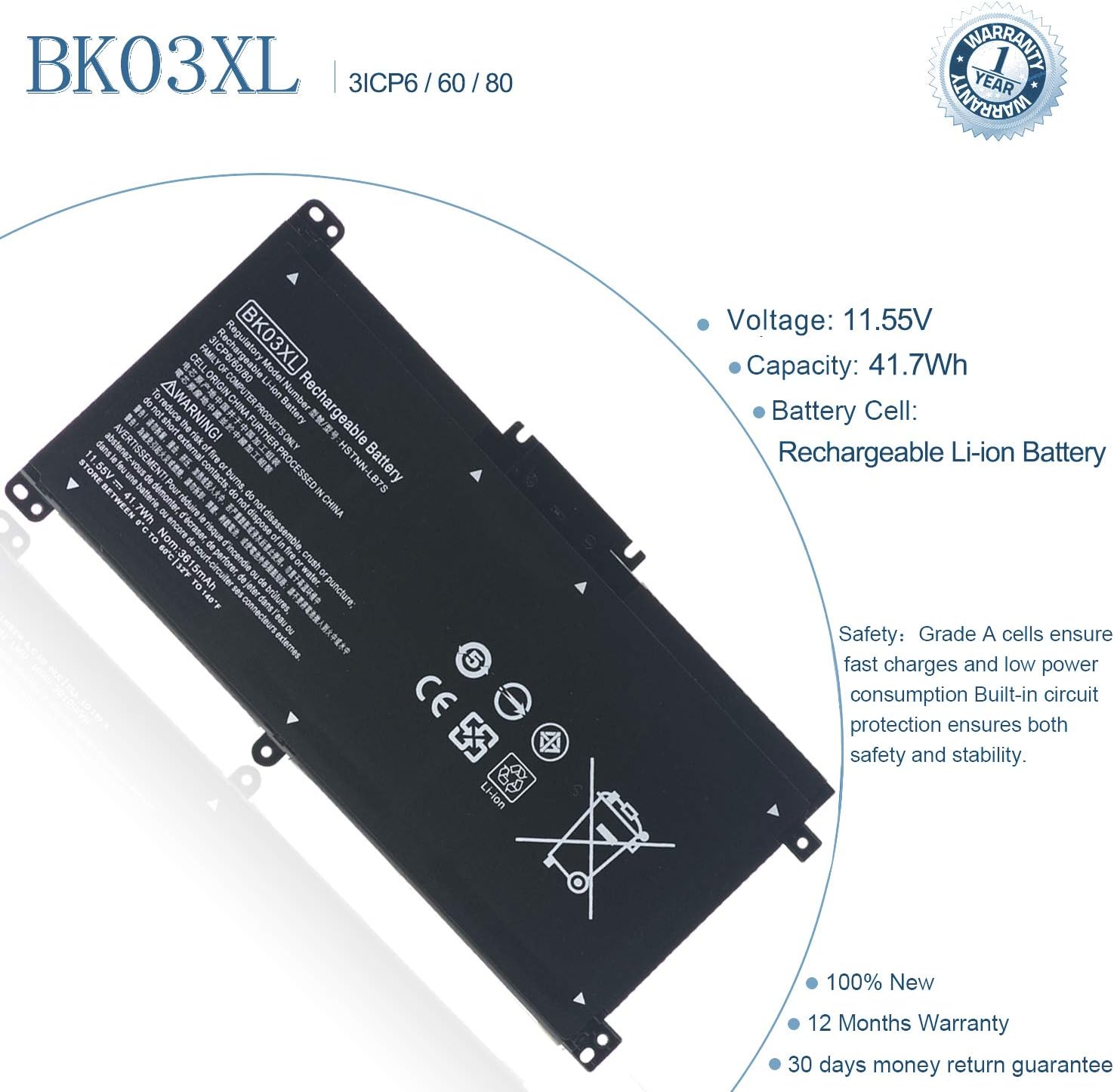
Image: The BK03XL rechargeable battery label, detailing its voltage (11.55V), capacity (41.7Wh), and Li-ion cell type. It also highlights safety features and certifications.
Warranty and Support
Your VUOHOEG BK03XL laptop battery comes with the following assurances:
- Warranty: 12 Months Warranty from the date of purchase.
- Return Policy: 30 Days Money Return Guarantee.
For technical support, warranty claims, or any questions regarding your battery, please contact VUOHOEG customer service through the retailer where you purchased the product. Please have your order number and product details ready when contacting support.