
1. Introduction
This manual provides detailed instructions for the installation, usage, and maintenance of the Occus PXtoys RC Truck Upgrade Parts Steel Ring Universal Wheel. These components are designed to enhance the performance and durability of compatible 1/18 scale RC vehicles, specifically the PXtoys 9300-9304 series. Please read this manual thoroughly before installation to ensure proper fitment and optimal performance.
2. Product Overview
The PXtoys Steel Ring Universal Wheel upgrade parts are engineered for high strength and durability, serving as direct replacements for original components. Their precise design aims to reduce energy loss and improve the overall performance of your RC model.
Key Features:
- High-quality material construction for superior strength and durability.
- Reasonable design to minimize unnecessary energy loss.
- High precision for perfect matching with original parts.
- Enhances model car performance and control.
- Exquisite appearance and lightweight for easy installation and use.
Product Components:


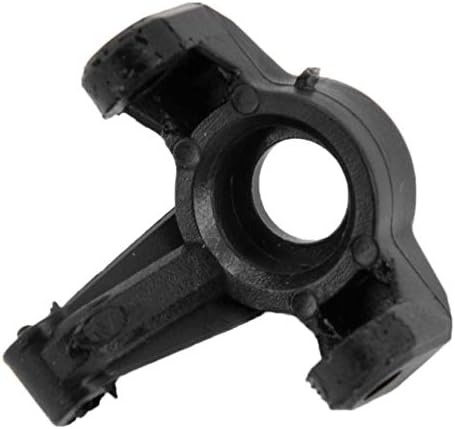


3. Setup and Installation
These upgrade parts are designed for direct replacement of existing components on PXtoys 9300-9304 series 1/18 scale RC vehicles. Basic tools typically used for RC car maintenance (e.g., small screwdrivers, hex wrenches) will be required.
- Preparation: Ensure your RC vehicle is powered off and the battery is disconnected before beginning any installation. Place the vehicle on a stable, clean surface.
- Identify Components: Locate the existing wheel hub and steering knuckle components on your RC vehicle that correspond to the upgrade parts.
- Removal of Original Parts: Carefully remove the screws, pins, or clips securing the original wheel and associated components. Detach the wheel, then the existing C-hub/steering knuckle and wheel hex adapter. Keep track of all small parts.
- Installation of Upgrade Parts:
- Attach the new C-hub/steering knuckle to the suspension arms using the appropriate screws or pins. Ensure it moves freely without excessive play.
- Install the new wheel hex adapter onto the axle.
- Mount the wheel onto the hex adapter and secure it with the wheel nut.
- Verification: After installation, gently move the suspension and steering to ensure all parts are correctly seated and operate smoothly. Check for any binding or loose connections.
It is recommended to consult your RC vehicle's original manual for specific disassembly and assembly procedures if you are unfamiliar with the process.
4. Usage Considerations
Once installed, these upgrade parts integrate seamlessly into your RC vehicle's wheel and steering assembly. While designed for durability, proper usage practices will extend their lifespan and maintain performance.
- Driving Conditions: Avoid extreme impacts or prolonged exposure to harsh environments (e.g., deep water, abrasive sand) that could prematurely wear components.
- Regular Inspection: Periodically inspect the installed parts for any signs of wear, cracks, or loose connections, especially after rigorous use.
- Compatibility: These parts are specifically designed for the PXtoys 9300-9304 series 1/18 scale RC cars. Using them with incompatible models may lead to improper fitment or damage.
5. Maintenance
Regular maintenance helps preserve the integrity and performance of your upgrade parts.
- Cleaning: After use, especially in dirty or dusty conditions, clean the parts with a soft brush or compressed air to remove debris. Avoid harsh chemicals that could degrade the plastic material.
- Lubrication: Moving parts, such as pivot points, may benefit from light lubrication with RC-specific grease or oil to reduce friction and wear.
- Fastener Check: Periodically check all screws and fasteners connected to these parts to ensure they are tight. Do not overtighten, as this can strip threads or crack plastic.
- Storage: Store your RC vehicle and spare parts in a cool, dry place away from direct sunlight and extreme temperatures.
6. Troubleshooting
If you encounter issues after installing the upgrade parts, consider the following:
- Loose Fit/Excessive Play: Ensure all fasteners are securely tightened. Verify that the correct parts were installed in the correct orientation. Check for any worn pins or bushings that might need replacement.
- Binding/Restricted Movement: Inspect for any foreign objects or debris obstructing movement. Confirm that no screws are overtightened, causing parts to bind. Ensure all components are aligned correctly.
- Part Damage: If a part appears cracked or broken, it may be due to extreme impact or incorrect installation. Replace damaged parts immediately to prevent further issues.
- Incompatibility: Double-check that your RC vehicle model is listed as compatible with these PXtoys upgrade parts.
7. Specifications
| Item Type | RC Accessory |
| Brand | PXtoys (Manufactured by Occus) |
| Material | Plastic |
| Part Number | PX9300-10 |
| Color | As Pictures Shown (Typically Black) |
| Package Size | Approx. 12.5 x 7 x 1.5 cm (4.9 x 2.8 x 0.6 in) |
| Weight | Approx. 7g |
| Fitment | For 1/18 PXtoys 9300-9304 series high-speed RC cars |
8. Warranty and Support
Specific warranty information for this product may vary depending on the retailer and region of purchase. Please retain your proof of purchase for any warranty claims.
For technical support, installation assistance, or inquiries regarding replacement parts, please contact the retailer where you purchased this product or the manufacturer, Occus, through their official support channels. Provide your product model number (PX9300-10) and details of your RC vehicle for efficient assistance.