
Introduction
This instruction manual provides detailed guidance for the proper application and care of the Occus Sticker Set, designed specifically for the Huina 592 and 1592 1:14 scale RC Excavator models. Following these instructions will ensure optimal appearance and longevity of the applied decals.
Product Contents
The Occus Sticker Set includes a sheet of various decals intended for aesthetic enhancement of your Huina RC Excavator. The specific designs include "VOLVO" logos, "EC950EL" model designations, and safety warning stripes.
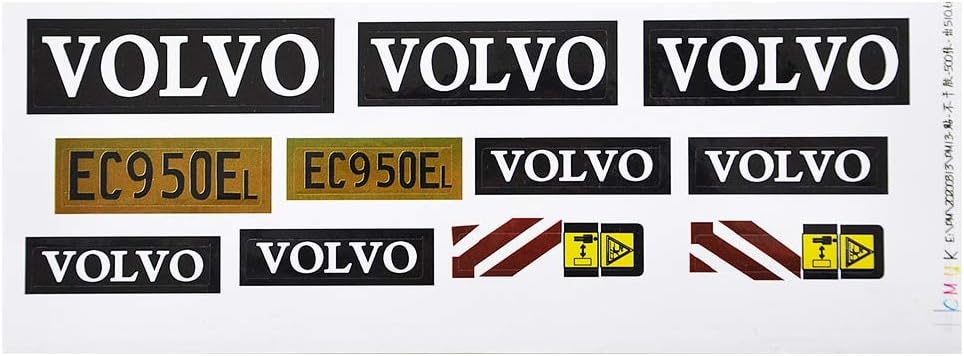
Image 1: The complete sticker sheet, displaying various logos and warning decals for the RC excavator.
Preparation
- Clean the Surface: Before applying any stickers, ensure the surface of your RC excavator is clean, dry, and free of dust, grease, or any other contaminants. Use a mild cleaner and a soft cloth.
- Gather Tools: You may find a pair of small scissors, tweezers, and a soft cloth or squeegee helpful for precise application.
- Plan Placement: Refer to the product images or your RC excavator's original design to determine the intended placement of each sticker.
Application Instructions
- Peel Carefully: Gently peel the desired sticker from the backing sheet. Avoid touching the adhesive side with your fingers as much as possible.
- Position: Carefully position the sticker on the chosen surface of the RC excavator. Take your time to align it correctly.
- Apply Smoothly: Once positioned, lightly press one edge of the sticker down and then slowly smooth it across the surface, working out any air bubbles. A soft cloth or squeegee can help achieve a smooth finish.
- Press Firmly: After the sticker is in place and smooth, press firmly over the entire surface of the sticker to ensure good adhesion.
- Repeat: Continue this process for all desired stickers.

Image 2: An example of the Occus stickers applied to a Huina RC Excavator, demonstrating typical placement.
Care and Maintenance
- Gentle Cleaning: When cleaning your RC excavator, use a soft, damp cloth and avoid harsh chemicals or abrasive materials that could damage the stickers.
- Avoid Peeling: Do not pick at the edges of the stickers, as this can cause them to peel prematurely.
- Storage: If storing the RC excavator for extended periods, keep it in a clean, dry environment away from direct sunlight to prevent sticker degradation.
Troubleshooting
- Air Bubbles: If small air bubbles appear after application, gently press them towards the nearest edge with your finger or a soft cloth. For stubborn bubbles, a very fine needle can be used to carefully puncture the bubble, then smooth it down.
- Misalignment: If a sticker is misaligned immediately after initial placement, you may be able to gently peel it back and reapply it, provided the adhesive has not fully set. Exercise caution to avoid stretching or tearing the sticker.
- Sticker Peeling: Ensure the surface was thoroughly cleaned and dry before application. If peeling occurs, the sticker may need to be replaced.
Specifications
- Material: Paper
- Compatibility: Huina 592, Huina 1592 1:14 RC Excavator models
- Item Weight: 0.704 ounces (approximate, for the entire set)
- Package Dimensions: 5.91 x 1.97 x 0.39 inches
Warranty and Support
As an accessory item, specific warranty information for this sticker set is not provided. For any product-related inquiries, please refer to the seller or manufacturer, Occus, through your purchase platform.