
1. Introduction
Thank you for choosing the Hesley Premium Smart Bluetooth Body Fat Weighing Scale. This device utilizes advanced Bioelectrical Impedance Analysis (BIA) technology to provide 18 essential body composition measurements, helping you monitor your health and fitness progress. This manual provides detailed instructions for setting up, operating, and maintaining your scale.

Image: The Hesley Smart Bluetooth Body Fat Weighing Scale with a digital display showing 68.0 kg, alongside a smartphone displaying the companion app.
2. Package Contents
Please check the box for the following items:
- Hesley Smart Bluetooth Body Fat Weighing Scale
- Instruction Manual
- 3 x AAA Batteries

Image: An unboxed Hesley Smart Scale showing the main unit, three AAA batteries, and the instruction manual.
3. Specifications
| Feature | Detail |
|---|---|
| Brand | Hesley |
| Model Number | Blueooth Medium |
| Colour | Blue |
| Special Feature | Body Fat, Bone Mass, 18 Essential Measurements |
| Display Type | LCD (Red font) |
| Weight Limit | 180 Kilograms |
| Division | 0.1kg (0.2lb) |
| Material | 6mm Tempered Safety Glass Platform, ITO Conductive Glass |
| Connectivity | Bluetooth 4.0 and above |
| App Compatibility | iOS 8.0 / Android 5.0 or higher version |
| Power Source | 2 x AAA LR03 1.5 Volts batteries (included) |
| Features | Auto On-Step On, Auto Zero, Auto Off, Low Battery/Overload Indication |
4. Setup
4.1. Battery Installation
- Open the battery compartment on the underside of the scale.
- Insert the 3 AAA batteries, ensuring correct polarity (+/-).
- Close the battery compartment securely.
4.2. App Download and Installation
The Hesley Smart Scale requires the companion app for full functionality and tracking of body composition data. The recommended app is AiFit or Hesley App.
- Scan the QR code provided on the product packaging or below, or search for "AiFit" or "Hesley App" in your device's app store.
- Download and install the app on your smartphone (iOS 8.0 / Android 5.0 or higher).
- Create a user profile within the app.


Image: Left: A smartphone screen displaying options to download the AiFit app from Google Play Store or Apple App Store, along with a QR code. Right: A woman performing yoga with the Hesley scale and a smartphone showing app download QR codes.
Download links: Android APK | Google Play Store (Hesley App) | Apple App Store (Hesley App)
4.3. Bluetooth Pairing
- Ensure Bluetooth is enabled on your smartphone.
- Open the Hesley or AiFit app.
- Step onto the scale to activate it. The scale will automatically attempt to connect to the app via Bluetooth.
- Follow any on-screen prompts in the app to complete the pairing process.
5. Operating Instructions
5.1. Taking a Measurement
- Place the scale on a hard, flat surface. Avoid carpets or uneven floors.
- Open the Hesley or AiFit app on your smartphone and ensure Bluetooth is connected.
- Step onto the scale barefoot, ensuring your feet are in contact with the ITO conductive areas. Stand still until the measurement is complete.
- The scale will display your weight, and the app will sync and display all 18 body composition measurements.

Image: A person's bare feet positioned on the Hesley Smart Scale, highlighting the stainless steel electrodes and BIA technology for high-precision accuracy.
5.2. Understanding Your Measurements
The scale, in conjunction with the app, tracks 18 essential body compositions:
- Weight
- BMI (Body Mass Index)
- BFR (Body Fat Rate)
- Muscle
- Moisture
- Bone Mass
- BMR (Basal Metabolic Rate)
- Visceral Fat
- Subcutaneous Fat
- Protein Rate
- Body Age
- Standard Weight
- Weight Control
- Body Fat
- Weight Without Fat
- Muscle Weight
- Amount of Protein
- Degree of Obesity

Image: A smartphone screen displaying the AiFit app interface, showing various body composition measurements like Weight, BMI, BFR, Muscle, Moisture, Visceral Fat, and more.
5.3. User Profiles and Data Tracking
The app can store up to 8 user profiles. Ensure you select the correct profile before each use to sync data accurately.
- Multiple Users: The scale can store up to 8 users' personal profiles. Select your profile in the app before weighing.
- Tracking Progress: View trend lines for each measurement in the app. This helps monitor progress over days, weeks, months, or even years.
- Integration: The Hesley app can sync data with other fitness apps like Apple Health, Google Fit, and Fitbit.
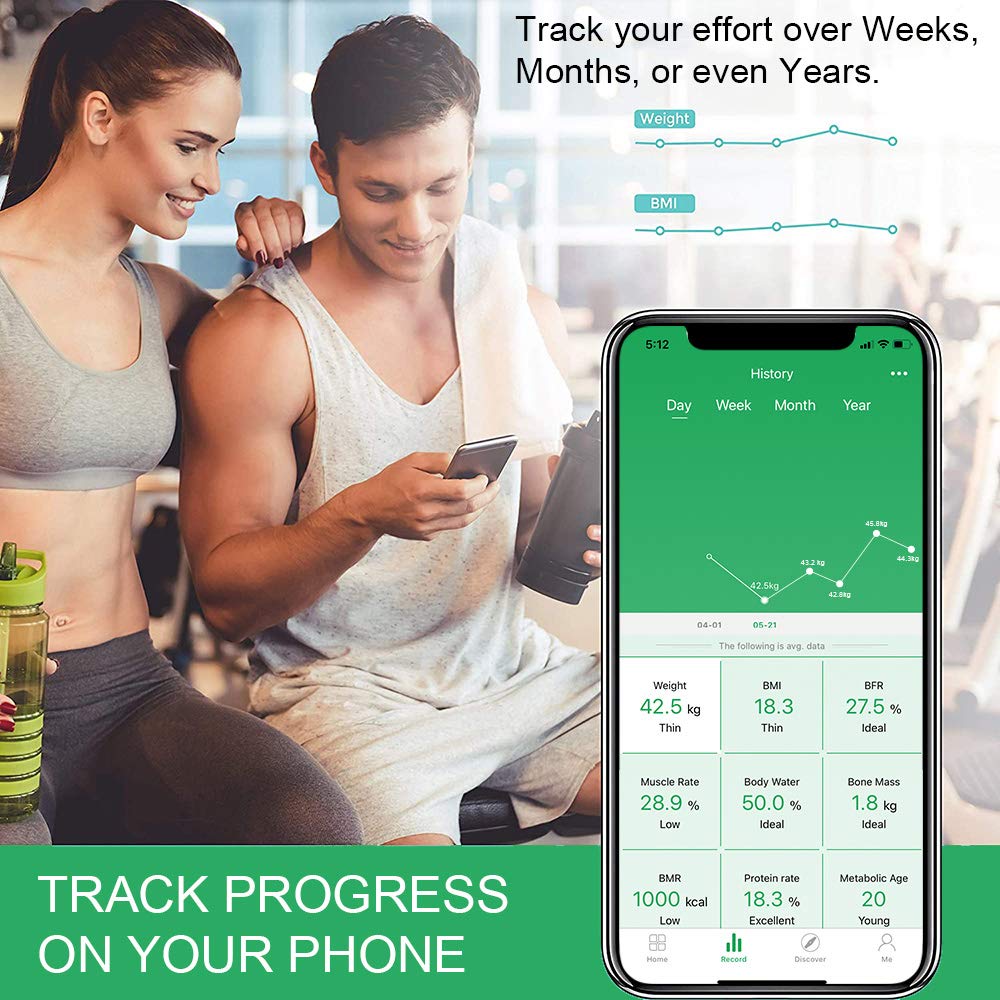

Image: Left: A smartphone displaying the app's history section, showing graphs for weight and BMI trends over time. Right: A couple looking at a smartphone, illustrating the app's ability to sync with Apple Health, Google Fit, and Fitbit.
5.4. Baby Mode
To weigh an infant or pet:
- Step onto the scale yourself to measure your weight.
- Once your weight is recorded, step off the scale.
- Hold the baby or pet and step back onto the scale. The app will calculate the baby's/pet's weight by subtracting your initial weight.

Image: A smartphone screen displaying the 'Baby Mode' feature in the app, showing instructions for weighing a baby by first weighing yourself, then weighing yourself while holding the baby.
5.5. Important Measurement Tips
- For consistent and accurate body composition measurements, weigh yourself at the same time each day, ideally in the morning after waking and before eating or bathing.
- Ensure your feet are clean and dry when stepping on the scale.
- Stand still and centered on the scale during measurement.
- Keep the scale on a firm, flat surface.
6. Maintenance
6.1. Cleaning the Scale
- Wipe the scale surface with a soft, damp cloth.
- Do not use abrasive cleaners or immerse the scale in water.
- Keep the scale dry to prevent damage to electronic components.
6.2. Battery Replacement
When the low battery indicator appears on the display, replace all three AAA batteries with new ones. Ensure correct polarity.
7. Troubleshooting
7.1. Scale Not Turning On / Display Not Working
- Check if batteries are installed correctly with the right polarity.
- Replace old batteries with new ones.
- Ensure the scale is placed on a hard, flat surface.
7.2. Bluetooth Connectivity Issues
- Ensure Bluetooth is enabled on your smartphone.
- Make sure the Hesley or AiFit app is open and running in the foreground.
- Step onto the scale to activate it and initiate connection.
- Try restarting your phone's Bluetooth or the app.
- Ensure your phone's operating system (iOS 8.0 / Android 5.0 or higher) and Bluetooth version (4.0 or above) are compatible.
7.3. Inaccurate or Inconsistent Readings
- Ensure the scale is on a hard, flat, and level surface.
- Step onto the scale barefoot and stand still.
- Take measurements at the same time each day for consistency.
- Ensure your feet are clean and dry.
- If the scale has been moved, it may need to be recalibrated. Step on it briefly, then step off and wait for it to display '0.0' before taking a measurement.
7.4. App Login/Sync Issues
- Verify your internet connection for app login.
- Ensure you are using the correct app (AiFit or Hesley App).
- Check for app updates in your app store.
- If issues persist, try reinstalling the app (note: this may delete local data if not synced).
8. Warranty and Support
For warranty information and customer support, please contact Hesley Inc. directly. Keep your purchase receipt as proof of purchase.
- Manufacturer: Hesley Inc
- Email: feedbackhesley@gmail.com
- Phone: 09911978267
- Address: New Delhi -110064
Please refer to the official Hesley website or your purchase documentation for the most up-to-date warranty terms and conditions.


