
1. Product Overview
The GoHawk TJ4-W is a waterproof audio system designed for motorcycles, ATVs, and other 4-wheelers. It features a compact amplifier and two 4-inch full-range speakers, offering Bluetooth wireless connectivity, USB playback, AUX input, and FM radio functionality. This system is built for outdoor use with an IP56 water-resistant rating for the amplifier and speakers.
Important Notes Before Installation:
- Speaker dimensions are 4 inches wide by 5 inches long. Ensure sufficient space and clearance for installation.
- Mounting clamps support handlebar sizes from 1 inch to 1-1/4 inches.
- Only the amplifier and speakers are water-resistant. Keep all USB, AUX, wired control, and RCA input cables away from direct water exposure.

Figure 1.1: The GoHawk TJ4-W system includes a waterproof amplifier and two 4-inch full-range speakers, designed for motorcycle handlebar mounting.

Figure 1.2: This diagram highlights features such as Bluetooth wireless, USB port, AUX input, FM radio, wired control, IP56 waterproof rating, 4-inch speaker size, and SAE connector.
2. Safety Information
Please read and understand all safety instructions before installing and operating the GoHawk TJ4-W system. Failure to follow these instructions may result in injury or damage to the product.
- Electrical Safety: Ensure the vehicle's power is disconnected before wiring. Incorrect wiring can cause electrical shorts, fire, or damage to the vehicle's electrical system.
- Mounting Safety: Securely mount all components to prevent them from becoming loose during vehicle operation, which could cause distraction or injury.
- Volume Control: Avoid listening at excessively high volumes, as this can impair your ability to hear traffic sounds and emergency vehicles, leading to dangerous situations.
- Water Exposure: While the amplifier and speakers are water-resistant, protect all cable connections (USB, AUX, wired control, RCA) from direct water exposure to prevent damage.
- Professional Installation: If you are unsure about any part of the installation process, consult a qualified professional.
3. Package Contents
Verify that all items listed below are included in your package:
- 2 x Waterproof Speakers (with 70" RCA Male cable each)
- 1 x Waterproof Amplifier
- 1 x Wired Control (with 75" cable)
- 1 x 3.5mm Audio AUX Cable (55" long)
- 1 x SAE to Ring Terminal Power Cord (78" long)
- 2 x 1 to 1-1/4" Swivel-able Mounting Clamps
- 1 x User Manual

Figure 3.1: The package contains two waterproof speakers, one waterproof amplifier, a wired control unit, a 3.5mm AUX cable, an SAE to ring terminal power cord, two mounting clamps, and a user manual.
4. Setup and Installation
Follow these steps to properly install your GoHawk TJ4-W stereo system.
4.1 Mounting the Speakers and Amplifier
- Choose suitable locations on your handlebar for the speakers. The swivel-able mounting clamps are designed for 1 to 1-1/4 inch bars.
- Securely attach the speakers using the provided mounting clamps. Ensure they are tightened to prevent movement during operation.
- Find a secure, dry location for the amplifier, preferably protected from direct water spray, although it is water-resistant.
- Mount the wired control unit in an easily accessible location on your handlebar.

Figure 4.1: Detailed measurements for the speakers (4x5 inches), amplifier (4-1/4 L x 3-1/2 W x 2-1/8 H inches), and wired control unit, along with handlebar clamp sizes.
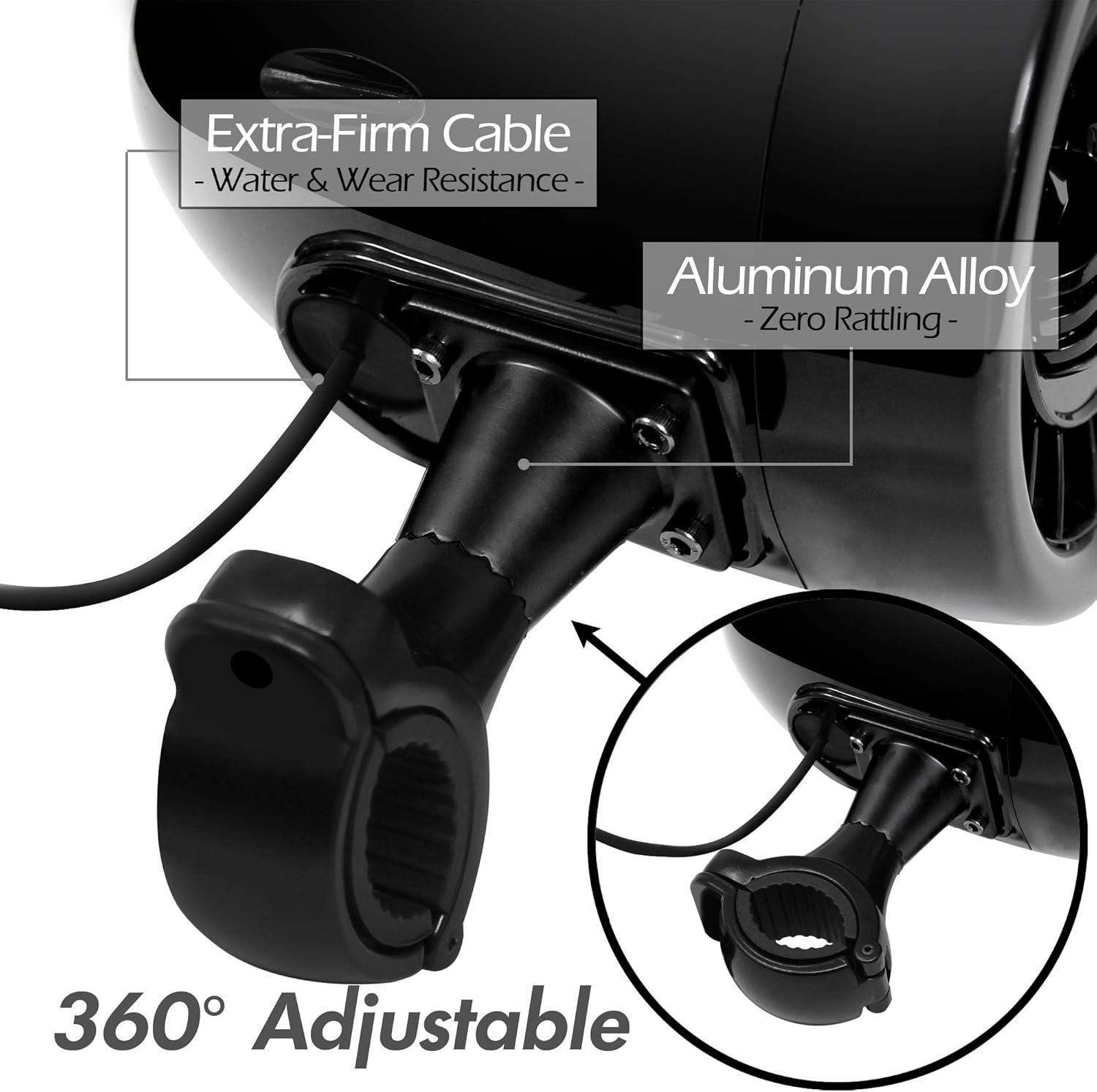
Figure 4.2: This image shows the adjustable mounting bracket for the speakers, allowing for flexible positioning, and highlights the durable, water and wear-resistant cable.
4.2 Wiring Connections
Refer to the wiring diagram below for proper connections.
- Power Connection: Connect the SAE to Ring Terminal Power Cord to your vehicle's 12V power source (battery). The red wire is positive (+), and the black wire is negative (-). Ensure a secure connection and proper polarity.
- Speaker Connection: Plug the RCA male connectors from the speakers into the corresponding RCA female ports on the amplifier.
- Wired Control: Connect the wired control unit cable to the designated port on the amplifier.
- AUX Input: If using an external audio device via AUX, connect the 3.5mm AUX cable to the amplifier's AUX-IN port and your device.
- USB Input: If using a USB drive for music playback, insert it into the USB input port. Note: This port does not support charging.
- Route all cables neatly and secure them to prevent interference with moving parts or exposure to excessive moisture.

Figure 4.3: This image illustrates the various connections on the amplifier, including wired control, AUX-IN, RCA inputs, SAE power connector, and USB input.
5. Operating Instructions
Learn how to use the various functions of your GoHawk TJ4-W system.
5.1 Power On/Off
- Press and hold the power button on the wired control unit to turn the system ON or OFF.
5.2 Bluetooth Pairing
- Turn on the GoHawk TJ4-W system. It will automatically enter Bluetooth pairing mode.
- On your smartphone or Bluetooth-enabled device, search for available Bluetooth devices.
- Select "GoHawk TJ4-W" from the list to pair. Once paired, you will hear a confirmation tone.
- You can now stream audio wirelessly from your device. The Bluetooth range is approximately 15 meters (49 feet).
5.3 USB Playback
- Insert a USB flash drive containing MP3 audio files into the USB input port on the amplifier.
- The system will automatically switch to USB mode and begin playing music.
- Use the wired control unit to navigate tracks (next/previous) and adjust volume.
5.4 AUX Input
- Connect your audio device (e.g., MP3 player, smartphone) to the amplifier's 3.5mm AUX-IN port using the provided AUX cable.
- The system will automatically switch to AUX mode.
- Control playback and volume from your connected device or the wired control unit.
5.5 FM Radio
- Switch to FM radio mode using the mode button on the wired control unit.
- Use the wired control unit to scan for stations and adjust volume.
- For optimal reception, ensure the FM antenna wire is extended and positioned away from metal obstructions.
5.6 Wired Control Functions
The wired control unit provides convenient access to essential functions:
- Power Button: Press and hold to turn ON/OFF.
- Mode Button: Cycle through input sources (Bluetooth, USB, AUX, FM).
- Volume Up/Down: Adjust the audio output level.
- Track Next/Previous: Skip tracks in Bluetooth or USB mode.
- Play/Pause: Control playback in Bluetooth or USB mode.
6. Maintenance
Proper maintenance ensures the longevity and optimal performance of your GoHawk TJ4-W system.
- Cleaning: Use a soft, damp cloth to clean the amplifier and speakers. Avoid harsh chemicals or abrasive cleaners.
- Cable Protection: Regularly inspect all cables for wear or damage. Ensure all connections remain dry and free from corrosion.
- Storage: If storing the vehicle for an extended period, consider disconnecting the power to the system.
- Water Exposure: While the main units are water-resistant, avoid submerging them or exposing the cable connections to high-pressure water jets.
7. Troubleshooting
If you encounter issues with your GoHawk TJ4-W system, refer to the following common troubleshooting steps:
| Problem | Possible Cause | Solution |
|---|---|---|
| No power | Loose power connection; Blown fuse; Vehicle battery low. | Check power cable connections; Inspect vehicle fuse; Charge vehicle battery. |
| No sound from speakers | Speaker cables disconnected; Volume too low; Incorrect input mode selected. | Ensure speaker RCA cables are securely connected; Increase volume; Cycle through input modes. |
| Bluetooth not connecting | Device not in pairing mode; Out of range; Previously paired device connected. | Ensure system is in Bluetooth mode; Move device closer; Disconnect from other Bluetooth devices. |
| Poor FM radio reception | Antenna obstructed or not extended; Weak signal area. | Ensure FM antenna wire is fully extended and clear of obstructions; Try scanning in a different location. |
| USB playback not working | USB drive not formatted correctly; Incompatible file types; USB drive damaged. | Ensure USB drive is FAT32 formatted; Use MP3 files; Try a different USB drive. |
8. Specifications
Detailed technical specifications for the GoHawk TJ4-W system:
Amplifier Specifications:
- Input Voltage: DC 12 V
- Input Sensitivity: 100MV-3000MV
- Rated Power: 2*15W @ 4Ω
- Peak Power: 100W
- Channel: 2.0
- Wireless Transmission Range: > 15m (49 feet)
- Response Frequency: 20Hz-20KHz
- S/N Ratio: >80dB
- Bluetooth Version: 5.0
- Features: Built-in FM Radio, Support USB Drive (Music Playback Only), 3.5mm AUX Audio Jack, Aluminum Housing, Full Function Wired Remote
- USB Charging: Not supported
- Dimensions: 4-1/4" L x 3-1/2" W x 2-1/8" H
Speaker Specifications:
- Color: Black
- Handlebar Mounting: 1 to 1-1/4"
- Cable Length: 70" each
- Dimensions: 4" W X 5" L
- Material: ABS, Acrylonitrile Butadiene Styrene
General Specifications:
- Water Resistance Level: IP56 (Amplifier & Speakers)
- Model Number: TJ4-W
- UPC: 810053880029
- Date First Available: June 12, 2020
9. Warranty and Support
9.1 Warranty Information
The GoHawk TJ4-W system comes with a 1-Year Limited Parts Warranty. This warranty covers manufacturing defects in materials and workmanship under normal use. It does not cover damage caused by improper installation, accident, abuse, misuse, natural disaster, or unauthorized modification.
9.2 Customer Support
For technical assistance, warranty claims, or general inquiries, please contact GoHawk customer support:
- Email: info@goldenhawkusa.com
- Phone: 1-714-599-7709
- Address: GoHawk, 521 Tamarack Ave, Brea, CA 92821, USA