
1. Safety Instructions
Please read and understand these safety instructions before using the product. Keep this manual for future reference.
- Do not scratch the product with sharp objects to avoid splinters or damage to the surface.
- Ensure the desk is placed on a stable and level surface to prevent it from falling or tipping over.
- Do not exceed the maximum static load capacity of 10 kg (22 lbs).
- Keep small parts away from children to prevent choking hazards.
- Avoid placing hot items directly on the surface without protection.
2. Product Overview
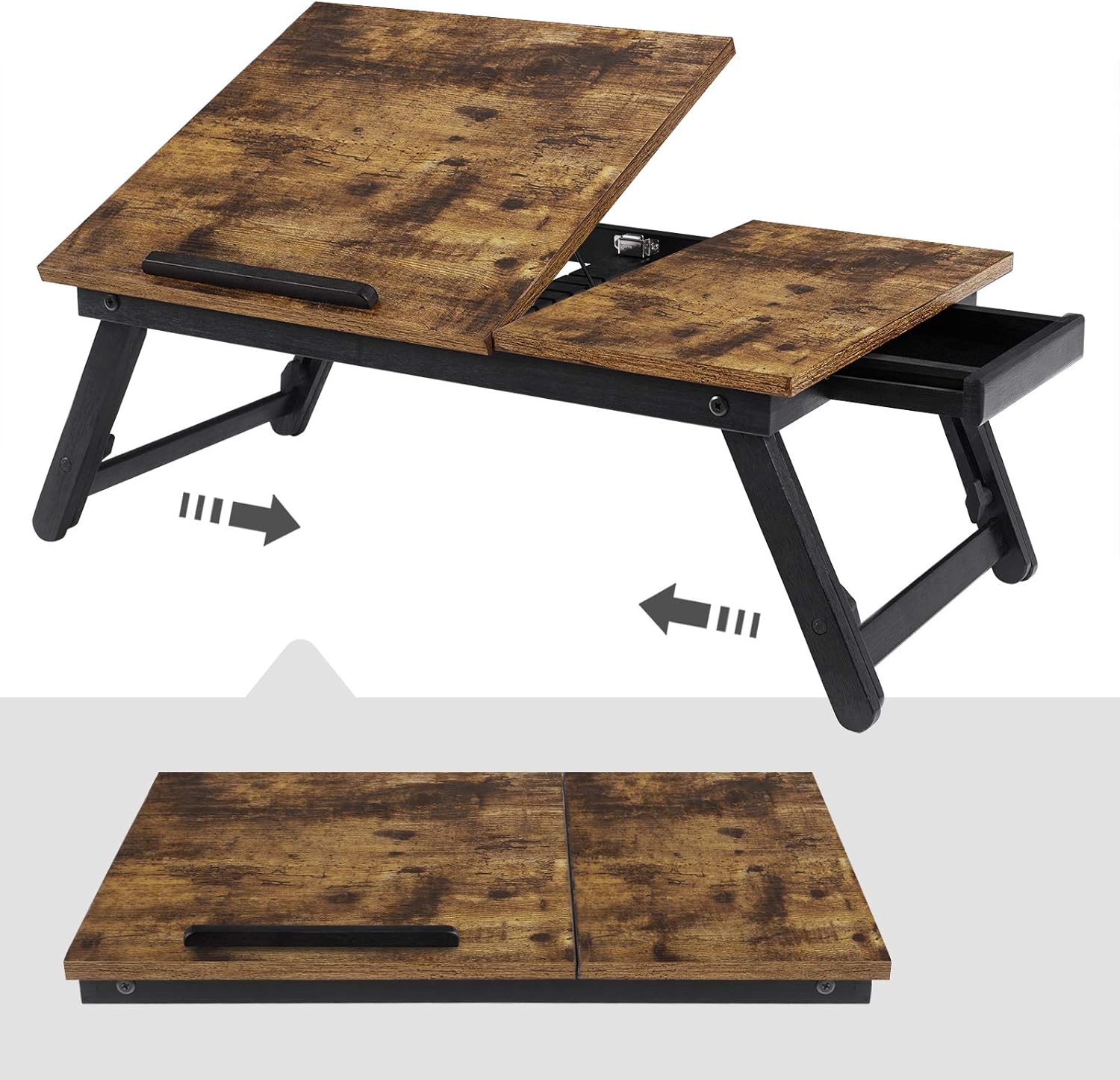
The SONGMICS LLD105B01 is a versatile portable laptop desk designed for comfort and convenience. It features adjustable height and angle settings, foldable legs for easy storage, and a small integrated drawer.


3. Package Contents
Verify that all components are present before assembly and use.
- 1 x Portable Laptop Desk (LLD105B01)
4. Setup Instructions
Follow these steps to set up your portable laptop desk:
- Unfold the Legs: Gently pull the foldable legs outwards until they lock into their open position. Ensure both sets of legs are fully extended and stable.
- Adjust Height (Optional): The legs can be adjusted to different heights. Locate the adjustment knobs on the inner side of each leg. Loosen the knobs, extend or retract the legs to your desired height (between 21.5 cm and 30.8 cm), and then tighten the knobs securely to lock the height.
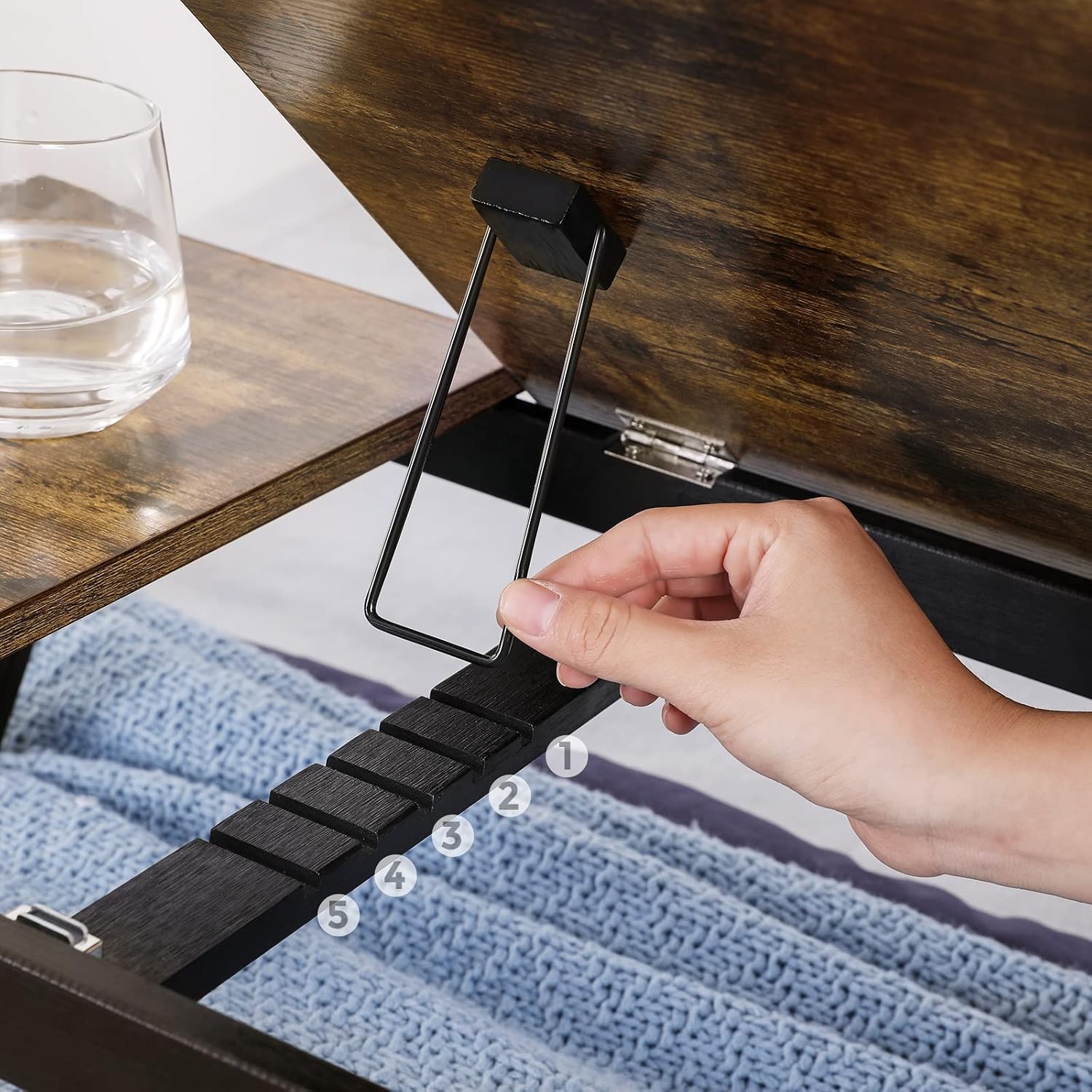
- Adjust Tilt Angle (Optional): The main desktop panel can be tilted. Lift the panel and engage the support bar into one of the five available slots to achieve your preferred viewing angle.

5. Operating Instructions
Utilize the features of your portable laptop desk for optimal comfort:
- Using the Adjustable Tilt Top: The left section of the desktop can be tilted to 5 different angles. Lift the panel and position the metal support bar into the desired notch. This is ideal for reading, drawing, or using a laptop.
- Using the Laptop Stopper: A removable stopper is provided to prevent your laptop or book from sliding off the tilted surface. Insert it into the designated slot at the bottom edge of the tilted panel.
- Using the Side Table: The right section of the desktop remains flat, providing a stable surface for a mouse, drinks, or other small items.
- Using the Storage Drawer: A small pull-out drawer is located on the right side of the desk, suitable for storing pens, USB drives, or other small accessories.


6. Maintenance
To ensure the longevity of your portable laptop desk, follow these maintenance guidelines:
- Cleaning: Wipe the surface with a soft, damp cloth. Avoid using harsh chemicals or abrasive cleaners, which can damage the bamboo and engineered wood finish.
- Storage: When not in use, fold the legs and store the desk in a dry place away from direct sunlight and extreme temperatures.
- Inspection: Periodically check all screws and connections to ensure they are tight. Retighten if necessary.
7. Troubleshooting
If you encounter any issues with your portable laptop desk, refer to the following common problems and solutions:
- Desk feels unstable:
- Ensure all four legs are fully extended and locked into place.
- Check that the height adjustment knobs are securely tightened.
- Make sure the desk is placed on a flat, even surface.
- Difficulty adjusting height or tilt:
- For height adjustment, loosen the knobs sufficiently before attempting to move the legs.
- For tilt adjustment, ensure the support bar is properly aligned with the notches. Do not force the mechanism.
- Drawer is stiff or difficult to open:
- Check for any obstructions inside or around the drawer.
- Ensure the desk is not overloaded or warped, which could affect drawer movement.
8. Specifications
| Feature | Detail |
|---|---|
| Model Number | LLD105B01 |
| Dimensions (L x W x H) | 55 x 35 x 21.5-30.8 cm (21.7 x 13.8 x 8.5-12.1 inches) |
| Weight | 3.5 kg (7.7 lbs) |
| Material | Bamboo, Engineered Wood |
| Max. Static Load Capacity | 10 kg (22 lbs) |
| Laptop Compatibility | Up to 15.6 inches |
| Adjustable Height Range | 21.5 cm - 30.8 cm (8.5 inches - 12.1 inches) |
| Adjustable Tilt Angles | 5 positions |
| Color | Rustic Brown |

9. Warranty and Support
For warranty information or customer support, please contact SONGMICS directly through their official website or the retailer where the product was purchased. Keep your purchase receipt as proof of purchase.