
1. Introduction
This manual provides essential instructions for the safe installation, operation, and maintenance of your WARMTECH 1500W Wall-Mounted Convector Heater, model WTCME1500DFO. Please read this manual thoroughly before using the appliance and retain it for future reference.
2. Safety Instructions
Important: Always follow basic safety precautions when using electrical appliances to reduce the risk of fire, electric shock, and injury.
- Ensure the voltage indicated on the rating label matches your mains supply voltage.
- Do not cover the heater. Covering the heater can cause overheating.
- Keep flammable materials (curtains, furniture, etc.) at least 1 meter away from the heater.
- Do not operate the heater with a damaged cord or plug.
- Do not use the heater in bathrooms, laundry areas, or similar wet locations.
- Unplug the heater when not in use or before cleaning.
- This appliance is not intended for use by persons (including children) with reduced physical, sensory, or mental capabilities, or lack of experience and knowledge, unless they have been given supervision or instruction concerning use of the appliance by a person responsible for their safety.
- Children should be supervised to ensure that they do not play with the appliance.
- The heater is equipped with an overheat protection system. If it overheats, it will automatically shut off. Unplug the unit and allow it to cool before restarting.
3. Package Contents
Verify that all components are present:
- WARMTECH 1500W Wall-Mounted Convector Heater
- Wall fixation kit (brackets and screws)
- User Manual (this document)

Image 1: Overview of the WARMTECH 1500W Convector Heater, highlighting its 1500W power, 4 modes (Comfort, Eco, Frost-Free, Standby), 24H timer, LCD thermostat, wall fixation, and aluminum heating element.
4. Installation
The WARMTECH convector heater is designed for wall-mounted installation. Ensure the chosen location is suitable for an electrical appliance and allows for proper air circulation.
- Choose Location: Select a wall location away from water sources, direct sunlight, and flammable materials. Maintain a minimum distance of 1 meter from any obstacles.
- Mark Drilling Points: Use the provided wall fixation brackets as a template to mark the drilling points on the wall. Ensure the marks are level.
- Drill Holes: Drill holes at the marked points and insert appropriate wall plugs (if necessary, depending on wall material).
- Attach Brackets: Securely fasten the wall fixation brackets to the wall using the provided screws.
- Mount Heater: Carefully hang the convector heater onto the installed wall brackets. Ensure it is securely seated and stable.
- Connect Power: Plug the heater into a suitable 230V AC power outlet.
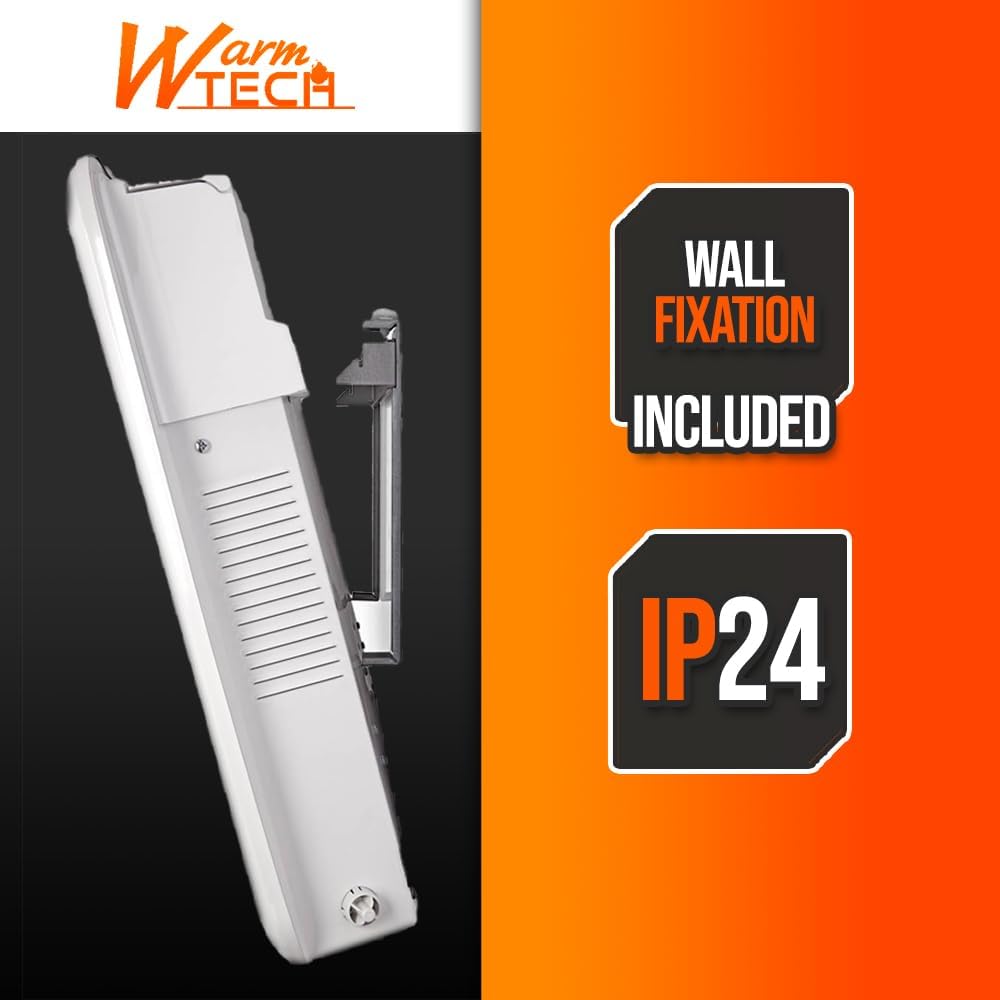
Image 2: Side profile of the heater illustrating the wall fixation mechanism and indicating an IP24 rating, signifying protection against splashing water.

Image 3: Diagram showing the dimensions of the WARMTECH convector heater: 43 cm height, 64.5 cm width, and 6.5 cm depth.
5. Operating Instructions
The heater features an electronic thermostat with an LED display for easy temperature and mode control.

Image 4: Close-up view of the heater's LCD display and control panel, showing temperature settings (5-35°C), mode indicators, and buttons for power, mode selection, temperature adjustment, and timer.
5.1. Power On/Off
- Press the ⑂ button to turn the heater on or off.
5.2. Setting Temperature
- Use the '+' and '-' buttons to adjust the desired temperature. The temperature range is 5°C to 35°C.
- The LED display will show the set temperature.
5.3. Selecting Operating Modes
Press the M button to cycle through the available modes:
- Comfort Mode: Maintains the set temperature for continuous heating.
- Eco Mode: Operates at a slightly lower temperature than Comfort mode to save energy.
- Frost-Free Mode: Maintains a minimum temperature (e.g., 5-7°C) to prevent freezing.
- Standby Mode: The heater is on but not actively heating, awaiting further commands or timer activation.
5.4. Timer Function
The heater includes a 24-hour timer. Refer to the full product manual for detailed timer programming instructions.
5.5. Open Window Detection
This heater is equipped with an open window detection system. If a sudden drop in temperature is detected (indicating an open window), the heater will automatically switch off to conserve energy. It will resume operation once the window is closed and the temperature stabilizes, or if manually restarted.
6. Maintenance
Regular maintenance ensures optimal performance and longevity of your heater.
- Cleaning: Before cleaning, always unplug the heater and allow it to cool completely. Wipe the exterior with a soft, damp cloth. Do not use abrasive cleaners or solvents.
- Storage: If storing the heater for an extended period, ensure it is clean and dry. Store it in a cool, dry place, preferably in its original packaging.
- No User-Serviceable Parts: There are no user-serviceable parts inside the heater. Do not attempt to open or repair the appliance yourself.
7. Troubleshooting
If you encounter issues with your heater, refer to the following common problems and solutions:
| Problem | Possible Cause | Solution |
|---|---|---|
| Heater does not turn on. | No power supply; Power button not pressed; Overheat protection activated. | Check power outlet and plug connection. Press the Power button. Unplug the heater, allow it to cool for 30 minutes, then plug it back in. |
| Heater stops heating unexpectedly. | Open window detected; Overheat protection activated; Desired temperature reached. | Close any open windows. Unplug the heater, allow it to cool, then restart. Check the set temperature and ensure it is higher than the ambient temperature. |
| Temperature displayed is inaccurate. | Sensor obstruction or environmental factors. | Ensure no objects are blocking the heater's sensor. Allow time for the heater to stabilize in the room. Note that the heater's sensor might read slightly differently from an external thermometer due to its internal location. |
8. Specifications
| Feature | Detail |
|---|---|
| Brand | WARM TECH |
| Model Number | WTCME1500DFO |
| Power Output | 1500W |
| Voltage | 230 Volts (AC) |
| Number of Speeds | 4 |
| Temperature Range | 5°C to 35°C |
| Heating Method | Convection |
| Special Features | Digital Display, Rapid Heating, Open Window Detection, Adjustable Temperature, Electronic Thermostat |
| Form Factor | Wall-mounted |
| Dimensions (D x W x H) | 6.5 cm x 64.5 cm x 43 cm |
| Ingress Protection (IP) Rating | IP24 (Protection against splashing water) |
| Intended Use | Indoor |
9. Warranty and Support
Information regarding specific warranty terms and availability of spare parts is not provided in the product details. For warranty claims or technical support, please contact your retailer or the manufacturer directly using the contact information provided at the point of purchase.