
1. Introduction
Thank you for choosing the Mikado MD-230KP Wireless Microphone Amplifier. This device is designed to provide clear audio amplification for various applications, including teaching, meetings, and public speaking. It features multiple connectivity options such as Bluetooth, FM radio, USB playback, and TF card playback, along with a wireless microphone for enhanced versatility. Please read this manual carefully before using the product to ensure proper operation and to maximize its lifespan.
2. Package Contents
Please check the package contents upon unboxing. If any items are missing or damaged, contact your retailer.
- Mikado MD-230KP Amplifier Unit
- Wireless Microphone
- USB Charging Cable
- User Manual
3. Product Overview
Familiarize yourself with the main components and controls of your MD-230KP amplifier.
3.1. Amplifier Unit

Figure 1: Front view of the Mikado MD-230KP amplifier unit, showing the speaker grille and control panel.
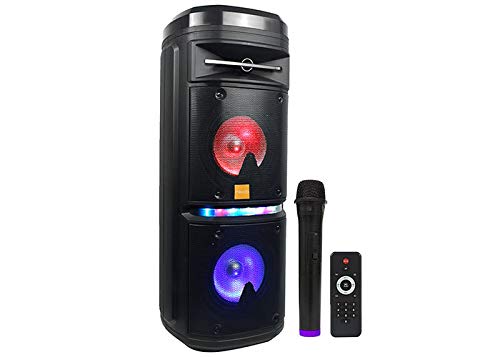
Figure 2: Side view of the Mikado MD-230KP amplifier unit, illustrating its compact design.
- Speaker: Main audio output.
- Control Panel: Buttons and ports for operation.
- USB Port: For USB drive playback.
- TF Card Slot: For TF (MicroSD) card playback.
- Charging Port: For connecting the USB charging cable.
3.2. Controls
| Control | Function |
|---|---|
| Power Button | Press and hold to turn the device ON/OFF. |
| Mode Button (M) | Short press to switch between Bluetooth, FM Radio, USB, and TF Card modes. |
| Play/Pause Button (▶/⏸) | Short press to play or pause audio. In FM mode, short press to auto-scan stations. |
| Previous Track/Volume Down (-) | Short press for previous track/station. Long press to decrease volume. |
| Next Track/Volume Up (+) | Short press for next track/station. Long press to increase volume. |
4. Setup
4.1. Charging the Device
- Connect the small end of the USB charging cable to the charging port on the MD-230KP amplifier.
- Connect the larger end of the USB charging cable to a standard USB power adapter (not included) or a computer's USB port.
- The charging indicator light will illuminate, typically red, during charging. It will turn off or change color (e.g., blue) when fully charged.
- Allow approximately 3-4 hours for a full charge.
Note: It is recommended to fully charge the device before first use.
4.2. Powering On/Off
- To Power On: Press and hold the Power button for approximately 3 seconds until you hear an audible prompt or see the display light up.
- To Power Off: Press and hold the Power button for approximately 3 seconds until the device powers down.
5. Operating Modes
5.1. Bluetooth Mode
- Turn on the MD-230KP amplifier. It will automatically enter Bluetooth pairing mode, indicated by a flashing blue light or an audible prompt.
- On your mobile device (smartphone, tablet, etc.), enable Bluetooth and search for available devices.
- Select "MD-230KP" from the list of found devices.
- Once paired, you will hear a confirmation sound, and the Bluetooth indicator light will become solid.
- You can now play audio from your device through the amplifier. Use the amplifier's controls or your device's controls to manage playback and volume.
5.2. FM Radio Mode
- Press the Mode (M) button repeatedly until you enter FM Radio mode.
- To auto-scan and save available FM stations, short press the Play/Pause (▶/⏸) button. The amplifier will scan and store stations automatically.
- Use the Previous Track (-) and Next Track (+) buttons to navigate between saved stations.
- Long press the Previous Track (-) or Next Track (+) buttons to adjust the volume.
5.3. USB Playback Mode
- Insert a USB flash drive containing MP3 audio files into the USB port.
- The amplifier will automatically switch to USB mode and begin playing audio. If not, press the Mode (M) button until USB mode is selected.
- Use the Play/Pause (▶/⏸), Previous Track (-), and Next Track (+) buttons to control playback.
5.4. TF Card Playback Mode
- Insert a TF (MicroSD) card containing MP3 audio files into the TF card slot.
- The amplifier will automatically switch to TF Card mode and begin playing audio. If not, press the Mode (M) button until TF Card mode is selected.
- Use the Play/Pause (▶/⏸), Previous Track (-), and Next Track (+) buttons to control playback.
5.5. Wireless Microphone Usage
- Ensure the MD-230KP amplifier is powered on.
- Turn on the wireless microphone. It should automatically pair with the amplifier. A successful connection is usually indicated by a steady light on the microphone or an audible prompt from the amplifier.
- Speak into the microphone. The sound will be amplified through the MD-230KP speaker.
- Adjust the microphone volume using the dedicated volume control on the amplifier, if available, or the main volume controls.
- Note: Keep the microphone at an appropriate distance from the amplifier to prevent feedback (howling sound).
6. Troubleshooting
If you encounter issues with your MD-230KP amplifier, refer to the following common problems and solutions:
| Problem | Possible Cause / Solution |
|---|---|
| Device does not power on. | Battery is depleted. Charge the device fully. Ensure the power button is pressed and held for 3 seconds. |
| No sound from the speaker. | Volume is too low. Increase the volume. Ensure the correct mode (Bluetooth, USB, TF, FM) is selected. Check if the audio source is playing. |
| Bluetooth pairing fails. | Ensure the amplifier is in Bluetooth mode and discoverable. Turn off and on Bluetooth on your device. Move your device closer to the amplifier. Clear previous Bluetooth connections on your device. |
| Wireless microphone not working. | Ensure the microphone is powered on and charged. Check if it's within range of the amplifier. Re-pair the microphone if necessary (refer to microphone's specific instructions if different). |
| FM radio reception is poor. | Relocate the device to an area with better signal. Extend any built-in antenna if available. Perform an auto-scan again. |
7. Specifications
- Brand: Mikado
- Model: MD-230KP
- Connectivity: Bluetooth, USB, TF Card, FM Radio
- Microphone: Wireless
- Product Weight: Approximately 300 g
- Approximate Dimensions: 10 x 10 x 10 cm (Package dimensions, product dimensions may vary slightly)
- Power Source: Rechargeable Battery (via USB)
8. Safety Information
- Do not expose the device to water or excessive moisture.
- Avoid extreme temperatures, direct sunlight, or heat sources.
- Do not attempt to disassemble or repair the device yourself. Refer to qualified service personnel.
- Keep out of reach of children.
- Use only the provided or recommended charging cable.
- Dispose of the device and its battery responsibly according to local regulations.
9. Maintenance
- Cleaning: Wipe the device with a soft, dry cloth. Do not use abrasive cleaners or solvents.
- Storage: Store the device in a cool, dry place away from direct sunlight when not in use for extended periods.
- Battery Care: To prolong battery life, avoid fully discharging the battery frequently. Charge it regularly, even if not in use.
10. Warranty and Support
Mikado products are designed and manufactured to the highest quality standards. For information regarding warranty terms and conditions, please refer to the warranty card included with your product or contact your local retailer. For technical support or service inquiries, please contact Mikado customer service through the contact information provided on the official Mikado website or your purchase documentation.