
Product Overview
This manual provides instructions for the Occus ZM-ATR02 2.4GHz Bluetooth Remote Controller, designed for use with compatible baby and kid's electric ride-on cars. This device allows for external control of the vehicle's movement, enhancing safety and interaction.
Key Features:
- 2.4GHz Wireless Technology for reliable connection
- Bluetooth Connectivity for pairing with compatible vehicles
- Designed specifically for electric ride-on cars
- Durable Plastic (PC type) construction
Package Contents:
The package typically includes the ZM-ATR02 receiver unit and a compatible handheld remote control. Please verify the contents against your purchase documentation.
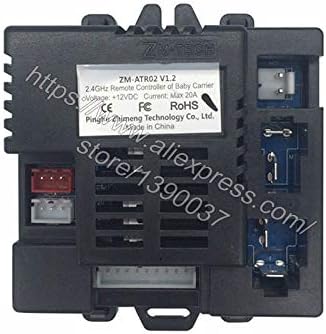
Image: The ZM-ATR02 V1.2 receiver unit, showing its various ports and the product label indicating specifications like 2.4GHz, +12VDC, and Max 20A current.
Setup and Installation
1. Battery Installation (Handheld Remote):
Locate the battery compartment on the back of the handheld remote control. Insert the required batteries (e.g., AA or AAA, typically 2-3 units) ensuring correct polarity (+ and -). Close the battery compartment securely.

Image: A black, ergonomic handheld remote control unit, featuring directional buttons and action buttons for operating a ride-on car.
2. Receiver Unit Installation (ZM-ATR02):
- Locate the designated installation area within your ride-on car. This is typically near the existing control board or battery compartment.
- Securely mount the ZM-ATR02 receiver unit using appropriate fasteners (not included). Ensure it is protected from moisture, excessive vibration, and direct heat.
- Connect the wiring harness from the ride-on car to the corresponding ports on the ZM-ATR02 unit. Refer to your ride-on car's specific wiring diagram for correct connections (e.g., power, motor, steering).
- Ensure all connections are firm and secure before proceeding.

Image: The ZM-ATR02 V1.2 receiver unit displayed with its compatible handheld remote control, illustrating the complete control system for a ride-on car.
3. Pairing the Remote Controller:
The pairing process may vary slightly depending on the specific ride-on car model. Generally, follow these steps:
- Ensure the ride-on car is powered OFF.
- Press and hold the pairing button on the handheld remote control (this button is often small and may be labeled "Code" or "Pair").
- While continuing to hold the pairing button, power ON the ride-on car.
- Continue holding the pairing button until an indicator light on the remote or car confirms successful pairing (e.g., a light stops flashing, or a distinct sound is heard).
- Release the button and test the remote's functionality by attempting to move the car.
Operating Instructions
Once successfully paired, the remote control allows you to operate the ride-on car. Familiarize yourself with the controls before allowing a child to use the vehicle.
Basic Controls:
- Forward/Backward: Use the designated joystick or buttons to move the car forward or backward.
- Left/Right: Use the steering controls to turn the car left or right.
- Stop: A dedicated stop button or releasing the directional controls will typically halt the car.
- Speed Selection: Some remotes may include buttons to adjust speed settings (e.g., slow, medium, fast).
Safety Precautions:
- Always supervise children when operating the ride-on car.
- Operate the vehicle in safe, open areas away from traffic, water, steep inclines, and other potential hazards.
- Do not operate the ride-on car or remote control in adverse weather conditions (rain, snow, strong winds).
- Ensure the car's battery is adequately charged before each use.
Maintenance
Cleaning:
Wipe the remote controller and receiver unit with a soft, dry cloth. Avoid using harsh chemicals, abrasive cleaners, or excessive moisture, as these can damage the electronic components.
Battery Replacement (Handheld Remote):
When the remote's operational range decreases or it becomes unresponsive, it is time to replace the batteries. Always use new batteries of the specified type and ensure they are inserted with correct polarity. Dispose of old batteries responsibly according to local regulations.
Storage:
Store the remote controller and receiver in a cool, dry place away from direct sunlight, extreme temperatures, and high humidity when not in use for extended periods. Remove batteries from the handheld remote if storing for several months.
Troubleshooting
Remote Not Responding:
- Check Batteries: Ensure the handheld remote has fresh batteries installed correctly.
- Re-Pair: Attempt to re-pair the remote with the ride-on car following the pairing instructions in this manual.
- Obstructions/Interference: Ensure there are no physical obstructions or strong sources of electromagnetic interference between the remote and the car.
- Range: Operate the remote within its effective wireless range.
Car Not Moving:
- Car Power: Verify the ride-on car is powered on and its battery is adequately charged.
- Connections: Check all wiring connections to the ZM-ATR02 receiver unit for looseness or damage.
- Car's Manual Mode: Some ride-on cars have a switch to toggle between manual operation and remote control. Ensure it is set to remote control mode.
Specifications
| Feature | Detail |
|---|---|
| Model Number | ZM-ATR02 |
| Brand | Occus |
| Connectivity Technology | 2.4GHz, Bluetooth |
| Material | Plastic (PC type) |
| Use | Vehicles & Remote Control Toys (Ride-on Cars) |
| Input Voltage (Receiver) | +12VDC |
| Max Current (Receiver) | 20A |
| Number of Buttons (Handheld Remote) | 4 (directional + action buttons) |
Warranty and Support
For warranty information and technical support related to the ride-on car itself, please refer to the documentation provided with your ride-on car or contact the ride-on car manufacturer directly. The ZM-ATR02 unit is a component part.
For product-specific inquiries regarding the Occus ZM-ATR02 remote controller, please contact Occus customer service through their official channels or the retailer from whom you purchased the product.