
JESLED SWL-90LED-CW
JESLED Solar Flood Lights User Manual
Model: SWL-90LED-CW
Introduction
Thank you for choosing JESLED Solar Flood Lights. This manual provides essential information for the proper installation, operation, and maintenance of your new solar-powered security lights. Designed for outdoor use, these lights feature a motion sensor, multiple lighting modes, and USB charging capability, providing reliable illumination for your garden, yard, patio, or driveway.
Safety Information
- Ensure the installation surface is stable and can support the weight of the light.
- Do not disassemble or modify the product. Unauthorized modifications may void the warranty and pose safety risks.
- Keep the solar panel clean to ensure optimal charging efficiency.
- Avoid installing the light in areas with constant shade, as this will reduce solar charging effectiveness.
- Do not stare directly into the LED light when it is on, as it may cause eye discomfort.
- Dispose of batteries and electronic components according to local regulations.
Product Overview and Components
The JESLED Solar Flood Light is designed for efficient outdoor lighting. Each unit includes a solar panel, 90 LED light sources, a motion sensor, and a USB charging port. A remote control and mounting hardware are also included for convenient installation and operation.
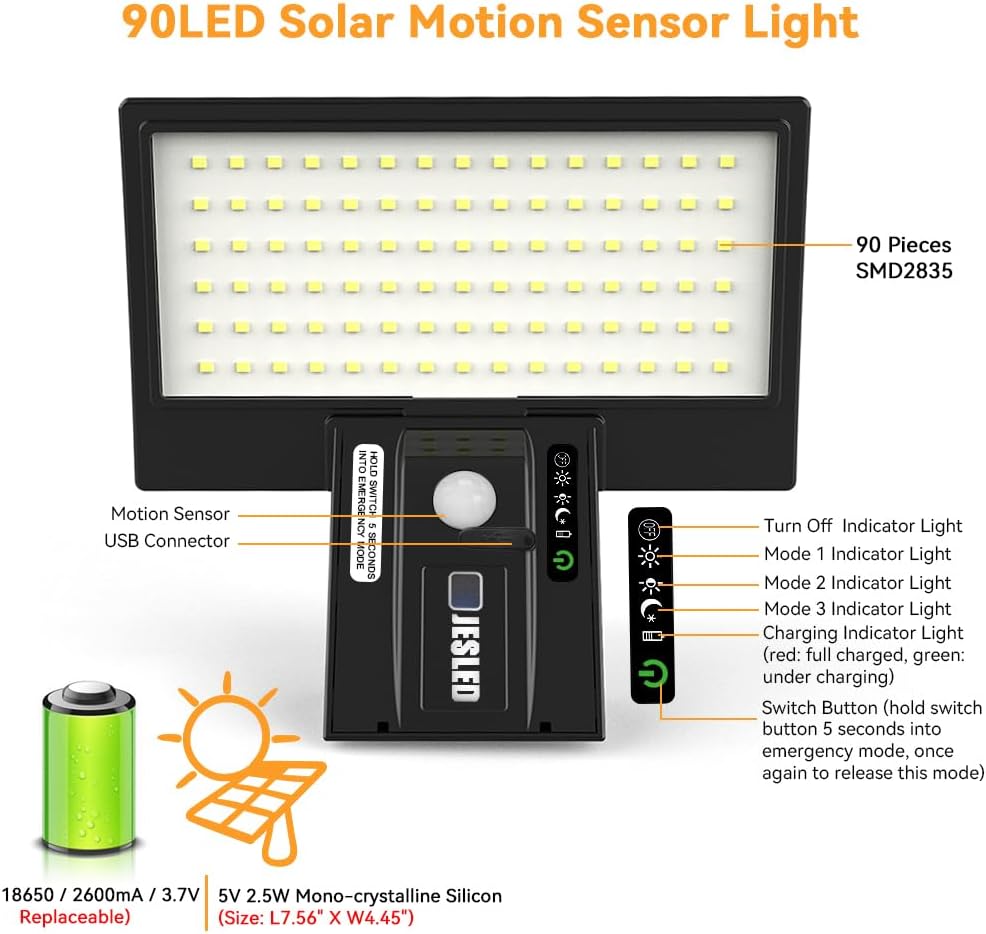
Image Description: A detailed diagram of the JESLED 90 LED Solar Motion Sensor Light. Key components are labeled, including the 90 SMD2835 LEDs, motion sensor, USB connector, and various indicator lights for power, modes, and charging status. The diagram also shows the internal 18650/2600mAh/3.7V battery and the 5V 2.5W Mono-crystalline Silicon solar panel (Size: L7.56" x W4.45"). Instructions for the switch button are also visible.

Image Description: This image displays two JESLED Solar Flood Lights, showcasing their sleek black design and the prominent LED panel. The motion sensor is visible on the front of each light, along with indicator lights.
Package Contents:
- JESLED Solar Flood Light (x2)
- Remote Control (x1)
- Mounting Hardware (screws, anchors)
- User Manual (this document)
Features
- 90 High-Brightness LEDs: Provides 1200 lumens of cool white light for effective illumination.
- PIR Motion Sensor: Detects motion up to 33 feet away with a 120° detection angle, activating the light when movement is detected.
- Solar Powered: Equipped with a high-efficiency mono-crystalline silicon solar panel for eco-friendly charging during the day.
- USB Charging: Offers an alternative charging method for cloudy days or emergency situations.
- Multiple Lighting Modes: Four distinct modes (Sensor, Sensor & Dim, Dim, Emergency) to suit various needs and preferences.
- Dusk-to-Dawn Operation: Automatically turns on at dusk and off at dawn via a photocell sensor.
- Waterproof Design: IP65 rated for reliable performance in various weather conditions.
- Adjustable Design: Allows for flexible positioning to optimize light coverage.
Setup and Installation
Follow these steps for optimal performance and safety.
Choosing an Installation Location:
- Select a location where the solar panel can receive direct sunlight for at least 4-6 hours daily.
- Avoid areas under eaves, trees, or other obstructions that might block sunlight or cast shadows on the solar panel.
- Recommended installation height is between 8ft and 12ft (2.4m - 3.6m) for optimal motion detection and light coverage.

Image Description: This image illustrates the ideal installation parameters for the solar flood light. It shows a recommended installation height of 8ft-12ft, a detection angle of 120°, and a detection distance of up to 33ft. A person is shown walking towards a door, demonstrating the light's coverage.
Mounting Steps:
- Mark the desired drilling points on the wall using the light's mounting holes as a template.
- Drill holes at the marked positions.
- Insert the provided wall anchors into the drilled holes.
- Align the light with the anchors and secure it using the provided screws. Ensure the light is firmly attached.
- Adjust the angle of the light and solar panel as needed to maximize sun exposure and light coverage.

Image Description: This image shows two JESLED Solar Flood Lights installed on the exterior wall of a house at night, effectively illuminating the area below them. The lights are positioned above windows, demonstrating their practical application for outdoor security and ambiance.

Image Description: This composite image highlights the versatility and durability of the JESLED Solar Flood Light. It shows the light installed on a house, illuminating a garage, and providing light for a patio gathering. A separate inset demonstrates the light's waterproof capability with rain falling on it.
Operating Instructions
Your JESLED Solar Flood Light features multiple operating modes, controllable via the integrated button or the included remote control.
Lighting Modes:

Image Description: This diagram visually explains the four operational modes of the solar light.
1. Sensor Mode: Light is off when no motion is detected, turns to full brightness when motion is detected.
2. Sensor & Dim Mode: Light stays dim when no motion, turns to full brightness when motion is detected.
3. Dim Mode: Motion sensor is off; light stays dim continuously from dusk to dawn.
4. Emergency Mode: Maintains maximum brightness until the battery is depleted.
- Mode 1 (Sensor Mode): The light remains off until motion is detected. Upon detection, it illuminates at full brightness for approximately 15-20 seconds, then turns off if no further motion is detected.
- Mode 2 (Sensor & Dim Mode): The light stays on at a dim brightness. When motion is detected, it switches to full brightness for approximately 15-20 seconds, then returns to dim mode.
- Mode 3 (Dim Mode): The light stays on at a continuous dim brightness from dusk to dawn, regardless of motion. The motion sensor is inactive in this mode.
- Mode 4 (Emergency Mode): To activate, press and hold the switch button on the light for 5 seconds. The light will illuminate at maximum brightness until the battery is depleted. To exit this mode, press and hold the switch button for another 5 seconds. This mode is useful for extended periods of constant illumination.
Using the Remote Control:
The included remote control allows for convenient switching between modes and power control.
- Point the remote control directly at the light's sensor area.
- Press the corresponding button for your desired mode (Mode 1, Mode 2, Mode 3).
- Use the power button to turn the light On/Off.
- Note: Emergency Mode (Mode 4) can only be activated and deactivated by pressing and holding the physical switch button on the light itself.
Charging Information
Your JESLED Solar Flood Light can be charged via its integrated solar panel or through the USB port.
Solar Charging:
- The solar panel requires 4-6 hours of direct sunlight per day for a full charge.
- Ensure the solar panel is free from dirt, dust, snow, or debris to maximize charging efficiency.
- A full charge typically provides 3-5 nights of operation, depending on the selected mode and motion frequency.
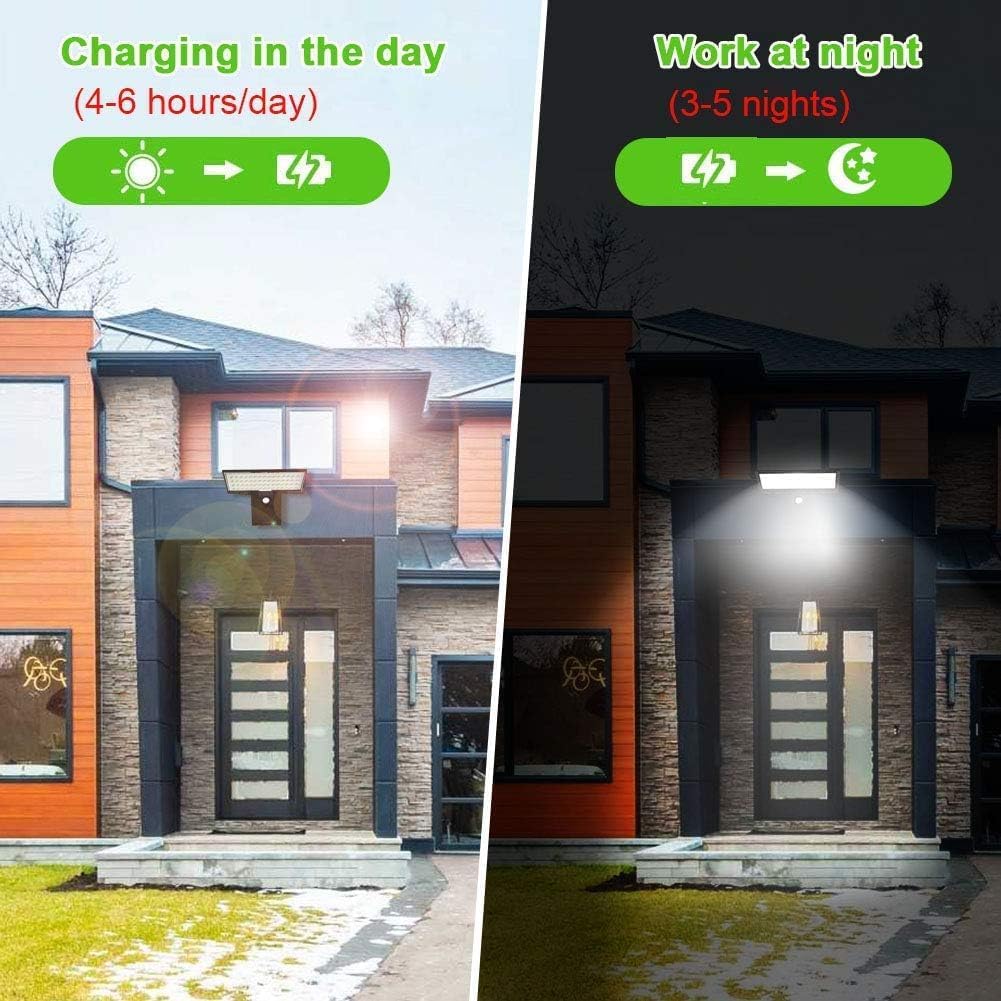
Image Description: This image illustrates the charging and working cycle of the solar light. It shows the light charging during the day (4-6 hours/day) under sunlight and working at night (3-5 nights) using the stored energy.
USB Charging:
- Locate the USB charging port on the light unit.
- Connect a standard USB cable (not included) to the light and a 5V USB power adapter (e.g., phone charger, power bank).
- USB charging is ideal for initial charging, prolonged cloudy periods, or when the light needs a quick power boost.
- The charging indicator light will show red when charging and turn green when fully charged.
Maintenance
- Clean Solar Panel: Regularly wipe the solar panel with a soft, damp cloth to remove dust, dirt, and debris. A clean panel ensures maximum solar energy absorption.
- Inspect Mounting: Periodically check that the light is securely mounted and that all screws are tight.
- Battery Care: While the internal battery is designed for longevity, prolonged periods of no sunlight can affect its performance. If storing the light for an extended period, ensure it is fully charged.
- Environmental Factors: In areas with heavy snow or ice, ensure the solar panel is cleared to allow for charging.
Troubleshooting
| Problem | Possible Cause | Solution |
|---|---|---|
| Light does not turn on at night. | Insufficient solar charge. | Ensure the solar panel receives 4-6 hours of direct sunlight daily. Clean the solar panel. Try USB charging to fully charge the battery. |
| Light flickers or has low brightness. | Low battery charge. | Allow more time for solar charging or use USB charging. |
| Motion sensor not working or too sensitive. | Incorrect mode selected; Obstruction; Environmental factors. | Ensure the light is not in Mode 3 (Dim Mode). Check for obstructions in front of the sensor. Avoid installing near heat sources or reflective surfaces. |
| Remote control not working. | Battery depleted; Obstruction; Not pointed correctly. | Replace the remote control battery. Ensure no obstructions between remote and light. Point directly at the light's sensor. |
Specifications
| Feature | Detail |
|---|---|
| Model Number | SWL-90LED-CW |
| Light Source | 90 LEDs (SMD2835) |
| Brightness | 1200 Lumens |
| Color Temperature | Cool White |
| Wattage | 4.2 watts |
| Voltage | 3.7 Volts |
| Power Source | Solar Powered, USB Charging |
| Battery Type | Lithium Ion (18650/2600mAh) |
| Solar Panel | 5V 2.5W Mono-crystalline Silicon |
| Motion Sensor Range | Up to 33 ft (10m) |
| Detection Angle | 120° |
| Water Resistance | Waterproof (IP65) |
| Product Dimensions | 10.23"L x 7.8"W x 2.52"H |
| Item Weight | 1.08 pounds (488 Grams) |
| Included Components | Remote Control, Mounting Hardware |

Image Description: This image provides a detailed dimension diagram of the JESLED Solar Flood Light. It shows the length (7.56" / 192mm), width (4.45" / 113mm) of the solar panel, and the overall height (3.23" / 82mm) and base dimensions (2.95" / 75mm width, 1.65" / 42mm height) of the light unit.
Warranty and Support
JESLED products come with a limited warranty. For specific warranty details, please refer to the product packaging or contact JESLED customer support.
If you encounter any issues or have questions regarding your JESLED Solar Flood Lights, please contact our customer support team:
- Email: support@jesled.com
- Manufacturer: JESLED Lighting
Please have your model number (SWL-90LED-CW) and purchase information ready when contacting support.
Ask a question about this manual
Ask about setup, troubleshooting, compatibility, parts, safety, or missing instructions. Manuals+ will review the question and use this page’s manual context to help answer it.