
1. Introduction
This manual provides essential information for the safe and efficient operation, installation, and maintenance of your BOSCH Climate 6000i Split Air Conditioner. Please read this manual thoroughly before using the appliance and retain it for future reference. This unit is designed to provide both cooling and heating for indoor spaces, ensuring optimal climate control.

Figure 1: The complete BOSCH Climate 6000i split air conditioning system, including the indoor unit, the outdoor compressor unit, and the wireless remote control for operation.
2. Safety Information
Always adhere to the following safety precautions to prevent injury or damage to the appliance:
- Professional Installation: Installation, maintenance, and repair must be performed by qualified personnel only. Improper installation can lead to electric shock, fire, or water leakage.
- Power Supply: Ensure the power supply matches the specifications of the unit. Do not use damaged power cords or plugs.
- Refrigerant: This unit uses R32 refrigerant. Handle with care and ensure proper ventilation during installation and servicing. R32 is a mildly flammable refrigerant.
- Ventilation: Do not block the air inlet or outlet of either unit. Maintain adequate clearance around the outdoor unit for proper airflow.
- Cleaning: Disconnect power before cleaning. Use a soft, dry cloth. Do not use water directly on the unit or harsh chemicals.
- Children and Pets: Keep children and pets away from the unit, especially during operation. The remote control should be kept out of reach of children.
- Abnormal Operation: If you notice unusual sounds, smells, or smoke, immediately turn off the unit and disconnect the power supply. Contact a qualified service technician.
3. Package Contents
Upon unpacking, verify that all components are present and undamaged. The standard package for the BOSCH Climate 6000i-Set_25_E typically includes:
- Indoor Unit
- Outdoor Unit (Compressor)
- Remote Control
- 5 m Insulated Refrigerant Cable
- 5 m Condensate Line (fluted)
- 5 m NYM Power Cable (5 x 1.5)
- Wall Bracket for Outdoor Unit (galvanized steel, powder coated, spout 465 mm, up to 140 kg)
- User Manual and Documentation
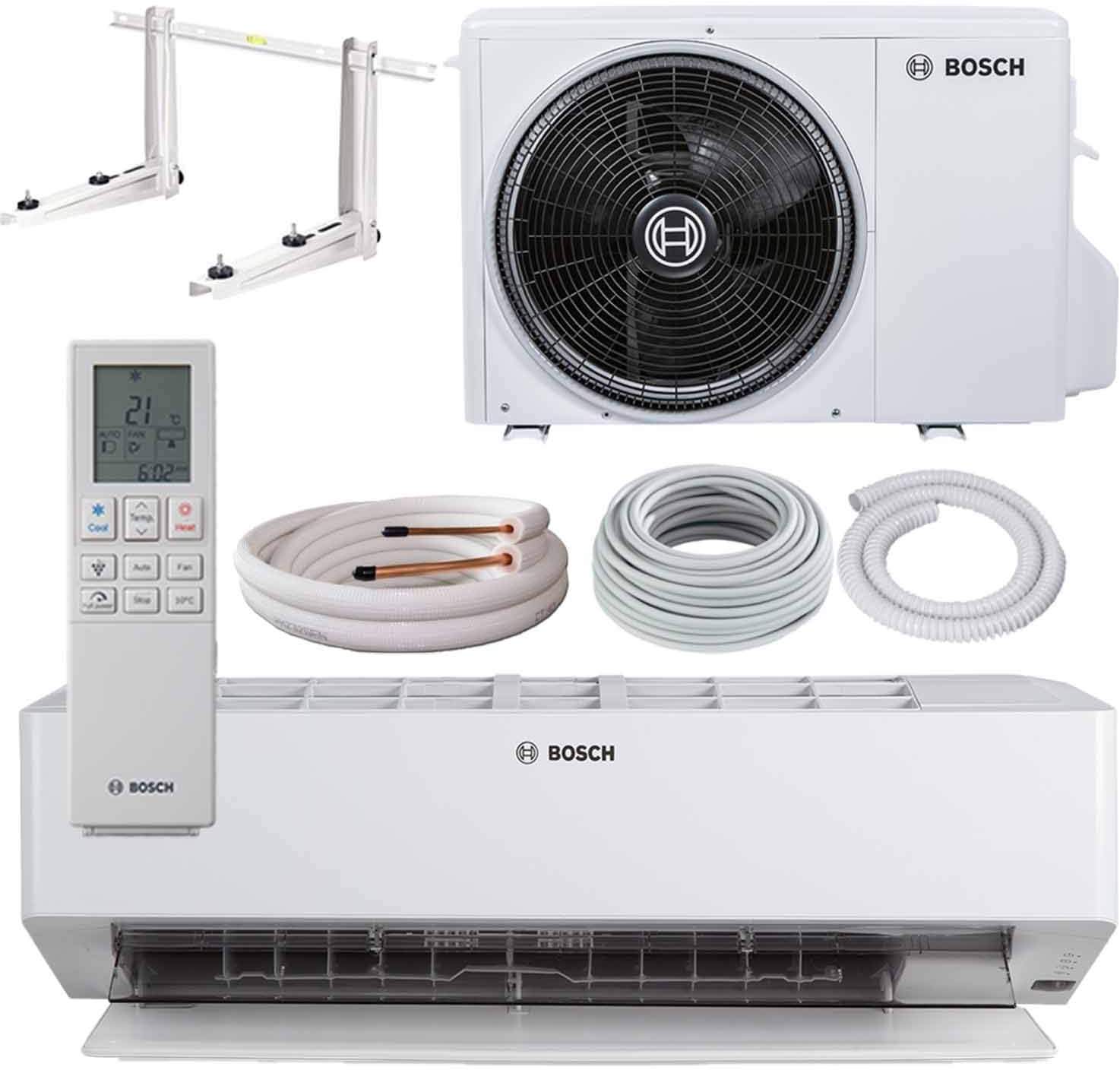
Figure 2: An overhead view showing all components included in the BOSCH Climate 6000i package: indoor unit, outdoor unit, remote control, and the various pipes and cables for installation.

Figure 3: Essential components for installing the air conditioner, such as the wall brackets for the outdoor unit, refrigerant pipes, electrical cables, and condensate drainage hose.
4. Setup and Installation
The BOSCH Climate 6000i is a split air conditioning system requiring professional installation. Attempting to install the unit yourself without proper qualifications can lead to serious injury, damage to the unit, and voiding of the warranty. Contact a certified HVAC technician for installation.
4.1. General Placement Guidelines
- Indoor Unit: Position the indoor unit on a wall where airflow is unobstructed and evenly distributed throughout the room. Avoid direct sunlight or heat sources.
- Outdoor Unit: Place the outdoor unit in a location with good ventilation, away from direct sunlight, and where noise will not disturb neighbors. Ensure stable mounting using the provided wall brackets.

Figure 4: Typical installation of the indoor unit of the BOSCH Climate 6000i split air conditioner in a residential setting, positioned high on a wall.

Figure 5: A detailed view of the outdoor unit of the BOSCH Climate 6000i air conditioner, showing its robust construction and fan grille.
5. Operating Instructions
The BOSCH Climate 6000i is operated primarily via the included wireless remote control. Ensure batteries are correctly inserted into the remote control.
5.1. Remote Control Functions
The remote control allows you to adjust settings, select operating modes, and monitor the room temperature. The temperature sensor within the IR remote control helps to accurately regulate the room temperature based on its location.
5.2. Operating Modes
- Cooling Mode: Reduces the room temperature to the desired setting. Ideal for warm weather.
- Heating Mode: Increases the room temperature to the desired setting. Suitable for colder periods.
- Dry Fashion (Dehumidification): Removes excess humidity from the room, particularly useful on humid days, without significant temperature change.
- Silent Mode: Operates the unit at a reduced fan speed and compressor output for quieter operation, ideal for nighttime use.
- Sleep Mode: Automatically adjusts temperature and fan speed during sleep for comfort and energy saving.
- Turbo Mode: Provides maximum cooling or heating power for rapid temperature adjustment.
- Timer Function: Allows you to set specific times for the unit to turn on or off automatically.
5.3. Air Filtration System
The unit is equipped with advanced filters to improve air quality:
- Organic Filter: Designed to remove bacteria from the air.
- Cold Catalysis Filters: Effectively removes volatile organic compounds (VOCs) such as odors and formaldehyde.
- High Density (HD) Filters: Features a compressed diameter to capture smoke, dust, and pollen particles from the air.
5.4. Self-Cleaning Mode
The Self-Cleaning Mode helps prevent the appearance of mold within the interior unit by utilizing plasma cluster ions, contributing to healthier air and maintaining unit efficiency.
6. Maintenance
Regular maintenance ensures optimal performance and longevity of your air conditioner. Always disconnect the power supply before performing any maintenance.
6.1. Filter Cleaning
The air filters should be cleaned regularly, typically every two weeks, or more frequently depending on usage and air quality. Refer to the detailed instructions in the full product manual for filter removal and cleaning procedures. Clean filters improve air quality and energy efficiency.
6.2. Outdoor Unit Maintenance
Periodically inspect the outdoor unit for any obstructions (leaves, debris) and ensure the coils are clean. Professional cleaning of the outdoor unit coils is recommended annually.
6.3. Self-Cleaning Function
Utilize the unit's Self-Cleaning Mode as recommended to maintain internal hygiene and prevent mold growth.
7. Troubleshooting
Before contacting service, review the following common issues and solutions:
- Unit Does Not Start: Check if the power plug is securely inserted, the circuit breaker has tripped, or the remote control batteries are dead.
- Insufficient Cooling/Heating: Ensure all doors and windows are closed. Check if air filters are clean. Verify that the correct operating mode and temperature are selected.
- Unusual Noise: A slight gurgling sound is normal due to refrigerant flow. If the noise is loud or unusual, turn off the unit and contact service.
- Water Leakage (Indoor Unit): This could indicate a blocked condensate drain pipe. Turn off the unit and contact a technician.
- Remote Control Not Working: Check battery orientation and charge. Ensure there are no obstructions between the remote and the indoor unit's receiver.
For issues not listed here or if problems persist, contact a qualified service technician.
8. Specifications
The following table outlines the key technical specifications for the BOSCH Climate 6000i-Set_25_E model:

Figure 6: This image presents a table detailing the technical data for different models of the Climate 6000i series, including cooling/heating capacities, energy efficiency, noise levels, and dimensions.
| Feature | Specification |
|---|---|
| Brand | Bosch |
| Model Name | Climate 6000i |
| Model Number | CL6000i-Set_25_E |
| Cooling Power | 2.5 KW / 9000 BTU |
| Wattage | 2.5 KW |
| Product Dimensions (Indoor Unit) | 79 x 29.9 x 24.9 cm |
| Refrigerant | R32 |
| Special Features | Anti Bacterial Filter, Heating & Cooling Function, High Density Filter, Inverter Compressor, Remote Controlled |
| Power Source | Corded Electric |
| Date First Available | 29 August 2020 |
9. Warranty and Support
For warranty information, please refer to the warranty card included with your product or visit the official Bosch website. In case of technical issues, service requests, or questions not covered in this manual, please contact Bosch customer support or your authorized dealer. Always provide your model number (CL6000i-Set_25_E) and purchase date when seeking support.