
Sumind HB-Sumind-66380
Sumind Upgraded Bluetooth FM Transmitter User Manual
Model: HB-Sumind-66380 | Brand: Sumind
Product Overview
The Sumind Upgraded Bluetooth FM Transmitter is a versatile in-car accessory designed to enhance your driving experience. It allows you to stream audio wirelessly from your smartphone or other devices to your car's FM radio, make hands-free calls, and charge multiple devices simultaneously. Featuring a 1.7-inch display and dual USB charging ports, including QC3.0, this device offers convenience and functionality for vehicles without built-in Bluetooth.

Figure 1: Sumind Upgraded Bluetooth FM Transmitter (Golden Normal variant)
Key Features
- Intelligent and Fast Charging: Input 12-24 Volt; Output 2 USB ports (PD 20W and QC3.0), allowing for simultaneous rapid charging of 2 devices.
- Special Design: Large key for easy operation; 1.7 Inch large LCD backlight display for song name/incoming phone number and car's battery level. The LCD display screen can rotate 270 degrees on a gooseneck for optimal viewing comfort. Long pressing the next song key for 5 seconds turns off the FM function while keeping charging active.
- Broad Compatibility: Works with compatible devices like tablets and smartphones. Music can be transferred to car audio via a 3.5mm audio cable. Supports TF/Micro card in FAT format up to 32G. Supports A2DP and MP3/WMA format. Also supports AUX output.
- High Clear Sound and Call Quality: Advanced interference and noise cancellation CVC technology creates full duplex sound and suppresses noise and wind. Built-in microphone supports hands-free talking, reducing interference.
- Features V4.2 and EDR: Compared to earlier versions, V4.2 consumes less energy and lasts longer. EDR (Enhanced Data Rate) ensures faster data transmission and a more stable connection between the device and audio receiver.
Product Components

Figure 2: Labeled diagram of the FM Transmitter components.
- 1. Display Screen
- 2. Previous Track Button
- 3. Next Track Button
- 4. Multifunction Button (Volume Down/Up, Play/Pause, Call Answer/End)
- 5. Flexible Hose (Gooseneck)
- 6. Reinforcing Shrapnel
- 7. Power Contactor
- 8. QC3.0 USB Charging Port
- 9. Smart 2.4A USB Charging Port
- 10. TF Card Slot
- 11. Frequency Down Button
- 12. Frequency Up Button
Setup Guide
- Power On: Insert the FM transmitter into your car's 12V power outlet (cigarette lighter socket). The device will power on automatically and the display screen will light up.
- Set FM Frequency: Tune your car's FM radio to an empty frequency (one with no strong broadcast signal). Then, adjust the FM transmitter to match this frequency. Use the "CH+" and "CH-" buttons on the transmitter to change the frequency. A clear, unused frequency will minimize interference.
- Bluetooth Pairing: On your smartphone or Bluetooth-enabled device, enable Bluetooth and search for available devices. Select "BT70" (or similar name displayed on the transmitter) from the list to pair. Once paired, the display will show "Bluetooth Connected" or similar confirmation.
- Audio Connection (Alternative): If Bluetooth is not preferred or available, you can connect your device via the 3.5mm AUX input/output port using an audio cable. Alternatively, insert a TF/Micro SD card (up to 32GB, FAT format) into the designated slot for direct music playback.
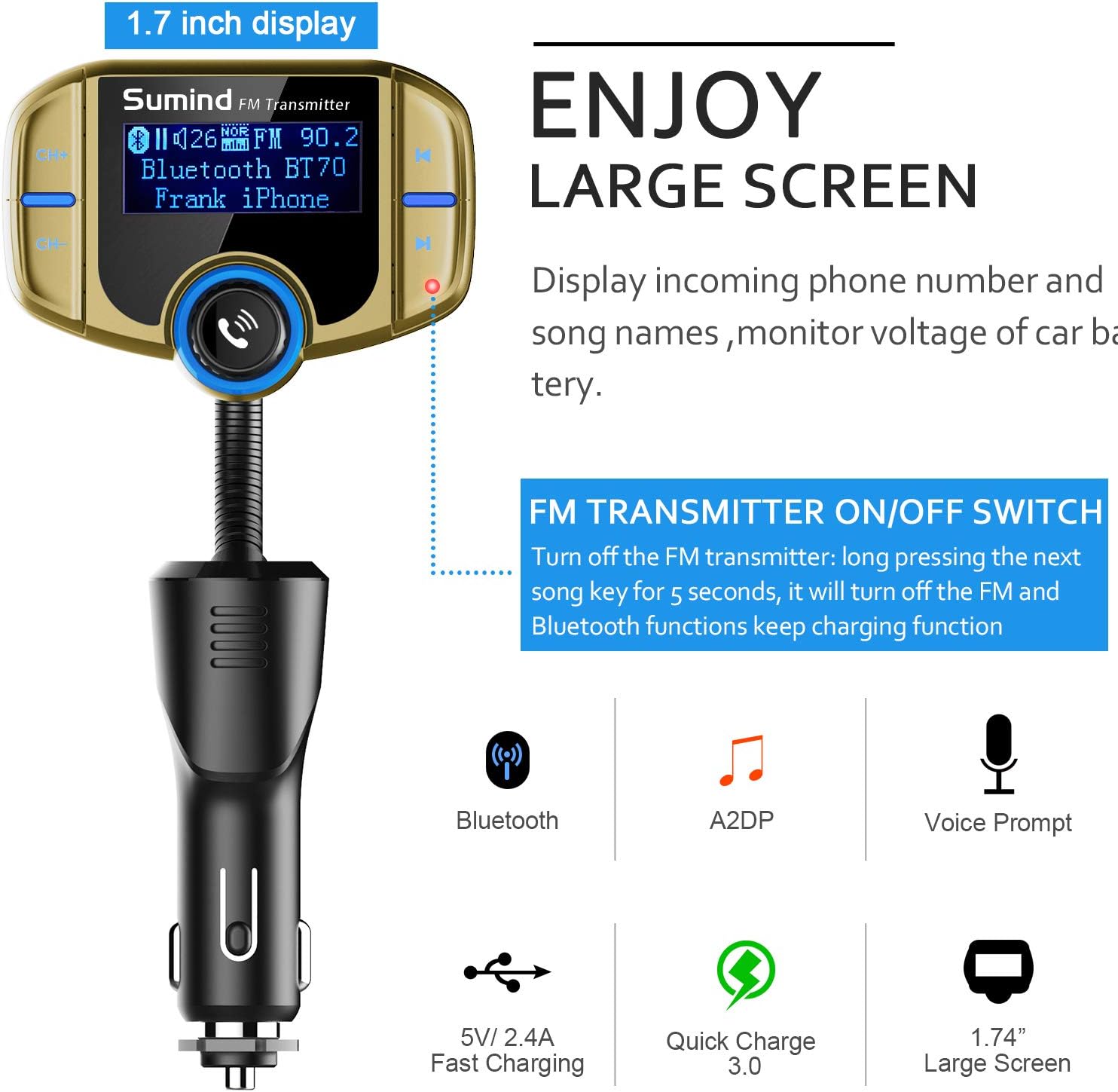
Figure 3: The 1.7-inch display showing connection status and frequency.
Operating Instructions
Music Playback:
- Bluetooth Streaming: After successful Bluetooth pairing, open your music player app on your phone. Audio will be streamed through the FM transmitter to your car's speakers.
- TF Card Playback: Insert a TF/Micro SD card with MP3/WMA files. The device will automatically detect and play music from the card.
- AUX Input: Connect your audio device to the transmitter's AUX input port using a 3.5mm audio cable.
- Controls: Use the "Previous Track" and "Next Track" buttons on the transmitter to navigate songs. The Multifunction Button can be pressed to Play/Pause music.
- Volume Adjustment: Rotate the Multifunction Button clockwise to increase volume and counter-clockwise to decrease volume. Adjust your car stereo volume as well for optimal sound.
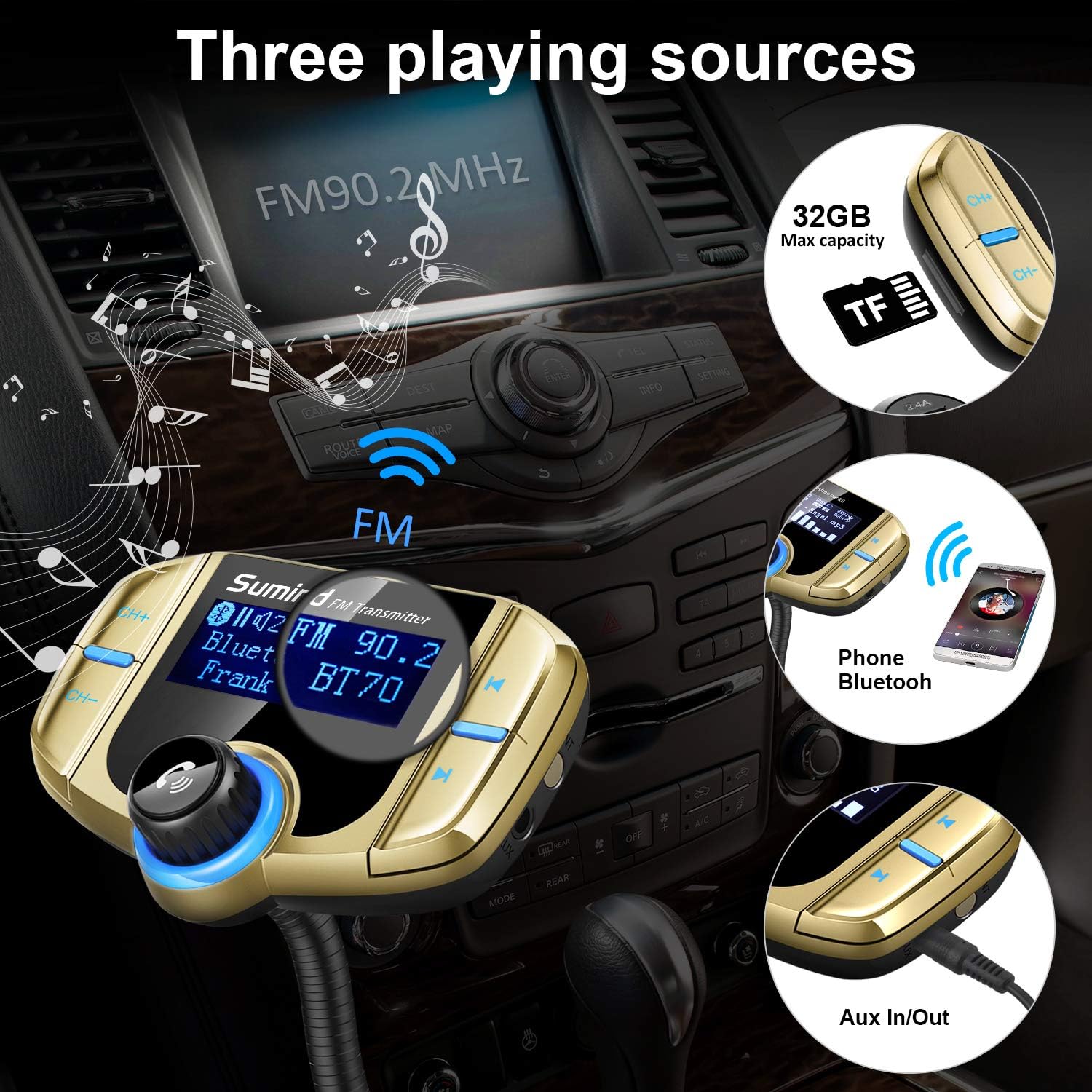
Figure 4: The transmitter supports multiple audio input sources including FM, Bluetooth, and AUX.
Hands-Free Calling:
- Answering Calls: When an incoming call rings, press the Multifunction Button once to answer.
- Ending Calls: During a call, press the Multifunction Button once to end the call.
- Rejecting Calls: Long press the Multifunction Button to reject an incoming call.
- Redialing: Double-press the Multifunction Button to redial the last outgoing number.
- Voice Assistant: Long press the Multifunction Button for 3 seconds to activate Siri or Google Voice Assistant (if supported by your phone).

Figure 5: Enjoy clear hands-free calls with CVC noise cancellation technology.
Charging Devices:
- The transmitter features two USB charging ports: one QC3.0 (Quick Charge 3.0) port and one Smart 2.4A port.
- Connect your devices using appropriate USB cables to charge them while driving.
- The device continues to provide charging functionality even when the FM and Bluetooth functions are turned off (by long pressing the next song key for 5 seconds).

Figure 6: Fast charging capabilities with QC3.0 and 2.4A USB ports.
Maintenance
- Keep the device dry and clean. Avoid exposure to moisture, dust, and extreme temperatures.
- Clean the device with a soft, dry cloth. Do not use harsh chemicals or abrasive cleaners.
- Ensure the car's 12V power outlet is clean and free of debris for optimal connection.
- The device features an innovated fuse tube design that is replaceable. If the device stops working due to overcurrent, check and replace the fuse if necessary.

Figure 7: The replaceable fuse tube protects your car and charging port from overcurrent.
Troubleshooting
| Problem | Possible Cause | Solution |
|---|---|---|
| No power/Device not turning on | Loose connection; Car's 12V outlet not working; Blown fuse in transmitter. | Ensure the transmitter is firmly inserted into the 12V outlet. Check if the car's outlet is functional. Inspect and replace the fuse if necessary. |
| Static or buzzing noise during playback | FM frequency interference; Loose AUX cable connection (if used). | Change to a different, clearer FM frequency on both the transmitter and car radio. Ensure the AUX cable is securely connected. Adjust the position of the AUX cable if it's causing interference. |
| Cannot pair via Bluetooth | Bluetooth not enabled on phone; Device not in pairing mode; Incorrect device selected. | Ensure Bluetooth is enabled on your phone. Restart both the transmitter and your phone. Make sure you select "BT70" (or the correct device name) from your phone's Bluetooth list. |
| Poor call quality | Microphone obstruction; High background noise; Weak signal. | Ensure the microphone is not obstructed. Reduce car noise (e.g., close windows). Try moving the transmitter slightly to improve signal. |
| Charging is slow or not working | Cable issue; Device not compatible with fast charging; Overloaded ports. | Use a high-quality charging cable. Ensure your device supports QC3.0 for fast charging. Avoid charging too many high-power devices simultaneously. |
Specifications
- Model Number: HB-Sumind-66380
- Product Dimensions: 3.09 x 2.24 x 8.41 inches
- Item Weight: 3.35 ounces
- Input Voltage: 12-24 Volt
- USB Output: QC3.0 (Quick Charge 3.0) and Smart 2.4A
- Display Screen: 1.7 Inch LCD
- Bluetooth Version: V4.2 + EDR
- Supported Audio Formats: MP3/WMA
- TF/Micro SD Card Support: Up to 32GB (FAT format)
- Special Features: Built-In Microphone, CVC Noise Cancellation, Flexible Gooseneck, AUX Input/Output
Warranty and Support
For warranty information or technical support, please refer to the official Sumind website or contact their customer service directly. You may also find additional resources and a downloadable PDF user guide at the following link: Sumind User Guide (PDF).