
1. Introduction
Thank you for purchasing the BESTEK Pure Sine Wave Power Inverter. This device is designed to convert 12V DC power from your vehicle's battery or cigarette lighter socket into 100V AC power, allowing you to operate household appliances and charge electronic devices on the go. With its pure sine wave output, it provides stable and clean power, similar to that from a standard wall outlet, making it safe for sensitive electronics.
This manual provides important information regarding the safe and efficient operation of your inverter. Please read it thoroughly before use and keep it for future reference.
2. Product Overview and Key Features
The BESTEK MRZ5010BU-BL inverter is a versatile power solution for your vehicle, offering both AC outlets and USB charging ports. Its robust design and advanced protection features ensure reliable performance.

Figure 2.1: The BESTEK Pure Sine Wave Power Inverter, showing the main unit, cigarette lighter adapter, and battery clamp cables.

Figure 2.2: Power output capabilities, illustrating the conversion from 12V DC to 100V AC and 5V USB power.
Key Features:
- Pure Sine Wave Output: Provides stable and clean power, ideal for sensitive electronics.
- 500W Continuous Power: Capable of powering devices up to 500 watts.
- Multiple Outputs: Two AC 100V outlets and two USB 5V (total 4.8A) charging ports.
- Advanced Protection: Equipped with 6 safety features including output overload, output short circuit, abnormal temperature, input low voltage, input over voltage, and input short circuit protection.
- Digital Display: LCD screen shows protection status, power consumption, and input voltage for easy monitoring.
- Durable Construction: Aluminum casing ensures robustness and heat dissipation.
- Emergency Power Supply: Can serve as a crucial backup power source during outages or disasters.
3. Setup and Installation
Before installation, ensure your vehicle's engine is off and the inverter is turned off. Choose a well-ventilated area for installation, away from direct sunlight, heat sources, and moisture.
Connection Methods:
- Cigarette Lighter Socket Connection (for devices under 150W):
- Insert the cigarette lighter adapter into your vehicle's 12V cigarette lighter socket.
- Connect the other end of the adapter to the inverter's DC input port.
- Battery Clamp Connection (for devices over 150W, up to 500W):
- Connect the red battery clamp to the positive (+) terminal of your vehicle's 12V battery.
- Connect the black battery clamp to the negative (-) terminal of your vehicle's 12V battery.
- Ensure the connections are secure and tight.
- Connect the other end of the battery clamp cable to the inverter's DC input port.

Figure 3.1: Inverter connected via cigarette lighter socket, demonstrating charging of multiple devices. Note: For devices exceeding 150W, use battery clamps.

Figure 3.2: The included battery connection cable for higher power devices.
Important Safety Note:
- Always ensure proper polarity when connecting to the battery.
- Do not connect the inverter to a 24V battery system. This inverter is designed for 12V vehicle systems only.
- Avoid placing the inverter in areas that obstruct its ventilation fans.
4. Operation
Once the inverter is properly connected to your vehicle's power source:
- Turn on the inverter using the power switch located on the unit. The LCD screen will illuminate, displaying current status.
- Plug your AC-powered devices into the 100V AC outlets or your USB-powered devices into the USB ports.
- Monitor the LCD screen for information on power consumption and input voltage.
- When finished, turn off the inverter before disconnecting any devices or the power source.
Smart Fan Function:
The inverter features a smart cooling fan that adjusts its speed based on the internal temperature and load. At low loads, the fan operates at a lower speed to minimize noise. When the load increases or the temperature rises, the fan speed increases to ensure efficient cooling and protect the unit.
Figure 4.1: Illustration of the smart fan mechanism within the inverter, designed for optimal cooling and noise reduction.
5. Safety Features
Your BESTEK inverter is equipped with six comprehensive protection functions to ensure the safety of both the inverter and your connected devices:
- Output Overload Protection: Automatically cuts power if the connected load exceeds the inverter's capacity.
- Output Short Circuit Protection: Prevents damage in case of a short circuit at the output.
- Abnormal Temperature Protection: Shuts down the unit if internal temperature exceeds safe limits (approx. 65°C).
- Input Low Voltage Protection: Protects your vehicle's battery by shutting off if input voltage drops too low.
- Input Over Voltage Protection: Prevents damage from excessively high input voltage.
- Input Short Circuit Protection: Safeguards against short circuits at the input.
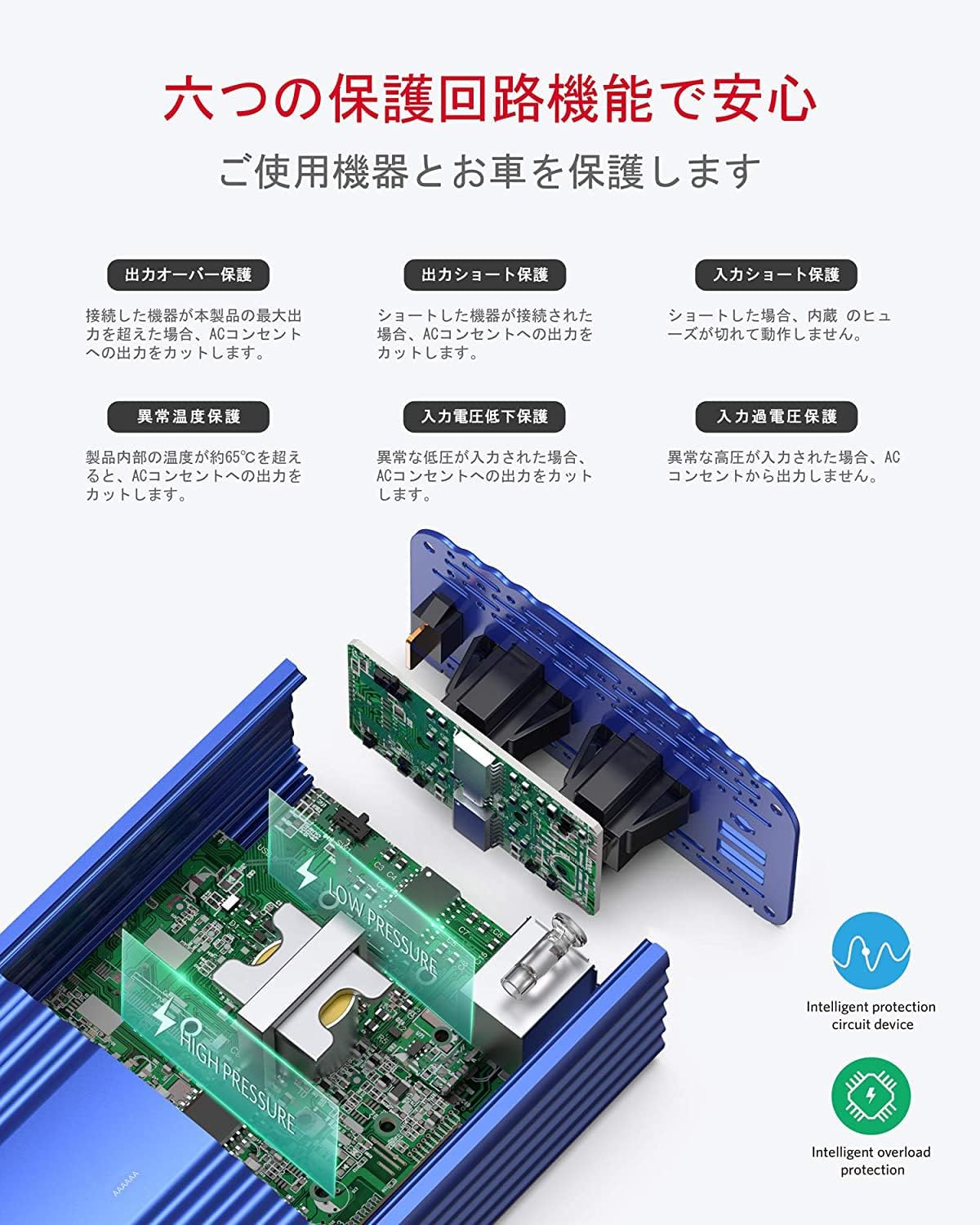
Figure 5.1: Visual representation of the inverter's internal protection circuits, highlighting its safety mechanisms.
6. Use Cases
The BESTEK Pure Sine Wave Power Inverter is an ideal companion for various situations, providing reliable power wherever you need it.
Common Applications:
- Road Trips & Camping: Power laptops, portable coolers, and other small appliances for a comfortable journey.
- Outdoor Activities: Charge cameras, drones, and audio equipment during outdoor adventures.
- Emergency Preparedness: A vital tool for providing emergency power during blackouts or natural disasters, allowing you to power essential devices.
- Mobile Office: Keep your laptop and other office equipment charged while working remotely from your vehicle.

Figure 6.1: Examples of the inverter's versatility in different environments and with various electronic devices.

Figure 6.2: The inverter's utility as an emergency power supply during unforeseen events like power outages or natural disasters.
7. Specifications
| Feature | Specification |
|---|---|
| Model Number | MRZ5010BU-BL |
| Input Voltage | DC 12V |
| AC Output Voltage | AC 100V |
| Rated Power | 500W |
| USB Output | DC 5V, 0-2.4A (Total 4.8A) |
| Output Waveform | Pure Sine Wave |
| Protection Functions | Output Overload, Output Short Circuit, Abnormal Temperature, Input Low Voltage, Input Over Voltage, Input Short Circuit |
| Dimensions | 28.4 x 16.6 x 11.2 cm |
| Weight | 990 g |
8. Troubleshooting
If you encounter issues with your BESTEK inverter, please refer to the following common problems and solutions:
| Problem | Possible Cause | Solution |
|---|---|---|
| Inverter not turning on | Loose connection, low battery voltage, blown fuse in vehicle or inverter | Check all connections. Ensure vehicle battery is charged. Check and replace fuses if necessary. |
| No AC output | Overload protection activated, short circuit, abnormal temperature | Reduce load. Check for short circuits in connected devices. Allow inverter to cool down. |
| Fan running loudly | High load, high internal temperature | This is normal operation. Ensure adequate ventilation around the inverter. |
| LCD display shows error code | Specific protection activated (e.g., low voltage, over voltage) | Refer to the specific error code on the display and consult the relevant protection section (Section 5) for resolution. |
If the problem persists after attempting these solutions, please contact BESTEK customer support.
9. Maintenance
To ensure the longevity and optimal performance of your inverter, follow these maintenance guidelines:
- Keep the inverter clean and free from dust and debris. Use a soft, dry cloth for cleaning.
- Ensure ventilation openings are not blocked. Periodically check for any obstructions.
- Store the inverter in a cool, dry place when not in use.
- Avoid exposing the inverter to extreme temperatures or direct sunlight for prolonged periods.
10. Warranty and Support
BESTEK is a Japanese corporation committed to providing high-quality products and excellent customer service. In the unlikely event of any quality issues with your inverter, please contact our customer support team. We are dedicated to resolving any concerns with utmost sincerity.
For support, please visit the official BESTEK website or contact the retailer where you purchased the product. Please have your model number (MRZ5010BU-BL) and purchase details ready when contacting support.
Note: Warranty terms and conditions may vary. Please refer to your purchase documentation for specific warranty details.