
1. Introduction
This manual provides detailed instructions for the installation, operation, and maintenance of your HFeng IP68 Outdoor Door Access Control System Kit. Please read this manual thoroughly before installation and use to ensure proper functionality and safety. This kit is designed to provide secure access control for outdoor doors, utilizing RFID technology and a keypad for user authentication.
2. Product Overview
The HFeng IP68 Outdoor Door Access Control System Kit includes the following main components:
- RFID Access Control Keypad: The primary interface for user authentication.
- Power Supply: Converts AC power to DC 12V for the system.
- Door Exit Button: Allows for convenient exit from the secured area.
- RFID Keyfobs (10 pieces): Pre-programmed tags for RFID access.
Note: Electric locks are not included in this kit and must be purchased separately.

Image 2.1: Overview of the HFeng IP68 Outdoor Door Access Control System Kit components.
3. Specifications
3.1. RFID Access Control Keypad
- User Capacity: 3000
- Material: High-quality ABS
- Panel: Touchscreen
- Waterproof Level: IP68 (suitable for outdoor installation)
- Working Frequency: 125KHz
- Card Reading Type: Supports EM compatible cards
- Identification Methods: Card, Password, Card + Password
- Backlight: Blue backlight for visibility in dark conditions
- Doorbell Button: Supports wired doorbell connection
- Wiegand Signal: WG26/34 input/output
- Management Card: Supported
- Operating Voltage: DC 12V
- Working Current: ≤ 30mA
- Door Opening Time: 0-255 seconds (adjustable)
- Working Temperature: -20 °C ~ 70 °C
- Product Size: 140 x 70 x 16 mm
3.2. Power Supply
- Material: Steel
- AC Input: Standard AC100V-260V / 50-60HZ
- DC Output: DC12V / 3A
- Time Delay: 0-15 seconds (adjustable)
- Dimension: 140 x 67 x 33 mm (L/W/H)
3.3. Door Exit Button
- Material: Hard Plastic
- Maximum Power: 36V DC 3A — 5A output
- Dimension: 86 x 86 mm
3.4. RFID Keyfobs
- Material: ABS
- Operating Frequency: 125 kHz
- Detection Range: 0-10 cm
- Quantity: 10 pieces
- Each card is pre-programmed with a unique identification number.
4. Setup and Installation
Careful wiring is essential for the correct operation of the access control system. Ensure all power is disconnected before beginning installation.
4.1. Component Placement
- Keypad: Mount the RFID access control keypad at the desired entry point. The IP68 rating allows for outdoor installation.
- Power Supply: Install the power supply in a secure, dry location, typically indoors or within a weatherproof enclosure.
- Exit Button: Mount the exit button on the inside of the door, allowing for easy egress.
- Electric Lock (Not Included): Install your chosen electric lock (e.g., electric strike lock, drop bolt lock, magnetic lock) according to its specific instructions.

Image 4.1: Keypad dimensions for mounting reference.
4.2. Wiring Diagram
Refer to the following diagram for connecting the components. Pay close attention to the wire colors and terminal labels.
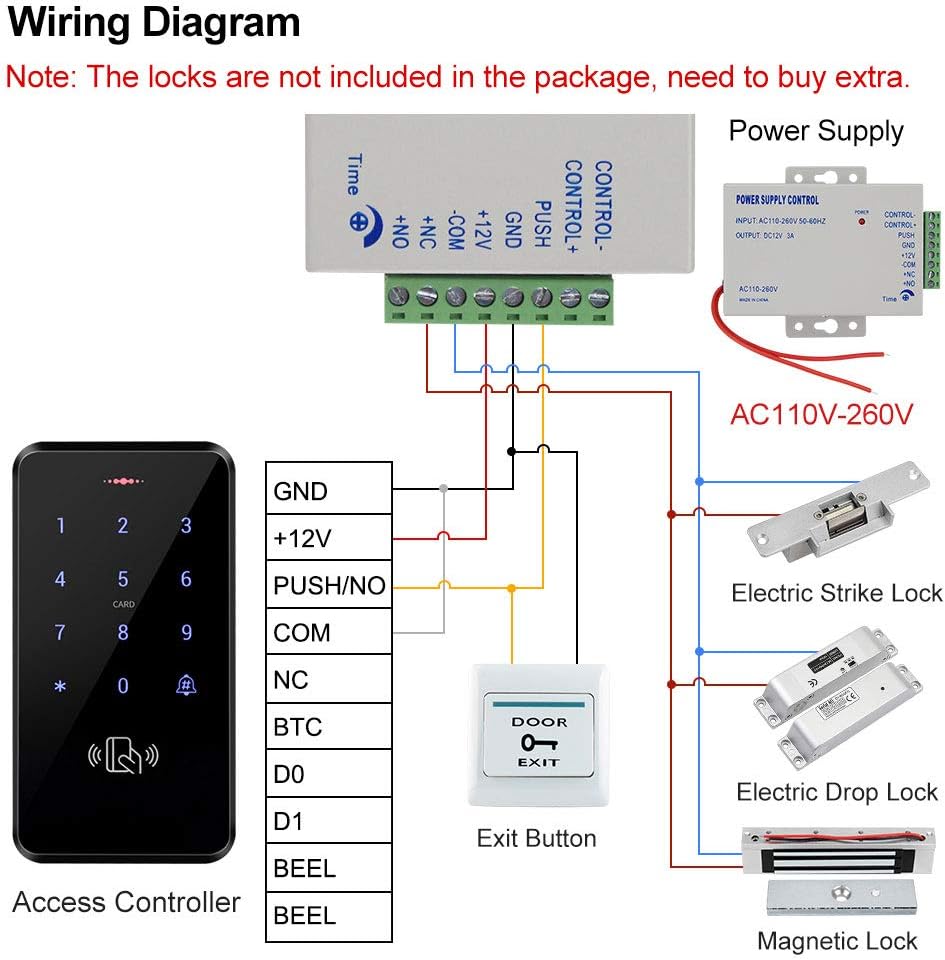
Image 4.2: Wiring diagram showing connections between the access controller, power supply, exit button, and various lock types. Note that locks are not included.
Key Wiring Connections:
- Power Supply Input: Connect AC100V-260V power to the power supply unit.
- Power Supply Output to Keypad: Connect the DC12V output from the power supply to the keypad's +12V and GND terminals.
- Exit Button Connection: Connect the exit button to the PUSH/NO terminal on the keypad and the GND terminal on the power supply.
- Lock Connection: Connect your electric lock to the appropriate terminals on the power supply (e.g., NO, NC, COM) and the keypad (e.g., PUSH/NO, NC, COM) based on your lock type (Fail Secure or Fail Safe). Consult your lock's manual for specific wiring requirements.
- Doorbell Connection: If using a wired doorbell, connect it to the BEEL terminals on the keypad.
- External Card Reader (Optional): If adding an external card reader, connect it to the WG26/34 interface on the keypad.
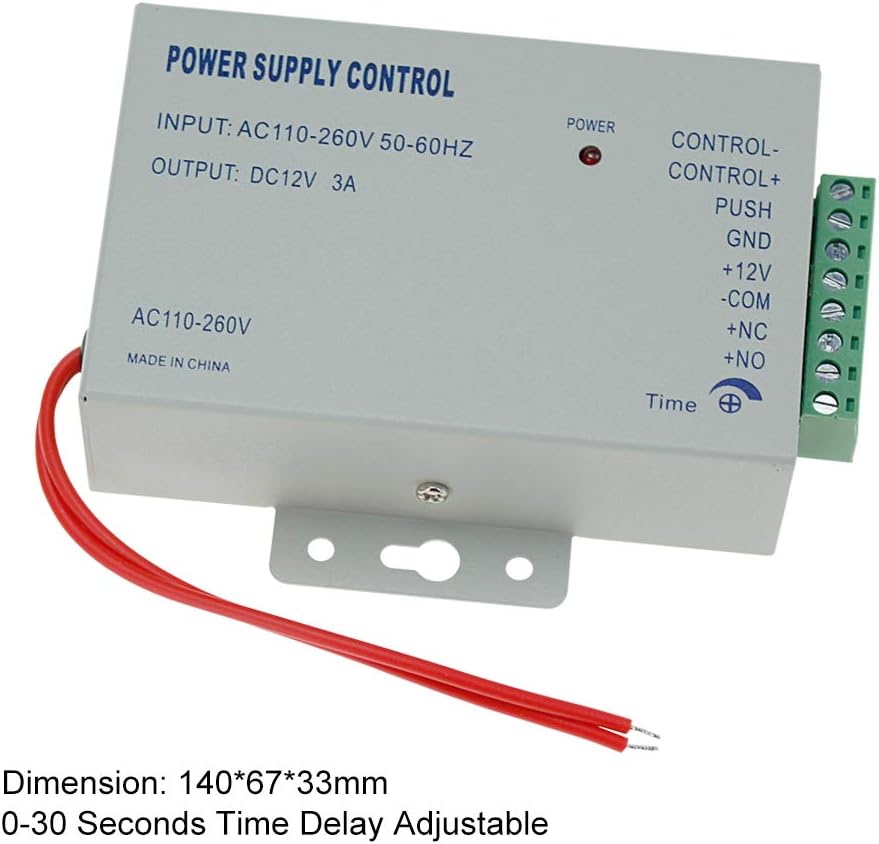
Image 4.3: The power supply unit, showing input and output specifications and adjustable time delay.

Image 4.4: The door exit button and a set of 10 blue RFID keyfobs included in the kit.
5. Operating Instructions
The access control keypad supports multiple methods for door access and user management.
5.1. Basic Operation
- Access with RFID Card: Present a registered RFID keyfob to the 'CARD' area on the keypad. The door will unlock if the card is valid.
- Access with Password: Enter your registered password followed by the '#' key. The door will unlock if the password is valid.
- Access with Card + Password: Present your registered RFID keyfob, then enter your password followed by the '#' key. This method provides enhanced security.
- Exit: Press the door exit button from the inside to unlock the door.
- Doorbell: Press the doorbell icon on the keypad to activate a connected wired doorbell.

Image 5.1: The keypad's touch interface and doorbell button.

Image 5.2: The keypad features a blue backlight for clear visibility in low-light conditions.
5.2. Programming (User Management)
The keypad allows for direct programming of user cards and passwords without needing a computer. Refer to the detailed programming guide included with your product for specific steps on:
- Entering programming mode (typically by entering a master code).
- Adding new RFID cards.
- Adding new user passwords.
- Deleting existing users (cards or passwords).
- Changing the master code.
- Adjusting door opening time.
Important: The default master code is typically '123456'. It is highly recommended to change this immediately after installation for security purposes.
6. Maintenance
To ensure the longevity and reliable operation of your access control system, follow these maintenance guidelines:
- Regular Cleaning: Wipe the keypad surface with a soft, damp cloth to remove dust and dirt. Avoid abrasive cleaners or solvents.
- Connection Checks: Periodically inspect all wiring connections to ensure they are secure and free from corrosion.
- Environmental Protection: While the keypad is IP68 waterproof, prolonged exposure to extreme weather conditions (e.g., direct heavy rain, intense sunlight, freezing temperatures) may affect its lifespan. Consider additional protective measures if installed in harsh environments.
- Keyfob Care: Keep RFID keyfobs clean and avoid bending or damaging them.

Image 6.1: The keypad is IP68 rated, designed to withstand rain and storms.
7. Troubleshooting
If you encounter issues with your access control system, refer to the following common problems and solutions:
- System is unresponsive / No power:
- Check the power supply unit. Ensure it is receiving AC input and providing DC 12V output.
- Verify all power connections from the power supply to the keypad are secure.
- Door does not unlock after valid input:
- Check the wiring between the keypad, power supply, and the electric lock. Ensure correct connections for your specific lock type (NO/NC/COM).
- Verify the electric lock is functioning correctly independently.
- Ensure the door opening time setting is not too short.
- Cannot enter programming mode:
- Ensure you are entering the correct master code.
- Press the keys firmly and deliberately. Some touch keypads can be sensitive.
- If the master code has been forgotten, refer to the product's detailed manual for factory reset procedures (if available).
- RFID card not recognized:
- Ensure the RFID card is correctly registered in the system.
- Present the card directly to the 'CARD' area on the keypad.
- Verify the card is not damaged.
- Keypad backlight not working:
- Check power connections to the keypad.
- The backlight may have a timeout setting; check the programming manual.
8. Warranty and Support
For warranty information, please refer to the documentation provided at the time of purchase or contact your retailer. HFeng products typically come with a standard manufacturer's warranty covering defects in materials and workmanship.
For technical support, installation assistance, or further inquiries, please contact the seller or manufacturer directly. Have your product model number (Kit Set S20FS) and purchase details ready when contacting support.