YUNTX PX6 Android 10 Car Stereo for Audi A4/S4/RS4 and Seat Exeo (8E/8H)
Model: YUNTX-A470
Introduction
This manual provides detailed instructions for the installation, operation, and maintenance of your YUNTX PX6 Android 10 Car Stereo. This unit is designed for specific Audi A4/S4/RS4 and Seat Exeo (8E/8H) models, offering advanced features such as GPS navigation, multimedia playback, Bluetooth connectivity, and smartphone integration. Please read this manual thoroughly before using the product to ensure proper function and safety.
Safety Information
Always prioritize safety when operating your vehicle. Distracted driving can lead to accidents. Ensure the unit is installed correctly by a qualified professional to prevent electrical issues or damage. Do not attempt to operate complex functions or make significant adjustments while driving. Keep the volume at a level that allows you to hear external traffic sounds. Disconnect the car battery before installation to avoid short circuits.
Setup and Installation
Package Contents
Before installation, verify that all components are present in the package:
Image: Overview of the YUNTX PX6 Android 10 Car Stereo package contents, including the main unit, power socket cables, RCA output cables, GPS antenna, instructions, USB cables, radio antenna, camera, and Canbus decoder.
Main Head Unit
Power Socket Cable
RCA Output Socket A
RCA Output Socket B
GPS Antenna
Instruction Manual
USB Cables (x2)
Radio Antenna
Rear Camera
Canbus Decoder
Wiring Diagram
Refer to the following diagram for correct wiring connections. Incorrect wiring can damage the unit or your vehicle's electrical system. If you are unsure, consult a professional installer.
Image: Detailed back panel of the YUNTX PX6 Android 10 Car Stereo showing numbered connection points and corresponding cable diagrams for Power Socket, RCA Output Sockets A and B, USB Cables, GPS Antenna, and Radio Antenna.
Power Socket: Connect the main power harness to the vehicle's power supply. Ensure correct connections for B+, ACC, GND, ILL, REVERSE, PARKING, and speaker outputs (RL+, RL-, RR+, RR-, FL+, FL-, FR+, FR-).
RCA Output Socket A: For auxiliary audio input (AUX IN L, AUX IN R), video input (AUX VIDEO IN 1), and front/rear camera inputs.
RCA Output Socket B: For subwoofer output (SUB-WOOFER) and external microphone.
USB Cables: Connect the provided USB cables for external storage or device charging.
GPS Antenna: Connect the GPS antenna for navigation functionality. Position it in a location with a clear view of the sky.
Radio Antenna: Connect the vehicle's radio antenna.
Note: The Canbus decoder should be connected according to your vehicle's specific wiring requirements to ensure proper communication with the car's systems, such as steering wheel controls and display of vehicle information.
Physical Dimensions
Before installation, confirm the dimensions of the head unit to ensure compatibility with your vehicle's dashboard opening.
Image: Front and side view diagrams illustrating the dimensions of the YUNTX PX6 Android 10 Car Stereo. The front panel measures approximately 9.29 inches (236mm) wide and 5.04 inches (128mm) high. The main body is 8.89 inches (226mm) wide, 5.59 inches (142mm) deep, and 3.94 inches (100mm) high.
The unit features multicolor illumination, allowing you to personalize the button backlight color to match your vehicle's interior.
Operating Instructions
Basic Operation
The unit operates on Android 10, providing a familiar smartphone-like interface. Use the touchscreen for most interactions. Physical buttons on the unit provide quick access to essential functions like power, volume, and navigation.
Image: The YUNTX PX6 Android 10 Car Stereo integrated into an Audi A4 dashboard, demonstrating multimedia playback and Bluetooth phone call functionality.
Power On/Off: Press and hold the power button. A short press typically mutes or unmutes audio.
Volume Control: Use the rotary knob or touchscreen controls to adjust audio volume.
Navigation: Access the pre-installed GPS application or download your preferred navigation app from the Google Playstore.
Radio: Tune into FM/AM stations. DAB+ functionality is available with an optional DAB+ module.
Media Playback: Play audio and video files from USB, internal storage, or streaming services.
Advanced Features
Image: Visual representation of key features: MirrorLink for Android and iOS, Split Screen Mode for running two apps simultaneously, optional DAB+ digital radio support, and access to the Google Playstore for app downloads.
MirrorLink: Connect your Android or iOS smartphone to mirror its screen onto the car stereo display. This allows you to control your phone's apps directly from the head unit.
Split Screen Mode: Run two applications side-by-side on the screen, for example, navigation on one side and music playback on the other.
DAB+ Support (Optional): If you have the optional DAB+ module, you can enjoy high-quality digital radio broadcasts.
Google Playstore: Access the Google Playstore to download and install a wide variety of Android applications, expanding the functionality of your car stereo.
Image: Visual representation of additional features: 4K video playback, offline and online GPS navigation, WiFi and 4G connectivity options, and Bluetooth 5.0 for music streaming and hands-free calling.
4K Video Player & HDMI: Enjoy ultra-high-definition video playback. The unit supports 4K HDMI video output and audio stream synchronization, requiring an optional HDMI cable for external display.
GPS Navigation: The integrated GPS module supports both offline and online mapping applications. Ensure the GPS antenna is properly installed for optimal signal reception.
WiFi & 4G: Connect to a WiFi hotspot or use an optional 4G dongle for internet access, enabling online navigation, streaming, and app downloads.
Bluetooth 5.0: Connect your smartphone for hands-free calling and high-quality audio streaming. Pair your device through the Bluetooth settings menu.
Image: The YUNTX PX6 Android 10 Car Stereo displaying the Apple CarPlay interface, with a connected iPhone. CarPlay provides a simplified, safer way to use your iPhone's features while driving.
Apple CarPlay: Connect your iPhone to access CarPlay, which integrates your phone's essential features like navigation, music, messages, and calls into the car's display in a driver-friendly interface.
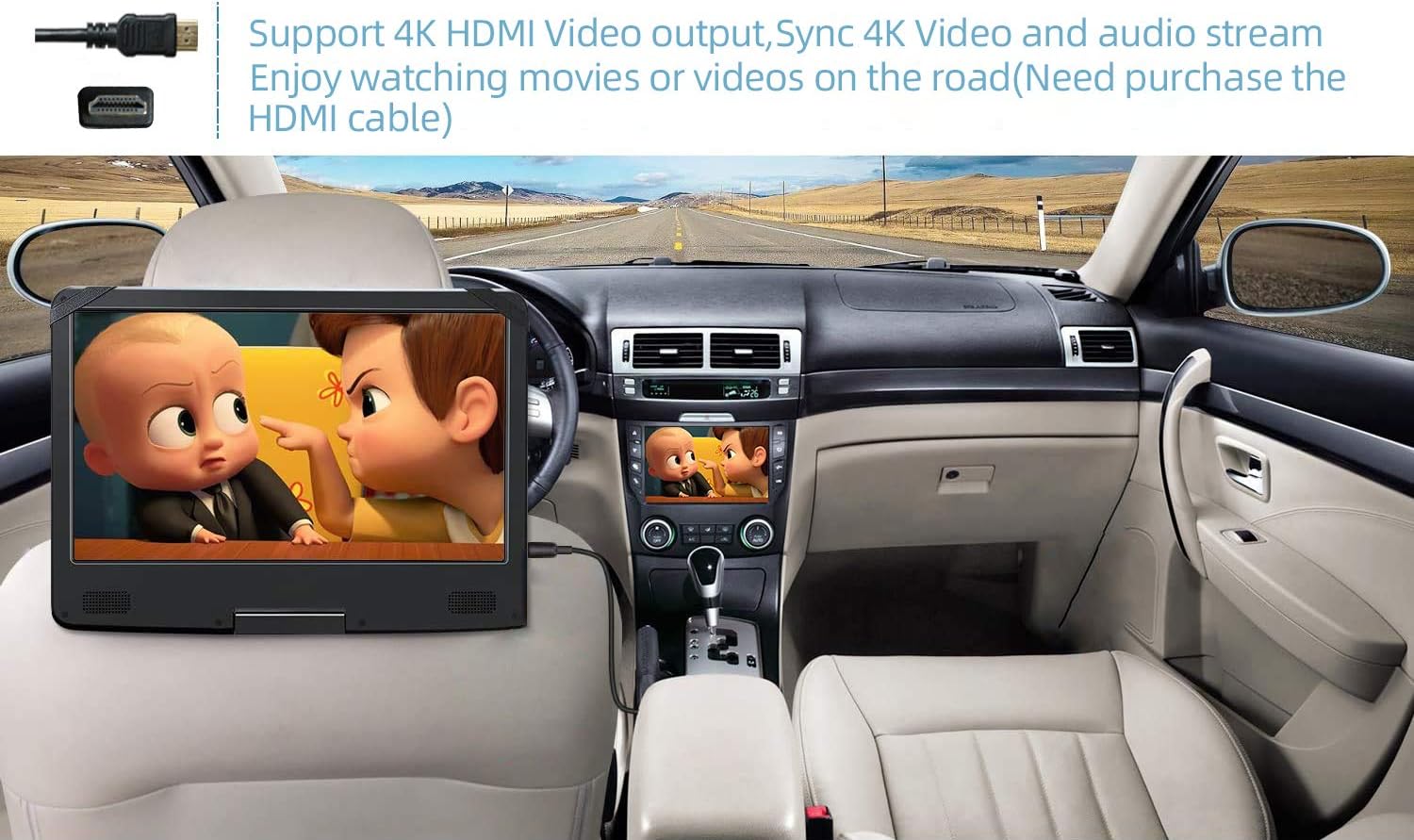
Image: A rear-seat entertainment screen connected to the YUNTX PX6 Android 10 Car Stereo via HDMI, demonstrating the 4K HDMI video output feature for enjoying movies or videos on the road. An HDMI cable is required and sold separately.
HDMI Video Output: The unit supports 4K HDMI video output, allowing you to connect external displays (e.g., rear-seat monitors) to share video content. An HDMI cable must be purchased separately.
Maintenance
Cleaning: Use a soft, dry cloth to clean the screen and unit exterior. Avoid abrasive cleaners or solvents.
Software Updates: Periodically check for system updates via the unit's settings menu (if connected to the internet) to ensure optimal performance and access to new features.
Data Backup: Regularly back up important data, such as contacts or custom settings, to prevent loss.
Troubleshooting
If you encounter issues, refer to the following common problems and solutions:
This issue is often related to incorrect wiring or incompatibility with the vehicle's existing amplifier system (e.g., Audi A4 B7 with active speakers). Ensure all speaker wires are correctly connected to the unit's output. If your vehicle has a factory amplifier, you may need an additional adapter or specific wiring configuration to integrate with the new head unit. Consult a professional installer or the vehicle's wiring diagram.
Specific to Audi A4 B7: Some Audi models require a special adapter for the rear speakers and subwoofer to function with aftermarket head units. Verify if your vehicle has an active sound system and if the provided Canbus decoder fully supports it.
GPS Signal Lost / Inaccurate
Ensure the GPS antenna is securely connected and placed in a location with a clear view of the sky, away from metal obstructions.
Bluetooth Not Connecting
Ensure Bluetooth is enabled on both the stereo and your smartphone. Delete previous pairings and try pairing again. Restart both devices.
Touchscreen Unresponsive
Restart the unit. If the problem persists, a factory reset might be necessary (note: this will erase all user data).
Apps Crashing / Slow Performance
Close unnecessary background applications. Clear app caches. Ensure sufficient storage space. Consider a factory reset if performance issues persist.
Specifications
Feature
Detail
Model Number
YUNTX-A470
Operating System
Android 10
Memory Storage Capacity
64 GB
Screen Size
7 inches
Connectivity Technology
USB, WiFi, Bluetooth 5.0, 4G (via dongle)
Human Interface Input
Buttons, Microphone, Touchscreen
GPS
Integrated, supports offline and online maps
DAB+
Supported (optional module required)
MirrorLink
Supported for Android & iOS
Apple CarPlay
Supported
Video Output
4K HDMI (optional cable required)
GTIN / UPC
603996242098
Warranty and Support
For warranty information and technical support, please refer to the documentation included with your purchase or contact YUNTX customer service directly. Keep your purchase receipt as proof of purchase.
Note: The availability of spare parts and software updates beyond the initial purchase period may vary. Please check with the manufacturer for the most current information.
Ask a question about this manual
Ask about setup, troubleshooting, compatibility, parts, safety, or missing instructions. Manuals+ will review the question and use this page’s manual context to help answer it.