
HOMIDEC FY-WFDNZ80-FGS
HOMIDEC 31.5 inch Computer Desk
Instruction Manual
Model: FY-WFDNZ80-FGS
Brand: HOMIDEC
Introduction
Thank you for choosing the HOMIDEC 31.5 inch Computer Desk. This desk is designed to provide a modern and practical workspace for various settings, including study rooms, offices, and bedrooms. It features a durable particleboard top, a sturdy steel frame, and convenient storage solutions. This manual provides essential information for assembly, operation, maintenance, and troubleshooting to ensure optimal use and longevity of your desk.

Image: The HOMIDEC 31.5 inch Computer Desk, showcasing its vintage brown top, black steel frame, and integrated non-woven storage bag and headphone hook.
Safety Information
Please read and follow all instructions carefully before assembly and use. Proper assembly is crucial for the stability and safety of the desk. Ensure all components are securely fastened. Keep small parts away from children during assembly. Always place the desk on a flat, stable surface. Avoid placing excessively heavy items on the desk. Follow any generic safety warnings that apply to furniture requiring assembly.
Setup and Assembly
The HOMIDEC computer desk is designed for quick and straightforward assembly. All necessary tools and additional screws are included. It is recommended to assemble the desk in the area where it will be used to avoid moving it unnecessarily after assembly.
Assembly Steps:
- Unpack Components: Carefully unbox all parts and lay them out on a clean, soft surface to prevent scratches. Verify that all components listed in the instruction manual are present.
- Assemble Frame: Attach the horizontal support bars to the vertical leg frames using the provided screws. Ensure all connections are firm but do not overtighten until the entire frame is assembled.
- Attach Desktop: Carefully align the desktop with the assembled frame. Secure the desktop to the frame using the designated screws. Ensure the desktop is centered and flush with the frame.
- Install Accessories: Attach the non-woven storage bag to the designated hooks on the side of the desk. Install the headphone hook on the opposite side or as preferred.
- Adjust Leveling Feet: The desk is equipped with adjustable leveling feet. Rotate these feet at the bottom of each leg to ensure the desk is stable and level on uneven floors.
- Final Tightening: Once all parts are in place and the desk is stable, go back and gently tighten all screws to ensure maximum stability. Do not overtighten to avoid damaging the material.

Image: Close-up of the adjustable leveling foot, demonstrating its rotation for stability on uneven surfaces.
Operating Instructions
Your HOMIDEC desk is designed for versatile use in various environments. Here are some tips for optimal operation:
- Utilizing the Non-Woven Storage Bag: The attached non-woven storage bag is ideal for organizing documents, books, magazines, or small office supplies, helping to keep your desktop clear and tidy.
- Using the Headphone Hook: The integrated hook provides a convenient place to hang headphones, cables, or small bags, keeping them easily accessible and off the desk surface.
- Desktop Space: The 31.5-inch desktop offers ample space for a laptop, monitor, keyboard, and other essentials. Arrange your items to maximize comfort and efficiency.

Image: Visual representation of the desk's key features, including the iron hook for headphones, the non-woven storage bag, and the waterproof desktop with corner protectors.
Maintenance and Care
To ensure the longevity and appearance of your HOMIDEC desk, follow these maintenance guidelines:
- Cleaning: The desktop is covered with a special protective layer that is non-slip, scratch-resistant, and easy to clean. Wipe the surface with a soft, damp cloth. Avoid using harsh chemicals or abrasive cleaners, which can damage the finish.
- Spills: In case of spills, wipe them immediately with a dry cloth to prevent moisture absorption.
- Stability Check: Periodically check all screws and connections to ensure they remain tight. Retighten if necessary to maintain stability.
- Avoid Extreme Conditions: Do not expose the desk to extreme temperatures, direct sunlight for prolonged periods, or high humidity, as this may cause warping or damage to the materials.
Troubleshooting
If you encounter any issues with your HOMIDEC desk, consider the following common solutions:
- Desk Wobbles: Ensure the desk is placed on a flat surface. Adjust the leveling feet at the bottom of each leg until the desk is stable. Check that all assembly screws are securely tightened.
- Missing Parts: If any parts are missing upon unboxing, carefully re-check the packaging. If still missing, contact HOMIDEC customer support immediately for assistance.
- Difficulty Assembling: Review the assembly instructions carefully. Ensure you are using the correct screws for each step. Do not force components together. If issues persist, refer to the assembly diagrams or contact customer support.
Specifications
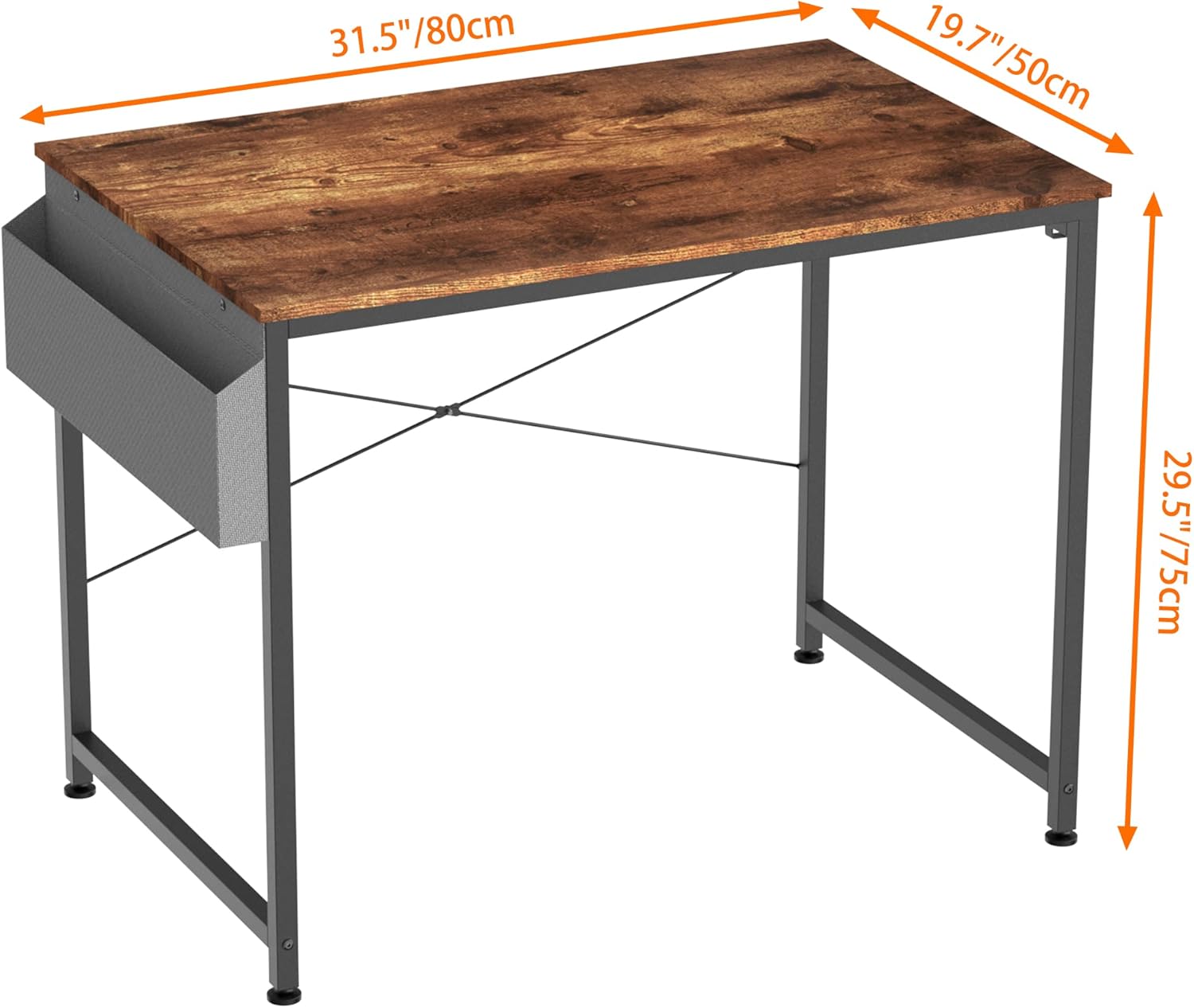
Image: Diagram illustrating the dimensions of the 31.5 inch HOMIDEC Computer Desk: 31.5 inches (80cm) length, 19.7 inches (50cm) depth, and 29.5 inches (75cm) height.
| Attribute | Value |
|---|---|
| Brand | HOMIDEC |
| Model Number | FY-WFDNZ80-FGS |
| Colour | Vintage Brown |
| Product Dimensions | 50D x 80W x 75H Centimetres (approx. 19.7D x 31.5W x 29.5H inches) |
| Material | Alloy Steel (Frame), Engineered Wood (Top) |
| Item Weight | 8.6 kg |
| Shape | Rectangular |
| Desk Design | Computer Desk |
| Style | Modern |
| Room Type | Bedroom, Office |
| Date First Available | June 5 2020 |
Warranty and Support
For warranty information or technical support regarding your HOMIDEC Computer Desk, please refer to the documentation included with your purchase or contact HOMIDEC customer service directly. You may also visit the official HOMIDEC store on Amazon for further assistance and contact details.
Online Store: HOMIDEC Amazon Store
Ask a question about this manual
Ask about setup, troubleshooting, compatibility, parts, safety, or missing instructions. Manuals+ will review the question and use this page’s manual context to help answer it.