
Technical Precision OPMI SENSERA LAMP
User Manual: Replacement for ZEISS OPMI SENSERA LAMP
Model: OPMI SENSERA LAMP | Brand: Technical Precision
Introduction
This manual provides essential information for the safe and effective use of your Technical Precision Replacement for ZEISS OPMI SENSERA LAMP. Please read this manual thoroughly before installation and operation, and retain it for future reference.
This product is designed as a direct replacement lamp for the ZEISS OPMI SENSERA system, ensuring compatibility and optimal performance. It is a high-quality xenon lamp, crucial for maintaining the illumination standards required for precise optical applications.

Image: Front view of the Technical Precision Replacement for ZEISS OPMI SENSERA LAMP, showing the bulb and reflector assembly with its white housing and connector cable.
Safety Information
Always observe the following safety precautions to prevent injury or damage to the product and associated equipment:
- Power Disconnection: Always ensure the main power to the ZEISS OPMI SENSERA system is disconnected and turned off before attempting any installation, removal, or maintenance of the lamp.
- Cool Down Period: Allow the lamp to cool down completely before handling. Lamps can reach very high temperatures during operation and remain hot for a significant period after being turned off.
- Handle with Care: Avoid touching the glass part of the lamp directly with bare hands. Oils from skin can create hot spots, leading to premature lamp failure. Use clean gloves or a soft cloth if handling the glass is unavoidable.
- Eye Protection: Never look directly into the lamp when it is operating. The intense light can cause severe eye damage.
- Proper Disposal: Dispose of old lamps according to local regulations. Xenon lamps may contain materials that require special disposal procedures.
- Compatibility: Use this lamp only with the ZEISS OPMI SENSERA system as specified. Using it with incompatible equipment may cause damage or malfunction.
Setup and Installation
Follow these steps carefully to install the replacement lamp:
- Prepare the System: Ensure the ZEISS OPMI SENSERA system is completely powered off and unplugged from its power source. Allow at least 15-30 minutes for the old lamp to cool down if it was recently in use.
- Locate Lamp Housing: Refer to your ZEISS OPMI SENSERA system's original manual to locate the lamp housing or compartment. This is typically accessible from the rear or side of the unit.
- Open Lamp Compartment: Carefully open the lamp compartment cover. This may involve unscrewing a few fasteners or releasing a latch.
- Remove Old Lamp: Gently disconnect the electrical connector from the old lamp. Then, carefully remove the old lamp assembly from its housing. Note its orientation for correct installation of the new lamp.
- Install New Lamp: With clean gloves, carefully insert the new Technical Precision replacement lamp into the lamp housing, ensuring it is correctly seated and oriented. Connect the electrical connector firmly to the new lamp.
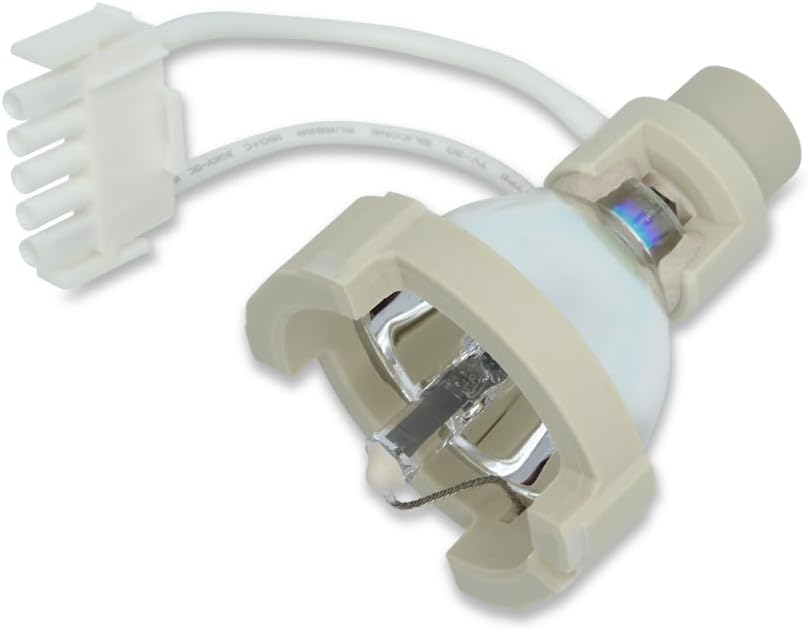
Image: Rear view of the replacement lamp, highlighting the white multi-pin connector and the cable leading to the lamp housing.
- Secure Compartment: Close the lamp compartment cover and secure any fasteners that were removed.
- Power On: Plug the ZEISS OPMI SENSERA system back into its power source and power it on. The new lamp should illuminate.
- Test Functionality: Verify that the illumination is consistent and bright. If there are any issues, refer to the Troubleshooting section.
Operating Instructions
Once installed, the Technical Precision Replacement for ZEISS OPMI SENSERA LAMP operates in conjunction with your ZEISS OPMI SENSERA system. Refer to your system's original operating manual for detailed instructions on controlling illumination, brightness, and other optical settings.
- Normal Operation: The lamp is designed for continuous operation within the specified parameters of the ZEISS OPMI SENSERA system.
- Warm-up Time: Xenon lamps may require a brief warm-up period to reach full brightness and stable color temperature.
- Power Cycling: Avoid frequent power cycling (turning the lamp on and off rapidly) as this can reduce the lamp's lifespan.

Image: Side view of the replacement lamp, showing the reflective surface and the bulb filament within the housing.
Maintenance
Proper maintenance can extend the life of your lamp and ensure optimal performance:
- Cleaning: If necessary, gently clean the exterior of the lamp housing with a soft, dry, lint-free cloth. Do not use abrasive cleaners or solvents. Avoid touching the glass bulb.
- Inspection: Periodically inspect the lamp and its connections for any signs of wear, damage, or loose connections. Replace the lamp if the light output diminishes significantly or if it flickers.
- Storage: If storing a spare lamp, keep it in its original packaging in a cool, dry place, away from direct sunlight and extreme temperatures.

Image: Angled view of the replacement lamp, showing the overall compact design and the integrated cable and connector.
Troubleshooting
If you encounter issues with your replacement lamp, consider the following:
| Problem | Possible Cause | Solution |
|---|---|---|
| Lamp does not light up. |
|
|
| Lamp flickers or dims. |
|
|
| Unusual noise from lamp housing. |
|
|
For issues not covered here, or if problems persist, please contact Technical Precision customer support or a qualified service technician for your ZEISS OPMI SENSERA system.
Specifications
| Attribute | Detail |
|---|---|
| Brand | Technical Precision |
| Model Number | OPMI SENSERA LAMP |
| Wattage | 180 watts |
| Voltage | 14 Volts |
| Color Temperature | 6200 Kelvin |
| Average Life | 500 Hours |
| Material | Copper (for internal components/contacts) |
| Unit Count | 1.0 Count |
| Bulb Length | 3.54 Inches |
| Specific Uses For Product | Lamp for ZEISS OPMI SENSERA |
Warranty and Support
Technical Precision stands behind the quality of its products. For specific warranty information regarding your replacement lamp, please refer to the packaging or contact Technical Precision directly. Keep your proof of purchase for warranty claims.
For technical support, inquiries, or to report issues, please visit the official Technical Precision website or contact their customer service department. When contacting support, please have your product model number (OPMI SENSERA LAMP) and purchase details ready.
Technical Precision Store: Visit Store