
Introduction
This manual provides detailed instructions for the setup, programming, operation, and maintenance of your Solidremote Visor Type 1 Garage Door Opener Remote. Please read these instructions carefully before use to ensure proper functionality and compatibility.

Image: Two Solidremote Visor Type 1 garage door opener remotes, designed for convenient visor attachment.
Compatibility Check
Before proceeding with setup, verify that your garage door opener is compatible with this remote. This remote is designed to work with specific LiftMaster, Chamberlain, Sears Craftsman, Raynor, and AccessMaster brand garage door openers manufactured from 1993 to the current year.
Required Criteria:
- Brand Compatibility: Your opener must be a LiftMaster, Chamberlain, Sears Craftsman, Raynor, or AccessMaster brand.
- Learn Button Type: Your opener must feature a Purple, Red/Orange, Yellow, or Green learn button. These correspond to Security+ 315 MHz / 390 MHz, Security+ 2.0 MyQ, or Billion Code technologies.
This remote is NOT compatible with Genie Intellicode or Overhead Door openers, nor does it work with any DIP switches system.
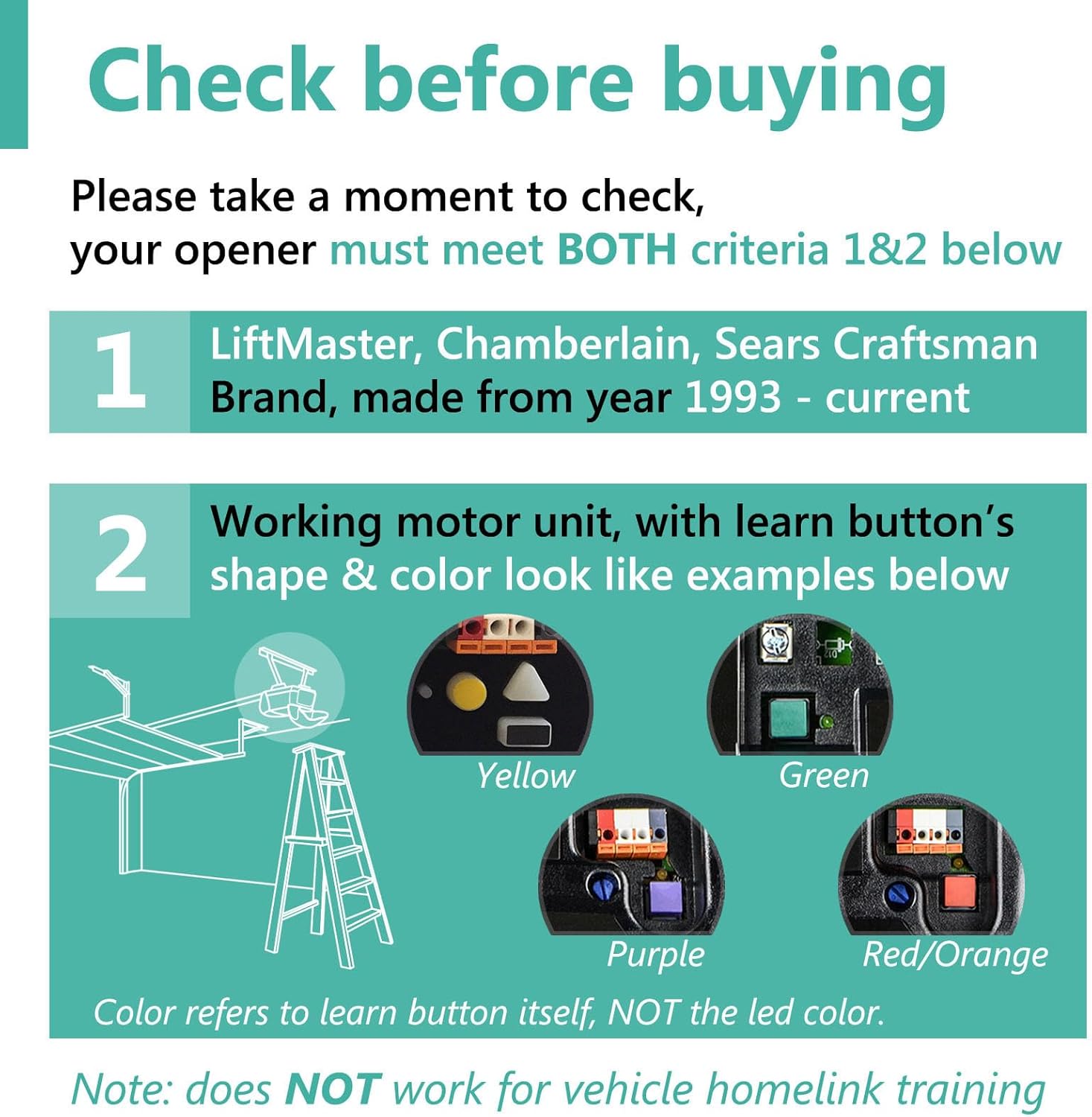
Image: Visual guide to compatible learn button colors (Yellow, Green, Purple, Red/Orange) on garage door opener motor units. The color refers to the learn button itself, not the LED color.
What's Included
Your Solidremote Visor Type 1 package includes the following items:
- 2 x Solidremote Visor Type 1 Remotes (each with a pre-installed CR2032 battery for trial purposes)
- 2 x Visor Clips
- 1 x Instruction Manual

Image: Contents of the Solidremote package, detailing two remotes, two visor clips, and the instruction manual. The remote features an LED transmitting & battery indicator and three buttons labeled A, B, and C.
Setup and Programming
Follow these steps to program your Solidremote garage door opener remote.
Step 1: Set Remote's Operating Mode
First, determine the color of the learn button on your garage door opener motor unit. This will dictate the correct operating mode for your remote.
- Locate the learn button on your garage door opener motor unit (often found on the back or side panel). Note its color.
- On your Solidremote, press and hold any button (A, B, or C) you intend to use. Observe the LED status on the remote.
- Refer to the table below to match the LED status with your opener's learn button color:
| LED Status | Mode # | For Opener Type (Learn Button Color) |
|---|---|---|
| SOLID | Mode 1 | Purple / Red / Orange |
| FLASHING | Mode 2 | Yellow / Green |
If the remote's LED status matches your opener's learn button color, proceed to Step 2. If not, you need to change the remote's working mode. Instructions for changing the working mode are typically provided in a separate video or detailed guide. After adjusting the mode, proceed to Step 2.

Image: Steps for setting the remote's operating mode. This involves identifying the learn button color on the garage door opener and observing the remote's LED status (solid for Mode 1, flashing for Mode 2) to ensure they match.
Step 2: Program Remote to Garage Door Opener
Once the remote's operating mode is correctly set, you can program it to your garage door motor unit.
- Press and release the learn button on your garage door motor unit. The Learn LED indicator on the motor unit will glow steadily for 30 seconds.
- Within these 30 seconds, press and hold the remote control button you chose in Step 1.
- Release the remote control button when the motor unit light blinks OR two clicks are heard. This indicates successful programming.
If programming is successful, your remote is ready for use. If not, refer to the troubleshooting section.

Image: Step-by-step guide for programming the remote to the garage door opener. This involves pressing the opener's learn button, then pressing and holding the remote button until the opener's light blinks or clicks are heard.
Operation
After successful programming, operating your Solidremote garage door opener is straightforward:
- To open or close your garage door, simply press the programmed button on your remote.
- The remote can control up to three garage door openers, gate operators, or accessories if programmed to multiple buttons.
Maintenance
Battery Replacement
The remote uses a standard 3V CR2032 lithium battery. Under average operating conditions, the typical battery life is approximately 2 years. If the remote's range decreases or it becomes unresponsive, the battery may need replacement.
- Locate the battery compartment on the back of the remote.
- Open the compartment using a small screwdriver or coin.
- Remove the old CR2032 battery and insert a new one, ensuring correct polarity (+ side up).
- Close the battery compartment securely.
General Care
- Keep the remote dry and away from extreme temperatures. The remote performs best between 0-70°C.
- Clean the remote with a soft, dry cloth. Avoid using harsh chemicals or abrasives.
Troubleshooting
If you encounter issues with your Solidremote, refer to the following common problems and solutions:
- Remote not working after programming:
Try changing the remote's working mode. Double-check if the working mode on the remote matches your opener's learn button color. Sometimes, the learn button color might be misinterpreted; try switching to the other mode. - New remote cancelled old one:
Your opener's memory might be full. Try erasing the garage opener's memory according to your motor unit's operation manual, then program the new remote again. - Short range or intermittent operation:
The battery may be low. Try replacing the pre-installed trial battery with a fresh CR2032 battery. - Programming fails:
Ensure the garage door is closed during programming. Some openers require the door to be in the closed position for successful programming. - A specific button doesn't work:
If you have programmed multiple buttons, try programming the function to a different button on the remote.

Image: Visual troubleshooting guide covering common issues such as incorrect working mode, full opener memory, short range, programming failures, and unresponsive buttons.
Specifications
| Feature | Detail |
|---|---|
| Brand | Solidremote |
| Model Number | L-VISOR-1 |
| Style | Visor Type 1 |
| Material | Plastic |
| Color | Black, Grey, Silver |
| Product Dimensions | 1.73 x 2.99 x 0.63 inches |
| Item Weight | 2.88 ounces (0.18 Pounds) |
| Battery Type | 1 x CR2032 (Lithium Manganese Dioxide) |
| Average Battery Life | 2 years |
| Operating Temperature | 0-70°C |
| Number of Pieces | 2 (remotes) |
| UPC | 611830657021 |
Support
For further assistance or inquiries, please visit the official Solidremote store or contact their customer support. You can find more information and products at the Solidremote Store on Amazon.


