
Hyper Tough AQ90104G
Hyper Tough AQ90104G 20-Volt Max Lithium-ion Cordless 2-Tool Combo Kit
User Instruction Manual
1. Introduction
This manual provides essential information for the safe operation, maintenance, and troubleshooting of your Hyper Tough AQ90104G 20-Volt Max Lithium-ion Cordless 2-Tool Combo Kit. Please read this manual thoroughly before using the tools to ensure proper function and to prevent injury.
The kit includes a cordless drill and a cordless impact driver, both powered by a 20-Volt Max Lithium-ion battery.
2. General Safety Instructions
Always follow basic safety precautions to reduce the risk of fire, electric shock, and personal injury.
2.1 Work Area Safety
- Keep work area clean and well lit. Cluttered or dark areas invite accidents.
- Do not operate power tools in explosive atmospheres, such as in the presence of flammable liquids, gases or dust. Power tools create sparks which may ignite the dust or fumes.
- Keep children and bystanders away while operating a power tool. Distractions can cause you to lose control.
2.2 Electrical Safety
- Power tool plugs must match the outlet. Never modify the plug in any way.
- Avoid body contact with grounded surfaces such as pipes, radiators, ranges and refrigerators. There is an increased risk of electric shock if your body is grounded.
- Do not expose power tools to rain or wet conditions. Water entering a power tool will increase the risk of electric shock.
2.3 Personal Safety
- Stay alert, watch what you are doing and use common sense when operating a power tool.
- Use personal protective equipment. Always wear eye protection.
- Prevent unintentional starting. Ensure the switch is in the off-position before connecting to battery pack, picking up or carrying the tool.
3. Product Components
Familiarize yourself with the components of your Hyper Tough 2-Tool Combo Kit.
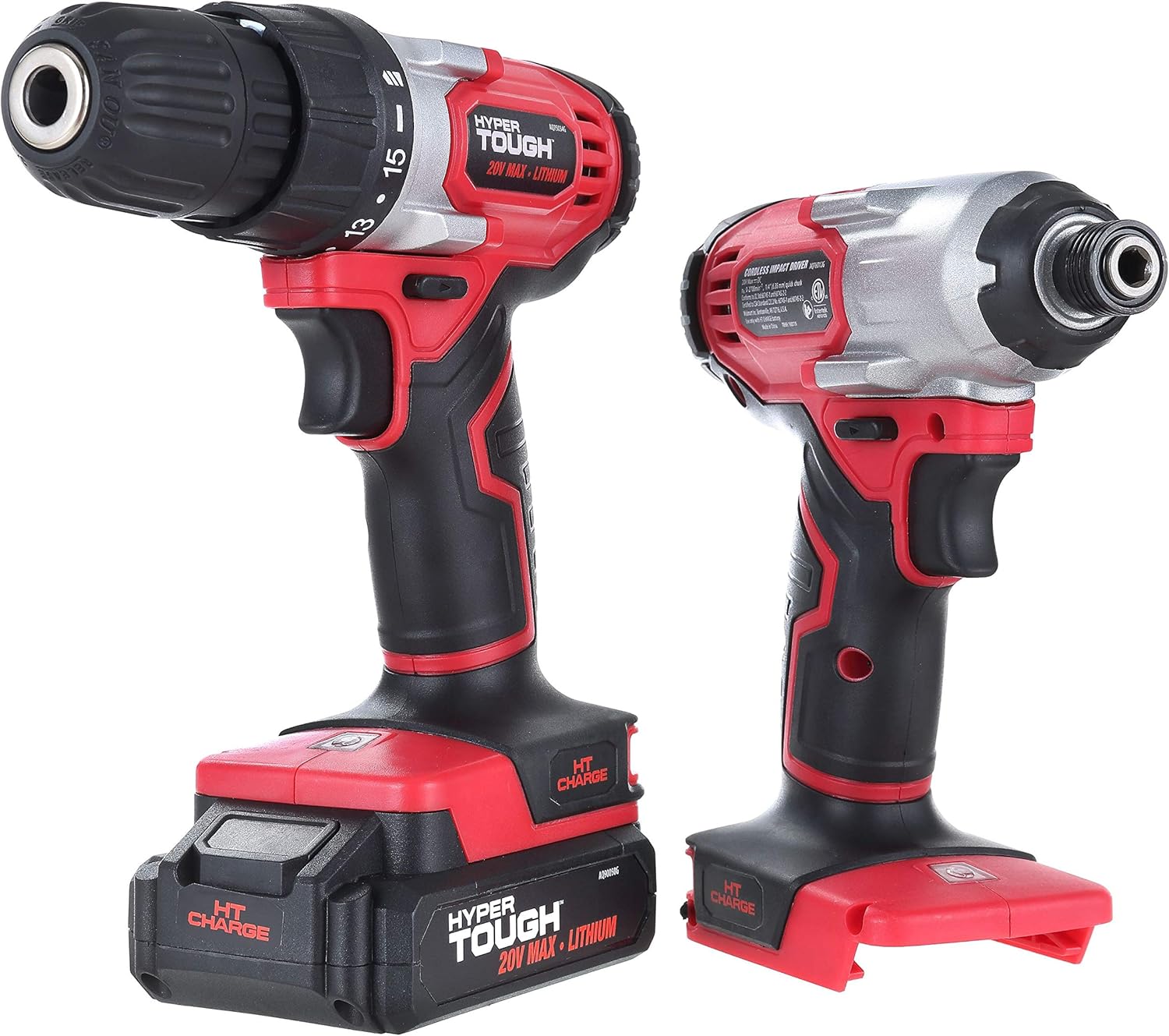
Figure 3.1: The Hyper Tough 20-Volt Max Cordless Drill and Impact Driver, showing both tools side-by-side.

Figure 3.2: The complete Hyper Tough 20-Volt Max Cordless Combo Kit, including the drill, impact driver, battery, and charger.
3.1 Drill Components
- Chuck: Holds drill bits securely.
- Torque Collar: Adjusts the amount of torque for different applications.
- Speed Selector: Switches between high and low speed settings.
- Trigger Switch: Activates the drill and controls speed.
- Forward/Reverse Selector: Changes rotation direction.
- Battery Port: Where the battery pack connects.
3.2 Impact Driver Components
- Hex Chuck: Accepts 1/4-inch hex shank bits.
- Trigger Switch: Activates the impact driver and controls speed.
- Forward/Reverse Selector: Changes rotation direction.
- Battery Port: Where the battery pack connects.
4. Setup and Charging
4.1 Battery Charging
The 20-Volt Max Lithium-ion battery requires charging before first use. Use only the charger provided with your kit.
- Connect the charger to a standard 120V AC outlet.
- Slide the battery pack onto the charger until it clicks into place.
- The charging indicator light on the charger will illuminate, indicating charging is in progress.
- Once fully charged, the indicator light will change (refer to charger specific instructions for exact light behavior). Disconnect the battery from the charger.
Note: It is normal for the battery pack and charger to become warm during charging. Do not charge batteries in extreme temperatures.
4.2 Attaching/Removing Battery Pack
- To attach: Align the battery pack with the battery port on the tool and slide it in until it clicks securely into place.
- To remove: Press the battery release button (if present) and slide the battery pack out of the tool.
5. Operating Instructions
5.1 Cordless Drill Operation
- Installing Drill Bits: Open the chuck by rotating it counter-clockwise. Insert the drill bit fully into the chuck and tighten by rotating clockwise until secure.
- Selecting Torque: Rotate the torque collar to the desired setting. Lower settings are for driving screws, higher settings for drilling.
- Selecting Speed: Use the speed selector switch to choose between low speed (for high torque applications) and high speed (for faster drilling).
- Starting the Drill: Squeeze the trigger switch to start the drill. Variable speed is controlled by the amount of trigger depression.
- Changing Direction: Use the forward/reverse selector to change the rotation direction. Ensure the tool is stopped before changing direction.
5.2 Cordless Impact Driver Operation

Figure 5.1: A hand demonstrating the use of the Hyper Tough Impact Driver, driving a screw into a wooden surface.
- Installing Hex Bits: Pull the collar of the hex chuck forward, insert the 1/4-inch hex shank bit, and release the collar to lock the bit in place.
- Starting the Impact Driver: Squeeze the trigger switch to start the impact driver. Speed is variable based on trigger depression.
- Changing Direction: Use the forward/reverse selector to change the rotation direction. Ensure the tool is stopped before changing direction.
6. Maintenance and Care
Regular maintenance ensures the longevity and optimal performance of your tools.
- Cleaning: Keep the tool's air vents clean and free of dust. Use a soft, damp cloth to clean the exterior. Do not use harsh chemicals or abrasive cleaners.
- Storage: Store tools and batteries in a cool, dry place, away from direct sunlight and moisture.
- Battery Care: Do not store battery packs in a discharged state. Charge them periodically if not in use for extended periods.
- Inspection: Periodically inspect the tools for any signs of damage, loose screws, or worn parts. Do not use damaged tools.
7. Troubleshooting
This section addresses common issues you might encounter.
| Problem | Possible Cause | Solution |
|---|---|---|
| Tool does not start. | Battery not charged or not properly inserted. | Ensure battery is fully charged and securely inserted into the tool. |
| Tool loses power during operation. | Battery is low or tool is overloaded. | Recharge battery. Reduce load on the tool. |
| Drill chuck not holding bit. | Chuck not tightened sufficiently or damaged. | Ensure chuck is tightened firmly. If issue persists, chuck may need replacement. |
| Impact driver bit falls out. | Hex chuck collar not fully engaged or worn. | Ensure bit is fully inserted and collar is released to lock. If worn, consider professional service. |
8. Specifications
| Feature | Detail |
|---|---|
| Model Number | AQ90104G |
| Voltage | 20 Volts Max |
| Battery Type | Lithium-ion |
| Included Components | Cordless Drill, Cordless Impact Driver, 1 Lithium-ion Battery, Charger |
| Item Weight | 5.3 pounds (total kit) |
| Manufacturer | Hyper Tough |
| UPC | 889526219956 |
9. Warranty and Support
For warranty information or technical support, please refer to the warranty card included with your product or contact Hyper Tough customer service. Keep your purchase receipt as proof of purchase.
Customer Service: Please visit the official Hyper Tough website or contact their support line for assistance.
Related documentsAQ90104G


Ask a question about this manual
Ask about setup, troubleshooting, compatibility, parts, safety, or missing instructions. Manuals+ will review the question and use this page’s manual context to help answer it.