1. Introduction
This manual provides essential information for the safe and effective use of your Philips Series 3000 Humidifier, Model HU3918/10. Designed to improve indoor air quality, this humidifier utilizes NanoCloud technology to provide hygienic humidification for rooms up to 45 square meters, reducing dry air symptoms and promoting a comfortable environment.
Please read these instructions carefully before operating the appliance and retain them for future reference.
2. Product Overview
The Philips Series 3000 Humidifier is engineered for efficient and hygienic air humidification. Key features include a 3-liter water tank, a humidification rate of 300 ml/h, three fan speeds, a dedicated sleep mode, an intelligent humidity sensor, and a timer function. The digital display provides real-time humidity readings and allows for easy setting adjustments.

Figure 1: Front view of the Philips Series 3000 Humidifier.
2.1 Components
- A. Air Outlet: Where humidified air is released.
- B. Digital Display: Shows humidity level, settings, and status.
- C. Control Panel: Buttons for power, mode, fan speed, and timer.
- D. Water Tank: Holds up to 3 liters of water.
- E. Humidification Filter: Absorbs water and releases clean moisture into the air.
- F. Air Inlet: Where dry air is drawn into the unit.
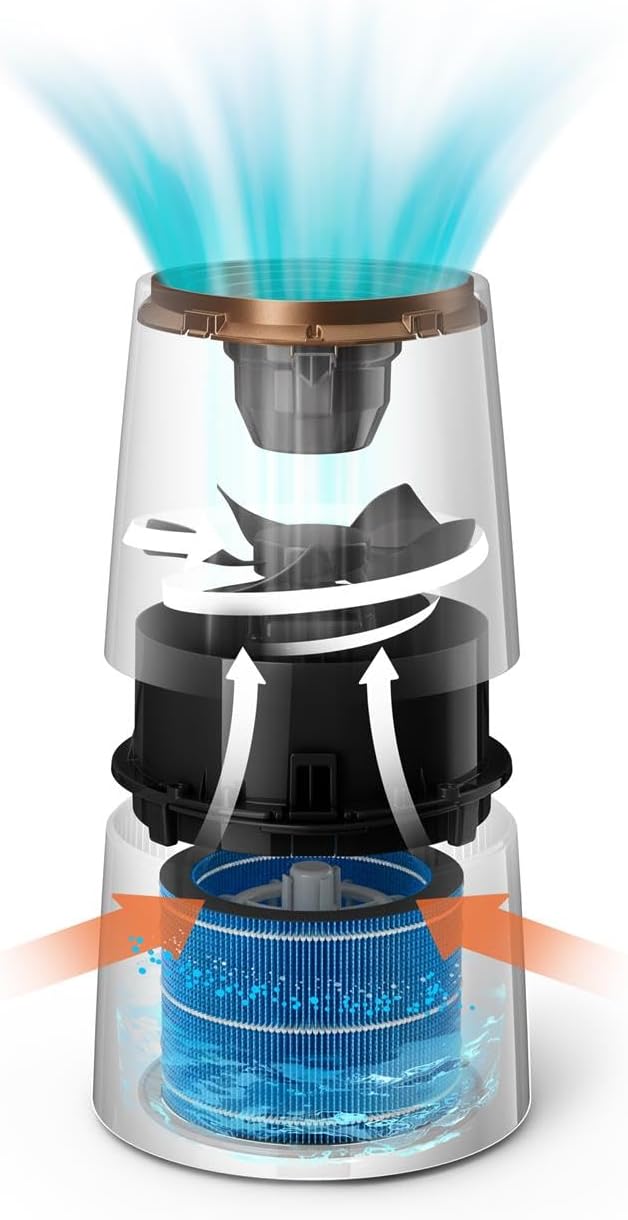
Figure 2: Internal diagram illustrating NanoCloud humidification technology.
3. Setup
3.1 Unpacking
- Remove the humidifier from its packaging.
- Remove all packing materials, including any protective films or stickers.
- Ensure all components listed in Section 2.1 are present and undamaged.
3.2 Placement
- Place the humidifier on a firm, level surface.
- Ensure there is at least 10 cm (4 inches) of space around the unit for proper airflow.
- Avoid placing the humidifier directly against a wall or near heat sources.
3.3 Filling the Water Tank
- Remove the top cover of the humidifier.
- Carefully lift out the water tank.
- Fill the water tank with clean tap water up to the maximum fill line. Do not overfill.
- Place the water tank back into the humidifier, ensuring it is seated correctly.
- Replace the top cover.

Figure 3: Illustration of filling the water tank.
3.4 Power Connection
Plug the power cord into a suitable electrical outlet. The humidifier is now ready for operation.
4. Operating Instructions
The control panel and digital display allow for easy management of the humidifier's functions.

Figure 4: Digital display and control panel.
4.1 Power On/Off
- Press the power button (U) to turn the humidifier on or off.
4.2 Adjusting Humidity Levels
The humidifier offers three preset humidity levels: 40%, 50%, and 60%.
- Press the humidity setting button (represented by a droplet icon with percentage) to cycle through the desired humidity levels. The display will show the selected target humidity.
4.3 Fan Speed Settings
Choose from three fan speeds to control the humidification rate.
- Press the fan speed button (represented by a fan icon) to select speed 1 (low), 2 (medium), or 3 (high).
4.4 Sleep Mode
For quiet operation during sleep, activate the sleep mode.
- Press the sleep mode button (represented by a moon icon) to engage. In this mode, the fan operates at its lowest speed, and the display lights dim.

Figure 5: Humidifier in sleep mode for quiet operation.
4.5 Timer Function
Set the humidifier to operate for a specific duration.
- Press the timer button (represented by a clock icon) to select the desired operating hours (e.g., 1-9 hours). The unit will automatically turn off after the set time.
4.6 Automatic Mode
The intelligent humidity sensor automatically adjusts the humidification rate to maintain optimal indoor humidity.
- To activate, select the desired humidity level (40%, 50%, or 60%). The humidifier will then automatically adjust its operation to reach and maintain this level.
5. Maintenance
Regular maintenance ensures optimal performance and longevity of your humidifier.
5.1 Cleaning the Water Tank
Clean the water tank weekly to prevent mineral buildup and bacterial growth.
- Turn off and unplug the humidifier.
- Remove the top cover and water tank.
- Empty any remaining water.
- Rinse the tank with clean water. For stubborn mineral deposits, use a soft brush and a mild descaling solution (e.g., white vinegar diluted with water).
- Rinse thoroughly to remove all cleaning solution before refilling.
5.2 Humidification Filter Replacement
The humidification filter should be replaced regularly, typically every 3-6 months, depending on water hardness and usage. A dirty filter can reduce efficiency and hygiene.
- Turn off and unplug the humidifier.
- Remove the top cover and water tank.
- Carefully remove the old humidification filter.
- Insert a new Philips replacement filter, ensuring it is correctly positioned.
- Reassemble the humidifier.
6. Troubleshooting
If you encounter issues with your humidifier, refer to the following common problems and solutions:
| Problem | Possible Cause | Solution |
|---|---|---|
| No mist or low humidification. | Water tank is empty or filter is clogged/dry. | Refill water tank. Check and clean/replace humidification filter. |
| Humidifier not turning on. | Not plugged in, power outage, or unit not assembled correctly. | Check power connection. Ensure all parts are correctly assembled. |
| Unusual noise during operation. | Unit not on a level surface, or internal component obstruction. | Place on a stable, level surface. Check for any foreign objects inside the unit. |
| Humidity level not increasing. | Room size too large, windows/doors open, or filter needs replacement. | Ensure room is sealed. Replace filter if necessary. Allow more time for humidification. |
If the problem persists after attempting these solutions, please contact Philips customer support for assistance.
7. Specifications
| Brand | PHILIPS |
| Model Number | HU3918/10 |
| Color | Black |
| Product Dimensions (L x W x H) | 25 x 37.5 x 25 cm |
| Weight | 2.61 Kilograms |
| Water Tank Capacity | 3 Liters |
| Power | 25 Watts |
| Material | Plastic |
| Automatic Shut-off Function | Yes |
| Runtime | 9 hours |
| Special Feature | Digital Display |
| Floor Area Coverage | Up to 45 square meters |
| Operating Mode | Turbine |
8. Warranty and Support
Your Philips Series 3000 Humidifier is covered by a manufacturer's warranty. Please refer to the warranty card included with your purchase for specific terms and conditions.
For technical support, replacement parts, or further assistance, please visit the official Philips website or contact their customer service department. Keep your proof of purchase and model number (HU3918/10) readily available when contacting support.
Official Philips Support: www.philips.com/support


