
1. Introduction
This manual provides essential information for the safe and effective operation of your Battery Tender 15 AMP Battery Charger and Maintainer. This device is designed to charge and maintain 12V lead-acid, AGM, and gel batteries, offering selectable charging rates of 2 AMP, 8 AMP, and 15 AMP. Please read all instructions carefully before use.
2. Safety Information
WARNING: Risk of explosive gases. Batteries generate explosive gases during normal operation. Ensure proper ventilation and avoid open flames or sparks near the battery.
- Always wear eye protection and protective clothing when working with batteries.
- Do not charge a frozen battery. Allow it to thaw before charging.
- Ensure the charger is disconnected from the AC power outlet before making or breaking connections to the battery.
- Connect the charger to a properly grounded outlet.
- Keep the charger away from moisture and extreme temperatures.
- This charger features reverse polarity protection and spark-proof connections, but always double-check connections for safety.
3. Product Overview and Package Contents
The Battery Tender 15 AMP Charger and Maintainer is a versatile device for various 12V battery types. It features an interactive LCD display for monitoring charging status and settings.
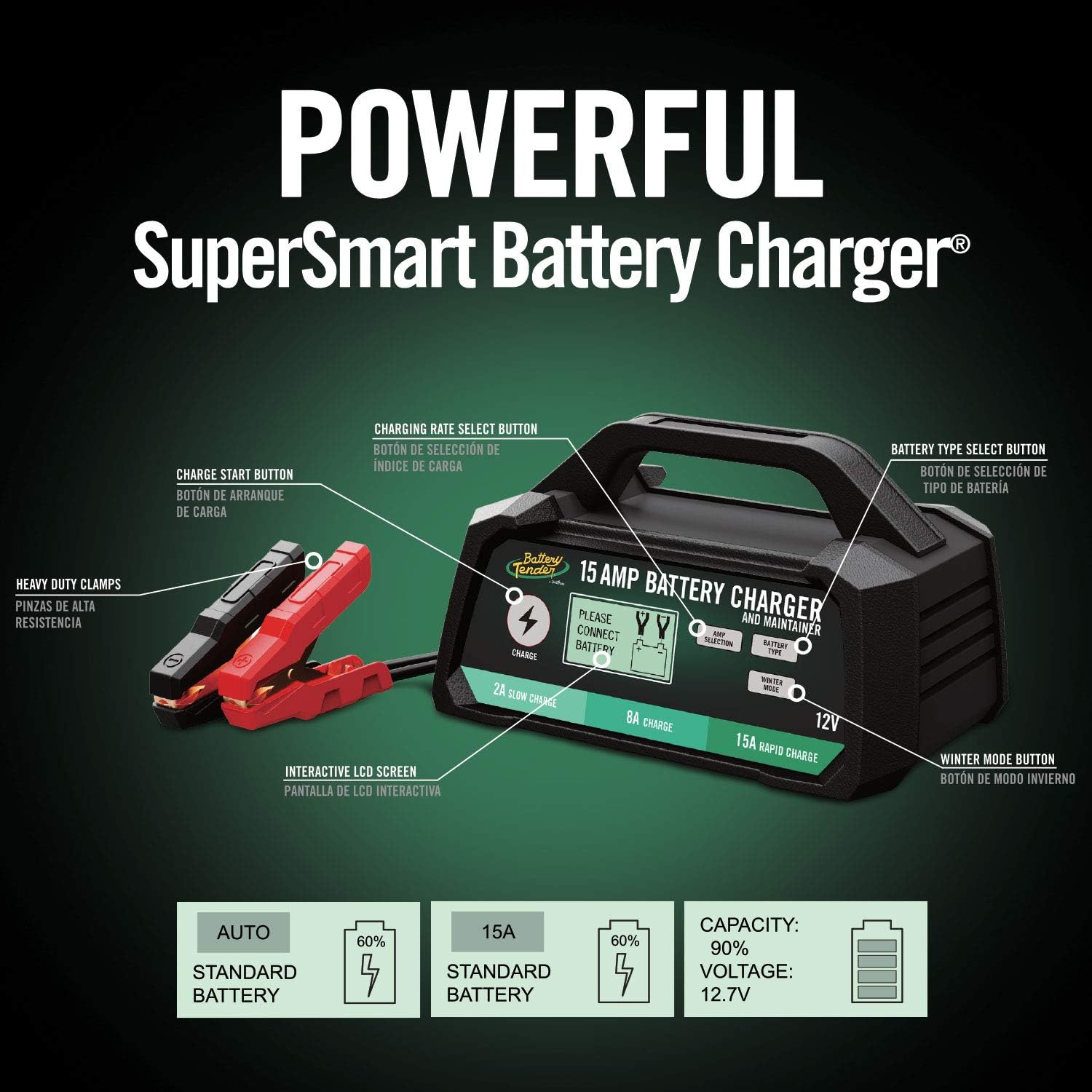
Figure 1: Front view of the Battery Tender 15 AMP Charger, highlighting its main components including the LCD display, charging rate select button, battery type select button, and heavy-duty clamps.
Package Contents:
- Battery Tender 15 AMP Charger and Maintainer Unit
- Attached Alligator Clips
- AC Power Cord
- User Manual (this document)

Figure 2: The Battery Tender 15 AMP Charger showing the integrated power cord and heavy-duty alligator clips.
4. Setup Instructions
Follow these steps to safely connect your Battery Tender charger to a battery:
- Prepare the Battery: Ensure the battery terminals are clean and free of corrosion. If the battery is in a vehicle, ensure the vehicle is turned off and in park/neutral with the parking brake engaged.
- Connect the Red Clamp: Attach the red positive (+) alligator clamp to the positive (+) battery terminal.
- Connect the Black Clamp: Attach the black negative (-) alligator clamp to the negative (-) battery terminal. If connecting to a battery in a vehicle, connect the black clamp to a non-painted metal part of the vehicle chassis, away from the battery and fuel line, if the battery is not easily accessible.
- Connect to AC Power: Plug the charger's AC power cord into a standard 120V AC wall outlet. The charger will power on and begin its diagnostic process.

Figure 3: Proper connection of the Battery Tender charger to a vehicle battery, showing the red clamp on the positive terminal and the black clamp on the negative terminal.
5. Operating Instructions
Once connected and powered on, the charger will display information on its LCD screen. You can select the charging amperage and battery type.

Figure 4: The interactive LCD screen of the charger, displaying options for amperage selection, battery type, and winter mode.
5.1. Selecting Amperage
Press the AMP SELECTION button to cycle through the available charging rates: 2 AMP (Slow Charge), 8 AMP (Charge), and 15 AMP (Rapid Charge). Choose the appropriate rate based on your battery's size and desired charging speed. A lower amperage is generally safer for smaller batteries and provides a more thorough charge.
5.2. Selecting Battery Type
Press the BATTERY TYPE button to select the chemistry of your 12V battery: Standard Lead-Acid, AGM, or Gel. Selecting the correct battery type ensures optimal charging and maintenance cycles.
5.3. Winter Mode
If charging in cold conditions (below 0°C / 32°F), press the WINTER MODE button. This mode adjusts the charging parameters for improved performance in low temperatures.
5.4. Monitoring Charging Progress
The interactive LCD display shows the selected charging rate, battery type, battery percentage charged, and any error messages. The solid-state two-color LED light also indicates the charging status. Once the battery is fully charged, the unit automatically switches to float mode to maintain proper voltage levels without overcharging.

Figure 5: The charger's LCD screen providing real-time feedback on charging status, including battery capacity and voltage.
6. Maintenance
The Battery Tender 15 AMP Charger is designed for low maintenance. Follow these guidelines to ensure its longevity and optimal performance:
- Cleaning: Disconnect the charger from AC power and the battery before cleaning. Wipe the exterior with a dry cloth. Do not use solvents or abrasive cleaners.
- Storage: Store the charger in a cool, dry place when not in use. Ensure cables are neatly coiled and not kinked.
- Cable Inspection: Periodically inspect the AC power cord and battery clamps for any signs of damage, fraying, or corrosion. Replace if necessary.
- Battery Maintenance: Regularly check the fluid levels of flooded lead-acid batteries (if applicable) and ensure terminals are clean.
7. Troubleshooting
If you encounter issues with your Battery Tender charger, refer to the following common problems and solutions:
| Problem | Possible Cause | Solution |
|---|---|---|
| Charger does not turn on. | No AC power; faulty outlet. | Check AC power connection. Test outlet with another device. |
| Charger displays an error message. | Reverse polarity; short circuit; battery voltage too low. | Verify correct clamp connections. Ensure no short circuits. If battery voltage is extremely low, it may not be recoverable by this charger. |
| Battery not charging or charging slowly. | Incorrect amperage/battery type selected; poor connection; sulfated battery. | Confirm correct amperage and battery type settings. Clean battery terminals and re-establish connections. A heavily sulfated battery may require reconditioning or replacement. |
| Charger gets warm during operation. | Normal operation; insufficient ventilation. | Some warmth is normal. Ensure the charger is in a well-ventilated area and not covered. If it becomes excessively hot, disconnect immediately. |
If the problem persists after attempting these solutions, please contact customer support.
8. Specifications
| Feature | Specification |
|---|---|
| Model Number | 022-0234-DL-WH |
| Input Voltage | 120 Volts AC |
| Output Voltage | 12 Volts |
| Amperage (Selectable) | 2 AMP, 8 AMP, 15 AMP |
| Compatible Battery Types | 12V Lead-Acid, AGM, Gel (LiFeP04 compatible) |
| Product Dimensions (D x W x H) | 7.64" x 9.39" x 5.28" |
| Item Weight | 3.48 Pounds |
| Connector Type | Battery Clamps |
| Manufacturer | Deltran |
9. Warranty and Support
Warranty Information:
This Battery Tender product is covered by a 5-year manufacturer's warranty. Please retain your proof of purchase for warranty claims. The warranty covers defects in materials and workmanship under normal use.
Customer Support:
For technical assistance, troubleshooting beyond this manual, or warranty inquiries, please contact Battery Tender customer service. Contact information can typically be found on the official Battery Tender website or on the product packaging.
You can also visit the official Battery Tender store on Amazon for more product information and support resources: Battery Tender Store


