
Introduction
This manual provides instructions for the SOLUPEAK U31 Premium RCA Switch Box. This device facilitates easy switching of RCA analog audio sources between various audio equipment. It eliminates the need to frequently plug and unplug RCA cables. The U31 functions as a 3-input, 1-output (3 IN 1 OUT) or 1-input, 3-output (1 IN 3 OUT) stereo audio mechanical switcher. The input and output directions are reversible.
Features
- RCA terminal and signal switch directly soldered on circuit PCB board for signal integrity.
- Separated left and right channel grounds.
- Aluminum shell for shielding and audio signal lossless transmission.
- Suitable for selecting signals from multiple sources or distributing a single signal to multiple amplifiers/active speakers.
- High-quality gold-plated RCA terminals.
- CNC solid knob and aluminum enclosure.
- Specialized audio rotary switch for easy selection.
- Passive device, requiring no external power supply.
Setup and Connections
Connect the source cables of your different home audio equipment to the RCA input ports on the rear of the device. If using the 3 IN 1 OUT configuration, connect your output device (e.g., amplifier) to the single 'OUT' port. If using the 1 IN 3 OUT configuration, connect your single audio source to the 'OUT' port and your multiple output devices to the 'IN' ports.

Figure 1: Connecting three audio sources (e.g., laptop, CD player, TV) to the 'IN' ports (1, 2, 3) and one amplifier to the 'OUT' port. This configuration allows selecting one of three input sources for a single output device.

Figure 2: Connecting a single audio source (e.g., CD player) to the 'OUT' port (acting as input) and three output devices (e.g., amplifier, active speakers, tube amp) to the 'IN' ports (1, 2, 3, acting as outputs). This configuration allows distributing one input source to one of three output devices. Note: Only one output device can be active at a time.

Figure 3: Detailed view of the SOLUPEAK U31. The front panel features the selector knob. The rear panel shows the RCA ports: one labeled 'Audio OUT' and three labeled 'Audio IN-1', 'IN-2', 'IN-3'. The labels '1 IN 3 OUT' and '3 IN 1 OUT' indicate the reversible functionality.
Operating Instructions
To operate the SOLUPEAK U31, use the selector knob on the front panel to switch between the desired audio sources or output paths. The knob allows you to select which input (1, 2, or 3) is routed to the output, or which output (1, 2, or 3) receives the single input signal, depending on your connection configuration.
Video 1: An official product video from SOLUPEAK demonstrating the unboxing and physical features of the U31 RCA audio switch, highlighting its compact design and connection ports.
Troubleshooting
Audio Noise (Hum) Issues
Audio systems can sometimes produce noise or hum, especially when multiple devices are connected. If you experience audio noise, it is recommended to connect a Ground Loop Isolator to at least one audio source that is causing the noise. This can help eliminate or reduce potential audio noise problems.
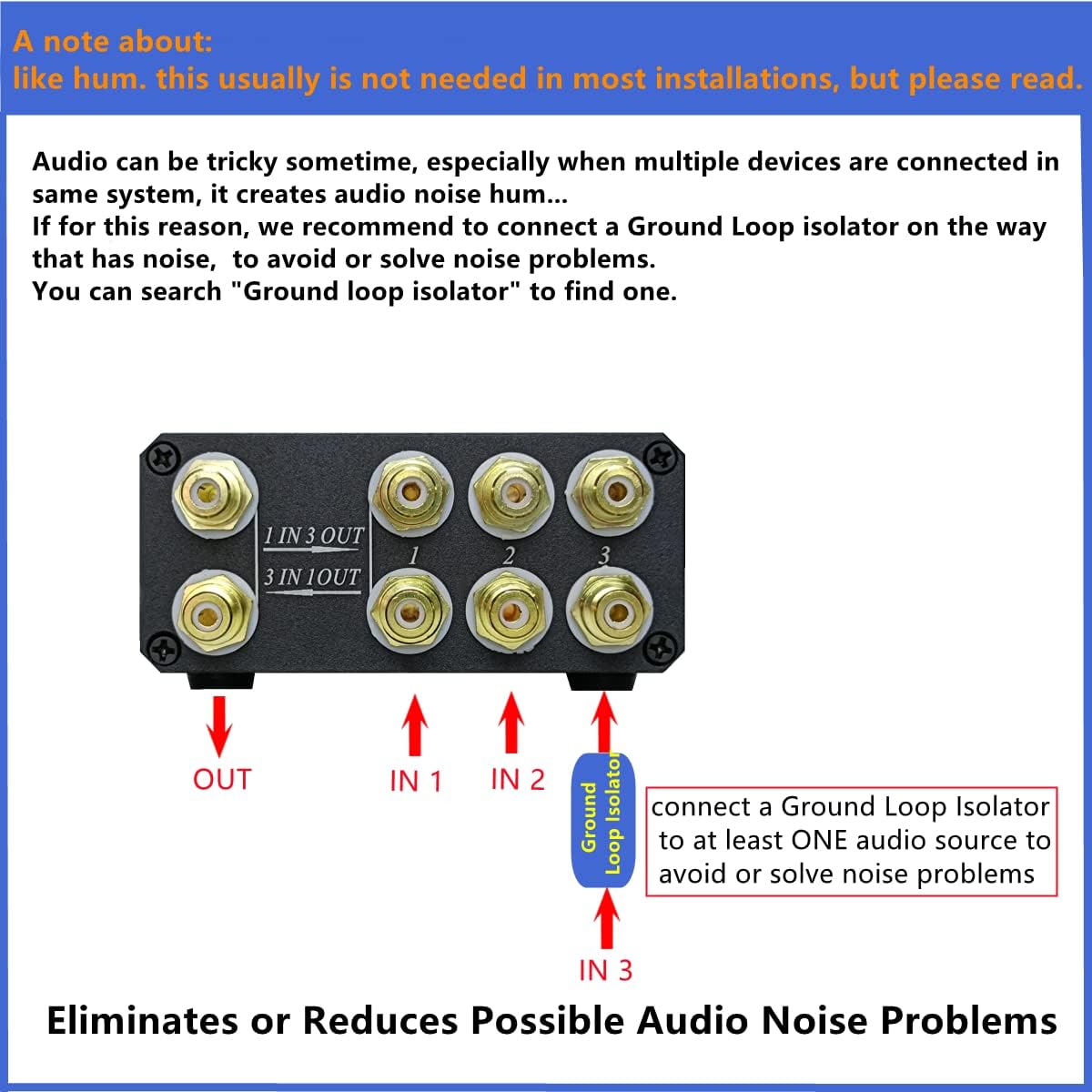
Figure 4: This diagram shows how to connect a Ground Loop Isolator to one of the input channels (e.g., IN 3) to mitigate audio hum. The isolator is placed between the audio source and the switch box input.
Specifications
| Model Number | U31 |
| Brand | SOLUPEAK |
| Dimensions (D x W x H) | 3.7" x 3.94" x 1.57" (100x94x40mm) |
| Weight | 400g (360 Grams) |
| Connector Type | RCA |
| Number of Ports | 3 (Input/Output) |
| Compatible Devices | CD player, PC, Amplifier, Tube amp |
| Power Requirement | Passive (No power supply needed) |
Warranty
The SOLUPEAK U31 Premium RCA Switch Box comes with a 6-month manufacturer warranty.