
1. Product Overview
The Aubric Universal Ceiling Fan Remote Control Kit is designed to convert traditional ceiling fans with lights into wirelessly controllable units. This 3-in-1 kit provides convenient control over fan speed, light operation, and timing functions from a distance. It is compatible with most major ceiling fan brands.

Image 1.1: The Aubric Universal Ceiling Fan Remote Control Kit, including the remote control, receiver, and an illustrative ceiling fan.

Image 1.2: This kit offers wide compatibility with various ceiling fan designs and brands.
2. Product Features
- Universal Compatibility: Converts traditional pull-chain ceiling fans into remote-controlled units.
- Wide Brand Support: Works with most ceiling fan brands including Hunter, Harbor Breeze, Westinghouse, and Honeywell.
- Multi-Function Remote: Features dedicated buttons for fan speed control (High/Medium/Low/OFF), light ON/OFF, and timing settings.
- Timing Functions: Includes 1-hour, 2-hour, 4-hour, and 8-hour timer options for fan operation.
- Easy Installation: Designed for straightforward installation over existing pull-chain or wall switch ceiling fan wiring.
- Durable Design: Remote control features rubber textured buttons for comfortable and reliable use.

Image 2.1: Key features of the RF remote control, including speed, light, timer, and wall-mountable design.
3. Package Contents
Please verify that all components are present before beginning installation:
- 1 x Universal Remote Control
- 1 x Receiver Unit
- 1 x Wall Mount Holster for Remote Control
- User Manual (this document)
Note: 2 AAA batteries are required for the remote control and are not included in the package.
4. Specifications
| Feature | Specification |
|---|---|
| Product Dimensions (Receiver) | 4.5 x 2 x 1 inches |
| Item Weight | 0.352 ounces |
| Model Number | Fan Remote Control |
| Batteries Required | 2 AAA batteries (not included) |
| Max Number of Supported Devices | 1 |
| Compatible Devices | Ceiling Fan |
| Max Load Power (Ceiling Fan) | 300W |
| Max Load Power (LED Light) | 200W |
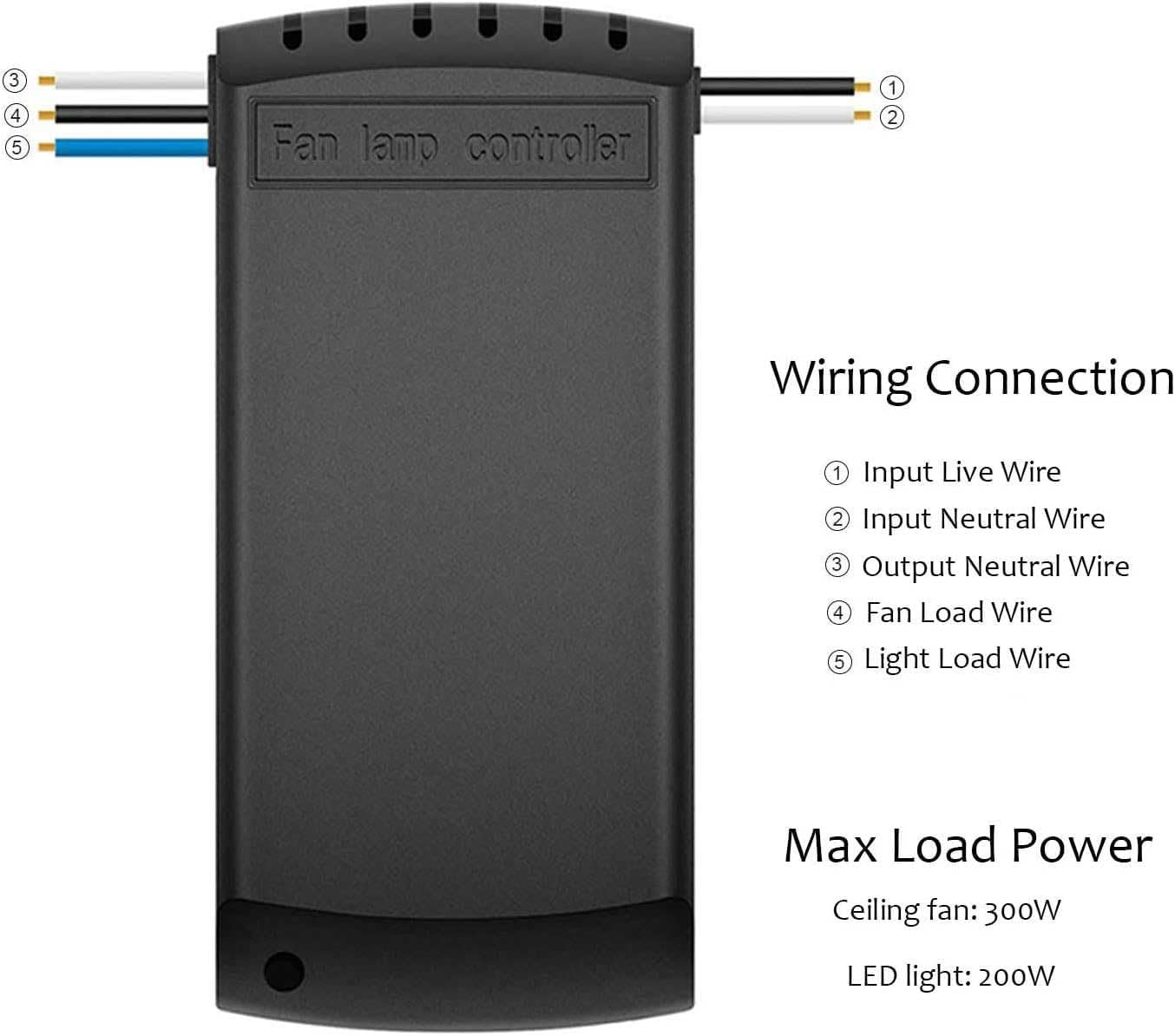
Image 4.1: Dimensions of the receiver unit. Ensure sufficient space in your fan canopy for proper fit.
5. Setup and Installation
Important Safety Information: Before beginning installation, ensure the power to the ceiling fan circuit is turned OFF at the circuit breaker. Failure to do so may result in electrical shock or injury.
- Prepare the Fan: Turn off power at the circuit breaker. Remove the canopy cover of your ceiling fan to expose the wiring.
- Connect the Receiver: Follow the wiring diagram carefully. Connect the receiver's input wires to the main power supply wires (Live and Neutral) and the receiver's output wires to the fan load and light load wires. Use wire nuts to secure all connections.
- Secure the Receiver: Carefully place the receiver unit inside the fan canopy. Ensure it fits without obstruction and that wires are not pinched.
- Close the Canopy: Reattach the fan canopy cover.
- Install Batteries: Insert 2 AAA batteries into the remote control.
- Restore Power: Turn the power back ON at the circuit breaker.
- Test Functionality: Use the remote control to test the fan speeds, light ON/OFF, and timing functions.

Image 5.1: Visual guide for the installation process of the receiver unit within the fan canopy.

Image 5.2: Detailed wiring diagram for connecting the receiver to your ceiling fan and power supply.
Video 5.1: An instructional video demonstrating the installation process of the Aubric Universal Ceiling Fan Remote Control Kit. This video provides a visual walkthrough of connecting the receiver and setting up the remote.
6. Operating Instructions
Once installed and powered, operate your ceiling fan and light using the remote control:

Image 6.1: Operating the ceiling fan and light wirelessly with the remote control.
- Fan Speed Control:
- Press HI for High speed.
- Press MED for Medium speed.
- Press LOW for Low speed.
- Press OFF to turn the fan off.
- Light Control:
- Press LIGHT ON/OFF to toggle the light on or off. Note: This remote does not support dimming functions.
- Timing Function:
- Press 1H to set the fan to turn off after 1 hour.
- Press 2H to set the fan to turn off after 2 hours.
- Press 4H to set the fan to turn off after 4 hours.
- Press 8H to set the fan to turn off after 8 hours.
7. Maintenance
To ensure optimal performance and longevity of your Aubric Universal Ceiling Fan Remote Control Kit, follow these simple maintenance guidelines:
- Battery Replacement: Replace the 2 AAA batteries in the remote control when the indicator light dims or the remote's range decreases. Ensure correct polarity when inserting new batteries.
- Cleaning: Wipe the remote control and receiver with a soft, dry cloth. Do not use abrasive cleaners or immerse the units in water.
- Environmental Conditions: Avoid exposing the remote and receiver to extreme temperatures, high humidity, or direct sunlight.
8. Troubleshooting
If you encounter issues with your remote control kit, refer to the following common problems and solutions:
| Problem | Possible Cause | Solution |
|---|---|---|
| Remote control not responding / Fan or light not working. | No power to the fan/receiver, dead batteries in remote, incorrect wiring, remote not paired (if applicable). | Check circuit breaker. Replace remote batteries. Verify all wiring connections are secure and correct according to the diagram. Ensure the receiver is properly installed. |
| Fan only operates at one speed (e.g., LOW). | Incorrect wiring for speed control, receiver malfunction. | Double-check the fan speed wiring connections to the receiver. Ensure the fan's internal speed settings (if any) are not interfering. |
| Light does not turn ON/OFF. | Light bulb issue, incorrect light wiring, receiver malfunction. | Check if the light bulb is working. Verify the light load wire connection to the receiver. |
| Remote range is poor. | Low batteries, interference, obstruction. | Replace batteries. Ensure there are no major obstructions between the remote and the fan. |
| Receiver does not fit in fan canopy. | Canopy space is too small for receiver dimensions. | Verify receiver dimensions (4.5 x 2 x 1 inches) against your fan's canopy space before purchase. If already purchased, consider professional installation or alternative mounting if safe and feasible. |
9. Warranty and Support
For any product inquiries, technical assistance, or warranty claims, please contact the Aubric Store directly through your purchase platform. Provide your order details and a clear description of the issue for prompt support.
Manufacturer: Aubric
Date First Available: May 29, 2020