
Introduction
This manual provides essential instructions for the proper setup, operation, maintenance, and troubleshooting of your ZINGYOU ZY-007 Condenser Microphone Bundle. Please read this manual thoroughly before using the product to ensure optimal performance and longevity.
Included Components
- ZY-007 Condenser Microphone
- Shock Mount
- Pop Filter
- Adjustable Suspension Scissor Arm Stand
- Windproof Foam Cap (Mic Windscreen)
- XLR Cable
- USB Sound Adapter (Note: May not provide sufficient phantom power for optimal performance)
- User Manual

Image: All components included in the ZINGYOU ZY-007 Condenser Microphone Bundle.
Setup Instructions
Follow these steps to assemble and connect your ZY-007 microphone bundle.
- Attach the Desk Clamp: Secure the desk clamp to a sturdy surface, such as a desk or table edge. Tighten the screw firmly to ensure stability.
- Insert the Scissor Arm Stand: Insert the base of the adjustable suspension scissor arm stand into the hole on the desk clamp. Tighten the locking knob on the clamp to secure the arm stand.
- Attach the Shock Mount: Screw the shock mount onto the threaded end of the scissor arm stand. Ensure it is securely fastened.
- Mount the Microphone: Gently place the ZY-007 condenser microphone into the shock mount. The microphone should be held securely by the elastic bands of the shock mount.
- Attach the Pop Filter: Clamp the pop filter to the scissor arm stand or desk. Position the pop filter approximately 2-3 inches in front of the microphone.
- Connect the XLR Cable: Connect one end of the XLR cable to the bottom of the ZY-007 microphone and the other end to your audio interface or the provided USB sound adapter.
- Connect to Computer: If using the USB sound adapter, plug it into an available USB port on your computer. If using an audio interface, connect it to your computer via its designated connection (e.g., USB, Thunderbolt).
- Power Requirement: The ZY-007 is a condenser microphone and requires 48V phantom power to operate correctly. Ensure your audio interface or mixer provides phantom power. The included USB sound adapter may not supply sufficient power for optimal performance.

Image: Detail of the desk clamp mechanism for the microphone stand.

Image: The microphone shock mount, designed to reduce vibrations.
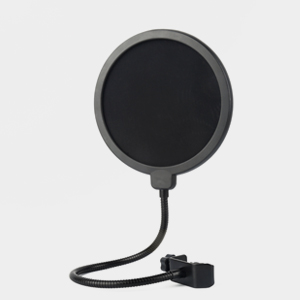
Image: The pop filter, used to reduce plosive sounds.

Image: The ZY-007 microphone fully assembled on its stand with the pop filter in place.
Operating Instructions
Proper operation ensures clear audio capture.
Microphone Directionality (Cardioid Pattern)
The ZY-007 condenser microphone features a cardioid pickup pattern. This means it is designed to capture sound primarily from the front, while reducing sound pickup from the sides and rear. This helps to isolate the desired sound source and minimize background noise.

Image: Illustration of the ZY-007's cardioid polar pattern and frequency response characteristics.
For best sound quality, always face the source (e.g., your mouth when speaking or singing) towards the side of the microphone with the ZINGYOU logo. This ensures that the primary sound is captured directly, maximizing clarity and minimizing unwanted ambient sounds.

Image: The ZINGYOU ZY-007 microphone, highlighting the logo as the optimal direction for sound input.
Software Configuration
After connecting the microphone, ensure it is selected as the input device in your computer's sound settings and any recording software you are using. Adjust input gain levels to prevent clipping (distortion) while ensuring sufficient volume.
Video Demonstration
Video: Official ZINGYOU ZY-007 Condenser Microphone overview and usage demonstration.
Maintenance
Proper care extends the life of your microphone bundle.
- Cleaning: Use a soft, dry cloth to clean the microphone body and stand. Do not use liquid cleaners or solvents, as these can damage the components.
- Storage: When not in use, store the microphone in a dry, dust-free environment. Disassemble the stand if necessary for compact storage.
- Cable Care: Avoid sharp bends or kinks in the XLR cable. Store cables neatly to prevent damage.
- Shock Mount: Periodically check the elastic bands of the shock mount for wear and tear. Replace if they become loose or broken to maintain effective vibration isolation.
Troubleshooting
If you encounter issues with your ZY-007 microphone, refer to the following common problems and solutions.
No Sound Output
- Check Phantom Power: Ensure your audio interface or mixer is providing 48V phantom power to the microphone. Condenser microphones require this power to function. The included USB sound adapter may not provide sufficient power.
- Verify Connections: Confirm that all cables (XLR, USB) are securely connected to the microphone, audio interface/adapter, and computer.
- Software Settings: Check your computer's sound settings and recording software to ensure the ZY-007 (or your audio interface) is selected as the active input device and that input levels are not muted or set too low.
- Cable Integrity: Test with a different XLR cable if possible to rule out a faulty cable.
Low Volume or Weak Signal
- Adjust Gain: Increase the input gain on your audio interface or in your recording software.
- Microphone Direction: Ensure you are speaking directly into the front of the microphone (the side with the ZINGYOU logo).
- Proximity: Position yourself closer to the microphone (typically 6-12 inches) for stronger signal capture.
- Phantom Power: Reconfirm that 48V phantom power is active and stable.
Distorted Sound (Clipping)
- Reduce Gain: Decrease the input gain on your audio interface or in your recording software.
- Distance: Increase your distance from the microphone if the sound source is very loud.
Unwanted Noise or Hum
- Ground Loop: Try plugging your equipment into different power outlets or using a power conditioner to eliminate ground loop hum.
- Cable Shielding: Ensure you are using a high-quality, shielded XLR cable.
- Environmental Noise: Minimize external noise sources in your recording environment.
- USB Sound Adapter: If using the included USB sound adapter, consider upgrading to a dedicated audio interface with proper phantom power, as the adapter may introduce noise.
Specifications
Key technical specifications for the ZINGYOU ZY-007 Condenser Microphone.
| Feature | Specification |
|---|---|
| Model Name | ZY-007 |
| Brand | ZINGYOU |
| Connectivity Technology | XLR |
| Polar Pattern | Unidirectional (Cardioid) |
| Audio Sensitivity | 34 Decibels |
| Signal-to-Noise Ratio | 78 dB |
| Power Source | Corded Electric (Requires 48V Phantom Power) |
| Compatible Devices | Personal Computer (with appropriate audio interface) |
| Material | Aluminum, Metal |
| Item Weight | 1.6 Kilograms |
| Item Dimensions | 15.8 x 9.1 x 4.7 inches |
Warranty and Support
ZINGYOU provides the following support for your ZY-007 Condenser Microphone Bundle:
- 7-Day No Reason Refund: If you are not satisfied with your purchase, you may be eligible for a refund within 7 days.
- 30-Day Replacement: In case of product defects or issues, a replacement may be provided within 30 days of purchase.
- 1-Year Warranty Service: The product is covered by a 1-year warranty against manufacturing defects.
- Customer Service: For any questions or assistance, please contact ZINGYOU customer service via email. 24-hour friendly customer service and email support are available.
Please retain your proof of purchase for warranty claims.
