
TDMOON U80BH
TDMOON U80BH Electronic Upper Arm Blood Pressure Monitor User Manual
Model: U80BH
1. Introduction
This manual provides instructions for the proper use and care of your TDMOON U80BH Electronic Upper Arm Blood Pressure Monitor. This device is designed for accurate measurement of systolic and diastolic blood pressure, as well as heart rate, for adult users in a home environment. Please read this manual thoroughly before first use to ensure safe and effective operation.

Image 1.1: TDMOON U80BH Blood Pressure Monitor with its components, including the main unit, upper arm cuff, and DC power adapter.
2. Important Safety Information
Statements regarding dietary supplements have not been evaluated by the FDA and are not intended to diagnose, treat, cure, or prevent any disease or health condition. This device is intended for general health monitoring and should not replace professional medical advice or treatment. Consult your physician for interpretation of blood pressure readings.
3. Package Contents
Verify that all items are present in the package:
- TDMOON U80BH Blood Pressure Monitor Unit
- Upper Arm Cuff (8.66-16.5 inches / 22-42 cm)
- 6V 1A DC Power Adapter
- Instruction Manual
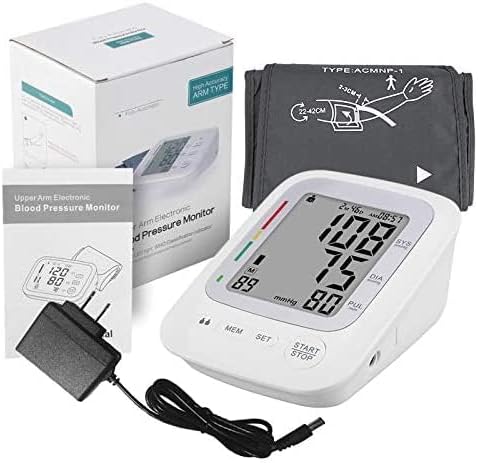
Image 3.1: The complete package contents, including the monitor, cuff, power adapter, and user manual, shown alongside the product box.
4. Product Overview
The TDMOON U80BH monitor features a large LCD display for clear readings and simple operation. Key features include:
- Large 3.5-inch LCD Display: Shows systolic BP, diastolic BP, and heart rate.
- Irregular Heartbeat Indicator: Alerts users to potential irregular heart rhythms.
- Dual-User Mode: Supports two users with separate memory storage.
- Memory Function: Stores up to 90 measurements per user with specific times and dates.
- One-Key Operation: Simplifies the measurement process.

Image 4.1: Visual representation of the monitor's key features, including the 3.5-inch LCD, irregular heartbeat indicator, dual-user mode, 2x90 memories, average of last 3 measurements, 60-second fast response, and DC power input.
5. Setup
5.1 Power Options
The TDMOON U80BH monitor can be powered by either the included DC adapter or four AA batteries (not included).
- DC Adapter: Connect the provided 6V 1A power adapter to the DC input port on the side of the monitor and plug it into a wall outlet.
- Batteries: Open the battery compartment on the bottom of the unit and insert four AA batteries, ensuring correct polarity.

Image 5.1: Illustration showing the two power options: the included 6V DC power supply and the option to use four AA batteries (not included).
5.2 Cuff Placement
Proper cuff placement is crucial for accurate readings. The adjustable cuff fits upper arm circumferences from 8.66 to 16.5 inches (22-42 cm).
- Ensure your arm is bare or has thin clothing.
- Sit in a comfortable position with your feet flat on the floor and your arm resting on a table at heart level.
- Wrap the cuff around your upper arm, approximately 2-3 cm (about 1 inch) above the elbow joint.
- The air tube should run down the center of your arm, aligned with your middle finger.
- Secure the cuff snugly, but not too tightly. You should be able to insert two fingers between the cuff and your arm.

Image 5.2: Diagram illustrating the correct positioning of the upper arm cuff, showing the 2-3 cm distance from the elbow and the cuff's wide-range comfort fit (8.66in - 16.5in).
6. Operating Instructions
6.1 Taking a Measurement
The monitor features a simple one-key operation for taking measurements.
- Ensure the cuff is correctly placed on your upper arm (refer to Section 5.2).
- Press the START/STOP button. The cuff will automatically inflate and then slowly deflate, taking your blood pressure reading.
- Once the measurement is complete, your systolic pressure, diastolic pressure, and pulse rate will be displayed on the LCD screen.
- The reading will automatically be stored in the selected user's memory.
- Press START/STOP again to turn off the device, or it will automatically shut off after a period of inactivity.
6.2 Dual-User Mode and Memory
The TDMOON U80BH supports two users, each with storage for up to 90 measurements. This allows for easy tracking of individual health data over time.
- To switch between User 1 and User 2, press the MEM button when the device is off. The user icon (M1 or M2) will change.
- To view past readings, press the MEM button repeatedly after selecting the desired user. The display will cycle through stored measurements, showing the average of the last three readings first, then individual readings with date and time.

Image 6.1: The monitor display showing readings for two different users, illustrating the dual-user mode functionality.
6.3 Irregular Heartbeat Indication
If the monitor detects an irregular heartbeat during measurement, an icon will appear on the display. This indicates that a pulse rhythm inconsistent with a normal heartbeat was detected. If this icon appears frequently, consult your physician.
7. Maintenance
- Cleaning: Wipe the monitor and cuff with a soft, dry cloth. Do not use abrasive cleaners or immerse the unit in water.
- Storage: Store the device in a cool, dry place, away from direct sunlight and extreme temperatures.
- Batteries: If using batteries, remove them if the device will not be used for an extended period to prevent leakage.
- Cuff Care: Ensure the cuff is not twisted or kinked during storage.
8. Troubleshooting
- No Power: Check if the DC adapter is properly connected or if batteries are inserted correctly and have sufficient charge.
- Inaccurate Readings: Ensure proper cuff placement, avoid talking or moving during measurement, and rest for at least 5 minutes before taking a reading.
- Error Message: Refer to the specific error code displayed on the screen (if any) and consult the manufacturer's support for detailed solutions.
- Cuff Not Inflating/Deflating: Check for any kinks in the air tube or ensure the cuff is securely connected to the monitor.
9. Specifications
| Feature | Specification |
|---|---|
| Model Number | U80BH |
| Product Dimensions | 6.5"L x 3.5"W x 4.3"Th (16.5 x 8.9 x 10.9 cm) |
| Item Weight | 14.11 ounces (400 Grams) |
| Cuff Size | 8.66-16.5 inches (22-42 cm) |
| Display Type | Large LCD Display |
| Power Source | DC 6V 1A Adapter (Included) or 4 x AA Batteries (Not Included) |
| Memory Storage | 2 Users, 90 measurements per user |
| Manufacturer | Shenzhen Urion Technology Co., Ltd. AOYOUMEI |

Image 9.1: Diagram showing the physical dimensions of the TDMOON U80BH monitor: 5.3 inches length, 3.9 inches width, and 2.8 inches thickness.
10. Warranty and Support
For warranty information or technical support, please refer to the contact details provided with your purchase documentation or visit the official TDMOON website. Keep your purchase receipt as proof of purchase.
Ask a question about this manual
Ask about setup, troubleshooting, compatibility, parts, safety, or missing instructions. Manuals+ will review the question and use this page’s manual context to help answer it.