
Introduction
This user manual provides essential information for the safe and effective operation of your Penrui JRT200 Digital Infrared No-Contact Thermometer. Please read this manual thoroughly before using the device and keep it for future reference. This thermometer is designed for safe and accurate measurement of real-time temperature for both children and adults, utilizing advanced infrared technology for non-contact measurements.
Safety Information
Always adhere to the following safety precautions to ensure proper use and prevent injury or damage to the device:
- Do not immerse the thermometer in water or other liquids.
- Keep the device away from direct sunlight, dust, and extreme temperatures.
- Do not drop the thermometer or subject it to strong impacts.
- Do not attempt to disassemble or repair the device yourself. Contact qualified service personnel for assistance.
- Ensure the measurement probe is clean before each use to maintain accuracy.
- This device is intended for household use. Consult a medical professional for any health concerns.
- Keep out of reach of children.
Product Overview
The Penrui JRT200 thermometer features a user-friendly design with an LCD display for clear readings and intuitive controls.

Figure 1: Front view of the Penrui JRT200 Digital Infrared Thermometer, displaying a temperature of 36.5°C on its LCD screen and indicating non-contact measurement with wave icons.
Key Features:
- Non-Contact Measurement: Reduces the spread of bacteria and infection.
- Rapid Measurement: Provides accurate readings in approximately 1 second.
- Dual Mode: Capable of measuring both body temperature and object surface temperature.
- High Temperature Alarm: Alerts the user to fever symptoms.
- LCD Display: Clear and easy-to-read digital display with backlight.
- Automatic Power Off: Conserves battery life by shutting down after 10 seconds of inactivity.
Setup
Battery Installation:
The Penrui JRT200 thermometer requires 2 x AAA batteries (not included) for operation.
- Locate the battery compartment cover on the handle of the thermometer.
- Slide the cover open in the direction indicated by the arrow.
- Insert two AAA batteries, ensuring the correct polarity (+ and -) as marked inside the compartment.
- Close the battery compartment cover securely until it clicks into place.
Note: Remove batteries if the device will not be used for an extended period to prevent leakage.
Operating Instructions
Taking a Body Temperature Measurement:
- Ensure the thermometer is in "Body" mode. If not, press the "MODE" button to switch between Body and Object modes.
- Hold the thermometer approximately 1-6 cm (0.4-2.5 inches) from the center of the forehead.
- Press the measurement button (trigger) once.
- The temperature reading will be displayed on the LCD screen within 1 second.
- If a high temperature is detected, the alarm function will activate.
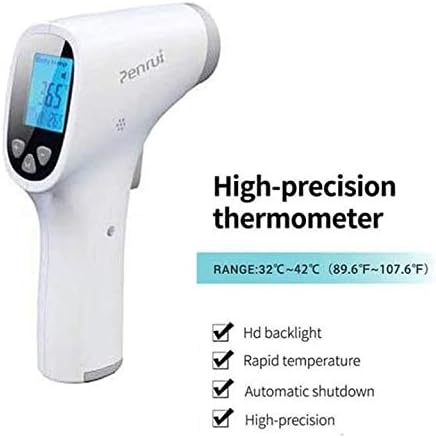
Figure 2: The thermometer highlighting its high-precision capabilities and features such as HD backlight, rapid temperature measurement, automatic shutdown, and high precision. The measurement range for body temperature is 32°C to 42°C (89.6°F to 107.6°F).
Taking an Object Surface Temperature Measurement:
This mode is useful for checking the temperature of milk, bath water, or food.
- Press the "MODE" button to switch to "Object" mode. The display will indicate the current mode.
- Point the thermometer at the surface of the object you wish to measure, maintaining a distance of 1-6 cm (0.4-2.5 inches).
- Press the measurement button (trigger).
- The surface temperature will be displayed on the LCD screen.

Figure 3: The thermometer demonstrating its "MODE" function, allowing users to measure the temperature of various objects such as milk in bottles, bath water for babies, and food.
Memory Function:
The thermometer automatically stores previous readings. Use the '+' and '-' buttons to scroll through stored measurements.
Maintenance
Cleaning:
- Wipe the thermometer body with a soft, slightly damp cloth.
- For the probe, use a cotton swab or soft cloth lightly moistened with alcohol (70% isopropyl alcohol is recommended) to gently clean the surface.
- Ensure the probe is completely dry before storage or next use.
- Do not use abrasive cleaners or immerse the device in water.
Storage:
- Store the thermometer in a cool, dry place, away from direct sunlight and extreme temperatures.
- If not in use for an extended period, remove the batteries to prevent leakage and damage.
Troubleshooting
| Problem | Possible Cause | Solution |
|---|---|---|
| No display/Device won't turn on | Low or dead batteries; Incorrect battery installation | Replace batteries with new ones; Check battery polarity. |
| Inaccurate readings | Dirty probe; Incorrect measurement distance; Environmental factors (e.g., strong airflow) | Clean the probe; Ensure correct distance (1-6 cm); Measure in a stable environment. |
| "Lo" or "Hi" displayed | Temperature is outside the measurement range | Ensure the temperature is within the specified operating and measurement ranges. |
Specifications
| Parameter | Value |
|---|---|
| Model Name | JRT200 |
| Brand | Penrui |
| Measurement Range (Body) | 32°C to 42.9°C (89.6°F to 109.2°F) |
| Operating Conditions | 16°C to 35°C (44.8°F to 98°F) |
| Measurement Distance | 1-6 cm (0.4-2.5 inches) |
| Accuracy | ±0.2°C |
| Resolution | 0.1°C |
| Measuring Time | Less than 1 second |
| Display Type | LCD |
| Power Source | 2 x AAA Batteries |
| Auto Power Off | After 10 seconds |
| Outer Material | ABS Plastic |
| Special Features | Alarm Clock, Non Contact, High Accuracy |
| Product Dimensions | 17 x 10.6 x 3.8 cm |
| Product Weight | 142 grams |
Warranty and Support
For information regarding warranty coverage, technical support, or service, please refer to the product packaging or contact Penrui customer service directly. Specific warranty details may vary by region and retailer.