
Introduction
The Lexsen LMX8 USB is an 8-channel audio mixer designed for various sound reinforcement and recording applications. It features a versatile input section including 6 Combo XLR inputs, 6 P10 (stereo) inputs, and 1 P10 L/R (stereo) input, along with L/R Stereo (main output) and P2 output. This manual provides essential information for the proper setup, operation, maintenance, and troubleshooting of your LMX8 USB mixer.
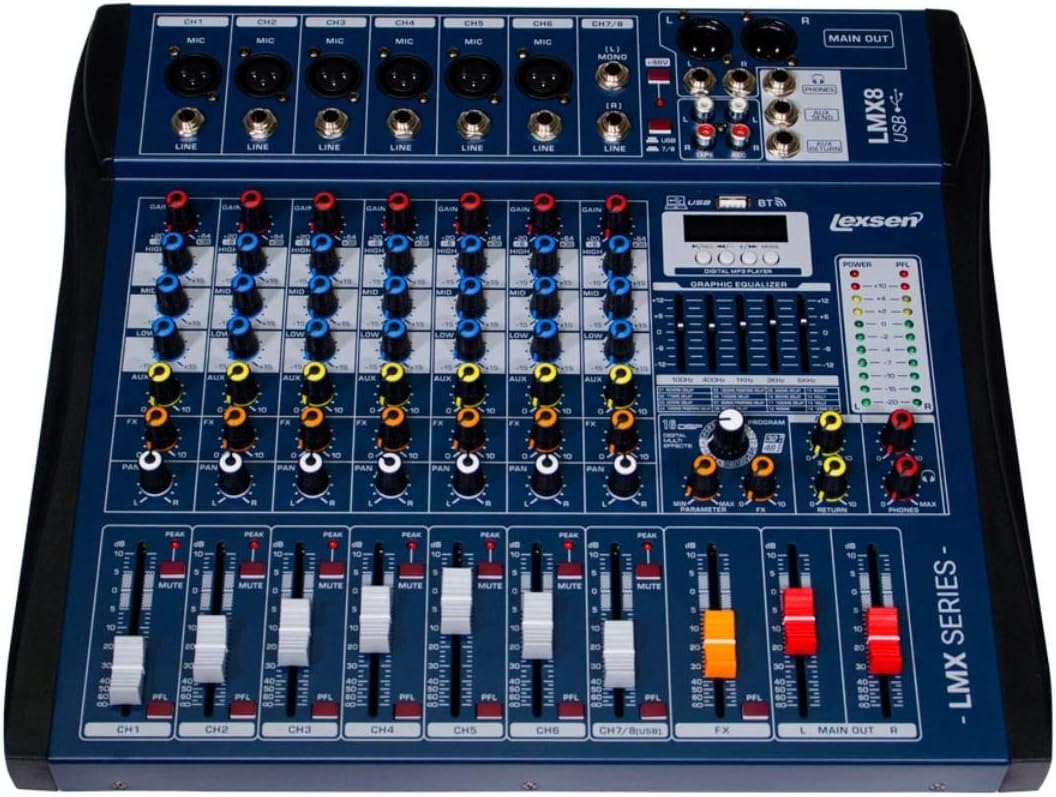
Figure 1: Front view of the Lexsen LMX8 USB 8-Channel Audio Mixer, showing all controls and inputs/outputs.
Setup
1. Unpacking and Placement
Carefully remove the mixer from its packaging. Place the mixer on a stable, flat surface, ensuring adequate ventilation around the unit. Avoid placing it near heat sources or in direct sunlight.
2. Power Connection
Connect the provided power adapter to the mixer's power input. Plug the adapter into a standard electrical outlet. The LMX8 USB operates on wired electric power. Ensure the power switch is in the 'OFF' position before connecting to power.
3. Input Connections
- Microphone/Line Inputs (Channels 1-6): Use the Combo XLR inputs for microphones or line-level devices. For line-level instruments, use the 6x P10 (stereo) inputs.
- Stereo Line Input (Channel 7/8): Use the 1x P10 L/R (stereo) input for connecting stereo line-level sources such as keyboards or media players.
4. Output Connections
- Main Output: Connect your main speakers or power amplifier to the L/R Stereo main outputs.
- Headphone Output: Connect headphones to the P2 output for monitoring.
5. USB and Bluetooth Connectivity
The LMX8 USB supports USB and Bluetooth connectivity for playback from external devices. Refer to the 'Operating' section for detailed instructions on using these features.
Operating Instructions
1. Powering On
After all connections are made, switch the power button to the 'ON' position. The power indicator light will illuminate.
2. Channel Controls (Channels 1-8)
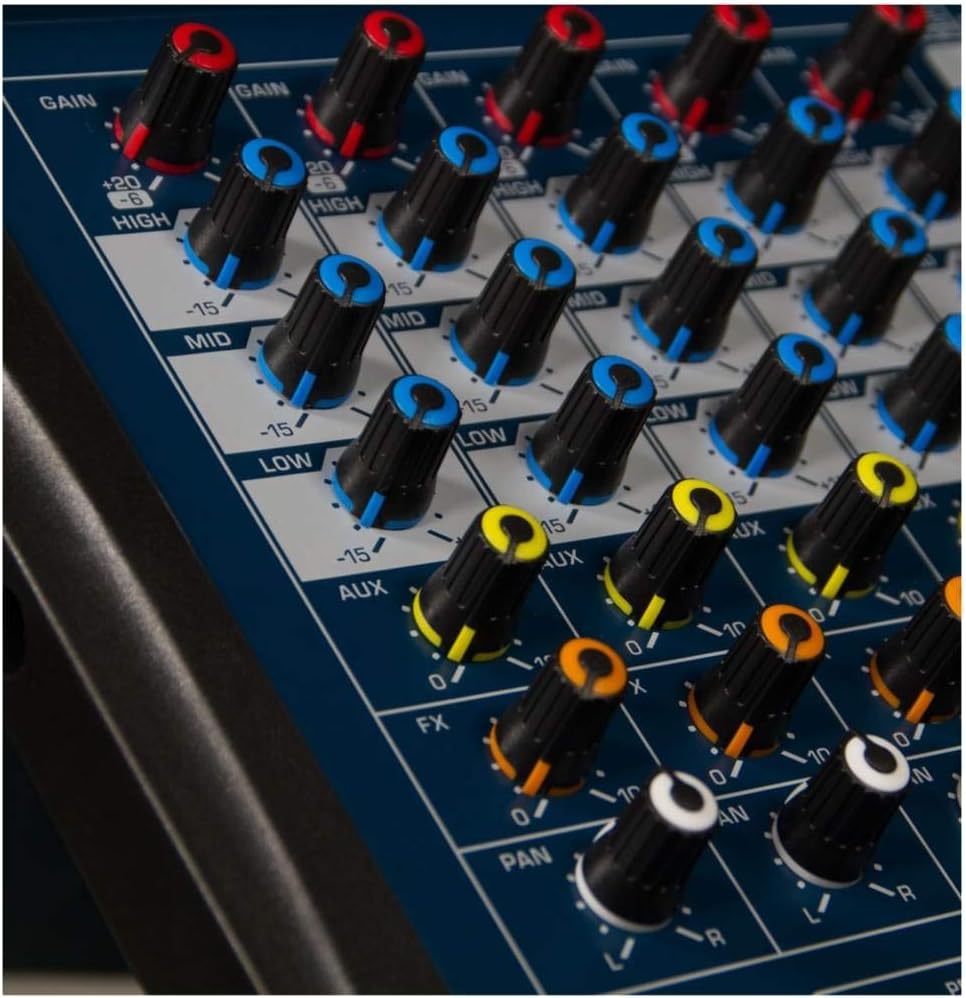
Figure 2: Detail of channel controls including GAIN, EQ, AUX, FX, and PAN knobs.
- GAIN: Adjusts the input sensitivity for each channel. Start with the GAIN knob fully counter-clockwise and gradually increase until the PEAK LED flashes only occasionally.
- HIGH, MID, LOW (EQ): These knobs control the treble, midrange, and bass frequencies for each channel. Adjust to shape the tone of your input source.
- AUX: Sends a portion of the channel signal to the auxiliary output, typically used for monitor mixes.
- FX: Sends a portion of the channel signal to the internal effects processor.
- PAN: Adjusts the stereo position of the channel signal (left to right).
- MUTE: Silences the channel output.
- PFL (Pre-Fader Listen): Routes the channel signal to the headphone output for monitoring before the fader.
- Channel Fader: Controls the output level of the individual channel.
3. Main Output Controls

Figure 3: View of the channel faders and the main output faders (L MAIN OUT R).
- MAIN OUT Faders (L/R): Control the overall stereo output level of the mixer. Adjust these to achieve the desired volume for your main speakers.
- Level Meters: Monitor the output level of the main mix. Aim for levels that are consistently in the green, occasionally peaking into the yellow, and avoiding the red (clipping).
4. Digital MP3 Player and Graphic Equalizer
The LMX8 USB features a built-in digital MP3 player with USB and Bluetooth connectivity. Use the dedicated controls to navigate tracks, play/pause, and adjust settings. The graphic equalizer allows for fine-tuning the overall sound of the main mix.
5. FX Section

Figure 4: Detailed view of the FX return fader and Main Out faders.
The FX section allows you to apply internal effects to your audio. Use the FX send knobs on individual channels to send signal to the effects processor. The FX return fader controls the overall level of the effects mixed back into the main output.
Maintenance
1. Cleaning
Regularly clean the mixer's surface with a soft, dry cloth. For stubborn dirt, use a slightly damp cloth and mild detergent, then wipe dry immediately. Avoid using abrasive cleaners, solvents, or waxes, as these can damage the finish and controls.
2. Storage
When not in use for extended periods, store the mixer in a cool, dry place, away from direct sunlight and extreme temperatures. It is recommended to cover the unit to protect it from dust.
3. Cable Management
Ensure all cables are neatly organized and not under tension. Avoid bending cables sharply or placing heavy objects on them, as this can lead to damage and intermittent connections.
Troubleshooting
- No Sound Output:
- Check if the mixer is powered on and the power indicator is lit.
- Ensure all input and output cables are securely connected.
- Verify that channel faders and the MAIN OUT faders are raised.
- Check if any MUTE buttons are engaged on active channels.
- Confirm that your speakers or amplifier are powered on and functioning correctly.
- Distorted Sound:
- Reduce the GAIN on the input channels to prevent clipping (PEAK LEDs should not be constantly lit).
- Lower the MAIN OUT faders if the main level meters are consistently in the red.
- Check for damaged cables or faulty input sources.
- USB/Bluetooth Playback Issues:
- Ensure the USB device is properly inserted and formatted correctly.
- For Bluetooth, ensure the device is paired correctly and within range.
- Check the volume level on the MP3 player section and the corresponding channel fader.
Specifications
| Feature | Detail |
|---|---|
| Manufacturer | Lexsen |
| Model Number | LMX8 USB |
| Number of Channels | 8 |
| Inputs | 6x Combo XLR, 6x P10 (Stereo), 1x P10 L/R (Stereo) |
| Outputs | L/R Stereo (Main Output), P2 (Headphone) |
| Connectivity Technology | Auxiliary, Bluetooth, USB |
| Power Source | Wired Electric |
| Product Dimensions | 40 x 43 x 9 cm |
| Product Weight | 3.9 Kilograms |
Warranty Information
The Lexsen LMX8 USB Audio Mixer comes with a 2-Year Extended Warranty. This warranty covers defects in materials and workmanship under normal use. Please retain your proof of purchase for warranty claims. The warranty does not cover damage caused by misuse, accidents, unauthorized modifications, or improper installation.
Support
For technical assistance, troubleshooting beyond this manual, or warranty inquiries, please contact your authorized Lexsen dealer or the Lexsen customer support team. Refer to the Lexsen official website for the most up-to-date contact information.