
Tribesigns TB-F1142
Tribesigns 55 Inch Computer Desk with Hutch
Model: TB-F1142
Product Overview
The Tribesigns 55 Inch Computer Desk with Hutch is engineered to provide a spacious and ergonomic workspace for various activities, including studying, writing, and gaming. Its thoughtful design integrates a large desktop, an elevated monitor hutch, and convenient storage solutions to enhance productivity and organization in any home office or studio environment.

Key Features:
- Spacious Desktop: A 55-inch by 23.6-inch contoured tabletop offers ample room for your keyboard, mouse, speakers, and other accessories.
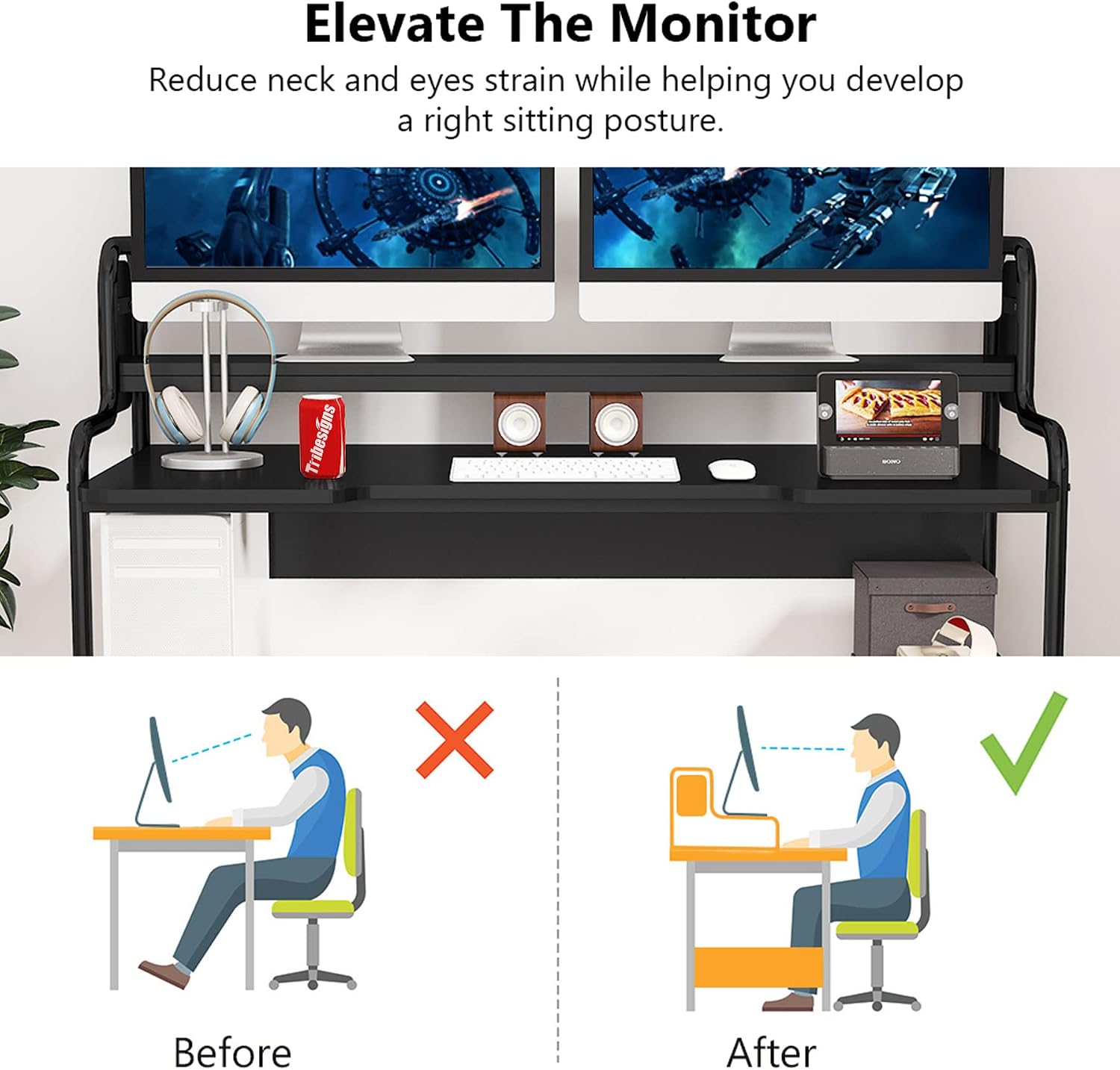
- Built-in Desk Hutch: An elevated shelf positions monitors at eye level, promoting comfortable viewing and reducing neck and eye fatigue.
- Two Bottom Shelves: Multifunctional storage shelves are ideal for housing a CPU tower, printer, baskets, books, or general storage, keeping your workspace organized.
- Super Sturdy Workstation: Constructed from 0.71-inch thick E1-grade MDF board with a powder-coated finish, complemented by 0.98-inch pipe frames and 0.59-inch x 1.18-inch metal tubes, ensuring stability and durability.

Setup and Assembly
The Tribesigns Computer Desk is designed for straightforward assembly. All necessary parts and detailed instructions are included in the packaging. It is recommended that two people participate in the assembly process to ensure ease and safety.

Assembly Steps:
- Unpack all components and verify against the parts list provided in the manual.
- Begin by assembling the main frame and attaching the bottom shelves. Refer to the 'Assembly the Bottom Shelves' video for visual guidance.
- Secure the main desktop to the assembled frame.
- Install the elevated monitor hutch. Consult the 'Assemble the Monitor Shelf' video for detailed steps.
- Ensure all screws and fasteners are tightened securely.
Important Note: For optimal safety and ease, it is strongly recommended to have two people for assembly.
Assembly Videos:
This video provides a comprehensive guide to the installation process of the Tribesigns 55-inch Computer Gaming Desk, demonstrating step-by-step assembly.
A detailed video guide focusing specifically on the assembly of the bottom storage shelves for the Tribesigns F1142/F1253 desk models.
This video demonstrates the assembly process for the elevated monitor shelf of the Tribesigns F1142/F1253 desk, showing how to securely attach it.
A short but important video emphasizing the recommendation for two people during assembly to ensure safety and ease of construction.
Operating and Usage
The Tribesigns 55 Inch Computer Desk is designed for versatile use, providing an efficient and comfortable workspace.
Optimizing Your Workspace:
- Ergonomic Monitor Placement: Utilize the elevated hutch to position your monitors at eye level, which helps maintain proper posture and reduces strain during long periods of use.
- Desktop Organization: The contoured desktop provides dedicated space for your keyboard and mouse, allowing for comfortable arm and wrist positioning.
- Storage Utilization: The two bottom shelves are ideal for keeping your CPU tower off the floor, storing a printer, or organizing books and office supplies, ensuring a clutter-free environment.

Maintenance
Proper care and maintenance will ensure the longevity and appearance of your Tribesigns Computer Desk.
Cleaning Instructions:
- Regularly wipe the desk surfaces with a soft, damp cloth to remove dust and light spills.
- Avoid using harsh chemicals, abrasive cleaners, or excessive moisture, as these can damage the finish.
- Immediately wipe up any liquid spills to prevent water damage or warping of the engineered wood surfaces.
General Care:
- Avoid placing extremely hot or cold items directly on the desktop without protective coasters.
- Do not drag heavy objects across the surface to prevent scratches.
- Periodically check and tighten all screws and fasteners to maintain the desk's stability.
Troubleshooting
This section addresses common concerns and provides solutions for your Tribesigns Computer Desk.
Common Issues and Solutions:
- Wobbling Desk: If the desk feels unstable, ensure all assembly screws are fully tightened. Check the adjustable feet at the bottom of the legs and adjust them to level the desk on uneven floors.
- Water Damage/Warping: The desk surfaces are susceptible to water damage. Always use coasters for drinks and immediately wipe up any spills with a dry cloth to prevent warping or discoloration.
- Difficulty Removing Stickers: If white identification stickers are difficult to remove, gently warm them with a hairdryer on a low setting to loosen the adhesive, then peel slowly. Any residue can be removed with a small amount of rubbing alcohol on a soft cloth.
- Legroom for Taller Users: Some users may find the upper bar restricts legroom. While the design is fixed, adjusting your chair height or footrest can help optimize comfort.
Specifications
| Attribute | Detail |
|---|---|
| Brand | Tribesigns |
| Model Number | TB-F1142 |
| Product Dimensions | 18.5"D x 55.11"W x 41.33"H |
| Color | Black |
| Style | Modern |
| Base Material | Metal |
| Top Material Type | Engineered Wood (E1-grade MDF) |
| Finish Type | Laminated, Powder-coated |
| Special Feature | Ergonomic Monitor Riser |
| Included Components | CPU Stand, Storage Shelf, Monitor Shelf |
| Item Weight | 34.4 Kilograms |
| Number Of Shelves | 3 |
| Tabletop Thickness | 0.71 Inches |
| Required Assembly | Yes |
| Recommended Number of People for Assembly | 2 |
| Tools Recommended For Assembly | Screw Driver |
| Includes All Assembly Tools | Yes |
Warranty and Support
Tribesigns is committed to customer satisfaction and product quality.
Warranty Information:
This Tribesigns Computer Desk comes with an 18-month warranty from the date of purchase, covering manufacturing defects and material flaws. Please retain your proof of purchase for warranty claims.
Customer Service:
For any questions, concerns, or assistance with assembly or product issues, please contact our friendly customer service team. We offer lifetime support to ensure your satisfaction with our products.
Contact information can typically be found on the Tribesigns official website or through your purchase platform.
Ask a question about this manual
Ask about setup, troubleshooting, compatibility, parts, safety, or missing instructions. Manuals+ will review the question and use this page’s manual context to help answer it.