
1. Introduction
This manual provides essential information for the installation, operation, and maintenance of the Generic Main Board, model 40-MST10R-MAB2HG, part number GTC006736A. This main board is a replacement component specifically designed for TCL TV model 55S421. It is intended for use by qualified technicians or individuals with experience in electronics repair. Please read this manual thoroughly before attempting any installation or repair.
2. Safety Information
Improper handling or installation of electronic components can result in personal injury or damage to the equipment. Adhere to the following safety guidelines:
- Disconnect Power: Always ensure the television is unplugged from the power outlet before beginning any work.
- Static Discharge: Electronic components are sensitive to electrostatic discharge (ESD). Use an anti-static wrist strap and work on an anti-static mat to prevent damage.
- Professional Installation Recommended: If you are not confident in your ability to perform the installation, seek assistance from a qualified electronics repair technician.
- Handle with Care: Avoid touching the surface of integrated circuits and connectors directly. Hold the board by its edges.
- Ventilation: Ensure the TV's ventilation openings are not blocked after reassembly to prevent overheating.
3. Product Overview
The 40-MST10R-MAB2HG main board serves as the central processing unit for your TCL 55S421 television, managing all primary functions including video processing, audio output, and input/output connectivity. This board is a direct replacement for the original component.
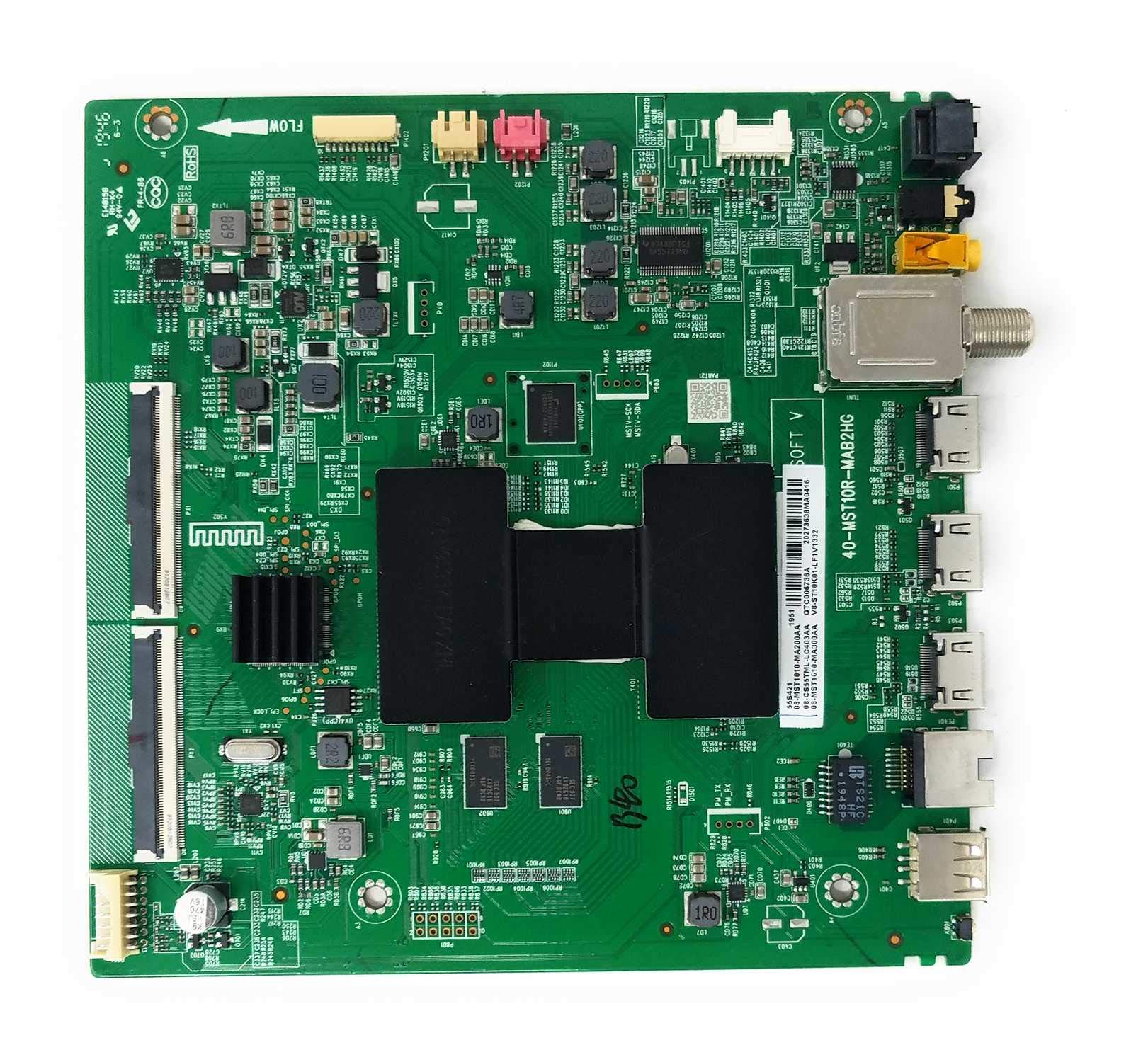
Figure 3.1: Top view of the Generic Main Board 40-MST10R-MAB2HG. This image displays the overall layout of the board, including various integrated circuits, connectors, and heat sinks.
Key components on the board include the main processor, memory modules, power management circuits, and various input/output ports such as HDMI, USB, and antenna inputs. The board is designed for seamless integration with the TCL 55S421 TV chassis.

Figure 3.2: Close-up view of a section of the main board, highlighting specific part numbers and connectors. Visible identifiers include '40-MST10R-MAB2HG' and '20273638MA0416', which confirm the board's model and revision details.
4. Installation Guide
Follow these steps carefully to replace the main board in your TCL 55S421 television:
- Preparation: Place the TV face down on a soft, clean surface to prevent screen damage. Ensure the TV is unplugged.
- Remove Back Cover: Unscrew all screws securing the TV's back cover. Carefully remove the cover.
- Locate Main Board: Identify the existing main board. It is typically the largest circuit board with numerous connectors for inputs (HDMI, USB, etc.) and internal components.
- Disconnect Cables: Carefully disconnect all cables connected to the old main board. This includes ribbon cables, power cables, and antenna/input cables. Note the orientation and connection points for reassembly. Taking photos can be helpful.
- Remove Old Board: Unscrew the mounting screws that secure the old main board to the TV chassis. Gently lift and remove the board.
- Install New Board: Position the new 40-MST10R-MAB2HG main board in the same location. Secure it with the mounting screws. Do not overtighten.
- Reconnect Cables: Reconnect all cables to the new main board, ensuring they are properly seated and oriented. Double-check all connections.
- Reassemble TV: Replace the TV's back cover and secure it with all screws.
5. Post-Installation Checks
After installing the new main board, perform the following checks:
- Power On: Plug the TV into a power outlet and attempt to power it on. Observe if the power indicator light illuminates.
- Display Check: Verify if the TV displays an image (e.g., a boot logo, input selection screen).
- Input Functionality: Test all input ports (HDMI, USB, AV, Antenna) with known working devices to ensure they are functioning correctly.
- Audio Check: Confirm that audio is produced through the TV's speakers or connected audio system.
- Remote Control: Ensure the TV responds to commands from the remote control.
If any issues arise, refer to the Troubleshooting section of this manual.
6. Maintenance
The main board itself requires minimal maintenance. To ensure its longevity and optimal performance:
- Keep Dry: Prevent any liquids from coming into contact with the TV or its internal components.
- Dust Control: Periodically clean the TV's ventilation openings to prevent dust buildup, which can impede cooling and lead to component failure.
- Stable Power: Use a surge protector to safeguard the TV from power fluctuations.
7. Troubleshooting
If you encounter problems after installing the main board, consult the table below for common issues and potential solutions:
| Problem | Possible Cause | Solution |
|---|---|---|
| TV does not power on. | Loose power cable, faulty power supply unit (PSU), incorrect board installation. | Check power cable connection. Verify PSU functionality. Re-check all board connections. |
| No picture, but audio is present. | Loose display panel ribbon cable, faulty T-Con board, backlight issue. | Ensure display panel ribbon cables are securely connected to the main board. |
| No audio, but picture is present. | Loose speaker cables, incorrect audio settings. | Check speaker cable connections to the main board. Verify TV audio settings. |
| Input ports (HDMI, USB) not working. | Loose internal cable connections, software issue. | Ensure all internal cables related to input ports are properly connected. Try a factory reset if accessible. |
If the problem persists after attempting these solutions, it is recommended to consult a professional technician.
8. Specifications
| Feature | Detail |
|---|---|
| Brand | Generic |
| Model Number | 40-MST10R-MAB2HG |
| Part Number | GTC006736A |
| Compatible TV Model | TCL 55S421 |
| Item Weight | 16 ounces (approx. 453 grams) |
| ASIN | B0893MRQT7 |
9. Warranty and Support
This Generic Main Board 40-MST10R-MAB2HG comes with a 30-day warranty from the date of purchase. This warranty covers defects in materials and workmanship under normal use. It does not cover damage caused by improper installation, misuse, accidents, or unauthorized modifications.
For technical support or warranty claims, please contact your original seller or distributor with your purchase details and the product's ASIN (B0893MRQT7).