
EUREKA ERGONOMIC Adjustable gaming desk
EUREKA ERGONOMIC 65-inch Electric Height Adjustable Gaming Desk User Manual
Introduction
Thank you for choosing the EUREKA ERGONOMIC 65-inch Electric Height Adjustable Gaming Desk. This manual provides essential information for the proper assembly, operation, and maintenance of your new desk. Please read it thoroughly before use to ensure safety and optimal performance.
Safety Information
For your safety and to prevent damage to the product, please adhere to the following guidelines:
- Assemble the desk strictly according to the provided instructions.
- Do not exceed the maximum recommended weight limit of 220 pounds (approximately 100 kg) on the desktop. Overloading can compromise stability and functionality.
- Ensure all connections are secure before operating the desk.
- Keep hands and objects clear of moving parts during height adjustments.
Product Overview
The EUREKA ERGONOMIC 65-inch Electric Height Adjustable Gaming Desk is designed to enhance your gaming and work experience with its robust features:
- Wider & Larger Surface: The spacious 65.35" x 27.56" desktop accommodates multiple monitors and provides ample space for peripherals.
- Ergonomic Height Adjustment: Electrically adjustable height from 29.92" to 48.43" with two memory presets for customized sitting and standing positions.
- Ultra-quiet High-Performance Dual-motor Lift System: Ensures smooth, reliable, and stable height adjustments with advanced Hall sensors and AI software algorithms. Features power-off self-locking and anti-collision protection.
- RGB LED Lighting: Controllable RGB lighting armor with six monochromatic options, RGB lighting variations, and strobe lights to create an immersive atmosphere.
- Multifunctional Design: Includes double rotatable headphone racks and an oversized full-desk mouse pad, suitable for gaming, office, or studio use.
Setup
Assembly is required for this desk. Please follow the detailed instructions provided in the separate assembly guide included with your product. Ensure all components are present and undamaged before beginning assembly.
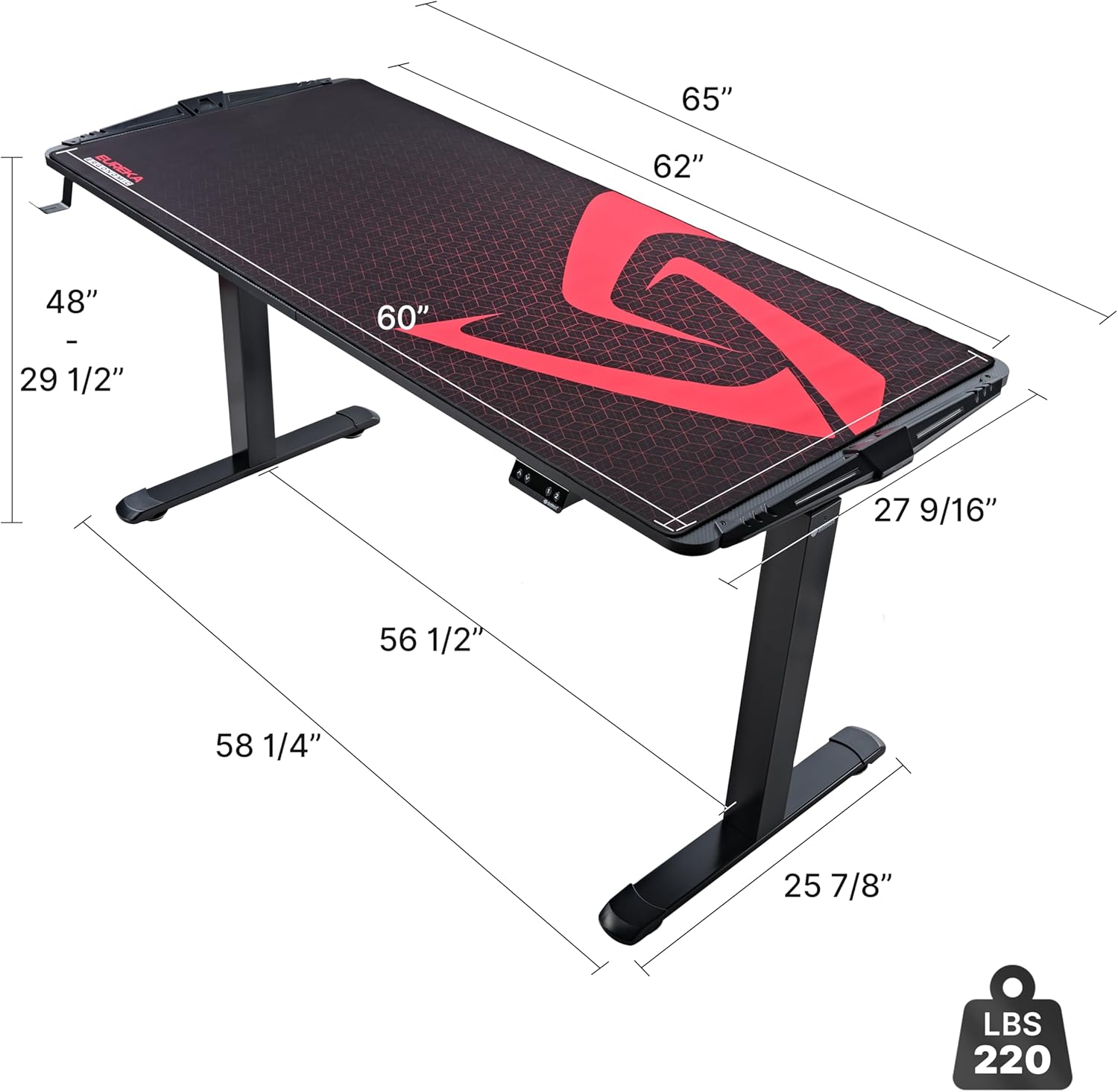
Image: Desk dimensions and weight capacity of 220 lbs.
Once assembled, ensure the desk is placed on a level surface. The desk is designed to support a maximum weight of 220 pounds (99.79 kg). Do not overload the desk to maintain stability and prevent damage.
Operating Instructions
Height Adjustment
The desk features an electric lift system for easy height adjustment. Use the control panel located on the front edge of the desk to raise or lower the desktop.
- Up/Down Buttons: Press and hold the up or down arrow buttons to continuously adjust the desk height. Release the button to stop at your desired height.
- Memory Presets (1, 2): The control panel has two memory preset buttons. To save a height, adjust the desk to the desired position, then press and hold a memory button (e.g., '1' or '2') until the display flashes or beeps, indicating the height is saved. To recall a saved height, simply press the corresponding memory button once.

Image: Illustration of the desk's height adjustment range from 29.92 inches to 48.43 inches.
RGB LED Lighting Control
The desk is equipped with integrated RGB LED lights. Use the dedicated button on the control panel to cycle through various lighting modes:
- Six monochromatic colors
- RGB light changing modes
- Strobe lighting effects

Image: Close-up view of the desk's RGB LED lighting strip and control options.
Anti-Collision Protection
The desk features an anti-collision function. If the desk encounters an obstacle while adjusting height, it will automatically stop and retract slightly to prevent damage to the desk or objects.

Image: Diagram illustrating the anti-collision mechanism, showing the desk stopping and retracting upon encountering an obstacle.
Maintenance
To keep your EUREKA ERGONOMIC gaming desk in optimal condition:
- Cleaning: Wipe the desktop and frame with a damp cloth. Avoid using harsh chemicals or abrasive cleaners that could damage the finish.
- Regular Checks: Periodically check all screws and bolts to ensure they are tight. Retighten if necessary.
Troubleshooting
If you encounter any issues with your desk, please refer to the following common troubleshooting tips:
- Desk Not Moving: Check if the power cord is securely plugged into both the desk and a working power outlet. Ensure no cables are tangled or obstructing the lift mechanism.
- Uneven Movement: Ensure the desk is not overloaded and that weight is distributed evenly. Check if the floor surface is level.
- Error Codes: If the display shows an error code, consult the specific error code section in the full assembly manual or contact customer support.
If the problem persists after attempting these steps, please contact EUREKA ERGONOMIC customer support for assistance.
Specifications
| Feature | Detail |
|---|---|
| Brand | EUREKA ERGONOMIC |
| Product Dimensions | 27"D x 65"W x 30"H |
| Color | Black |
| Style | Modern |
| Base Material | Alloy Steel |
| Top Material Type | Engineered Wood |
| Finish Type | Powder Coated |
| Special Feature | Adjustable |
| Maximum Weight Recommendation | 220 Pounds |
| Minimum Height | 29.92 Inches |
| Maximum Height | 48.43 Inches (123 Centimeters) |
| Lifting Mechanism | Electric |
| Included Components | Standing desk, headphone hook, full-desk mousepad |
Warranty
This EUREKA ERGONOMIC desk comes with a Two-year manufacturer warranty. Please retain your proof of purchase for warranty claims. For detailed terms and conditions, refer to the warranty information provided with your product packaging.
Customer Support
EUREKA ERGONOMIC is committed to providing world-class products and support. Our customer support team is based in the U.S.A. and is available to assist you with any questions or support you may need regarding your desk.
For further assistance, please visit the official EUREKA ERGONOMIC Store or refer to the contact information provided in your product packaging.
Ask a question about this manual
Ask about setup, troubleshooting, compatibility, parts, safety, or missing instructions. Manuals+ will review the question and use this page’s manual context to help answer it.