Introduction
This manual provides comprehensive instructions for the AIDITIYMI CT-RC2US-18 replacement remote control. This remote is designed to be compatible with various Toshiba Smart LED HDTV models, offering a direct replacement for your original remote. It requires no programming or pairing, functioning immediately upon battery installation.

Image: Angled view of the AIDITIYMI CT-RC2US-18 remote control, showcasing its ergonomic design and button layout.
Setup and Battery Installation
The AIDITIYMI CT-RC2US-18 remote control is pre-programmed and does not require any additional setup or pairing with your Toshiba TV. Simply install the batteries, and it will be ready for use.
- Open the Battery Compartment: Locate the battery compartment cover on the back of the remote control. Slide the cover downwards or press the latch and lift to open it.
- Insert Batteries: Insert two (2) new 1.5V AAA alkaline batteries into the compartment. Ensure that the positive (+) and negative (-) terminals of the batteries align correctly with the markings inside the compartment. Incorrect insertion can prevent the remote from functioning.
- Close the Battery Compartment: Replace the battery compartment cover by sliding it back into place until it clicks securely.
- Test the Remote: Point the remote control towards your Toshiba TV and press the Power button. The TV should respond.
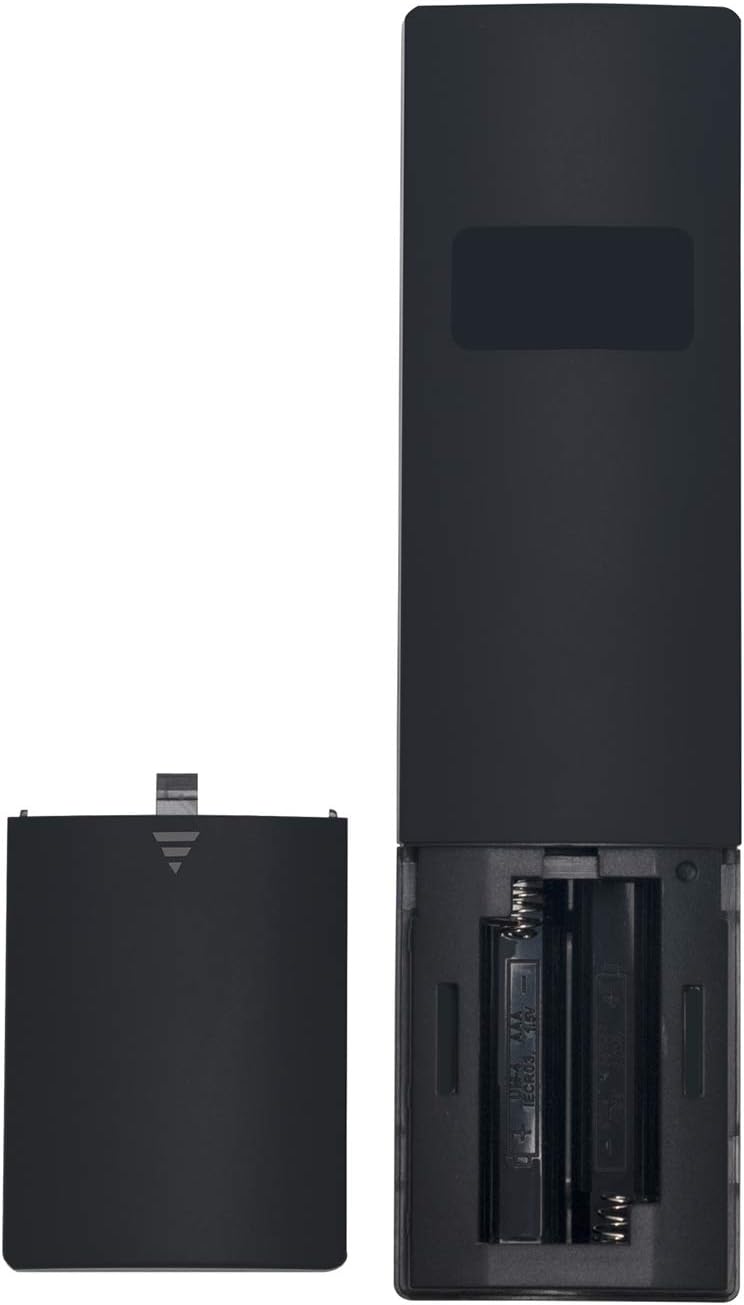
Image: Rear view of the remote control with the battery compartment open, showing the slots for two AAA batteries.
Operating Instructions
This section outlines the primary functions of the buttons on your AIDITIYMI CT-RC2US-18 remote control.

Image: Front view of the remote control, clearly displaying all buttons and their labels.
- Power: Turns the TV on or off.
- INPUT: Cycles through available input sources (HDMI, AV, etc.).
- SAP: Selects Secondary Audio Program (if available).
- ACC: Accesses Closed Captioning settings.
- CCD: Activates or deactivates Closed Captioning.
- Sound: Accesses sound settings or audio modes.
- SLEEP: Sets the sleep timer for automatic TV shutdown.
- Picture: Accesses picture settings or video modes.
- MUTE: Mutes or unmutes the TV audio.
- INFO: Displays on-screen information about the current program or input.
- MENU: Opens the TV's main menu for settings and options.
- EXIT: Exits the current menu or on-screen display.
- Directional Pad (Up, Down, Left, Right) & OK: Navigates through menus and confirms selections.
- VOL+/-: Adjusts the volume level.
- CH+/-: Changes TV channels.
- Play/Pause: Controls media playback (if supported by the TV and content).
- Cast/Screen Mirroring: Initiates screen mirroring or casting functions (if supported by the TV).
Maintenance
Battery Replacement
When the remote control's performance degrades or it stops responding, it is likely time to replace the batteries. Follow the steps outlined in the "Setup and Battery Installation" section to replace the two (2) AAA alkaline batteries.
Cleaning
To clean the remote control, use a soft, dry cloth. For stubborn dirt, slightly dampen the cloth with water or a mild, non-abrasive cleaner. Avoid using harsh chemicals, solvents, or abrasive materials, as these can damage the remote's surface or internal components. Ensure no liquid enters the remote control.
Troubleshooting
- Remote is not responding:
- Check if the batteries are inserted correctly with the correct polarity (+/-).
- Replace the batteries with new 1.5V AAA alkaline batteries.
- Ensure there are no obstructions between the remote control and the TV's infrared receiver.
- Confirm you are within the effective range of the TV's IR receiver.
- Some buttons are not working:
- This remote is a direct replacement and should function for all listed compatible Toshiba TV models. If specific buttons do not work, ensure your TV model is listed in the compatibility section.
- Clean the remote control, especially around the unresponsive buttons, to remove any debris that might be preventing proper contact.
- No programming required: This remote is designed to work out of the box with compatible Toshiba TVs. If it does not work after installing fresh batteries, verify your TV model against the compatibility list.
Specifications
| Model Number | CT-RC2US-18 (AD-CT-RC2US-18 CTRC2US18-ad001) |
| Brand | AIDITIYMI |
| Product Dimensions | 6 x 1.5 x 0.5 inches |
| Item Weight | 2 ounces |
| Batteries Required | 2 x AAA (Alkaline recommended) |
| Compatible Devices | Television |
| Compatible Toshiba TV Models | 55L421U, 43L621U, 55L621U, 49L621U, 65L621U, 43L511U18, 50L711U18, 55L711U18, 32L221U, 50L711M18, 55L711M18 |
Warranty Information
Specific warranty details for the AIDITIYMI CT-RC2US-18 remote control are not provided in the product information. Please refer to the retailer or manufacturer's website for any applicable warranty policies.
Customer Support
For further assistance or inquiries regarding the AIDITIYMI CT-RC2US-18 remote control, please contact the retailer from whom the product was purchased or visit the AIDITIYMI official support channels if available.


