
1. Introduction
This manual provides detailed instructions for the installation, operation, and maintenance of the AMPINVT 120A MPPT Solar Charge Controller. This device is designed to efficiently manage power flow from solar panels to various battery systems, including 12V, 24V, 36V, and 48V configurations. Please read this manual thoroughly before installation and operation to ensure optimal performance and safety.

Figure 1: Front view of the AMPINVT 120A MPPT Solar Charge Controller.
2. Key Features
- 120A MPPT solar charge controller for Off-Grid Solar Systems.
- Compatible with solar panel inputs up to 1700W (12V), 3400W (24V), 6800W (48V).
- Maximum Power Point Tracking (MPPT) rate of ">=99%" and conversion rate of ">98%".
- Integrated LCD Display for clear operating data and working conditions.
- Real-time energy statistics function with multiple load control modes.
- Supports 4 charging options: Sealed, Gel, Flooded, and User-defined.
- Maximum PV DC Input of 150V.
- Automatic detection for 12V, 24V, and 48V battery systems.
- RS485 communication for Wi-Fi remote monitoring (requires additional purchase).

Figure 2: Overview of the controller's key features including MPPT efficiency and maximum PV input voltage.
3. Product Overview
The AMPINVT MPPT Solar Charge Controller features a robust design with clearly labeled components for easy installation and operation.

Figure 3: Product Function Introduction. Key components include (1) Cooling Fan, (2) Hang Bracket, (3) LCD Display, (4) Menu Button, (5) Down Button, (6) Up Button, (7) Enter Button, (8) Temperature Interface, (9) Solar Panel Terminals, (10) Battery Terminals, (11) DC Load Terminals, and (12) RS485 Port.
4. Setup and Installation
Proper installation is crucial for the safe and efficient operation of your solar charge controller. Ensure all connections are secure and correctly polarized.
4.1. Connection Diagram
Follow the diagram below for connecting your solar panels, battery, and DC load to the controller. Always connect the battery first, then the solar panels, and finally the DC load.

Figure 4: Connection Diagram for the 120A MPPT Solar Charge Controller. Shows connections for solar panels, battery, DC load, and optional Wi-Fi module.
4.2. Battery Type Compatibility
The controller is compatible with various battery types. Ensure you select the correct battery type in the settings for proper charging.

Figure 5: The controller is compatible with 12V/24V/36V/48V systems and supports LiFePO4, AGM, Lithium, GEL, Flooded, and User-defined battery types.
5. Operating Instructions
The controller features an intuitive LCD display and buttons for easy navigation and parameter setting. The following video demonstrates basic operation and setting adjustments.
Video 1: Demonstration of AMPINVT MPPT solar charge controller operation and settings adjustment via the LCD interface.
5.1. LCD Display and Buttons
The LCD displays real-time system data. Use the Menu, Down, Up, and Enter buttons to navigate through the menus and adjust settings. The video above provides a visual guide to these interactions.
5.2. Parameter Settings
Access the parameter settings menu to configure various aspects of the controller, including battery type, charge current limits, and load control modes. Refer to the detailed instructions in the full user manual for specific parameter values and advanced configurations.
6. Maintenance
Regular maintenance ensures the longevity and optimal performance of your solar charge controller. Perform the following checks periodically:
- Cleanliness: Keep the controller clean and free from dust and debris. Ensure the cooling fan and vents are unobstructed.
- Connections: Periodically check all wiring connections for tightness and corrosion. Loose connections can lead to overheating and poor performance.
- Environmental Conditions: Ensure the controller is installed in a dry, well-ventilated area, away from direct sunlight and excessive heat or moisture.
- Firmware Updates: Check the manufacturer's website for any available firmware updates that may improve performance or add new features.
7. Troubleshooting
If you encounter issues with your AMPINVT Solar Charge Controller, consider the following common troubleshooting steps:
- No Display/Power: Check battery connections and ensure the battery voltage is within the controller's operating range. Verify the fuse is intact.
- No Charging: Confirm solar panel connections are correct and receiving adequate sunlight. Check PV input voltage and current on the display. Ensure the battery type settings are correct.
- Load Not Working: Verify DC load connections. Check load control mode settings (e.g., always on, timer). Ensure the battery has sufficient charge.
- Overheating: Ensure proper ventilation around the controller. Check for obstructions to the cooling fan. Reduce load if continuously operating at maximum capacity in high ambient temperatures.
For persistent issues or complex problems, refer to the comprehensive troubleshooting section in the complete user manual or contact AMPINVT customer support.
8. Specifications
Detailed technical specifications for the AMPINVT 120A MPPT Solar Charge Controller:
| Specification | Value |
|---|---|
| Display Type | LCD |
| Manufacturer | Top One Power |
| Product Dimensions | 11.93 x 5.43 x 17.17 inches (30.3 x 13.8 x 43.6 cm) |
| Item Weight | 25.9 pounds (11.75 kg) |
| Item Model Number | AP-120C |
| Batteries Required | No |
| Color | Silver |
| Brand | AMPINVT |
| Voltage | 150 Volts (DC) Max Input |
| Material | Plastic |
Figure 6: Product dimensions of the AMPINVT 120A MPPT Solar Charge Controller.

9. Wide Application
The AMPINVT MPPT Solar Charge Controller is versatile and suitable for a variety of off-grid solar applications, providing reliable power management in diverse environments.
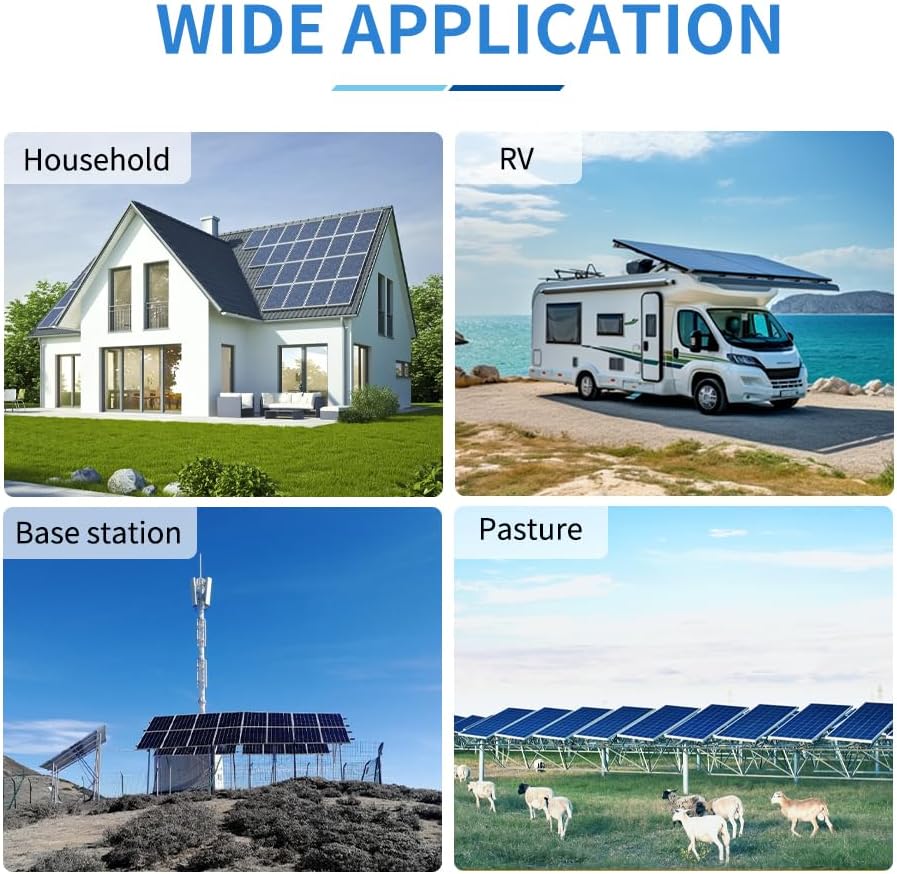
Figure 7: Examples of wide applications including household solar systems, RVs, base stations, and agricultural pastures.
10. Warranty and Support
AMPINVT products are backed by a manufacturer's warranty. For detailed warranty information, technical support, or service inquiries, please refer to the official AMPINVT website or contact their customer service department directly. Keep your purchase receipt for warranty claims.
Contact Information: Please refer to the product packaging or the official AMPINVT website for the most current contact details.