
1. Product Overview
The Blaupunkt BP-WB232 is a versatile TV wall mount designed for screens ranging from 23 inches (58.4 cm) to 42 inches (106.7 cm). This mount supports a maximum load capacity of 35 kg and features a swivel and tilt mechanism for optimal viewing angles. Its robust construction ensures secure mounting for your television.
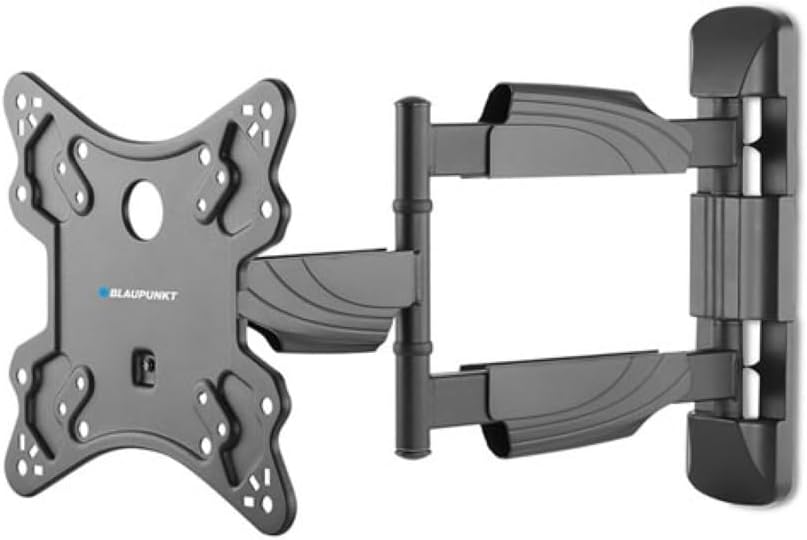
Image 1: Front view of the Blaupunkt BP-WB232 TV Wall Mount, showing the wall plate and the articulating arm with the TV mounting plate.
2. Important Safety Instructions
- Read all instructions carefully before installation. If you have any doubts, consult a qualified professional.
- Ensure the wall structure can safely support the combined weight of the mount and the television.
- Do not exceed the maximum load capacity of 35 kg (77 lbs).
- Use only the provided mounting hardware. If your installation requires different hardware, consult a professional.
- Keep children and pets away during installation.
- Periodically check all screws and connections to ensure they remain secure.
3. Package Contents
Please verify that all components are present before beginning installation.
- Wall Plate Assembly
- TV Bracket Arms (2x)
- Mounting Hardware Kit (screws, anchors, washers, spacers)
- Instruction Manual

Image 2: The Blaupunkt BP-WB232 TV Wall Mount disassembled, showing the wall mounting arm and the TV attachment plate.
4. Installation Guide
This section provides step-by-step instructions for installing your Blaupunkt BP-WB232 TV wall mount.
4.1 Tools Required (Not Included)
- Pencil
- Drill
- Stud Finder (for wood stud installation)
- Level
- Phillips Head Screwdriver
- Socket Wrench (for lag bolts)
- Measuring Tape
4.2 Mounting the Wall Plate
- Determine Mounting Location: Choose a location on the wall that can support the weight of the TV and mount. Ensure there are no hidden electrical wires or plumbing.
- Mark Drill Holes: Hold the wall plate against the wall at the desired height. Use a level to ensure it is perfectly horizontal. Mark the drill hole locations with a pencil.
- Drill Pilot Holes:
- For wood studs: Drill pilot holes using a drill bit slightly smaller than the lag bolts.
- For concrete/brick walls: Drill pilot holes using a masonry drill bit. Insert wall anchors into the drilled holes.
- Secure Wall Plate: Align the wall plate with the drilled holes. Insert the lag bolts (and washers) through the wall plate and into the pilot holes/anchors. Tighten securely with a socket wrench. Do not overtighten.
4.3 Attaching Brackets to TV
- Identify VESA Holes: Locate the four mounting holes on the back of your TV. These are standard VESA mounting patterns.
- Select Screws and Spacers: Choose the appropriate diameter and length of screws from the hardware kit that fit your TV's VESA holes. If the TV back is uneven or cables interfere, use spacers.
- Attach TV Brackets: Align the TV bracket arms with the VESA holes on the back of your TV. Secure them using the selected screws and washers. Ensure the brackets are oriented correctly (hooks facing downwards) and are evenly spaced. Tighten firmly but do not overtighten.
4.4 Mounting TV to Wall Plate
- Lift TV: With assistance, carefully lift the TV with the attached brackets.
- Hook onto Wall Plate: Hook the TV brackets onto the wall plate. Ensure both brackets are securely seated on the wall plate's rail.
- Secure TV: Locate the safety screws or locking mechanisms on the bottom of the TV brackets. Tighten these to prevent the TV from accidentally lifting off the wall plate.
5. Operation and Adjustments
The Blaupunkt BP-WB232 mount allows for flexible positioning of your TV.
- Swivel: Gently push or pull the TV to the desired left or right angle. The articulating arm allows for a wide range of horizontal movement.
- Tilt: Loosen the tilt adjustment knobs (if present, typically on the TV brackets) slightly, adjust the TV to the desired vertical angle, and then re-tighten the knobs to secure the position.
6. Maintenance
- Cleaning: Wipe the mount with a soft, dry cloth. Do not use abrasive cleaners or solvents.
- Periodic Checks: Every few months, check all mounting screws and bolts to ensure they are still tight and secure.
- Inspect for Damage: If any part of the mount appears damaged or worn, discontinue use and contact customer support.
7. Troubleshooting
- TV is not level: Ensure the wall plate was installed level. If not, carefully adjust the wall plate or use the fine-tuning adjustments on the TV brackets if available.
- Mount feels unstable: Re-check all screws and bolts for tightness. Ensure the wall structure is appropriate for the weight. If concerns persist, consult a professional.
- Difficulty with movement: Check for any obstructions. Ensure all cables are routed freely and not snagged.
8. Technical Specifications
| Brand | Blaupunkt |
| Model | BP-WB232 |
| Material | Stainless Steel |
| Screen Size Compatibility | 23 - 42 inches (58.4 - 106.7 cm) |
| Maximum Load Capacity | 35 kg (77 lbs) |
| VESA Compatibility (mm) | 100x100, 100x150, 200x100, 200x200 |
| Movement Type | Swivel, Tilt |
| Product Dimensions | 5 x 39.4 x 32 cm |
9. Warranty and Support
For warranty information or technical support, please refer to the documentation included with your purchase or visit the official Blaupunkt website. Keep your proof of purchase for warranty claims.
You can find more information about Blaupunkt products and support at: Blaupunkt Store on Amazon