
BOBLOV 02US-T5128GB-NEW
BOBLOV T5 Body Camera User Manual
Model: 02US-T5128GB-NEW
Introduction
The BOBLOV T5 Body Camera is a high-definition, wearable recording device designed for law enforcement, security personnel, and personal protection. Featuring 1296P video recording, 40-megapixel photo capabilities, and robust night vision, it captures clear footage in various conditions. With its built-in 128GB storage and dual replaceable batteries, the T5 ensures extended operational time and reliable performance.

Figure 1: BOBLOV T5 Body Camera in use.
What's in the Box
Upon unboxing your BOBLOV T5 Body Camera, please verify that all the following components are included:
- 1x T5 Body Camera (with one battery installed)
- 1x Charging Dock
- 1x Additional Battery (total 2 batteries)
- 1x 360 Degree Short Clip
- 1x 180 Degree Long Clip
- 1x User Manual
- 1x USB Cable

Figure 2: Contents of the BOBLOV T5 Body Camera package.
Product Overview
Familiarize yourself with the various parts and controls of your BOBLOV T5 Body Camera.

Figure 3: BOBLOV T5 Body Camera and accessories.
Key Features:
- Full HD 1296P Video Recording: Captures high-resolution video footage.
- 40 Megapixel Photo: High-resolution still image capture.
- Dual 1800mAh Replaceable Batteries: Provides extended recording time (up to 10-12 hours for video).
- Dedicated Charging Dock: Conveniently charges batteries without direct cable connection to the camera.
- Built-in 128GB Storage: Internal memory for immediate use without additional accessories.
- Auto/Manual IR Night Vision: Clear footage up to 32 feet in low-light conditions.
- Stealth Mode: Operates without indicators or sound for discreet recording.
- File Protection Function: Marks important videos to prevent accidental deletion.
- Wide 140-Degree Field of View: Captures a broad perspective.
- IP65 Water Resistance: Protected against dust and low-pressure water jets.
Setup
1. Charging the Batteries
Before first use, fully charge both batteries. The camera comes with one battery installed and one spare.
- Connect the USB cable to the charging dock and then to a power adapter (not included) or a computer USB port.
- Insert a battery into the charging dock. The indicator light on the dock will show charging status.
- A full charge typically takes approximately 3 hours per battery.

Figure 4: Battery charging and usage times.
2. Installing/Replacing Batteries
The BOBLOV T5 uses replaceable batteries for extended operation.
- Ensure the camera is powered off.
- Locate the battery compartment on the back of the camera.
- Carefully open the battery compartment cover.
- Insert a charged battery, ensuring correct orientation.
- Close the battery compartment cover securely.
3. Powering On/Off
- To Power On: Press and hold the Power button until the screen illuminates.
- To Power Off: Press and hold the Power button until the camera shuts down.
Operating Instructions
1. Video Recording
The camera supports 1296P Full HD video recording.
- Ensure the camera is powered on.
- Press the Video Record button to start recording. A red indicator light will typically flash, and a recording icon will appear on the screen.
- Press the Video Record button again to stop recording. The footage will be saved automatically.
- The camera supports video fragments up to 30 minutes in length.

Figure 5: High-definition video and photo capabilities.
2. Photo Capture
Capture high-resolution still images.
- While in standby mode, press the Photo button to take a picture.
3. Night Vision (IR)
The camera features automatic and manual infrared night vision for clear recording in low light.
- The camera can automatically activate IR night vision in dark conditions.
- Refer to the on-screen menu for manual IR activation/deactivation options.
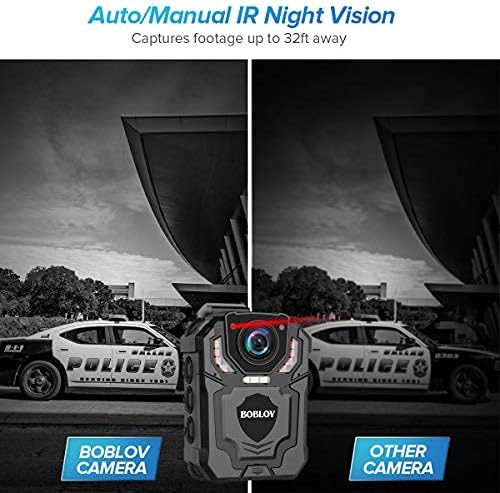
Figure 6: Auto/Manual IR Night Vision capability.
4. Stealth Mode
For discreet operation, activate Stealth Mode.
- In Stealth Mode, the camera operates without indicator lights or audible sounds.
- Access the camera's menu settings to enable or disable Stealth Mode.

Figure 7: Stealth Mode setting.
5. File Protection Function
Mark important recordings to prevent accidental overwriting or deletion.
- During or after recording, use the designated button or menu option to protect a file.
- Protected files will not be deleted during normal operation or when storage is full.

Figure 8: File Protection and Police ID settings.
6. Setting Police ID
Customize your camera with a unique Police ID for identification purposes on recorded footage.
- Navigate to the settings menu to find the "Officer ID" or "Police ID" option.
- Enter your desired ID using the camera's controls.
7. Connecting to a Computer
To transfer files or access camera settings via a computer:
- Connect the camera to your computer using the provided USB cable.
- The camera will appear as a removable disk drive.
- You can then copy files to your computer or manage settings as needed.
Maintenance
Cleaning
- Use a soft, dry cloth to clean the camera body.
- For the lens, use a specialized lens cleaning cloth and solution to avoid scratches.
- Do not use harsh chemicals or abrasive cleaners.
Storage
- Store the camera in a cool, dry place away from direct sunlight and extreme temperatures.
- If storing for an extended period, ensure batteries are partially charged (around 50%) and recharge them every few months to maintain battery health.
Battery Care
- Avoid exposing batteries to extreme heat or cold.
- Do not puncture, disassemble, or short-circuit batteries.
- Dispose of depleted batteries according to local environmental regulations.
Troubleshooting
| Problem | Possible Cause | Solution |
|---|---|---|
| Camera does not power on. | Battery is depleted or not properly installed. | Ensure battery is fully charged and correctly inserted. |
| Cannot record video/take photos. | Internal storage is full. | Transfer files to a computer and delete them from the camera to free up space. |
| Poor video/image quality. | Lens is dirty; insufficient lighting; incorrect settings. | Clean the lens. Ensure adequate lighting or activate night vision. Check resolution settings. |
| Camera freezes or becomes unresponsive. | Software glitch. | Perform a soft reset by holding the power button until it shuts down, then restart. If issue persists, contact support. |
Specifications
| Feature | Detail |
|---|---|
| Model Name | 02US-T5128GB-NEW |
| Video Capture Resolution | 1296p |
| Effective Still Resolution | 4 MP |
| Field Of View | 140 Degrees |
| Battery Type | Lithium Polymer |
| Battery Capacity | 1800 mAh (per battery) |
| Storage | Built-in 128GB TF Card |
| Water Resistance Level | IP65 (Waterproof) |
| Item Dimensions (L x W x H) | 2.87 x 2.17 x 0.91 inches |
| Item Weight | 1.01 pounds |
| Connectivity Technology | Wired (for data transfer) |
| Manufacturer | BOBLOV |
| Country of Origin | China |
Safety Information
Please read and follow these safety instructions carefully before using your BOBLOV Body Camera to ensure proper operation and prevent damage or injury.
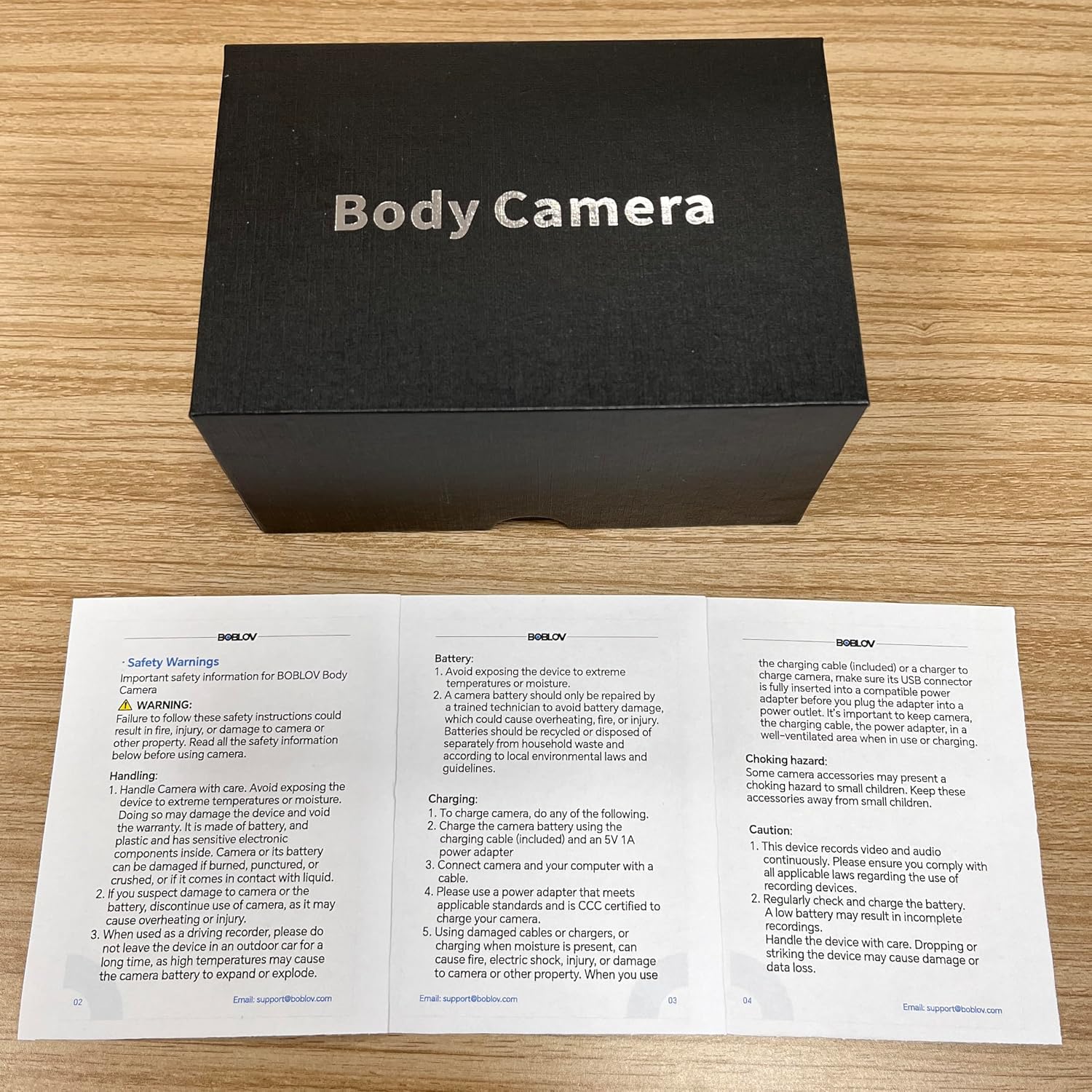
Figure 9: Important Safety Information from the User Manual.
WARNING:
- Failure to follow safety instructions could result in fire, electric shock, injury, or damage to the property.
- Avoid exposing the device to extreme temperatures or moisture.
- Do not disassemble or modify the camera.
- If the camera is dropped or damaged, discontinue use.
- Use only specified charging accessories.
- Keep out of reach of children.
Handling:
- Handle the camera with care. Avoid exposing the device to extreme temperatures or moisture.
- If the device is used in an outdoor car for a long time, high temperature may cause the camera battery to swell or explode.
Battery:
- Avoid exposing the device to extreme temperatures.
- A camera battery should only be repaired by a professional.
- Batteries should be recycled or disposed of properly.
Charging:
- To charge camera, do any of the following: Charge the camera battery using the charging dock (included) and an 5V 1A power adapter.
- Connect camera and your computer with a cable.
- Please use a power adapter that meets applicable standards.
- Do not use damaged cables or chargers.
Choking Hazard:
- Small components may present a choking hazard to small children. Keep these accessories away from small children.
Caution:
- This device records video and audio. Be aware of local laws and regulations.
- Regularly check and charge the battery.
- A low battery may result in incomplete recordings.
- Handle the device with care. Dropping or damaging the device may cause damage or data loss.
Warranty and Support
BOBLOV products typically come with a manufacturer's warranty. Please refer to the warranty information provided with your purchase documentation or contact BOBLOV customer support for details regarding warranty coverage and service.
Customer Support:
For technical assistance, troubleshooting, or warranty inquiries, please contact BOBLOV customer support:
- Email: support@boblov.com
- Website: Visit the official BOBLOV website for FAQs and additional resources.
Ask a question about this manual
Ask about setup, troubleshooting, compatibility, parts, safety, or missing instructions. Manuals+ will review the question and use this page’s manual context to help answer it.