
1. Introduction
The FLEXTAILGEAR MAX Pump 2020 is a compact and lightweight portable air pump designed for quick inflation and deflation of various inflatable products. It features a built-in 3600mAh rechargeable battery, making it ideal for both outdoor and indoor use. This manual provides essential information for the safe and efficient operation of your MAX Pump 2020.

Image: The FLEXTAILGEAR MAX Pump 2020, highlighting its compact design, 5.29 oz weight, 3600 mAh battery, and 2.2 kPa pressure. It also notes that it is not suitable for high-pressure items like balloons, sports balls, or tires.
2. Package Contents
Please check the package to ensure all items are present:
- 1 x FLEXTAILGEAR MAX Pump 2020
- 4 x Nozzles (various sizes for different inflatables)
- 1 x USB Charging Cable
- 1 x Storage Bag
- 1 x User Manual

Image: A flat lay of the MAX Pump 2020 package contents, showing the pump, four different nozzles, a USB cable, a black storage bag, and the instruction manual.
3. Specifications
| Feature | Specification |
|---|---|
| Brand | FLEXTAILGEAR |
| Model | MP2020 |
| Material | Plastic |
| Item Weight | 5.3 Ounces (150g) |
| Product Dimensions | 2.3"L x 5.5"W x 5"H (approx. 5.8cm x 14cm x 12.7cm) |
| Power Source | Battery Powered |
| Battery Type | Lithium Polymer (3600mAh) |
| Air Flow Capacity | 300 Liters Per Minute |
| Maximum Pressure | 2.2 Kilopascal |
| Operation Mode | Automatic |
4. Safety Information
- The MAX Pump 2020 is not suitable for inflating high-pressure items such as balloons, sports balls, or vehicle tires.
- Do not use the pump continuously for more than 15 minutes. Allow it to cool down before resuming operation to prevent overheating.
- Keep the device away from water and extreme temperatures.
- Do not block the inflation or deflation ports during operation.
- Keep out of reach of children.
5. Setup
5.1 Charging the Pump
Before first use, fully charge the MAX Pump 2020. The pump has a built-in 3600mAh lithium battery.
- Connect the provided USB charging cable to the Micro-USB charging port on the pump.
- Connect the other end of the USB cable to a power source (e.g., power bank, laptop, car USB port, or wall adapter).
- Ensure the pump's switch is in the OFF position while charging.
- The charging indicator light will show the charging status. It will typically change color or turn off when fully charged.

Image: Illustration of the MAX Pump 2020's internal battery and charging indicator. A red light indicates low power (0-99%), and a green light indicates a full charge (100%).
5.2 Identifying Ports and Nozzles
The pump features an inflation port and a deflation port. Select the appropriate nozzle for your inflatable item.
- Inflation Port: Used to inflate items.
- Deflation Port: Used to deflate items.
- Nozzles: The package includes various nozzles for different valve sizes, such as sharp air nozzles for swimming rings, rubber air nozzles for outdoor air mattresses, and large-caliber air nozzles for air beds. A vacuum nozzle is also included for vacuum storage bags.

Image: A detailed view of the MAX Pump 2020, pointing out the deflation port, inflation port, Micro-USB charging port, and charging indicator.
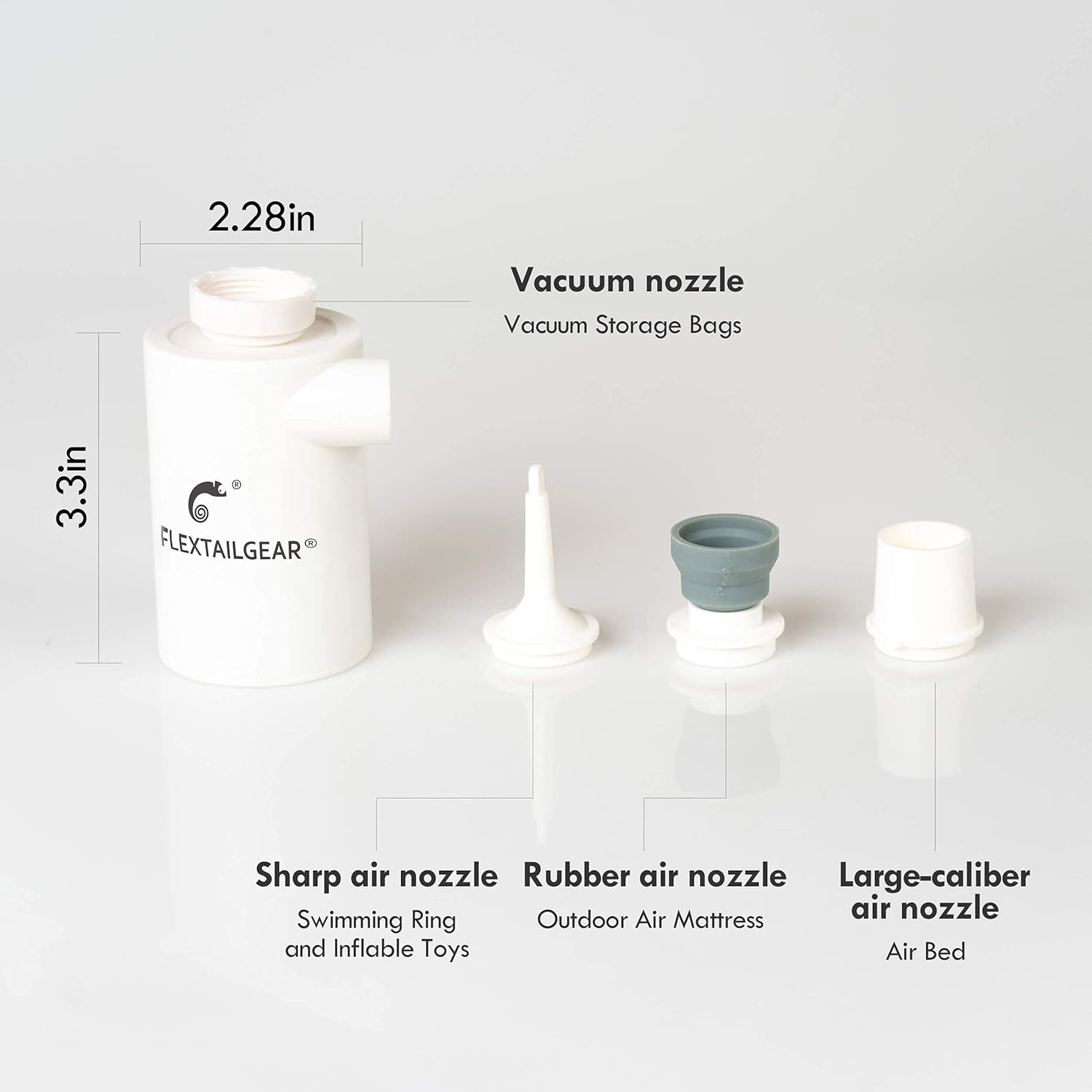
Image: The MAX Pump 2020 shown with its various nozzles: a vacuum nozzle for storage bags, a sharp air nozzle for swimming rings and inflatable toys, a rubber air nozzle for outdoor air mattresses, and a large-caliber air nozzle for air beds.
6. Operating Instructions
6.1 Inflation
- Select the correct nozzle for your inflatable item.
- Attach the selected nozzle firmly to the inflation port of the pump.
- Insert the nozzle into the valve of the item you wish to inflate.
- Press the power switch to turn on the pump.
- Once the item is inflated to the desired firmness, turn off the pump and remove the nozzle.

Image: A visual guide demonstrating the inflation process: 1. Choose the right air nozzle. 2. Install the nozzle on the side air port. 3. Switch to open the pump.
6.2 Deflation
- Select the correct nozzle for your inflatable item.
- Attach the selected nozzle firmly to the deflation port of the pump.
- Insert the nozzle into the valve of the item you wish to deflate.
- Press the power switch to turn on the pump.
- The pump will draw air out of the item. Once deflated, turn off the pump and remove the nozzle.

Image: A visual guide demonstrating the deflation process: 1. Choose the right air nozzle. 2. Install the nozzle on the top air port. 3. Switch to open the pump.
7. Maintenance
- To maintain optimal battery performance, charge the pump at least once every three months, even if not in use.
- Clean the exterior of the pump with a soft, dry cloth. Do not use harsh chemicals or abrasive cleaners.
- Store the pump and its accessories in the provided storage bag in a cool, dry place when not in use.
8. Troubleshooting
- Pump not turning on: Ensure the battery is charged. Connect the pump to a power source and allow it to charge for at least 30 minutes before attempting to turn it on again.
- Weak airflow: Check that the correct nozzle is securely attached and that there are no obstructions in the inflation/deflation ports. Ensure the battery is sufficiently charged.
- Pump overheating: If the pump feels hot, turn it off immediately and allow it to cool down for at least 15 minutes before further use. Avoid continuous operation for more than 15 minutes.
- Inflatable not inflating/deflating properly: Verify that the correct nozzle is used and that it forms a tight seal with the inflatable's valve. Ensure the pump is set to the correct mode (inflation or deflation).
9. Support
If you encounter any issues or have questions regarding your FLEXTAILGEAR MAX Pump 2020 that are not covered in this manual, please contact FLEXTAILGEAR customer support for assistance. Refer to the product packaging or the official FLEXTAILGEAR website for contact information.

Image: A summary of important reminders: 1. Not suitable for tires or balloons. 2. Charge every 3 months. 3. Do not use continuously for over 15 minutes. 4. Contact support for problems.
