1. Introduction
The Music Hero TWS Beat True Wireless Stereo Earphones offer a seamless audio experience with their wireless design and intuitive controls. Designed for comfort and convenience, these earphones are ideal for music listening, hands-free calls, and on-the-go use. This manual provides comprehensive instructions to help you get the most out of your TWS Beat earphones.

Image 1.1: Music Hero TWS Beat True Wireless Stereo Earphones (Sky Blue)
2. Package Contents
Please check the package for the following items:
- Music Hero TWS Beat True Wireless Stereo Earphones (Left and Right)
- Charging Case
- Charging Cable
- User Manual

Image 2.1: Package Contents of Music Hero TWS Beat Earphones
This image displays all items included in the product package: the two earphones, the charging base, the charging cable, and the user manual.
3. Product Overview
Familiarize yourself with the key components and features of your TWS Beat earphones:

Image 3.1: Earphone Components and Functions
This diagram highlights the main features of the earphones: the touch-sensitive area for answering/ending calls and play/pause music, the LED indicator for charge status, and the magnetic charging contacts at the bottom of the stem.
- Touch Answer/End Button: Located on the top of the earphone stem. Used for call management (answer/end) and music playback (play/pause).
- LED Charge Indicator: A small LED light on the earphone stem that indicates charging status and connection status.
- Magnetic Charging Points: Located at the base of the earphone stem, these connect with the charging case for power.

Image 3.2: Music Hero TWS Beat Charging Case
This image shows the compact charging case for the TWS Beat earphones, which also serves as a protective storage unit.
The charging case has a 300 mAh capacity, allowing you to recharge your earphones multiple times on the go.
4. Charging
Before first use, ensure both the earphones and the charging case are fully charged.
4.1 Charging the Earphones
- Place the earphones into their respective slots in the charging case. Ensure the magnetic contacts align.
- The LED indicator on the earphones will illuminate to show they are charging.
4.2 Charging the Case
- Connect the provided charging cable to the charging port on the case and to a USB power source (e.g., computer, wall adapter).
- The indicator lights on the case will show the charging status.
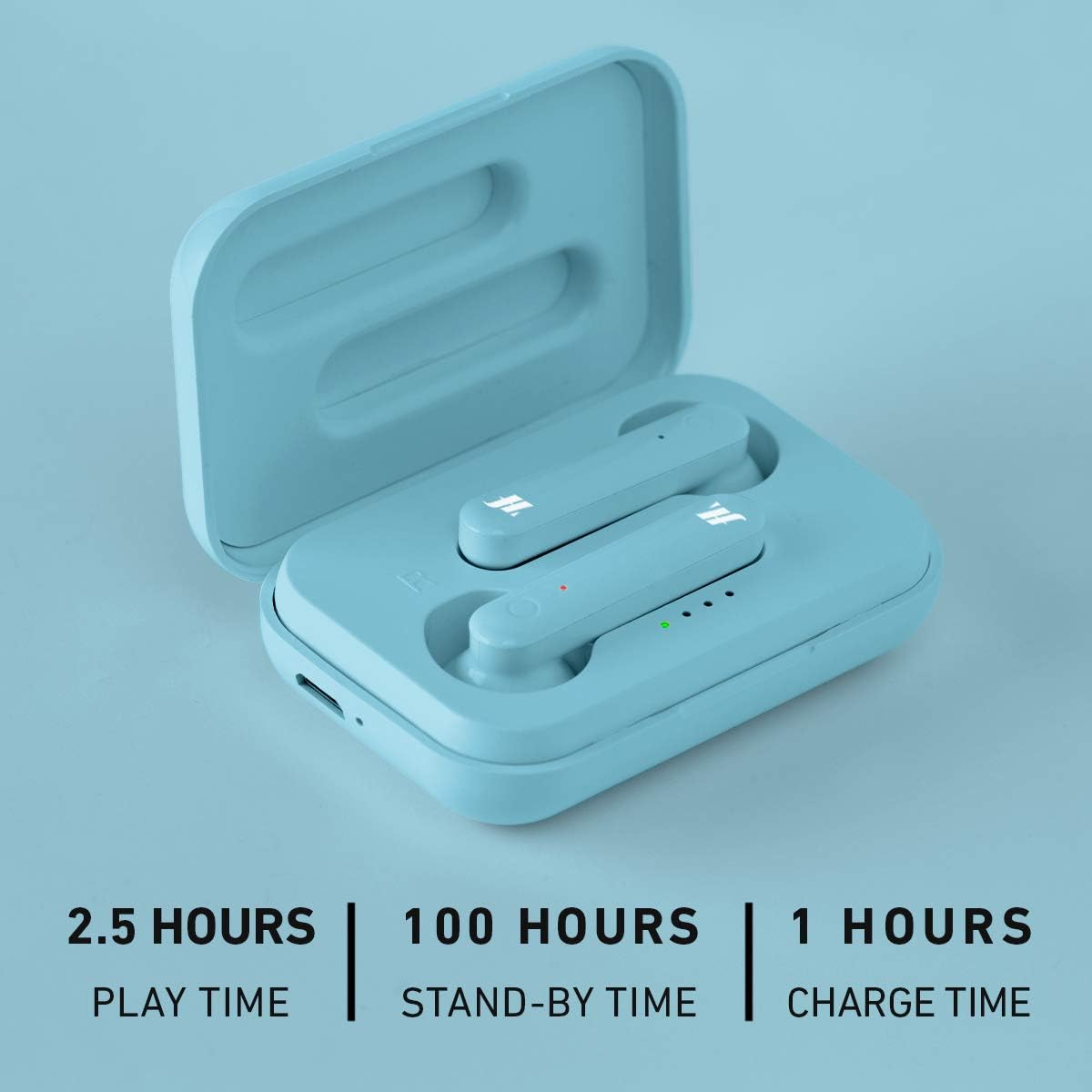
Image 4.1: Charging and Battery Life Overview
This image illustrates the approximate battery performance: 2.5 hours of play time, 100 hours of standby time, and 1 hour for a full charge.
Approximate Battery Performance:
- Play Time: Up to 2.5 hours
- Stand-by Time: Up to 100 hours
- Charge Time: Approximately 1 hour
5. Setup and Pairing
5.1 Initial Pairing
- Ensure the earphones are charged.
- Open the charging case and remove both earphones. They will automatically power on and attempt to pair with each other (True Wireless Stereo).
- On your smartphone or Bluetooth-enabled device, go to the Bluetooth settings and enable Bluetooth.
- Search for available devices. You should see "TWS Beat" or a similar name appear in the list.
- Select "TWS Beat" to connect. Once connected, a voice prompt or LED indicator will confirm the successful pairing.
5.2 Automatic Power-On and Reconnection
Once initially paired, the earphones will automatically power on and attempt to reconnect to the last paired device when removed from the charging case.
6. Operating Instructions
The TWS Beat earphones feature multi-function touch controls for easy management of calls and music.
6.1 Music Playback
- Play/Pause: Tap the touch button on either earphone once.
- Next Track: (Information not explicitly provided, typically double-tap right earphone)
- Previous Track: (Information not explicitly provided, typically double-tap left earphone)
6.2 Call Management
- Answer Call: Tap the touch button on either earphone once when an incoming call is received.
- End Call: Tap the touch button on either earphone once during a call.
- Reject Call: (Information not explicitly provided, typically press and hold)
6.3 Voice Assistant
The earphones support voice assistant activation. (Information not explicitly provided on activation method, typically triple-tap or long press)
7. Maintenance
To ensure the longevity and optimal performance of your earphones, follow these maintenance guidelines:
- Keep the earphones and charging case clean and dry.
- Wipe with a soft, dry cloth. Do not use abrasive cleaners or solvents.
- Avoid exposing the earphones to extreme temperatures, humidity, or dust.
- Store the earphones in their charging case when not in use to protect them and keep them charged.
8. Troubleshooting
If you encounter issues with your TWS Beat earphones, refer to the following common solutions:
| Problem | Possible Cause | Solution |
|---|---|---|
| Earphones not pairing with device | Bluetooth is off on device; earphones not in pairing mode; out of range. | Ensure Bluetooth is on. Place earphones back in case, then remove to re-enter pairing mode. Move closer to device. |
| Only one earphone working | Earphones not paired to each other (TWS); one earphone out of battery. | Place both earphones back in the case, close it, then open and remove them together. Ensure both are charged. |
| No sound | Volume too low; earphones not connected; audio source issue. | Increase volume on your device. Reconnect earphones. Check audio on your device without earphones. |
| Earphones not charging | Poor contact; charging cable/port issue; case out of battery. | Ensure earphones are correctly seated in the case. Check charging cable and port. Charge the case. |
9. Specifications
Detailed technical specifications for the Music Hero TWS Beat Earphones:
| Feature | Specification |
|---|---|
| Model Name | TWS Beat |
| Model Number | MHTWSBEATBTA |
| Connectivity Technology | Wireless (Bluetooth) |
| Ear Placement | In-Ear |
| Control Method | Touch |
| Frequency Range | 20 Hz - 20,000 Hz |
| Material | Plastic |
| Water Resistance Level | Not waterproof |
| Rechargeable Battery | Yes (Lithium-polymer) |
| Included Components | Charging cable |
| Manufacturer | SBS |
10. Safety Information
Please read and follow these safety guidelines to prevent damage to the product or injury to yourself:
- Do not disassemble, repair, or modify the product.
- Do not expose the product to fire, high temperatures, or direct sunlight.
- Keep the product away from water and other liquids.
- Do not use the product in environments with extreme temperatures or high humidity.
- Keep out of reach of children and pets.
- Dispose of the product and its battery responsibly according to local regulations.
11. Warranty and Support
For warranty information and customer support, please refer to the documentation provided with your purchase or contact the manufacturer directly. Keep your proof of purchase for any warranty claims.
Manufacturer: SBS


