
WixGear Wireless Earbuds 20
WixGear Sport Wireless Earbuds User Manual
Model: Wireless Earbuds 20
Introduction
This manual provides detailed instructions for the WixGear Sport Wireless Earbuds, Model Wireless Earbuds 20. Please read this guide thoroughly before using your earbuds to ensure proper operation and to maximize your listening experience. This product features Bluetooth 5.0 connectivity, touch controls, and an ergonomic over-ear hook design for secure fit during activities.

Image: The WixGear Sport Wireless Earbuds, black in color, shown with their charging case. The earbuds feature an over-ear hook design and red eartips.
Package Contents
Your WixGear Sport Wireless Earbuds package should include the following items:
- WixGear Sport Wireless Earbuds (Left and Right)
- Charging Station (Charging Case)
- Ear Cushions (various sizes)
- Eartips (various sizes)
- Protective Case (integrated with charging station)
- User Manual (this document)
Setup
1. Charging the Earbuds and Case
Before first use, fully charge both the earbuds and the charging case. The charging case provides extended hours of playback for your earbuds.
- Place the earbuds into their respective slots in the charging case.
- Connect the charging case to a power source using the provided charging cable.
- Indicator lights on the case and/or earbuds will show charging status. Refer to the indicator light section for details.
- A full charge typically takes [X] hours for the earbuds and [Y] hours for the case. (Note: Specific charging times not provided in source data, user should refer to product packaging if available.)
2. Pairing with a Bluetooth Device
The earbuds are designed for automatic pairing. Once removed from the charging case, they will enter pairing mode.
- Ensure the earbuds are fully charged.
- Open the charging case and remove both earbuds. They will automatically power on and enter pairing mode.
- On your device (e.g., smartphone), go to Bluetooth settings.
- Search for available devices and select "WixGear-W20" from the list.
- Once connected, you will hear an audio confirmation, and the indicator light on the earbuds will change.
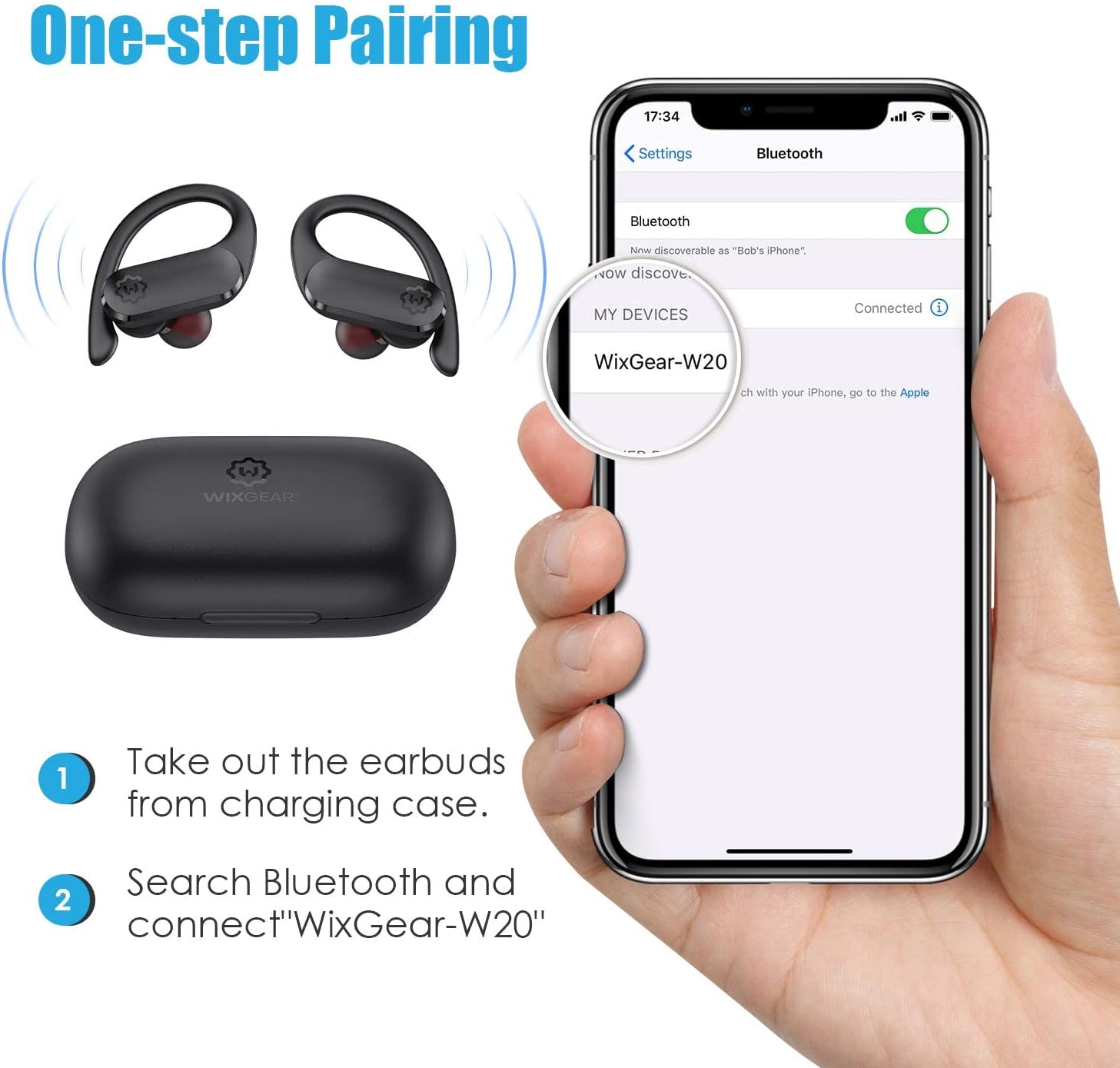
Image: A diagram illustrating the one-step pairing process. It shows removing earbuds from the case and then selecting "WixGear-W20" in a phone's Bluetooth settings.
Automatic Reconnection: After initial pairing, the earbuds will automatically connect to the last paired device when removed from the charging case, provided Bluetooth is enabled on your device.
Operating Instructions
1. Wearing the Earbuds
The WixGear Sport Wireless Earbuds feature an over-ear hook design for a stable and comfortable fit, especially during physical activities.
- Identify the Left (L) and Right (R) earbuds.
- Place the earbud into your ear canal and gently hook the ear hook over the top of your ear.
- Adjust the earbud and hook until it feels secure and comfortable. Experiment with different ear cushion sizes for the best fit and sound quality.

Image: A person wearing the WixGear Sport Wireless Earbuds, demonstrating the stable and comfortable fit provided by the secure earhooks and soft eartips.
2. Touch Controls
The earbuds are equipped with touch-sensitive controls for various functions. Specific actions may vary slightly depending on your device and operating system.
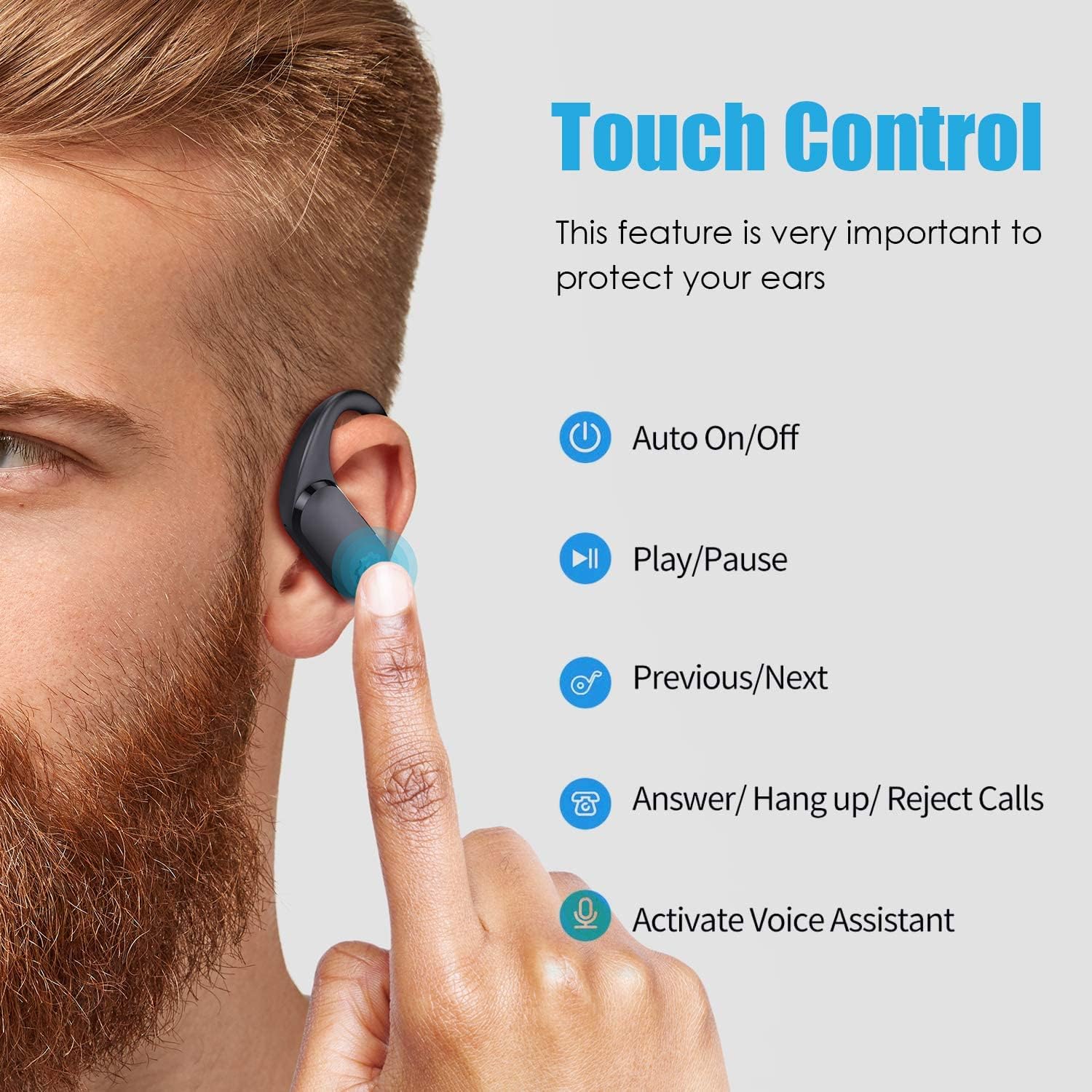
Image: A diagram illustrating the touch control functions on the earbud, including Auto On/Off, Play/Pause, Previous/Next track, Answer/Hang up/Reject Calls, and Activate Voice Assistant.
- Power On/Off: Automatic when removed/placed in case. Manual control may be available via long press (refer to product specific instructions if provided).
- Play/Pause: Single tap on either earbud.
- Next Track: Double tap on the right earbud.
- Previous Track: Double tap on the left earbud.
- Answer/End Call: Single tap on either earbud during an incoming call.
- Reject Call: Long press on either earbud during an incoming call.
- Activate Voice Assistant: Triple tap on either earbud (e.g., Siri, Google Assistant).
- Volume Control: (Note: Volume control via touch is not explicitly listed in the provided data. Volume is typically controlled via the connected device.)
3. Earbud Modes
The WixGear Sport Wireless Earbuds support different usage modes for flexibility.

Image: A visual guide explaining the three earbud modes: Single-Ear Mode (using one earbud for calls), Binaural Mode (using both for stereo sound), and Share Mode (sharing one earbud with another person).
- Single-Ear Mode: Use only one earbud (left or right) for calls or mono audio. The other earbud can remain in the charging case.
- Binaural Mode: Use both earbuds for stereo sound, ideal for music and immersive audio experiences.
- Share Mode: You can share one earbud with another person to enjoy music or movies together.
Maintenance
1. Cleaning
- Regularly clean the earbuds, especially the eartips and charging contacts, with a soft, dry, lint-free cloth.
- Do not use harsh chemicals, cleaning solvents, or strong detergents.
- Ensure the earbuds are completely dry before placing them back in the charging case.
2. Water Resistance
The earbuds are designed with a waterproof rating, making them suitable for use during workouts and in light rain. However, they are not intended for swimming or prolonged submersion in water.

Image: Two individuals running in the rain, wearing the WixGear Sport Wireless Earbuds, demonstrating their waterproof capability for sports and exercise.
- Avoid exposing the charging case to water, as it is not waterproof.
- If the earbuds get wet, wipe them dry thoroughly before placing them back in the charging case to prevent damage to the charging contacts.
3. Storage
- When not in use, store the earbuds in their charging case to protect them and keep them charged.
- Store in a cool, dry place, away from extreme temperatures and direct sunlight.
Troubleshooting
If you encounter any issues with your WixGear Sport Wireless Earbuds, please refer to the following common solutions:
| Problem | Possible Solution |
|---|---|
| Earbuds not pairing with device. |
|
| Only one earbud is working. |
|
| Low volume or poor sound quality. |
|
| Earbuds not charging. |
|
| Battery life is shorter than expected. |
|
Specifications
Technical details for the WixGear Sport Wireless Earbuds, Model Wireless Earbuds 20:
| Model Name | WixGear Sport Wireless Earbuds |
| Model Number | Wireless Earbuds 20 |
| Connectivity Technology | Wireless (Bluetooth) |
| Bluetooth Version | 5.0 |
| Bluetooth Range | Up to 10 meters (33 feet) |
| Frequency Range | 20 Hz - 20,000 Hz |
| Control Type | Touch (Call Control, Media Control, Noise Control) |
| Microphone | Included |
| Water Resistance Level | Waterproof (suitable for sweat and light rain) |
| Ear Placement | Over Ear |
| Power Source | 3 Lithium Polymer batteries (included) |
| Item Weight | 0.23 Kilograms (8 ounces) |
| Included Components | Charging Station, Ear Cushions, Eartip, Protective Case |
| UPC | 850012517153 |

Image: An overview of key features including Bluetooth 5.0, IPX5 Waterproof rating, single button operation (touch control), 30h playing time (with case), Hi-Fi Stereo Sound, and a built-in microphone.

Image: A close-up view highlighting the Bluetooth 5.0 technology within the earbud, indicating support for HSP, HFP, A2DP, AVRCP protocols for stable transmission and in-call stereo sound.
Warranty Information
Specific warranty details for the WixGear Sport Wireless Earbuds are not provided in this manual. For information regarding warranty coverage, terms, and conditions, please refer to the product packaging, the official WixGear website, or contact WixGear customer support directly.
Support
If you require further assistance or have questions not covered in this manual, please contact WixGear customer support:
- Online Support: Visit the official WixGear Store on Amazon for FAQs and product information.
- Contact Information: Refer to the product packaging or the WixGear website for direct contact methods (email, phone).
Ask a question about this manual
Ask about setup, troubleshooting, compatibility, parts, safety, or missing instructions. Manuals+ will review the question and use this page’s manual context to help answer it.