
1. Introduction
Thank you for choosing the FLAMEZUM 1500W Pure Sine Wave Power Inverter. This device converts 12V DC battery power into 110V-120V AC household power, suitable for a wide range of electronics and appliances. Designed for reliability and efficiency, it provides clean, stable power essential for sensitive equipment. Please read this manual thoroughly before installation and operation to ensure safe and optimal performance.
2. Safety Information
- Ventilation: Ensure the inverter is installed in a well-ventilated area. Do not block ventilation openings.
- Dry Environment: Avoid exposure to water, rain, or excessive moisture. The inverter is not waterproof.
- Correct Voltage: Connect the inverter only to a 12V DC power source. Connecting to other voltages may cause damage.
- Avoid Short Circuits: Ensure all connections are secure and correct. Do not short-circuit the input or output terminals.
- Grounding: Properly ground the inverter according to local electrical codes.
- Load Capacity: Do not exceed the inverter's continuous power rating of 1500W. The peak power is 3000W for starting inductive loads.
- Children and Pets: Keep the inverter out of reach of children and pets.
- Heat: The inverter can generate heat during operation. Do not place flammable materials near it.
- Qualified Personnel: Installation and servicing should ideally be performed by qualified personnel.
3. Product Features
- Pure Sine Wave Output: Provides clean and stable AC power, suitable for sensitive electronics.
- High Power Output: 1500W continuous power, 3000W peak power.
- LCD Display: Real-time monitoring of battery voltage, internal temperature, output frequency, output voltage, and power consumption.
- Intelligent Cooling Fan: Automatically activates when internal temperature exceeds 104°F (41°C) or load exceeds 480W, ensuring optimal operating temperature.
- Multiple AC Outlets: Equipped with four (4) US standard AC outlets.
- USB Charging Ports: Two (2) 2.4A USB ports for charging mobile devices.
- Remote Control: Includes a remote control with a 15ft cable for convenient power management from a distance.
- High Precision Circuit Board: Designed for stable AC output and anti-pulse interference, extending product life.
- Comprehensive Protection: Features multiple safety protections including input undervoltage, overvoltage, low voltage, full load alarm, overload, thermal protection, short-circuit protection, and front board overload protection.
- UL Certified Strong Copper Wire: Ensures efficient power transmission with low loss and enhanced safety.
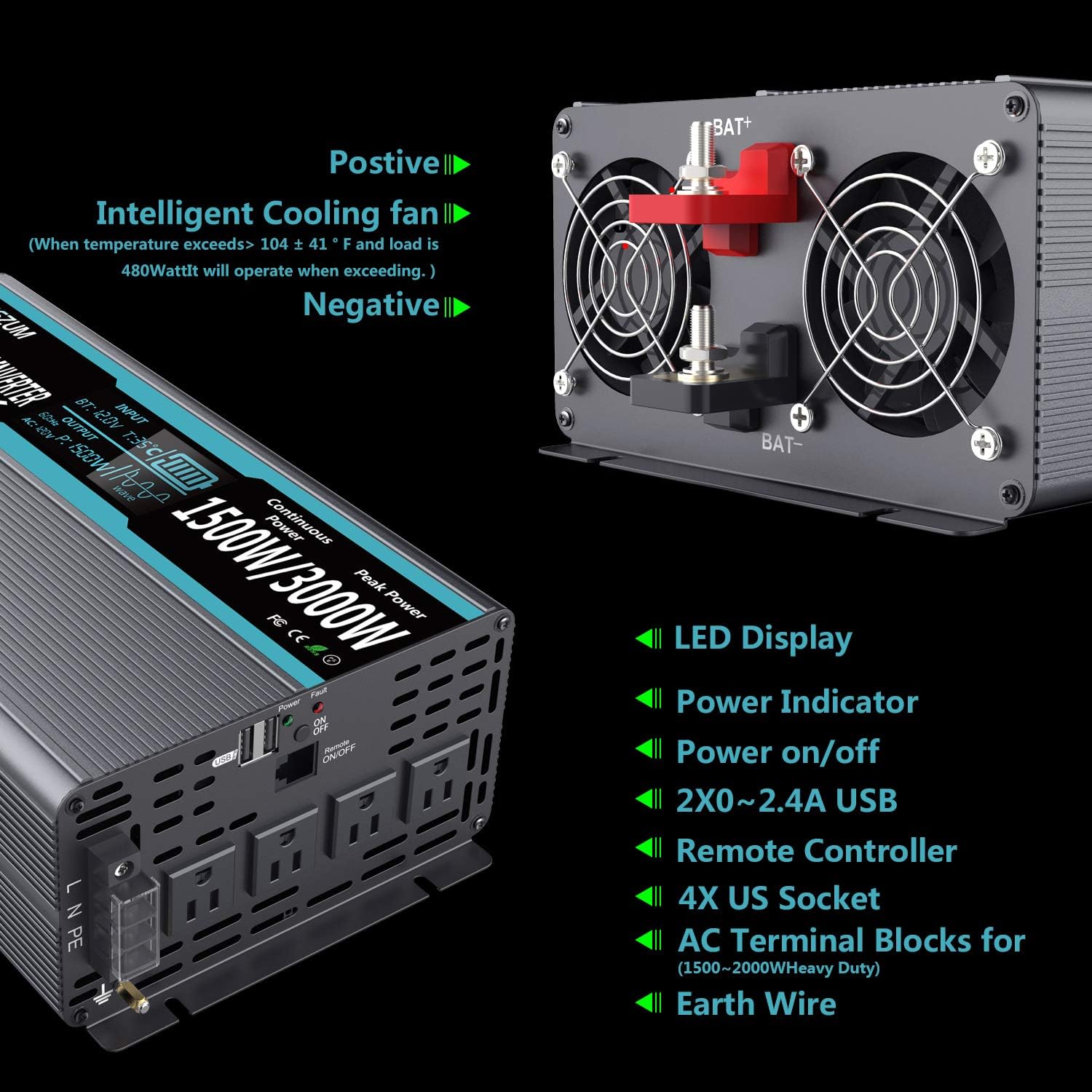
Figure 1: Rear view of the inverter highlighting cooling fans, battery terminals, and output ports.

Figure 2: Internal view illustrating the high precision circuit board for stable AC output.

Figure 3: Details on the intelligent cooling fan and UL certified copper wiring.
4. Package Contents
Upon unpacking, please verify that all items listed below are present and undamaged:
- FLAMEZUM 1500W Pure Sine Wave Power Inverter Unit
- Remote Control with 15ft (4.5m) Cable
- Battery Connection Cables (Red and Black, approx. 80cm)
- Wrench (for terminal connections)
- Terminal Covers (Red and Black)
- Spare Fuses (40A auto type)
- Ground Wire

Figure 4: All components included in the FLAMEZUM inverter package.
5. Setup and Installation
- Choose a Location: Select a cool, dry, and well-ventilated area for installation. Ensure there is sufficient space around the inverter for airflow.
- Connect Battery Cables:
- Connect the red battery cable to the positive (+) terminal of the 12V battery and to the positive (+) terminal on the inverter.
- Connect the black battery cable to the negative (-) terminal of the 12V battery and to the negative (-) terminal on the inverter.
- Ensure all connections are tight and secure. Use the provided wrench for tightening.
- Cover the terminals with the provided terminal covers after connection.
- Grounding: Connect the green ground wire from the inverter to a proper earth ground point.
- Connect Remote Control: Plug the remote control cable into the designated remote port on the inverter.

Figure 5: Inverter connected to its remote control, demonstrating remote operation.
6. Operating Instructions
- Power On: Turn on the inverter using the ON/OFF switch on the unit or the remote control. The LCD display will illuminate, showing current status.
- Connect AC Devices: Plug your 110V-120V AC appliances into the AC outlets on the inverter. For USB charging, use the USB ports.
- Monitor Display: Observe the LCD display for real-time information on battery voltage, output power, and temperature. This helps in managing your power usage and preventing overload.
- Power Off: When finished, turn off the inverter using the ON/OFF switch on the unit or the remote control. Disconnect AC devices before powering off for safety.
7. Maintenance
- Keep Clean: Regularly clean the inverter's exterior and ventilation openings to prevent dust buildup, which can hinder cooling. Use a dry cloth.
- Check Connections: Periodically inspect battery cable connections to ensure they remain tight and free from corrosion.
- Battery Care: Ensure your 12V battery is well-maintained and charged to prolong its lifespan and the inverter's efficiency.
- Storage: If storing the inverter for an extended period, disconnect it from the battery and store it in a cool, dry place.
8. Troubleshooting
The inverter features a comprehensive protection system that displays fault codes on the LCD screen to assist with troubleshooting. Refer to the image below for common fault indicators:

Figure 6: Inverter protection modes and corresponding fault codes for troubleshooting.
Common Issues and Solutions:
- No Power Output / Inverter Not Turning On:
- Check battery connections for tightness and correct polarity.
- Verify battery voltage is within the 12V operating range.
- Check for blown fuses (replace with spare 40A fuses if necessary).
- Low Output Voltage / Intermittent Power:
- Ensure the load does not exceed the inverter's continuous power rating.
- Check battery charge level; a low battery can cause voltage drops.
- Inspect battery cables for damage or insufficient gauge.
- Overload Alarm / Shutdown:
- Reduce the total wattage of connected appliances.
- Some appliances (e.g., motors) have high starting surge power; ensure the peak power rating is not exceeded.
- Overheating / Thermal Protection:
- Ensure adequate ventilation around the inverter. Clear any obstructions from the cooling fans.
- Reduce the load on the inverter.
- Allow the inverter to cool down before restarting.
9. Specifications
| Feature | Specification |
|---|---|
| Model Name | FLK-1500W-12V-120V |
| Continuous Power | 1500W |
| Peak Power | 3000W |
| Input DC Voltage | 12V |
| Output AC Voltage | 110V-120V |
| Output Waveform | Pure Sine Wave |
| USB Output | 2 x 2.4A |
| Product Dimensions | 12.6 x 7.2 x 3.94 inches |
| Item Weight | 10.56 pounds |
| Color | Grey |
| Manufacturer | FLAMEZUM |
Figure 7: Physical dimensions of the inverter unit.
10. Warranty and Support
FLAMEZUM products are designed for reliability and performance. For warranty information, technical support, or service inquiries, please refer to the contact information provided with your purchase documentation or visit the official FLAMEZUM website. Please retain your proof of purchase for warranty claims.