
1. Important Safety Instructions
When using electrical appliances, basic safety precautions should always be followed to reduce the risk of fire, electric shock, and/or injury to persons, including the following:
- Read all instructions before operating the hand mixer.
- To protect against risk of electrical shock, do not put the mixer body, cord, or electrical plug in water or other liquid.
- Close supervision is necessary when any appliance is used by or near children.
- Unplug from outlet when not in use, before putting on or taking off parts, and before cleaning.
- Avoid contact with moving parts. Keep hands, hair, clothing, as well as spatulas and other utensils away from beaters during operation to prevent injury and/or damage to the mixer.
- Do not operate any appliance with a damaged cord or plug, or after the appliance malfunctions or has been dropped or damaged in any manner. Contact customer service for examination, repair, or electrical or mechanical adjustment.
- The use of attachments not recommended or sold by the manufacturer may cause fire, electric shock, or injury.
- Do not use outdoors.
- Do not let cord hang over edge of table or counter.
- Do not let cord contact hot surfaces, including the stove.
- Remove all attachments from the mixer before washing.
- This appliance is intended for household use only.
2. Product Overview
The Bear Hand Mixer is designed for efficient and convenient mixing tasks in your kitchen. It features a powerful motor, multiple speed settings, and a compact design for easy storage.
Components:
- Main Unit: Houses the motor, speed controls, and eject button.
- Beaters (2): Ideal for whisking eggs, cream, and light batters.
- Dough Hooks (2): Suitable for kneading dough for bread or pastries.
- Storage Base: Keeps the mixer and all attachments organized.
- Power Cord: For connecting to an electrical outlet.

Figure 2.1: Bear Hand Mixer Electric with main unit, beaters, dough hooks, and storage base.
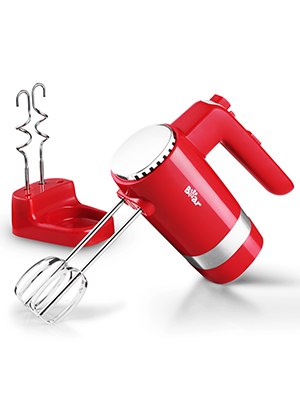
Figure 2.2: The Bear Hand Mixer in its compact storage stand.
3. Setup
Attaching Beaters/Dough Hooks:
- Ensure the hand mixer is unplugged from the power outlet and the speed selector is set to "0" (off).
- Insert the desired attachments (beaters or dough hooks) into the openings on the underside of the mixer. Push firmly until they click into place. Ensure the attachments are securely locked before use.
- For dough hooks, ensure they are installed correctly to avoid flour entering the machine while mixing. The hook with the collar should be inserted into the larger opening.

Figure 3.1: Correctly inserting dough hooks into the mixer.
Connecting to Power:
- Plug the power cord into a standard electrical outlet (220V, 60Hz).
4. Operating Instructions
Speed Control:
The Bear Hand Mixer features 5 adjustable speeds, allowing you to select the appropriate mixing intensity for various ingredients. The speed selector is located on the handle.
- Start with the speed selector at "0" (off).
- Gradually slide the selector upwards to increase the speed from 1 to 5.
- For optimal results and to prevent splashing, always begin mixing at a low speed and increase gradually as needed.
Turbo Function:
For an extra burst of power at any speed setting, press and hold the "TURBO" button. Release the button to return to the selected speed.

Figure 4.1: Speed selector and Turbo button on the mixer handle.
Easy Eject Button:
To remove attachments safely after use:
- Ensure the speed selector is set to "0" (off) and the mixer is unplugged.
- Press the "EJECT" button firmly. The attachments will release from the mixer body.

Figure 4.2: Step-by-step guide for ejecting attachments.

Figure 4.3: Pressing the eject button to release attachments.
5. Attachments
The Bear Hand Mixer comes with two types of stainless steel attachments for various mixing needs:
Beaters:
- Use for whipping cream, beating eggs, mixing cake batters, and preparing light sauces.
- The unique design ensures thorough mixing and aeration.
Dough Hooks:
- Designed for kneading heavier doughs, such as bread dough or pizza dough.
- Ensure proper insertion as described in the Setup section.

Figure 5.1: The included 304 stainless steel beaters and dough hooks.
6. Cleaning and Maintenance
Proper cleaning and maintenance will ensure the longevity and optimal performance of your hand mixer.
Cleaning the Main Unit:
- Always unplug the mixer before cleaning.
- Wipe the exterior of the mixer body with a damp cloth. Do not immerse the main unit in water or any other liquid.
- Avoid using abrasive cleaners or scouring pads, as these may damage the surface.
Cleaning Attachments:
- The stainless steel beaters and dough hooks are dishwasher safe.
- Alternatively, wash them by hand with warm, soapy water and rinse thoroughly. Dry immediately to prevent water spots.

Figure 6.1: The mixer's design includes efficient heat dissipation for durability.
7. Storage
The Bear Hand Mixer comes with a convenient storage base to keep your appliance and its attachments organized and easily accessible.
- After cleaning and ensuring all parts are dry, place the main unit onto the storage base.
- Insert the beaters and dough hooks into their designated slots on the storage base.
- Store the mixer in a dry, cool place, away from direct sunlight or heat sources.

Figure 7.1: Compact design with integrated storage for attachments.
8. Troubleshooting
If you encounter any issues with your Bear Hand Mixer, please refer to the following common problems and solutions:
| Problem | Possible Cause | Solution |
|---|---|---|
| Mixer does not turn on. | Not plugged in; power outlet malfunction; speed selector not at "0". | Ensure the mixer is securely plugged into a working outlet. Set the speed selector to "0" before plugging in, then select a speed. |
| Attachments do not stay in place. | Attachments not fully inserted. | Push attachments firmly until they click into place. Ensure they are correctly aligned. |
| Mixer slows down or struggles with ingredients. | Too much load; incorrect speed setting. | Reduce the amount of ingredients. Increase the speed setting or use the Turbo function for tougher mixtures. |
| Unusual noise or smell during operation. | Overheating; internal malfunction. | Immediately turn off and unplug the mixer. Allow it to cool down. If the issue persists, discontinue use and contact customer service. |
If the problem persists after trying these solutions, please contact Bear customer service for further assistance.
9. Specifications
| Feature | Detail |
|---|---|
| Brand | Bear |
| Model Name | Bear Hand Mixer Electric |
| Item Model Number | DDQ-B02L1-RED |
| Power | 300 Watts |
| Voltage | 220 Volts |
| Speeds | 5 Speed with Turbo Function |
| Material | Stainless Steel (Attachments) |
| Item Weight | 3.45 pounds (1.57 Kilograms) |
| Product Dimensions | 1"D x 1"W x 1"H (Note: These dimensions seem generic/placeholder from the source, actual product dimensions might vary) |
| Dishwasher Safe | Yes (Attachments only) |
10. Warranty and Support
Bear provides a 1-year after-sale warranty for all its products, including 24-hour customer service and lifelong technical support. A refund within 30 days of purchase is also provided.
For warranty claims, technical assistance, or any product-related inquiries, please contact Bear customer service through the retailer where the product was purchased or visit the official Bear website.
11. Product Videos
Bear Hand Mixer Electric Overview
This video provides a general overview of the Bear Hand Mixer Electric, showcasing its features and design. (Source: Bear-Home)
Bear Hand Mixer with 4 Attachments Demonstration
A demonstration of the Bear Hand Mixer, highlighting its 10-speed (5 speeds with turbo) functionality and the four included attachments. (Source: Bear-Home)
Bear Electric Hand Mixer Review Test
This video from the seller "Bear-Home" provides a detailed review and test of the Bear Electric Hand Mixer, demonstrating its performance. (Source: Bear-Home)

