
Introduction
Thank you for choosing the iKanzi T22 Wireless Earbuds. This manual provides detailed instructions for setting up, operating, and maintaining your earbuds to ensure optimal performance and longevity. Please read this manual thoroughly before using the product.
Package Contents
- iKanzi T22 Wireless Earbuds (Left and Right)
- Portable Charging Case
- USB Charging Cable
- Ear Tips (Sizes S, M, L)
- User Manual
Product Overview
The iKanzi T22 Wireless Earbuds feature Bluetooth 5.0 technology for stable connectivity and deliver Hi-Fi stereo sound. They are designed for comfort and portability, making them suitable for various activities.

Image: iKanzi T22 earbuds in use, highlighting superior music quality with a built-in high-quality audio chip. The image shows a man enjoying music with the earbuds, alongside the open charging case and a graphic illustrating noise reduction.
Key Features:
- Bluetooth 5.0: Provides faster transmission speed and more stable connectivity.
- Hi-Fi Stereo Sound: Delivers clear music with rich bass.
- Portable Charging Case: Compact case for recharging on the go, offering up to 12 hours of extended playback.
- Comfortable Fit: Ergonomically designed with multiple ear tip sizes for secure wear.
Setup
1. Charging the Earbuds and Case
Before first use, ensure both the earbuds and the charging case are fully charged.
- Place the earbuds into the charging case. Ensure they are correctly seated; magnetic contacts will hold them in place.
- Connect the charging case to a power source using the provided USB charging cable.
- The LED indicators on the charging case will illuminate to show the charging status. Four bright blue LED lights indicate the charging percentage.
- A full charge typically provides up to 4 hours of playback for the earbuds, with the case extending this to 12 hours.
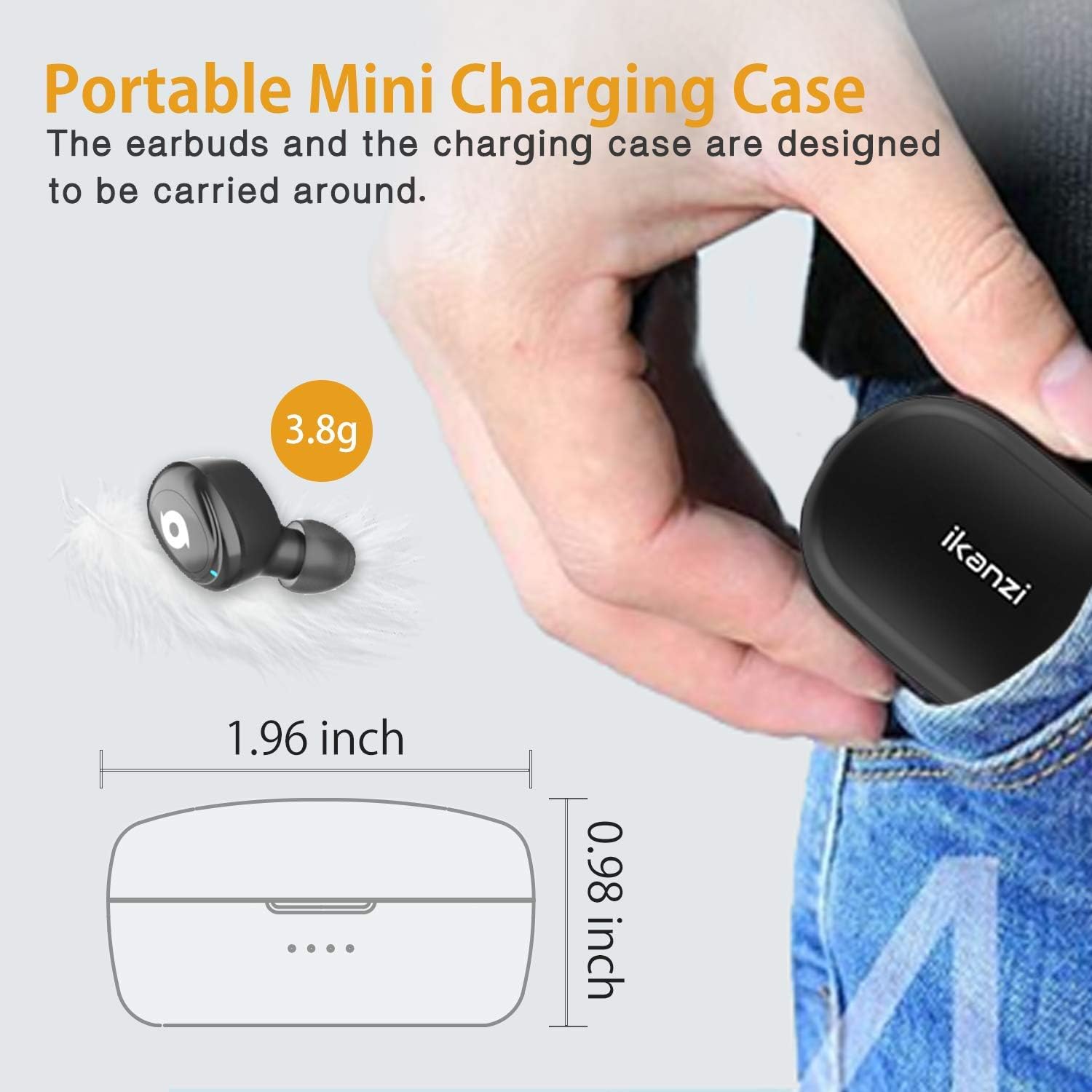
Image: The iKanzi T22 portable mini charging case, showing its compact size (1.96 inches length, 0.98 inches height) and the four LED indicators for battery status.
2. Pairing with Your Device (One-Step Pairing)
The iKanzi T22 earbuds feature one-step pairing for convenience.
- Ensure Bluetooth is enabled on your smartphone or other audio device.
- Remove both earbuds from the charging case. They will automatically power on and enter pairing mode.
- On your device, go to the Bluetooth settings and search for available devices.
- Select "T22" from the list of devices to connect.
- Once connected, you will hear an audio prompt, and the earbuds will be ready for use.

Image: A smartphone displaying its Bluetooth settings, showing "T22" as a connected device, illustrating the easy pairing process for the iKanzi T22 earbuds.
Note: After initial pairing, the earbuds will automatically connect to the last paired device when removed from the charging case, provided Bluetooth is active on the device.
Operating the Earbuds
Wearing the Earbuds
For optimal sound quality and comfort, choose the ear tips that best fit your ears. The earbuds are designed to fit securely.

Image: A man wearing an iKanzi T22 earbud, demonstrating a comfortable and secure fit. Below him are three ear tip sizes (S, M, L), indicating options for personalized comfort.
- Insert the earbud gently into your ear canal.
- Rotate it slightly until it feels snug and comfortable.
- Experiment with the different ear tip sizes (S, M, L) to find the best seal for sound isolation and secure fit.
Basic Controls (Touch Control)
The iKanzi T22 earbuds feature touch controls for various functions. Specific touch gestures may vary slightly; refer to the quick start guide for precise commands.
- Play/Pause: Single tap on either earbud.
- Next Track: Double tap on the right earbud.
- Previous Track: Double tap on the left earbud.
- Answer/End Call: Single tap on either earbud.
- Reject Call: Press and hold on either earbud.
- Activate Voice Assistant: Triple tap on either earbud (e.g., Siri, Google Assistant).
Maintenance
Proper maintenance ensures the longevity and performance of your iKanzi T22 Wireless Earbuds.
- Cleaning: Regularly clean the earbuds and charging case with a soft, dry, lint-free cloth. Do not use harsh chemicals or abrasive materials.
- Ear Tips: Remove and clean the ear tips periodically with water and mild soap. Ensure they are completely dry before reattaching.
- Storage: When not in use, store the earbuds in their charging case to protect them from dust and damage.
- Avoid Water: While the earbuds are water-resistant, avoid submerging them in water. Dry them thoroughly if they get wet.
- Temperature: Avoid exposing the earbuds to extreme temperatures (hot or cold) or high humidity.
Troubleshooting
| Problem | Solution |
|---|---|
| Earbuds not pairing/connecting. |
|
| No sound or low volume. |
|
| One earbud not working. |
|
| Charging case not charging. |
|
Specifications
| Feature | Detail |
|---|---|
| Model Name | T22 |
| Brand | iKanzi |
| Connectivity Technology | Wireless (Bluetooth) |
| Bluetooth Version | 5.0 |
| Ear Placement | In Ear |
| Form Factor | In Ear |
| Control Type | Call Control |
| Control Method | Touch |
| Frequency Range | 20 Hz - 20,000 Hz |
| Battery Average Life | 4 Hours (earbuds), up to 12 hours with charging case |
| Water Resistance Level | Waterproof |
| Material | Plastic |
| Included Components | Wireless Charging Case |
| Compatible Devices | iPhone X XS 8 8PLUS, Samsung Galaxy S9 S9 PLUS, HuaWei P10 P10PLus (and other Bluetooth-enabled devices) |
Safety Information
Please read and follow these safety guidelines to prevent injury or damage to your device:
- Do not disassemble, repair, or modify the product.
- Keep the product away from extreme temperatures, direct sunlight, and open flames.
- Avoid using the earbuds at excessively high volumes for prolonged periods to prevent hearing damage.
- Keep out of reach of children and pets.
- Dispose of the product and its battery responsibly according to local regulations.
Warranty and Support
For warranty information or technical support, please refer to the documentation included with your purchase or contact iKanzi customer service through their official website or the retailer where the product was purchased. Please have your model number (T22) and proof of purchase ready.